Administator for GetUSB.info
GetUSB.info started in 2004 with the concept of providing USB information for everything USB related. At the time, USB was gaining momentum and every day new products, articles and news became published. Today, the site is focused on bringing technical information, tricks and hacks to USB related products. The site does publish off topic information as well, to keep the variety up. Please visit the footer area of any page if you or your company is interested in article or product placement via purchased advertising.
I’m not sure about the rest of the world, but Texas Hold’em in the US is a very popular past time right now. In fact, I got 2nd place last night in my neighborhood poker tournament. Well, Dane-Memory is a fan too. Dane-Electronic made 1GB and 2GB USB poker chips.
The size is official but I’m wondering if the chip has that clay feel to it? The USB poker chip splits in half when being used. Top half is the cap and the bottom half has the USB connection and memory. Red is 1GB and blue is 2GB.
For the Texas Hold’em enthusiast you might want to pick up several of these USB poker chips, as now you can go “all in” using your personal financial records as liquid cash.
USB poker chip product page.
Source:Â UberGizmo.
**Mike [Dane-Elec Irvina CA – send me a comment if you’ve seen/used this chip before]
Continue Reading
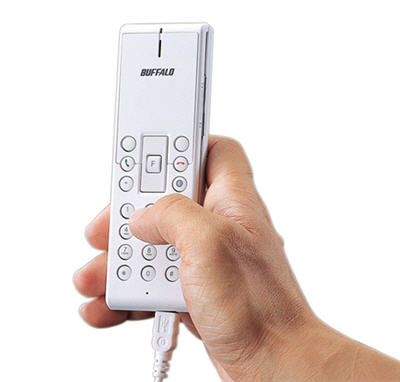
Buffalo introduces their VH-MU01 USB phone for Skype and MSN chat so you can drop those headsets if you have a complex. The Buffalo USB phone looks like a slim design with easy button navigation. Any asstute reader will quickly realize there is no LCD or display for the phone. Well, if you’re looking to get into USB phones for home or work, don’t let the lack of display worry you.
These phones are designed to work with software like Skype where the software on your computer provides the visual display you need. So as you click the touch pad of the USB phone the action shows up on your Skype software.
This type of USB phone makes using on-line VoIP more like the traditional phone. However, if you just can’t part with the land-line setup than you should consider the MagicJack phone. The MagicJack is a USB dongle which connects to your computer and on the other end of the dongle is a traditional phone connection. Simply connect your good’ol phone to the dongle and you’re talking over VoIP.
Continue Reading
The Imation Disc Stakka is a management tool for keeping those messy CDs organized and accessible. Granted your music is probably on your iPod and if it isn’t then you should contact a CD Ripper Service…but even with all your music on that MP3 player you can still find a use for the Disc Stakka.
I’ve got at least 3 dozen installation CDs, software CDs, and utility CDs that I like to have in storage. Problem is the over flow of putting those CDs into a leather case – now I’ve got two cases. Rather then spending more mone on another bulky leather CD/DVD case, I’m looking at this Disc Stakka.
The Stakka is an automated carousel that stores and protects your CDs and DVDs. It does the painfully obvious as well, retrieves them. The Stakka holds
Continue Reading
The Hawking parabolic WiFi dish is a fancy version of our home-brew version to boost your wireless signal. The one thing Hawking has which you will never achieve, this the cool dish look. The Hi-Gain Wireless 300N is a dish adapter to your WiFi network which connects via USB and could boost your signal as much as 600%.
The 300N supports b, g and n networks so regardless of your setup, you can put the Wireless-300N to use. As with any wireless solution security is a big concern and the Hawking unit supports WEP, WPA and WPA2 enccryption – so again, whever your setup the 300N will work.
“Since the dual-antenna is highly directional, they’re also trying to sell it on the idea that you can avoid signal interference by pointing it away from other electronics. I’m not sure that’s something I’ve ever experienced using WiFi, but I could imagine it might be useful to specifically target a base station in an area with lots of wireless congestion.  — SlashGear“
If you’ve got Guitar Hero and recently acquired Rock Band from say…Christmas then you’ve probably wanted to bridge the two together for a complete bi-gaming experience. Since Activision and Harmonix will never come to minds on hardware connectivity and interface you’ll have to resort to the Ant Commandos converter to make the two play nice.
The converter has a USB connector on one end and PS2 connector on the other. Simply plug the converter into PS3, connect the PS2 controller, and set the switch to either Guitar Hero, Rock Band or Gamepad and you are ready to go.
TAC’s Universal PS2-to-PS3 Converter is compatible with PS3 Rock Band and PS2 / PS3 GHIII, and it works with basically every PS2 axe you can think of, wired and wireless.
The PS2 to PS3 converter product page.
Source: Engadget.
Continue Reading
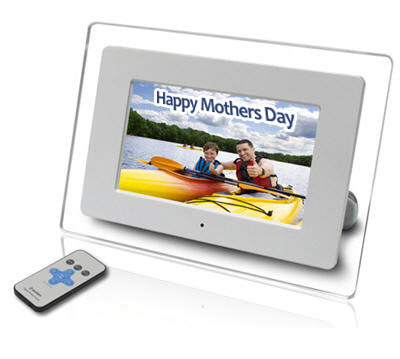
So how about this 7 inch widescreen LCD digital picture frame with clock, calendar and alarm? It’s only $59 (after $20MIR). The picture frame is widescreen which makes it easier to display landscape pictures and with a remote it’s easy to flip between pictures, click over to the calendar or clock setting.
It’s safe to say any Mother loves pictures of her kids, grand kids or anyone else in the family tree. That’s why you can’t go wrong with a digital picture frame.
With Mother’s Day still a couple weeks away, you can order this perfect gift today and have plenty of time to load it up with family photos. I did a similar thing for last years Christmas and it was a hit. Brought tears to Grandma’s eyes.
Considering the $60 isn’t too much for a Mother’s day gift, feel free to check out more details on the 7 inch widescreen picture frame.
As for the company line we have:
“The full-featured AXN-9702 7-inch digital picture frame functions as a calendar, clock, and alarm, and also supports MP3 music playback. It comes with a card-style remote control, built-in memory that can store up to 15 pictures (depending on size), USB input jack, and an AC/DC power adapter. The super-slim remote controls viewing and music options to enhance your experience without leaving the sofa.
Use the USB jack to download media directly from a USB flash drive. SD, xD, MMC and Sony Memory Stick flash media compatibility make it easy to show off pictures without a PC. MP3 playback, built-in speakers, and the calendar and alarm functions round out a cool, convenient multimedia experience.
Comes with manufacturer’s limited warranty (90 days Labor; 1 year Parts).”
Continue Reading
Joe from USB Geek sent me an email about his new USB washing machine alarm clock, I thought we hit the mother-load. We didn’t. But lets stop and think for a minute, could we – one day - have a USB washing machine? It’s possible if the USB 3.0 spec really boosts the power over the bus to 12v. Until then, the USB washing machine can only be an alarm clock.
The USB washing machine plays four crappy alarm clock sounds along with an hourly chime and LED signal. Perfect for late night slumber.
In case you have a military friend you can set the hours for 12 or 24 and power the gadget via USB or two double A batteries.
At just $20 you can please any gadget lover who’s a germaphobic and likes to sleep in.
Visit the USBGeek web page and get a sample of the alarm clock sounds. Music to the ears [not].
USB washing machine alarm clock product page.
Continue Reading
WiHood is a relatively new service which is the world’s first “virtual laptop” that protects children online [ anywhere & at all times] with the WiHood’s USB bracelet.
The concept is ideal and it appears the user interface, setup and configuration is just as simple. This is what WiHood is: A USB bracelet which auto-launches a virtual desktop when connected to any computer. The virtual desktop runs off the WiHood servers which monitor and update website, programs, virus etc 24/7 for a completely kid friendly computer system.
From personal experience, my kids have trashed my computer – by mistake of course – but it still took time and skill to restore my PC. The WiHood USB bracelet eliminates this risk because a virtual desktop is all your child can use. The other issue I have with my kids using “the parent’s PC” is constant maintenance to monitor website, filters and content. With WiHood, that daunting task is automatically taken care of.
“WiHood protects children, saves parents from purchasing a new PC, and kids love that they have their own “virtual laptop” which stores their pictures, music, homework, etc. and can be worn on their wrist!”
The USB bracelet uses the internal storage to save files, folders, pictures, music etc…but those files are only accessed through the virtual desktop which runs off the WiHood servers. This means your kids will enjoy all the performance of a PC with the security of a remote server running the underlining PC desktop.
The WiHood is free to try and costs $49 for 6 months service or $100 per year. Stack that cost up against purchase of a dedicated PC for the kids and the WiHood is the clear choice.
Still interested. Maybe some more information? Check out the WiHood FAQ page. Or their WiHood Virtual Laptop home page.
WiHood was founded in August 2007 and has been honored to be awarded funding from Innovation Norway, a division of the Norwegian government providing capital to the most innovative companies in Norway.
Continue Reading
Gadget4All generally has some useful USB gear they sell, but today in my inbox was a USB flower fan that was nothing short of gadget crap. Sorry guys.
Powered by USB or AAA batteries you can clutter up your office space with a pink or green USB flower fan. Granted it’s only $12 to buy, but sometimes it’s just more fun taking random items from around your space and creating something yourself…example: this USB fan.
BUT, if you are looking for a colorful and playful looking fan to prop up on your PC for the kids during the hot summer months, than please reconsider the USB flower fan. Or if you’ve got a lady friend who’s totally into Disney trinkets and anything gay and colorful like that.
USB Fever is thinking outside the box on this one. Going away from standard box USB hubs, this hub is all cable. To continue along the lines of abstract thinking USB Fever includes a separate power cable to extract juice from the system bus solely for the purpose of powering up those peripherals.
So we are looking at one upstream USB connection, a 4 port USB hub held together by cables along with a dedicated power line (red cap) for those thirsty gadgets.
You should note, one of the four USB ports is a mini USB connection. All this for just $14 + $3 shipping.
USB Cable Hub product page
Continue Reading
FilterMyRSS is another website I run. This website is an RSS Filter utility to help people manage the amount of information flowing through their reader. Today I’ve added a new feature: exclusion via keyword.
This new feature allows you to filter out articles based off keywords. A simple example would be filtering out content with profanity.
The RSS exclusion function is very easy to use. Simply place a negative sign in front of the keyword for exclusion. Example: Lets say you are sick-and-tired of hearing about the iPhone. You could filter out articles based on that keyword by typing “-iphone” into the filter field.
Check it out: www.filtermyrss.com
So who cares about RSS filters anyway? Well, just about anyone who reads their information via a RSS feed reader.
Lets say you are Paul from Technabob who wants to only post articles about “gadgets” Using FilterMyRSS he can subscribe to 100s of RSS feeds, from a variety of genres, and only read information related to “gadgets.”
Or maybe Max from SiteHoppin loves to read up on blogging and social networking, but can’t stand to hear another word about “Stumbleupon.” Using FilterMyRSS, Max can subscribe to any feed he wants and filter OUT anything related to “Stumbleupon.”
If you haven’t started using RSS readers to get your daily dose of information, you should start. It’s a lot easier than visiting dozens of sites each day. It’s a lot easier than managing your email inbox too. Spice things up with a RSS filter and get EXACTLY what you want.
Don’t know how to get a RSS link? It’s easy, look on any homepage for the RSS logo (or text) and click the link. When the new webpage is displayed copy the link and paste into FilterMyRSS, enter some keywords and begin getting your filtered RSS feed.
It’s quick. It’s easy. It’s fun…and best of all, it’s free!
Still confused – check out my explanation of RSS feeds and how you can use them.
Continue Reading
Happy Earth Day. Over the years, GetUSB has reported on a number of green friendly products. Today we’ll take a quick look at what some of those are.
For example, how would you like to listen to music with a hand crank MP3 player while making your way through a jungle? Not adventurous – well you can still do your part with the Go Green USB Earth Drive. But even that might be a little extreme for you. We do have a selection of wood flash drives which might not be the best “go green” decision, but it would cut down on plastic.
Probably one of the most useful things we could collectively do is stream line production and consumption and go with one standard for power connections. This would reduce the number of useless cables and connectors made for all different types of electronics and we could just settle for one cable which does it all.
As a closing note, we could monitor our electricity consumption a little better with a USB temperature and humidity logger. After all, keeping a closer eye on how often that air condition goes on would not only help the environment, but reduce your electric bill.
To read up on Earth Day please visit the official website for more details on how to clean up our mess.
Continue Reading





 WiHood is a relatively new service which is the world’s first “virtual laptop” that protects children online [ anywhere & at all times] with the WiHood’s USB bracelet.
The concept is ideal and it appears the user interface, setup and configuration is just as simple. This is what WiHood is: A USB bracelet which auto-launches a virtual desktop when connected to any computer. The virtual desktop runs off the WiHood servers which monitor and update website, programs, virus etc 24/7 for a completely kid friendly computer system.
WiHood is a relatively new service which is the world’s first “virtual laptop” that protects children online [ anywhere & at all times] with the WiHood’s USB bracelet.
The concept is ideal and it appears the user interface, setup and configuration is just as simple. This is what WiHood is: A USB bracelet which auto-launches a virtual desktop when connected to any computer. The virtual desktop runs off the WiHood servers which monitor and update website, programs, virus etc 24/7 for a completely kid friendly computer system.


 Happy Earth Day. Over the years, GetUSB has reported on a number of green friendly products. Today we’ll take a quick look at what some of those are.
For example, how would you like to listen to music with a
Happy Earth Day. Over the years, GetUSB has reported on a number of green friendly products. Today we’ll take a quick look at what some of those are.
For example, how would you like to listen to music with a