With “going green” such a big trend right now you might find yourself wanting to put a little green in your workspace – and no, I don’t mean that green. The following is a video USB tutorial on taking some supplies from around your office or home, LED lights and some USB power to create your very own USB LED Greenhouse.
Video is 3 minutes.
Continue Reading
Creative Labs just came out with a hot little box for 5.1 digital surround sound for any laptop or PC. What Creative did with this new Sound Blaster is rather than make a card out of it, the Sound Blaster is a USB based external device. The X-Fi, as they call it, operates over a USB interface and will provide full cinematic digital surround sound in hi-fidelity with a 1 second connection.
Two Creative technologies are embedded into the USB Sound Blaster which are X-Fi Crystalizer and X-Fi CMSS-3D. I’ve talked about these technologies before which are the key components to Creative’s solution.
Not to leave any stone unturned, here are the list of features for the USB Sound Blaster:
Supports USB 2.0 for high quality 5.1 audio
USB bus-powered
Gold plated RCA front outputs and mini-jack surround outputs for maximum fidelity
Optical Output for connectivity to surround sound systems
24-bit Playback and Recording ADC, DAC
X-Fi audio enhancement technology
Easily accessible Headphone out and Mic In for connecting headsets
Convenient Volume Control with push to mute feature
Line-in monitoring
Host-based EAX advanced HD 4.0 and OpenAL support
Creative Alchemy software that restores DS3D Games’ 3D audio in Windows Vista
The Sound Blaster X-Fi Surround Sound 5.1 system will retail for $60 – a great price for the package (available now).
Continue Reading
Still doubt that the 3G iPhone is coming soon?
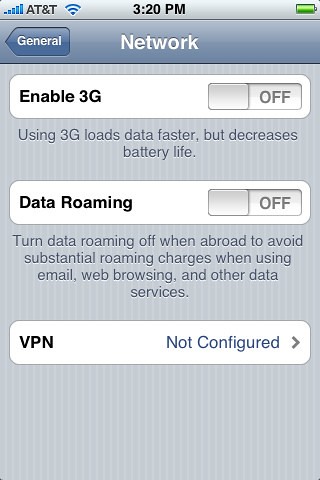
This settings screen with a 3G toggle switch (see image) was found in the latest beta release of the iPhone’s 2.0 firmware.
Why would you want to turn off 3G? Because 3G drains cell phone batteries very quickly. In this screenshot, Apple has included a toggle setting to turn 3G off, and use AT&T’s slower but more battery friendly EDGE network instead. Probably a very useful feature if you are almost out of juice.
When can we expect to see a 3G iPhone and how much will it cost?
Continue Reading>>>Continue Reading
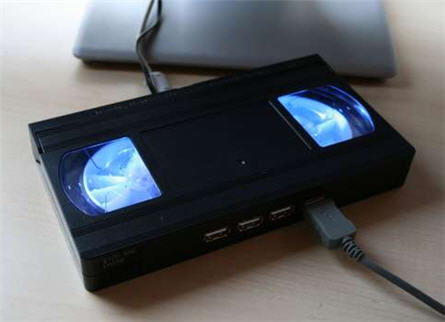
Instructables posted a great little USB hack for turning an old VHS tape into a glowing USB hub. I like this mod because it takes an old, out of date medium, puts some retro lighting in there which creates a modern day device I can use everyday.
Instructables also brings up a good point with hubs getting smaller these days, it’s more likely you’ll lose it behind your desk. Having a honk’in big VHS tape solves that problem.
So what is this USB tutorial all about? Well, in short, you will destroy an old VHS tape, cut out some through-holes for USB ports and power. Secure some LEDs for effect and reassemble everything to impress your buddies. Since this outline isn’t enough to start or finish the project, jump over to Instructables for the full low down.
Continue Reading
EVGA is lowering the bar for USB to VGA adapters and that’s a good thing. Traditionally you would pay upwards of $200 dollars for a USB to VGA adapter but now the UV12 and UV16 adapter from EVGA are under $80!
The UV Plus family take an existing USB port and convert that bus into a VGA/DVI adapter for additional monitors. This is ideal for those will lower video processing power (laptops) who want two or three widescreen monitors.
I spoke with Jeff, a pre-sales rep at EVGA and he did caution me against using the UV Plus family for hard core video applications such as
Continue Reading
Waterproofing your USB drive is a good preventative maintenance procedure as you never know when it’ll end up in the wash. Below is a video on how to use epoxy and little skill to waterproof your UFD. Enjoy this USB tutorial:
Continue Reading
Hmm, that title came out a little weird. Anyway, Vladimir released updated versions of his USB wood drives to include some odd shapes that include, what looks like to me, a mushroom, tree stump, wooden tooth and a fluted casing.
Wooden Jewelery is offering these for $20 [1GB] and $30 [2GB]. The wood drives come with a leather lanyard and a quality case. The line is called MEMORE and there is a full selection available with larger shapes and sizes to choose from.
So what else do you get for the $20 or $30? Well, for starters you get a very unique wood USB drive perfect to start any conversation. Not only does your USB drive hold valuable data, but the wood case is valuable too. To prove that point you can explain [depending on what you get] that a Bog Oak drive has been created from wood that is carbon dated back 1,300 years. Or Yew Root drives have been carbon dated back 600 years.
A quote from the creator:
…I prefer to work in wood because it is a living material…
-Vladimir Levestam
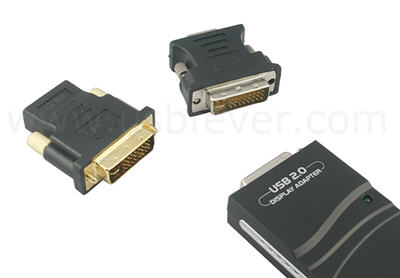
On the heels of announcing the EVGA USB to VGA or DVI adapter comes USB Fever with their power house trifecta USB to VGA, DVI and HDMI adapter. I believe it’s the first USB video adapter with these three options.
So with the news of USB Fevers multi-display adapter we can revisit the idea of boosting your video space. For me, this product is of special interest as I’m currently running a 19″ wide screen off my laptop dock station. Unfortunately the laptop doesn’t have enough video processing to push two monitors. The USB Fever multi-display USB adapter solves this problem.
It appears EVGA has an edge on higher end resolution, but the USB Fever will still get you a max 1400×1050 resolution. This is ideal for 19″ wide screens. The VGA, DVI and HDMI video adapter can string up to 6 monitors together and will work through powered USB hubs. I would venture to say this solution isn’t ideal for hi-end graphics applications like 3D modeling or gaming, but would be a good product for use of viewing spreadsheets, email, word processing, web surfing, blogging, Photoshop and TV.
Continue Reading
The Y-Shaped USB hub from Apacer is a clever design, but it’s not the first time we’ve seen it. RiDATA introduces a flash drive with combo two port hub on the back side, which I’m still wondering why it hasn’t gained more popularity, about a year ago. The Apacer Y-shaped USB hub increases the port connectivity over the RiDATA by two fold, but doesn’t have flash memory storage.
The Apacer PH151 uses a miniUSB connection to the host computer [via cable] and then provides two vertical ports and two horizontal ports. To me, once you’ve put a cable to the hub, it doesn’t matter what shape it’s in. Just stick your device in and go. The clear advantage with this design, is increasing
Continue Reading
I think Brando found the perfect Father’s Day gift, the drinking Tic Tac Toe game set. Looks like each glass holds about 3oz of your favorite liquor. Question is, does the loser clear the table?
Microsoft developed a USB stick to pluck evidence out of computers at crime scenes. The USB device is called COFEE (Computer Online Forensic Evidence Extractor) and has the power to blast through security settings to get the good stuff…and quick.
The COFEE USB devices is ideal for on-site investigation where law-enforcement needs to extract data quickly and accurately. The Microsoft COFEE contains 150 commands which dramatically cuts down time to gather digital evidence. It can decrypt passwords and analyze a computer’s
Continue Reading
REVIEW OF MAGICJACK PHONE
The MagicJack phone is a simple device which is specifically designed to connect your regular [and current] land-line phone to the internet for Voice Over IP calling.
I ran into one of the project managers of MagicJack from a different business deal and he sent a phone for review. I’ve mentioned the MagicJack phone before, but this is my first experience using the product.
OVERVIEW
The MagicJack is a small device [2.5″ x 1.5″] and works as a USB dongle which connects to your computer via USB port. The MagicJack phone does not require a Hi-Speed USB connection and thus will work on your front USB connection of a PC tower or the slower ports off your laptop docking station.
The USB MagicJack costs about $35-$40 depending on where you get it. You then pay $19 [the year after you buy it] for unlimited calling in the United States, Canada and parts of central America. Calls outside this region are then chargeable, but very reasonable. I looked up rates to the UK at it was $0.02 per minute. Not bad at all.
WHY IT’S UNIQUE
The MagicJack phone is unique because it has a regular phone jack connected to the dongle. This means ANY phone can be plugged into the device and used for VoIP calling
Continue Reading