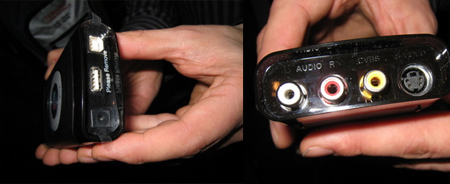
Our good friends at GizmosForGeeks cruised through CES’08 this year and one of their highly recommend products was the Pinnacle Video Transfer unit from Pinnacle Systems. The point of this device is making the record, copy and transfer of your favorite video (TV, DVD etc) to your iPod [or other hand held device] quick and easy.
As seen here, USB is the answer for plug-n-play connection and the Video Transfer box gives three settings for video quality. Your setting choice will dictate the file size and resolution quality. The video input options include S-video or Composite video.
The Gizmo guys had a moment to demo the unit and reported the unit was easy to use, compact and simple in operation.
The Pinnacle Video Transfer box will be available later this month for just $129.
Continue Reading
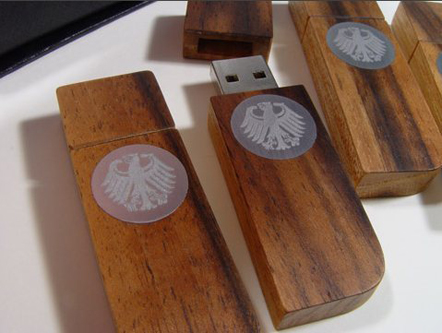
Markus Bischof is a Germany craftsman who’s recently applied his skills to the creation of hand crafted USB drives.
Made from extremely old wood and veneers it’s hard to believe a single tree hasn’t been (recently) cut down for it’s creation. Rather, the materials used, come from old wood collections where the wood is as hard as stone and incredibly smooth to the touch. For example some USB drives where made from an old pipe organ built in 1839 and dismantled years ago.
It’s clear these materials aren’t collected from local trees but rather hand crafted and hold a historical past from the materials used.
The image above is a sample shot which the German Bundesumweltminister (Federal Environment Minister) ordered as a representative giveaway to the ministers of other countries.
Continue Reading
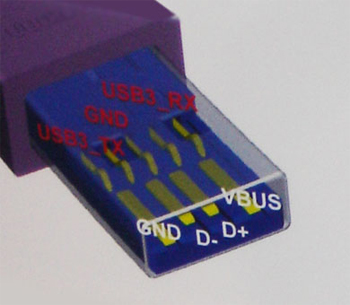
Not to anyone’s surprise…the USB 3.0 jacks and sockets look exactly the same. Go figure, as part of the specification is to be backward compatible. But taking a closer look, you do see some differences.
The folks from Register Hardware had a peak at the USB 3.0 connectors while at CES 2008 this year. As you can see from the image below, the USB 3.0 sockets have an additional row of connectors. The connectors located in front are to keep the backward compatibility to USB 1.1 and USB 2.0. The connectors placed behind this first row are for USB 3.0.
The new USB 3.0 specification is promising transfer speeds 10 times greater than current 2.0 standards – to that of 4.7Gb/s. There is also a fiber optics connector which hasn’t been made available yet.
As the USB 3.0 specification is expected to be finalized sometime in June of 2008 – we can expect to see product following by the end of this year. Although I am looking forward to the new, faster USB 3.0 spec, not everyone shares the same love. Here is what some are saying:
Continue Reading
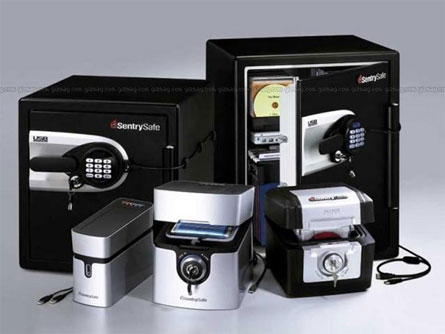
SentrySafe is the first [I think] Safe manufacturer to include USB connectivity for external access. We’ll get to the USB portion soon enough, but lets take a look at the physical characteristics of the SentrySafe Fire-Safe.
In the picture above, I am talking about the larger two Safes in the back. The sizes are available in 1.2 or 2.0 cu feet sizes. Are fire resistant for up to 2 hours and can sit in water up to 8 inches. A perfect Safe for the home or office.
Now on to the USB Safe portion: Sizing allows for 120CDs or DVDs with door pockets to hold hard drives. In the door pocket sits USB connectivity to an external USB port. From here, outside of safe, you have digital access to the hard drives inside. This is a nice twist for those who need high security for their hard drives.
However, and I can see it now, you need to encrypt your hard drive. Saving your digital data physically is only half the battle. Here is some free open source USB encryption software that’ll work great with any hard drive.
As a closing note, if you have a window office spot, and the safe happens to fall out during an blaze, she’s good for a drop up to 30 feet. Cost is $420 for the 1.2 cu ft and $520 for the 2.0 cu ft version.
SentrySafe USB Fire Safe
Photo Source: GizMagContinue Reading
Well, it’s probably a good idea to vaccine your dog too, but today we can apply that term to something new, USB drives.
LG Electronics launched a Vaccine USB drive equipped with anti virus and malware protection software. Appartently the first of it’s kind.
The Vaccine USB protects the UFD in real-time during operation. There is a built-in autorun feature which constantly monitors data being transferred on the UFD device. The Vaccine USB monitors both
Continue Reading
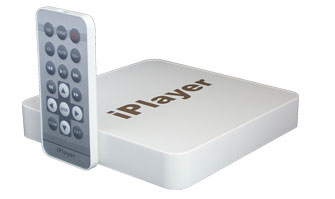
No, I’m not a “player” but the iPlayer is a nice piece of technology for cocktail conversations. The iPlayer is a standalone video player which can run content from a number of different flash media cards or USB drives. In addition, the iPlayer may be connected to either your TV or monitor.
The iPlayer has the ability to quickly and easily share photos, music and movies on your TV or monitor.
Sure, for the home user this might not be the ideal USB gadget for viewing your favorite content, BUT if you are running a business and doing trade shows the iPlayer is clearly worth a second look. The iPlayer makes it easy to set up a video displays without needing a PC or TV. With the combination of the iPlayer and monitor (flat screen I’d assume) you could have a slick looking trade show presentation in little time.
Continue Reading
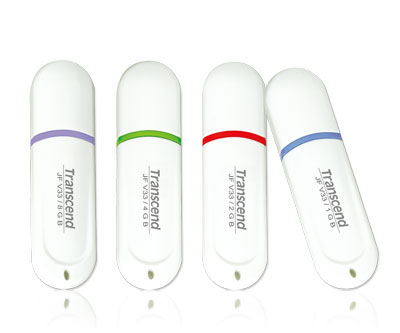
Transcend has built a great name for themselves with the Jetflash UFD product line. It’s been tested as one of the fastest drives on the market, simple designs which are small and compact.
The new Transcend Jetflash V33 is no exception. At just 60 x 16 x 8 mm in size and 7g of weight the 1 through 8GB size would hardly let you know they are there.
As with all Jetflash UFDs you have the option of downloading the Jetflash Elite software package for personal UFD management. The software suite includes:
Continue Reading
Luigi of I4U had some time yesterday to review the PNY IronKey USB 4GB UFD. In short it’s a great security device but you give up performance for such security.
The PNY IronKey uses AES encryption which is always on and keys generated by the on-board cryptochip uses FIPS 140-2 true compliant random number generation. Since the IronKey uses the cryptochip the keys used to generate access never leave the UFD (and onto computer).
The PNY IronKey has an on board stealth browser via Firefox and is entirely incased with a water tight sealant which sits underneath the rugged, outside enclosure.
Continue Reading
Have you ever wanted to hide files on your computer or flash drive? I could think of several “categories” of data in which I’d like to hide from people around me. Of course I’m talking about valuable data such as passwords, financial records and the priceless contact list for GetUSB.info network of publishers.
Today I found a small utility called HideFlash 1.0 which does just what the name says. Hides your data on a UFD.
The USB security software protects files and folders from others who are trying to view them without permission. What works for me with this package is not only do you have the 128bit encryption working for you, but the Hide Flash software also hides the files and folders it’s protecting. This means when a USB drive is plugged into any computer, the user wouldn’t even know there’s extra data.
The USB security software remains hidden on any computer and invisible to even
Continue Reading
Several weeks ago I picked up a 1 penny (yes 0.01) card reader for microSD cards from USB Fever. Today, I set aside some time to see how well the little bugger performs…and to my surprise, very well.
Introduction:
The microSD USB Card Reader is very compact and comes with mini lanyard and plastic case. The device is unique in that all components for the card reader sit inside the USB Type-A connector. It makes for an extremely small and portable reader, and can be, at times, difficult to pull out from a stubborn USB port. However, given the idea of what this product is all about – compact, portable performer – it didn’t bother me too much.
I compared the performance of a direct connect of the microSD card through the USB card reader to the microSD adapter provided to me from SanDisk when I purchased the flash memory. When using the SanDisk adapter, I did need a USB card reader which could contribute to
Continue Reading
Capture the everyday moments that happen anywhere, and share them with family and friends everywhere. That’s the idea behind the new Flip video camcorder. It’s portable, simple to use, and amazingly affordable. Shoot anything. Share everything.
Never Miss Another Moment
Flip Video’s simple, one-touch recording feature and compact size make it the ideal choice for capturing videos on the go. No bulky gear, charger, or memory card needed.
Flip camcorder functions
View, Share, and Save Videos With Built-In Software
Flip Video makes sharing videos incredibly simple. Watch your movies instantly on TV using the included cable. Or, connect Flip Video directly to your computer through the built-in USB arm. The simple on-board software makes it easy to view, edit, and share your favorite videos.
Email videos and greeting cards with ease
Publish directly to YouTube and Grouper
Organize and archive your videos
Capture Still Photos and Make Custom Movies
With Flip Video’s on-board software, you can easily edit video clips, capture still photos from your videos, or create custom movies set to music.
Product Description
Simple to use, pocket-sized camcorder with one-touch recording and digital zoom. Holds up to 60 Minutes of TV-Quality video on 1 GB of built-in memory; no tapes or additional memory cards required. Flip Video is equipped with a convenient USB arm that plugs directly into your computer for easy sharing and archiving. Flip’s built-in software lets you easily email videos, share them on YouTube and Grouper, edit your footage, and capture still photos from video. System Requirements: Windows: PC with USB port and Windows 2000 / XP/ Vista. Mac: Macintosh with USB port and Mac OS X.
Looking for other USB video camera items?
Continue Reading
Buffalo just put the call to action for SanDisk, Western Digital and the like for the world’s largest portable hard drive, the MiniStation.
I’m a big fan of portability. I’m a big fan of storage space. And I’m going to need to get some serious work-on to fill up the 300GB hard drive in addition to my standard 120GB HHD of my laptop. Not to say, I wouldn’t turn down some extra space.
The Buffalo USB MiniStation (HD-PS320U2) is just over $300 and comes with Buffalo’s 256-bit AES encryption security software and Memeo’s autobackup utility. After all, out of 300GBs there has got to be something worth saving.
Continue Reading