Yesterday we spoke about Elcom introducing a USB power strip and today we have USB Fever with a solar powered USB hub. We where very excited to hear about this product - as it seems to be a step up from the introduction from yesterday, and it’s got some great features, but unfortunately, the solar power charging system isn’t for the USB devices which are connected, but rather the built-in LED torch light [insert sad face here].
I understand it would take a fairly big solar panel to correctly power 4-5 devices connected to a USB hub, but it would be nice to see a trickle charge feature for anything connected. Like I said yesterday, in our house we have 3 iPhones, a Flip Video camera, two blue-tooth headsets and some other stuff, so a solar powered trickle charging USB hub would be nice.
Continue Reading
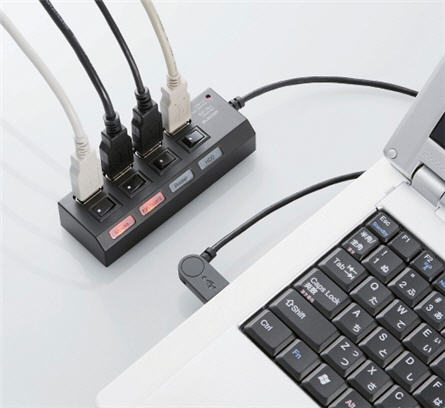
About three weeks ago I started the process to design a USB power strip where the device would be a dumb down version of a USB hub…it only gives power. The reason why I wanted to design something like this was for the infinite number of USB items I have. Just in my house alone, we have 3 iPhones, one Flip Video camera and two blue-tooth headsets…all powered and recharged by USB.
So enter, stage left, my thought of a USB power strip. Well, Elcom was thinking the same thing, but only months earlier! They have officially released the USB for port power strip and the 7 port USB power strip. Clearly I think the idea is simply brilliant.
Elcom includes LED lights for each port to show if a device is active or not. They include a switch to flip On or Off that particular port and last, Elcom gives you some clear labels [in English] to label what cable is going to which device.
The 4 port USB power strip is $40. The 7 port USB power strip is $110. Both are available at Geek Stuff 4 You. Page.
Continue Reading
Warpia is a wireless docking station for your laptop to easily connect your keyboard, mouse, monitor and just about anything else without using cables. Using just a wireless USB dongle to your laptop it will then connect with the base dock station where you’ve connected the keyboard & mouse dongle, the monitor, hard drive and other peripherals.
The wireless connection of the Warpia supports resolution up to 1400 x 1050, 32-bit True Color Depth. The dock station includes the following ports to support your peripherals – DVI connection, two USB ports and a 3.5mm audio jack.
The wireless USB dock station does support Mac and Windows operating systems and after a quick scan of some blogs/forums we cannot conclude if the Warpia supports Linux.
We found the Warpia as low as $140 here.
Continue Reading
Several years ago, I reported on a USB wifi extender in parabolic form. Now, we’ve got a slimmed down version using an empty food can and your USB wifi dongle.
It’s not the prettiest thing, but it works and will boost your signal strength enough to grab the channel from your neighbor who’s barely showing up in your wireless network.
Plus this hack gives you adjustable control both up and down, and left and right.
The concept here is getting the can to increase your signal. In addition, mounting the can and USB wifi dongle to a portable camera stand. This will give you the stability you need to keep the signal strength strong while in use. It will also allow you to keep the position for use from day to day.
Continue Reading
It’s very common these days to see a media player with a USB port. Whether it be a Blu-ray player or a set-top box, chances are, a USB port is somewhere in the front or back.
At first glance you say to yourself, “sweet, a USB port so I can play content off my flash drive” but then you think a bit more and wonder if you can hang a wireless dongle off the media player and stream content to your media box from a source computer?
Well, Home Server Technologies Inc is one step ahead of you. Their new Wireless Media Stick will do exactly that; stream digital content to your media player.
Whether it’s a laptop, TV, DVD player, Stereo or game console the Wireless Media Stick can stream the content and your media player will play it. There is no limit to the type of format, music, audio or video.
Currently the USB Wireless Media Stick will only stream saved content from the source computer, but future updates will include the ability to stream internet content to your wireless setup, so now you’ll have the best of both worlds.
The Wireless USB Media Stick is $99 USD.
Continue Reading
The love for Linux is that with a bit of tweaking you can do just about anything. Case in point: Sven Killig took the Nexus One, loaded up some code to control the USB host controller and is now running a full work station.
Now this sounds awesome. Sven can run a digital camera off his phone, stream video from a USB stick to his screen or even run a printer off the USB port. Check out the screen-shot of his work station…
So if you’re like me, this project would be in the advanced level of Instructables for DIY mods, but thanks to Sven’s recording skills, we have a video to tell us how.
The best part of all this? He’s got the whole thing demonstrated for you on video, but not only that, you can hit up the down-loadable binaries from his website. And while he tried all of this on Android 2.2, which means its the only version of Android it’s been successfully tested on (at the moment), Sven believes that it will work on Android 2.1, too.
Source: SlashGear.com.
Continue Reading
HyperMac updated their power blocks to include support for the iPad product line. There are a couple models to chose from, but the high end, $500 unit, will give you 99 hours of iPad life. More then enough for that weekend get-away.
For a bit less, the $200 battery pack will get you the 60 watt version capable of powering your beloved Apple product for 34 hours. For this price, at least they include USB ports to power those USB gadgets you have in every corner of your office.
The HyperMac power bricks are not yet available, but will be within a couple of weeks. Just in time to be received with your long delayed iPad order.
Continue Reading
Cisco is basing their new Wireless Valet product off a study that finds only about one third of US households are set up for wireless Internet—and that low rate of adoption is due in part to the complexities of setting up wireless networks.
Cicsco is the leader in backbone routers, switches and networking gear, but have always been business enterprise focused. Today that all changes with the Valet.
The Valet is Cisco’s answer to getting a simple wireless network connected for the non-tech people…and honestly, I think they are on to something. Here is how it works.
Simply power up the Valet and connect it to your cable connection in your house. Then take the Cisco Valet USB key and plug that into each computer you want on the network. Answer three simple questions, Cisco does the rest.
That’s it.
Cisco says the Valets are so easy to set up that all users have to do is pop the included USB Setup Key in their PC or Mac, and the Valet software does the rest. Cisco says its Valet system takes the 20 or 30 steps normally involved in setting up a wireless network down to just three steps, and users can then move the USB Setup Key to additional home computers to painlessly get them up and running on wireless. Included Cisco Connect software then makes it straightforward to add more devices to the network (think iPhones, game consoles, etc.), set up a separate network for guests, establish parental controls, and customize security settings.
Cisco is offering two models of Valet routers. The Valet and Valet Plus. The Valet offers 802.11n Wi-Fi networking and four 100 Mbps Ethernet ports for connecting to a wired network. The Valet Plus steps up to four gigabit Ethernet ports. The Valet is priced at
Continue Reading
GetUSB Dealz just spotted a D-Link RangeBooster for your laptop or PC for only $9. Sure you can take a piece of tinfoil and make a paraball and reflect your signal off the router, but where is the fun in that? Besides, it looks cheap.
So here is the dealz…the D-Link RangeBooster has a list price of $48. There is a $41 discount and Buy.com is throwing in free ground shipping. Net cost, only $9 USD.
Here is the company line:
ENHANCED WIRELESS PERFORMANCE
Connect to a fast and secure wireless network by adding the D-Link RangeBooster G™ USB Adapter (WUA-2340) to your desktop or notebook PC. Access your network’s high-speed Internet connection while also getting secure access to shared files, music, and photos from other computers in your network.
RANGEBOOSTER Gâ„¢ TECHNOLOGY
Built with RangeBooster G Technology, this Wireless USB Adapter delivers faster wireless signal rates and better reception than most other 802.11g devices. Having a faster connection gives you more time to enjoy listening to music and watching videos rather than spending time waiting for files to finish transferring. With better wireless reception, you can connect to the network from farther distances.
TOTAL NETWORK SECURITY
This USB Adapter offers total network protection by supporting WEP and WPA encryption. These features safeguard your data and privacy by giving you access to a secure wireless network.
EASY TO INSTALL AND USE
Set up the Wireless USB Adapter in minutes with D-Link’s Quick Setup Wizard. In addition, D-Link’s new utility detects available wireless networks so you can quickly connect to the network. It also keeps track of the networks used most often so that you can easily rejoin them. This Wireless USB Adapter is backward compatible with 802.11b standard, ensuring compatibility with a wide range of wireless routers and networks.
Continue Reading
MacBook laptops don’t come with VGA out or DVI out connectors for extending one’s video screens to more then the MacBook itself. Today Wisair announced a solution for just that with their Wireless USB DisplayDock Set.
Wisair’s DisplayDock solution allows Mac users to connect to a monitor, keyboard, mouse and speakers, via a single wireless link with a single adapter that connects to a USB port on the MacBook. Since we haven’t seen a big offering to help out MacBook users we expect this to be a big hit with the MacFanBoys.
Wisair will be OEMing the solutions via three vendors [Atlona, Source R&D, Cables Unlimited and Olidata in the UK.
Some major points to consider:
Point to point plug and play USB wireless
Universal solution for MacBooks
Distance up to 30 feet
Doesn’t load over WiFi so your internet USB gadget surfing remains fast
Wireless video supports up to 1440 x 1050 screen resolution
Mac Leopard (10.5) and Snow Leopard (10.6) OS support.
No price yet was announced from the Press Release or OEM sites. Product will be available the first of March.
Continue Reading
At first glance we became very excited about this 80 port USB board, we thought it was a huge USB hub. Then we read the details and realized it’s just an 80 port USB power source. And we say “just” with all the enthusiasm that word can carry. Wicked awesome from our point of view.
We’ve done the math and have still come up short on the exact NEED for the 80 port USB power board, but never-the-less, it makes you smile. Kinda like the iPad [even without USB support].
Our calculations seem to bring us back to quality control, that is the only legitimate reason why this board would be of “true” value.
iCarte is a snap-on device for the iPhone to allow it to receive RFID signals. This is great for all sorts of on-the-go applications.
The iCarte could be used for micro payments, such as public transportation payments or vendy machine purchasing.
Another application is getting RFID signals for promotional material. Such as walking past a movie theater and you would be asked to download the trailer for an upcoming movie. Or past a music store and you can get a sample of the latest releases.
Makes you wonder what the world will be like in a couple years, doesn’t it?
UberGizmo rumors that Apple might integrate an RFID feature in the next release, but who knows.





 Well, Home Server Technologies Inc is one step ahead of you. Their new Wireless Media Stick will do exactly that; stream digital content to your media player.
Whether it’s a laptop, TV, DVD player, Stereo or game console the Wireless Media Stick can stream the content and your media player will play it. There is no limit to the type of format, music, audio or video.
Currently the USB Wireless Media Stick will only stream saved content from the source computer, but future updates will include the ability to stream internet content to your wireless setup, so now you’ll have the best of both worlds.
The
Well, Home Server Technologies Inc is one step ahead of you. Their new Wireless Media Stick will do exactly that; stream digital content to your media player.
Whether it’s a laptop, TV, DVD player, Stereo or game console the Wireless Media Stick can stream the content and your media player will play it. There is no limit to the type of format, music, audio or video.
Currently the USB Wireless Media Stick will only stream saved content from the source computer, but future updates will include the ability to stream internet content to your wireless setup, so now you’ll have the best of both worlds.
The 


