GetUSB.info Logo

USB Dog Humps on Command ah…Copy

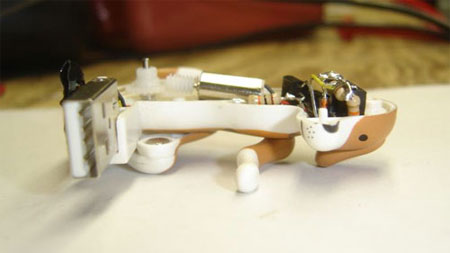
The original USB humping dog was out about 6 months ago and humped while plugged into a USB port. Now, there is a mod thats more of what you’d expect. He’ll hump only when copying data or accessing data. Unfortunately it’s just a mod so not for sale, but follow the tutorial and you too could have your own USB humping dog on command copy.

usb humping dog mod

Video after the jump Continue Reading No Comments

Disney MixStick MP3 Player With Feeble Attempt iPod Look

It’s always healthy to check in over-seas and see what trinkets are in the works. Well, the latest is a Disney MP3 player with a feeble attempt for looking like an iPod. The MixStick is a 512MB MP3 player where the navigation area is circular like the iPod but classy touch of a shuffle and repeat button atop for that Mickey tech look.
mickey mp3 player
And the stainless steel Mickey MP3 player isn’t alone, one can also select from all white, pink with Minnie MP3 player or the blue Stitch MP3 player. Continue Reading No Comments

Free Style USB Optical Mouse Strapped to Your Finger

I’m a little skeptical about the USB optical finger mouse. The potential is there, but I see some issues with the strap working loose and thus becoming more of a nuisances then asset. None the less, the optical finger mouse is worth a closer look.

usb optical finger mouse

So the USB finger mouse straps to your index finger via Velcro, then use your thumb to push two levers up or down for scrolling. There is a rotary navigation dial as well, and I’m guess you depress the dial for

Continue Reading No Comments

U3 Software: Atlantis Portable Word Processing for U3

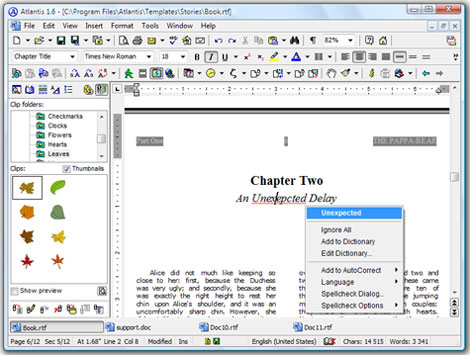
Atlantis is carving out a name for themselves with non-Microsoft word processing software. I’ve used the software and I like it. Atlantis is taking a more social approach to their software. You’ve got plugins to download and easy integration of audio and video.
u3 atlantis word processing
Recently Atlantis made their Word Processing portable for U3 flash drives. I think most of us can agree there is a love-hate relationship between Microsoft applications and having to use them. Don’t get me wrong, I’m impressed with Microsoft, I couldn’t have done what Bill did. But the fact is, most of us get trapped into using their software because it’s at home, at work and everywhere else. Continue Reading No Comments

What is the Life Cycle of a USB Flash Drive?

What is the Life Cycle of a USB Flash Drive is a question which has been around for a long time. There are many factors which contribute to the longevity of a flash drive. Let us consider the following:

USB Flash Drive Life Cycle explained in detail

There are three main components which affect the life cycle of a USB flash drive.

  • Flash memory type
  • Construction of PCB and components used
  • USB connectivity, the physical process

Flash drives use three primary types of flash memory. There is SLC, MLC and TLC memory wafers (NAND memory). SLC is Single Layer Cell memory. MLC is Multi Layer Cell memory. TLC is Triple Layer Cell memory. GetUSB.info did an in-depth write-up about SLC and MLC flash memory if you’re interested, but for this article we have:

  • SLC memory is good for about 100,000 write cycles.
  • MLC memory is good for about 10,000 write cycles.
  • TLC memory is good for about 3,000 write cycles.

Most UFDs use MLC memory because it’s cheaper to make and allows manufacturers to offer more storage in a smaller space. It’s difficult to figure out which type of memory a UFD has, but it doesn’t matter anyway – most flash drives are more limited by other factors.

As of this article update of January 2022, most USB 2.0 product is made of MLC NAND memory because MLC is the least expensive being manufactured at this time. TLC memory is the most common memory type for USB 3.0 product because TLC is the least expensive which also satisfies the large storage capacities of USB 3.0 product. SLC memory is very difficult to source, very expensive, and not found in most flash drive products.

The second component which makes up the life cycle of a USB flash drive is how it’s made. Yes, the PCB (printed circuit board) matters. So do the components used on the device and the soldering quality. Collectively, these elements are absolutely crucial to the performance and longevity of a flash drive. For example, the USB specification states that, at a minimum, a four-layer PCB is required to make a USB device to specification; however, 95% of USB flash drives use a two-layer PCB. Two-layer PCBs are much less expensive to make and thus keep the unit price lower, but this is not a good strategy if the ultimate goal is performance and longevity. Companies like Nexcopy manufacture a four-layer product which results in better performance, more reliability, and longer lifespan.

Last, we must consider the physical connector of a USB flash drive and how the device is used throughout its life cycle. This is the actual socket which connects the UFD to the host computer. Doing some research, most USB Type-A socket manufacturers provide a specification called Mating Durability. The spec is around 1,500 connections. WOW, that sure limits the life cycle, but I doubt many would connect the UFD to a host over 1,500 times.

Finally, the chassis or case helps the USB life cycle. The chassis helps the UFD look cool, but also provides a small amount of protection against wear and tear. UFDs are exposed to all sorts of shock. Whether it be physical shock or electric shock, it’s important to treat your UFD with care. True, there are some indestructible flash drives out there, but the point here is try not to let external factors instantly destroy your drive. The best method for shock protection is A) don’t drop, slam or smash your UFD and B) keep the cap on so the connectors don’t rub or touch another object which could create electric shock.

So, to sum everything up: Given you don’t physically ruin your drive, you have about 1,500 connections and about 10,000 write cycles before you can expect the USB flash drive life cycle to become questionable.

USB Drive Life Expectancy Guide

Continue Reading No Comments

Play Anything USB Wind Instrument

The Electronic USB Wind Instrument from Ion Audio is something I bet any mother would pay top dollar for. With this USB instrument any middle-schooler can plug in and play a range of woodwind, brass, string synthesizer and percussion straight from the computer. Add in headphones and no more annoying notes while your little one learns the pipes. Or in my case, no more howling dog while playing the sax.
usb flute sax clarinet
If you think about it, the USB wind instrument is probably the best tool for any newbie looking at learning an instrument. The EWI USB also comes with sampler software, pitch bend plates and octave rollers for an unprecedented playing experience. The touch-sensitive buttons make it ideal to learn clarinet, sax and flute. Add this to your USB roll-up piano and you’re set. Continue Reading No Comments

Two Outstanding Trust USB Gamer Wheels

Trust raises the bar for the pedal-to-the metal type. They’ve just released two new USB gamer steering wheels, the GM-3200 and GM-3400, and Trust didn’t lack in upgrades. The GM-3200 is for the tiny-tikes looking to break-it-loose with a smaller wheel diameter for smaller hands and rubber coating for optimal grip and sensitivity of wheel. The 3200 also comes with sturdy clamp and suction cup so nothing shakes loose.
trust usb gm-3200
The GM-3400 is the vibration feedback steering wheel version of the earlier GM-3100 series wheel. The vibration feedback technology should provide one of the most realistic experiences available. This too, comes with Continue Reading No Comments

WUSB TV Spot – The Official Sales Pitch About Wireless USB

The USB-IF posted a somewhat interesting TV spot on YouTube about the convenience of wireless USB technology. The ad makes sense and sure is nice to watch, but where the hell are the WUSB products? I see the ad as a motivator to encourage faster development of WUSB products while at the same time, peak the interest of the consumer. Wonder if it will work…well, with respect to getting products out there faster – I think we can already agree consumer’s interest is there. Continue Reading No Comments

10 Million Flash Drives and Still Going Strong – Super Talent

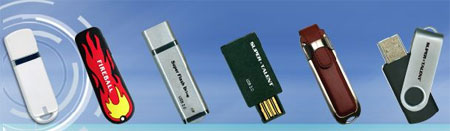
Super Talent will ship their 10 millions flash time sometime mid March. With 30 model styles (I only counted 26 on web site) to choose from, things wont be slowing down anytime soon.
super talent flash drive
Super Talent began making flash drives in 2003 and focused on high performance, solid engineering and attractive packaging styles to claim their market share. Continue Reading No Comments

iPod Charger Made from Altoids Tin

There is definitely an Altoids DIY underground. I bumped into an article on how to make an iPod charger from an Altoids Tin yesterday at Chris DiClerico’s website. After doing a little research I see there is a big following for Altoids Tin do-it-yourself projects. So, to service my reader group, herezzz the how to:
ipod charger altoids
It’s a very easy project and a great one for beginners looking to tweak something. The goal is to make a charger from two 9V batteries and two AA batteries which should juice your iPod for another 10 hours. Then house that charger in a clean looking Altoids Tin. Couple things you’ll need: Continue Reading No Comments

Old Twist on New Product – Dust Cover

Ion Audio released their iTTUSB USB Turntable several years ago and has since introduced the product with dust cover, the iTTUSB10. But isn’t the dust coming off those old records?
ittusb10
Once you get the convert vinyl to MP3 process down, grab the portable iPod PA system and head outdoors. The iPA03 is from Ion Audio and is built for outdoor abuse with the roadie looking case, wheels and handle. With microphone included this might be Continue Reading No Comments

Bored? Kill 1min 27sec and Watch Vista Load Using USB Readyboost

So… things are a little bit slow this morning with USB so jumping over to YouTube I found this 1min 27sec video on Vista booting up using the USB Readyboost technology. Although it’s not an official test using multiple machines and configurations, I think you’ll conclude that if you’ve got an extra 512MB flash drive laying around, use it for Readyboost. If you want the money shot without video, read the end of this post:
Sorry – Video off Youtube but the point was the benefit isn’t all that great using Readyboost to speed boot process
Results: Without Readyboost – 43 seconds to boot. With Readyboost – 14 seconds. Continue Reading No Comments

Copyright

Copyright © 2006 +

USB Powered Gadgets and more...

All Rights Reserved

Advertise with us

GetUSB Advertising

This is a high value website providing great exposure to your product and brand. Visit our advertising page to learn specifics.

For more information
Visit our advertising page.

Nexcopy Ad

Nexcopy Provides

USB copy protection with digital rights management for data loaded on USB flash drives.

Contact us learn more

Resources and References Page

Resources and References Page