If you take a typical USB stick and select the Windows format option, you only get the FAT and FAT32 option for anything under 4GBs. However, there are times you might want to format as NTFS. For example, you want to set specific file and folder privileges to the content and you feel NTFS is the best way.
Well, there is an easy solution and it’s just a matter of setting the options correctly in Windows for your device.
This is how you do it:
Start > My Computer > Right click on the drive letter for the USB stick and select Properties.
Next click the Hardware tab of the Properties dialogue box and select the device which you’d like to change. In this case, it’s drive letter F shown as “Simple Flash Disk 2.0 USB Device“ From here you can double-click the device or highlight in blue and click the Properties button.
Continue Reading
One of the unique things GetUSB.info strides to offer is content in a variety of different languages. The team which makes up GetUSB are dedicated to their task, love technology and enjoy writing about USB related devices, gadgets and news. Today we announce GetUSB.info now available in Greek.
We have tried translator engines to no avail. They do a miserable job of automated translation, so we search the globe in the hopes of finding internatonal publisher to spread the word from GetUSB.info. Today we welcome Andreas Gerogiannis of Corfu Greece. Andreas is the editor of his own technology blog called CyberEddie and will also manage the gr.getusb.info domain.
Currently, GetUSB.info is available in Spanish, Dutch, Indonesian, Italian, Traditional Chinese, Simple Chinese and now Greek.
We are looking for editors to continue the work with our Italian and Dutch domains. If you are interested, or know of someone who might be interested, please let us know.
Welcome Andreas!
Continue Reading
Press Release:Â Andrea Electronics Revolutionizes PC Sound Quality with Debut of New High Fidelity USB Sound Card.
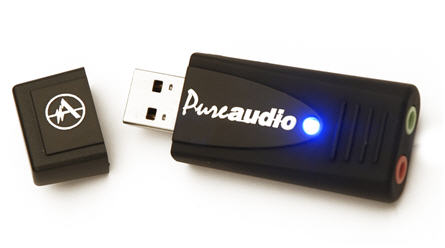
Andrea Electronics revolutionizes PC sound with their all new PureAudioâ„¢ USB-SA high fidelity external sound card. Yes, it’s the shape of a USB stick, but it packs the power of even the most impressive sound cards. In fact, it’s designed to surpass the quality of hi-end sound cards.
Andrea Electronics is a specialist in noise cancelation technology and has incorporated their technology into the PureAudio™ USB-SA sound card. The idea is to provide superior tools for noise cancelation so conversations via VoIP, gaming chats, or on-line video such as YouTube will sound much better than from traditional sound cards found inside your PC.
One of the fundamental problems with sound cards inside your computer is their location. Sitting right next to a power supply or processor means there is audio degradation from noise emitted from these devices. By having the PureAudioâ„¢ USB-SA external sound card away from all this, your sound quality is greatly improved. Coupled with the Andrea Electronics noise cancellation technology it’s unlikely you’ll get anything as clean and clear as the PureAudioâ„¢ USB-SA.
“We were immediately impressed by the compact size and the quality. The full duplex device isn’t just a petite pretty face. It produced the lowest noise floor of any previous soundcard we’ve tested.†said Lunis Orcutt of KnowBrainer, value added reseller of speech recognition equipment and software. “The USB-SA seems to be well thought out and attractively priced. Some of the microphones that we sell have difficulty with full duplex USB Pods but none have a problem with the USB-SA, which is now our favorite.â€
The floppy diskette was an icon of portable storage. For years, this was the de facto standard for moving information from one location to another. Heck, an entire industry was made for duplicating floppy diskettes. Today things are a bit different. We still have the specialized duplicator equipment, but the media has changed. Now, the de facto standard are USB flash drives.
Well, this commercialized floppy has the look and feel of the old days, but all the flare and space of modern USB sticks. Check out this USB floppy drive.
We don’t know what the deal is today, but several blogs have mentioned news about expensive flash drives. I have to say, this is perfect timing of a product launch with the global economy in the tank. I guess those guys with cash are looking for a bargin. Doubt they’ll find anything here.
First off from Engadget, they report an 8GB flash drive over $800 USD. Sure it’s got 8GBs of storage and made of beautiful looking Titanium house inside a sweet looking case, but do we need $100 per GB?
Next up we have Gizmodo with a report about a $500 Mahjong USB drive with 16GBs of storage. At least the storage capacity has come up, but things drop again with the material being that of wood. The Mahjong drive has the option for customized engraving of whatever you fancy.
Next up we have Gizmodo with a report about a $500 Mahjong USB drive with 16GBs of storage. At least the storage capacity has come up, but things drop again with the material being that of wood. The Mahjong drive has the option for customized engraving of whatever you fancy.
Bottom line – unless your bottom line is full of green cash, I don’t think these drives are for you [certainly not me].
Continue Reading
Ahh, Budweiser. I could use a nice cold one right now, but I don’t think this USB beer drive is the answer. First off, it’s not cold – which is how I like it.
Clearly a promotional USB drive for a trade show give-away, this Budweiser stick is the first I’ve ever seen with liquid inside the plastic case. Then again, taking just 5 seconds to think about this and review the picture, there is no way liquid is inside. Rather that’s some nice looking brown plastic and fake white bubbles for an ever-so-real look. How could this thing still have carbonation?
If you’re a fool and think this USB drive is drinkable – then you really do need a drink.
Source [who could use a beer] TechEBlog.
Continue Reading
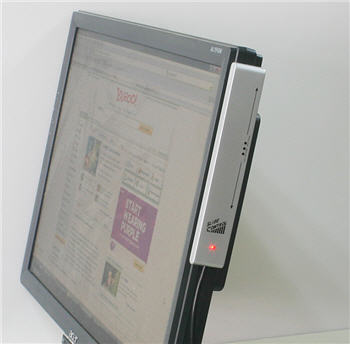
USB Fever introduces a quick access volume control via USB. This gadget docs to the side of your monitor or desk and with a swipe of the finger will adjust your volume control.
Great for the gamer or web addicted employee who wants the full experience of multimedia on-line video while reducing the risk of exposure through loud noise when the boss walks by. With the swipe of the finger, that volume is down to mute. Couple the USB volume control with hiding your flash drive on your computer, and you’ll remain stealth hours at a time.
However, for more serious applications this USB volume control is ideal for kiosks where users need to adjust volume, yet no keyboard or mouse are available. This simple USB conntected volume control is the perfect answer. Or maybe older folks who want a quick and easy way to adjust sound volume while using the computer, again the USB Fever volume control is an ideal option.
USB volume control product page.
Continue Reading
Tektronix just announced test tools for the USB 3.0 SuperSpeed specification. This means those uber geeks – and we don’t mean that in a derogatory way – will have the tools to prove their devices meet the new USB 3.0 specification.
It is estimated that initial SuperSpeed USB interface ICs and consumer products should appear in early 2010, with widespread adoption continuing throughout 2010. The first SuperSpeed USB products will likely include data-storage devices such as flash drives, external hard drives, digital music players, and digital cameras.
“SuperSpeed USB is a giant leap forward in data transfer rates for many devices and consequently requires much more sophisticated testing,” said Ian Valentine, general manager, Technology Solutions Group, Tektronix. “SuperSpeed USB will operate at 5 Gb/s, more than 10 times greater than the existing high-speed USB standard. This speed will require comprehensive signal testing for transmitters, interconnects, and receivers. Customers will be able to fully test the physical layers of their SuperSpeed USB devices using the latest test solution from Tektronix.”
The Tektronix test solution for USB 3.0 includes:
Continue Reading
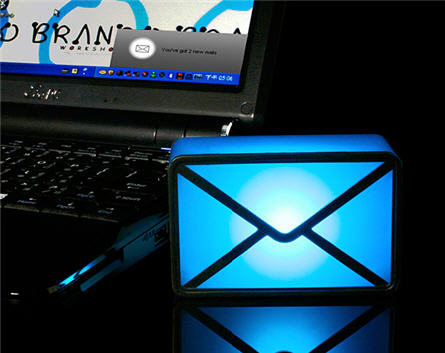
If you have the personality which requires attention from your co-workers, family and friends, then the Brando USB Webmail notifier is definitely for you. The USB webmail notifier uses a large envelope box which illuminates each time you receive an email. As you can tell from the picture, it’s quite a ghastly looking thing.
The lighted envelope box connects via USB and comes with it’s own USB client software. The webmail software runs from the box so even if you can load your personal email server, the simple USB connection will let you get email notifications from Yahoo, MSN, Outlook, Outlook Express and just about any POP3 account.
You can set the illumination color to that of
Continue Reading
Century is coming out with a mini LCD screen for your laptop which is powered via USB. The hand-held size screen is ideal for users with a laptop and don’t have the horse power to run a second screen or don’t have the space.
The LCD-4300U seems to be the perfect companion for running Instant Message or maybe Toolboxes for your Photoshop program. Resolution is up to 800×480 with a total width of 4.3″
And if for some odd reason you fall in love with these little monitors you can daisy-chain up to 7 of them from your PC.
The concept is great, but the problem I have with this is the cost. Starting street price this November will be around 195USD. I can get a 19″ flat screen for less then that…but sometimes you have to pay the price for the small size.
Source:Â CyberEddie.
Continue Reading
No pun intended, but this laptop fan is cool looking with a great design. The Dog shapped USB cooling fan is an ideal adition to those working from laptops. With two 6″ built-in cooling fans, it can dissipate heat away from the bottom of your laptop and cool down the the under belly of your laptop.
The USB cooling fan for your laptop comes in either a Dog or Penguin shape and acrylic top. It’s almost a shame you cover up the design with your laptop.
Here is a side view of the laptop cooling pad:
Continue Reading
Sony is definitely not a team player when it comes to formats and building a universal base for outside development [Betamax and Memory Stick to name a few] but Sony did make a small step in the right direction with their Marine CD Receivers.
The Sony Marine CD Receiver is a wired remote which allows connection via USB from iPods or iPhones for digital music playback.
The Sony Marine uses a powerful navigation dial system to weed through your extensive audio collection or you can use the connected device itself to select your song of choice.
The Sony Marine is comprised of two units with remote connecting via USB. The main unit, like a typical stereo and the RM-X60M remote to control your stereo, well remotely. Both head units share DM+ technology that enhances the sound quality of compressed audio files such as supported MP3 and non-DRM WMA and AAC formats.
The remote will be priced at $130 when it ships, and the CDX-H910UI marine receiver priced at about $350. Nothing for a boat is cheap. After all doesn’t B.O.A.T. mean Bust out Another Thousand?
Source:Â CyberEddie.
Continue Reading


 Press Release:Â Andrea Electronics Revolutionizes PC Sound Quality with Debut of New High Fidelity USB Sound Card.
Andrea Electronics revolutionizes PC sound with their all new PureAudioâ„¢ USB-SA high fidelity external sound card. Yes, it’s the shape of a USB stick, but it packs the power of even the most impressive sound cards. In fact, it’s designed to surpass the quality of hi-end sound cards.
Andrea Electronics is a specialist in noise cancelation technology and has incorporated their technology into the PureAudio™ USB-SA sound card. The idea is to provide superior tools for noise cancelation so conversations via VoIP, gaming chats, or on-line video such as YouTube will sound much better than from traditional sound cards found inside your PC.
Press Release:Â Andrea Electronics Revolutionizes PC Sound Quality with Debut of New High Fidelity USB Sound Card.
Andrea Electronics revolutionizes PC sound with their all new PureAudioâ„¢ USB-SA high fidelity external sound card. Yes, it’s the shape of a USB stick, but it packs the power of even the most impressive sound cards. In fact, it’s designed to surpass the quality of hi-end sound cards.
Andrea Electronics is a specialist in noise cancelation technology and has incorporated their technology into the PureAudio™ USB-SA sound card. The idea is to provide superior tools for noise cancelation so conversations via VoIP, gaming chats, or on-line video such as YouTube will sound much better than from traditional sound cards found inside your PC.


 Tektronix just announced test tools for the USB 3.0 SuperSpeed specification. This means those uber geeks – and we don’t mean that in a derogatory way – will have the tools to prove their devices meet the new