How good are bus powered USB devices? That’s a good question and the answer depends upon the device and the application. To start, let me summarize situations / products you could find problematic. From here we can determine what & when “bus power” is best.
Most problem situations are with USB devices which require a heavy load of power. Products such as USB disc [hard] drives, external USB CD or DVD burners etc. With these products you need a lot of power, if you don’t get it, you have problems. If the power running through the USB cable (the USB bus) to your device is not enough good chance the product will fail. Problems such as drive failures, burning CD coasters or repetitive USB disconnects during operation.
With the larger USB hard drives coming out this is where you need to pay attention. I would recommend against purchasing a “USB hard drive” where the drive itself runs from USB bus power.
But lets say you’ve covered your bases and purchased a USB hard drive with an external power adapter – now we must consider the connection to your computer? Many times I’ve heard users making the connection via their
Continue Reading
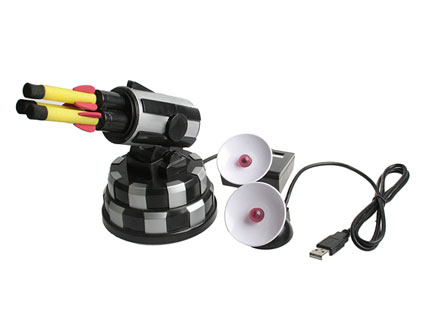
On the heels of USB missile launcher with webcam we have the Wireless USB Missile Launcher from Dream Cheeky.
I’m not sure how much value the wireless missile launcher brings to the table, other than distancing yourself another 15 feet from the firing source, the webcam version with MSN software controls seems a little better.
None-the-less, if your boss doesn’t allow Instant Message software on your PC then roll in the Wireless USB Missile Launcher. At 15 feet distance, it would be easy enough to hide it behind a plant and fire “at will” from an office down the hall.
Albeit a direct hit on the forehead of your boss would be funny enough, I don’t think
Continue Reading
Buy.com is currently running a special on the Belkin wireless 5 port USB hub and I thought to share the tip. Right now you can get the $100 wireless USB hub at just $79. The discounted price requires a MIR for the cash-back $20.
Being able to reduce the amount of clutter in ones office, even by a cable or two, is always a noble cause. The Belkin wireless USB hub allows you to stream line your office and reduce the cable count by 5. Not bad I must say. Plus you get to share the love [wirelessly] with printers, scanners, network connections and digital cameras.
Using the wireless USB hub lets other computers on your network think a printer is directly connected to a PC, so instant and reliable access from any PC to a remote or introvert printer is np.You will need a router to make this bad boy work and transfer speeds will vary by environment and distance. But for $80 it’s worth giving this wireless thing a shot.
Belking Wireless Hub product page.
Continue Reading
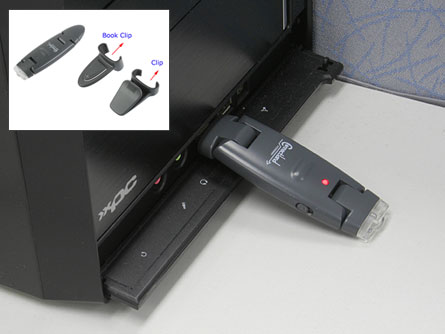
It’s called a USB rechargeable clip torch but I’m not sold on the term torch…sound like something needs to go up in flames. Rather, the rechargeable clip light uses a USB port on the back-end for juicing up during down time.
The convenient and portable LED light comes with a couple different clips so attachment can be made virtually anywhere. At just $14 the rechargeable light also affordable for just about anyone. The LED light portion and USB connect portion do rotate a full 180 so it’s fairly easy to get optimal positioning…as with this book clip light illustration.
The recharge part is done in about 3 hours however no specs where given on how long the USB clip light stays…well…lit.
Here is the USB rechargeable clip torch product page. Keep in mind
Continue Reading
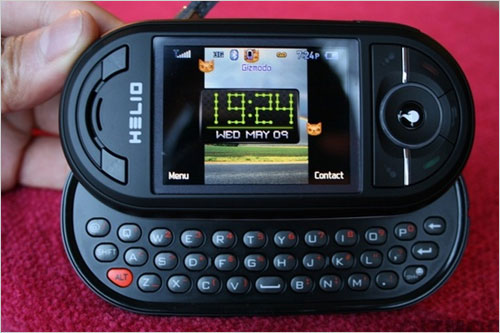
TV Guide and mobile content provider Helio introduced a new service offering TV show information, program listings, search functions and daily recommendations to Helio users.
Text-based program alerts can be set to remind yourself and friends of what’s coming on the tube. TV Guide Mobile is available to Helio subscribers for $2.99/month, in addition to carrier data charges.
BeSocial: methodshopContinue Reading
hField Wi-Fire Review
hField sent GetUSB.info their latest WiFi signal boost device the USB Wi-Fire for product review. Below are the details from our Wi-Fire review.
Wireless Local Area Networks are by far the least expensive and most convenient way to stay connected. However, using WiFi technology means we live with limitations. The biggest limitation, and most obvious from the term “wireless local area network” is the distance between access point and receiver. To that end, hField develops WiFi extenders to boost signal strength, increase connection speed and improve reception.
The hField Wi-Fire is a directional antenna with a highly sensitive receiver designed to increase signal strength and connection speed. hField includes their proprietary software which also aids in the optimization effort. It’s important to understand the Wi-Fire is not a wireless router, but rather an add-on device to boost signal strength on a laptop or workstation which is receiving a wireless router signal.
Update:Â Review Wi-Fire from hFieldhField Technologies launched their Windows Vista compatible version USB WiFi Adatper for high-performance, long-rage boost earlier this week.
The Wi-Fire boosts signal strengths up to 1,000 feet making it extremely easy for Windows XP and Vista users to login and work surf. This is more than 3 times the range of a typical 802.11 b/g network.
And for you Mac fans stop your b!tching because the hField USB WiFi extender version was released back in August.
“Wi-Fire is the perfect device—light weight and easy to use—for the seriously mobile Vista user and those who have problems connecting to their regular wireless network because of distance, obstacles or other interference,†said Tom DiClemente, hField’s CEO. “We’re dedicated to empowering people to connect better, faster and more economically.â€
Due to the California Wildfires, AT&T has stated it will be offering freeT-Mobile Hot Spot Wi-Fi services to San Diego, San Bernardino, Riverside, Los Angeles, Santa Barbara and Orange and Ventura counties.
About 600 locations total will participate. The offer began on October 27th and will last a several weeks.
It’s a very nice gesture, especially for people who lost their homes and need to reconnect online and get their life back in order. But I’m not exactly sure why AT&T is offering T-Mobile’s service for free. Weird right?
Photo Credit: MalkoffDid another major telecom merger happen and I missed it? Or is AT&T just offering other people’s products for free? Maybe I’ll take a walk down 5th Avenue at lunch time and tell people that AT&T says they can get a free copy of OS X Leopard at the Apple Store.
Think it will work?
BeSocial: digg story | methodshopContinue Reading
There must be a group of young guns at Thanko as their latest USB gadget is a well thought out USB charger bracelet designed for the youthful gamer.
I would say ideal for the kid in us who can’t put down their PSP, the USB charger bracelet lets you go a little longer to reach that high score, or talk into wee hours of the morning with your significant other.
Continue Reading
Eltima released their latest USB to Ethernet Connector software, version 2.4. The Eltima solution makes it possible to connect to any USB device over a LAN or Internet connection.
So how does Eltima get a USB device to work over Ethernet or LAN? In a nutshell their application intercepts USB port activity for the prepared (shared) device and redirects it via TCP/IP network to the remote site, where the protocol is handled appropriately.
To make this theory a reality, the USB to Ethernet Connector 2.4 must be installed on both computers. Here is a diagram:
Continue Reading
Reading an article from Crave, I realized the very obvious… I should have written about this topic months ago…maybe years ago. Turning a typical USB hub into a power center for all those electronic gadgets.
The key is getting a USB hub that has a dedicated AC Power adapter which plugs directly into the wall. This way a stable supply of 5v will be streaming to all ports. You can grab a 4 port, 6 port or 7 port hub for only a few dollars.
The power hub via USB is a perfect illustration of the potential of such a setup: pretty much anything that accepts USB charging (iPods, Blackberries, cellphones, headsets, Xbox 360 controllers, and the like) should be compatible.
You should be able to power up non USB charging devices as long as they are
Continue Reading
So the USB Ecostrip is a kinda like a smart power strip for office peripherals and gadgets. The surge protector was designed to reduce energy waste. This is how it works:
The USB Ecostrip plugs into the wall and the PC is plugged into the socket marked by the red arrow on the diagram. From there all other devices on the power strip are powered via the USB port connected from the surge protector to the PC.
This way, when the PC is shut down all other devices are also shut down, such as your printer, scanner, modem and speakers.
“We set out to design a product that reduces energy waste, yet, allows distributors and retailers to profit from the new emphasis on this type of product,” said Bjarne Waedeled, President of Centritech Limited, Hong Kong, designer and producer of the Ecostrip. “And, because it functions like any other power strip, there is no education of the consumer required.”

 How good are bus powered USB devices? That’s a good question and the answer depends upon the device and the application. To start, let me summarize situations / products you could find problematic. From here we can determine what & when “bus power” is best.
Most problem situations are with USB devices which require a heavy load of power. Products such as USB disc [hard] drives, external USB CD or DVD burners etc. With these products you need a lot of power, if you don’t get it, you have problems. If the power running through the USB cable (the USB bus) to your device is not enough good chance the product will fail. Problems such as drive failures, burning CD coasters or repetitive USB disconnects during operation.
With the larger USB hard drives coming out this is where you need to pay attention. I would recommend against purchasing a “USB hard drive” where the drive itself runs from USB bus power.
But lets say you’ve covered your bases and purchased a USB hard drive with an external power adapter – now we must consider the connection to your computer? Many times I’ve heard users making the connection via their
Continue Reading
How good are bus powered USB devices? That’s a good question and the answer depends upon the device and the application. To start, let me summarize situations / products you could find problematic. From here we can determine what & when “bus power” is best.
Most problem situations are with USB devices which require a heavy load of power. Products such as USB disc [hard] drives, external USB CD or DVD burners etc. With these products you need a lot of power, if you don’t get it, you have problems. If the power running through the USB cable (the USB bus) to your device is not enough good chance the product will fail. Problems such as drive failures, burning CD coasters or repetitive USB disconnects during operation.
With the larger USB hard drives coming out this is where you need to pay attention. I would recommend against purchasing a “USB hard drive” where the drive itself runs from USB bus power.
But lets say you’ve covered your bases and purchased a USB hard drive with an external power adapter – now we must consider the connection to your computer? Many times I’ve heard users making the connection via their
Continue Reading




 Due to the California Wildfires, AT&T has stated it will be offering free T-Mobile Hot Spot Wi-Fi services to San Diego, San Bernardino, Riverside, Los Angeles, Santa Barbara and Orange and Ventura counties.
About 600 locations total will participate. The offer began on October 27th and will last a several weeks.
It’s a very nice gesture, especially for people who lost their homes and need to reconnect online and get their life back in order. But I’m not exactly sure why AT&T is offering T-Mobile’s service for free. Weird right?
Due to the California Wildfires, AT&T has stated it will be offering free T-Mobile Hot Spot Wi-Fi services to San Diego, San Bernardino, Riverside, Los Angeles, Santa Barbara and Orange and Ventura counties.
About 600 locations total will participate. The offer began on October 27th and will last a several weeks.
It’s a very nice gesture, especially for people who lost their homes and need to reconnect online and get their life back in order. But I’m not exactly sure why AT&T is offering T-Mobile’s service for free. Weird right?


