If the USB A$$ Blower didn’t satisfy your need for fresh air then maybe a more subtle approach is needed…a more politically correct way of freshening up your office space. How about fresh fruit straight from a flash drive?
The crazy UFDs coming out these days are a stretch to grab marketing share; however I for one believe putting a little fresh-n-fruity smell into the air is a great idea. As not to leave any one preference out of mind, select from orange, strawberry, grape and apple. But you probably figured that out from the picture.
This is a pre-launch announcement from Microdia as the drives are not yet available. But they are expected to generate fruitful results.
Continue Reading
IOCELL introduced their version of the U3 launch pad – I like the name better – very direct with “USB Computer.” U3 might have gotten more traction with that name.
IOCELL created a launch pad to provide the user with an easy-to-use interface for launching portable applications. Really, the same thing as U3, the difference being IOCELL gives you the ability to make any application portable for storing and running off your UFD.
It appears IOCELL (like U3) uses a micro-controller (chip logic) to confirm the drive is a “USB Computer” version and thus launches the IOCELL interface without seeing the default Windows screen “What do you want Windows to do?” question. IOCELL is calling this COB Technology (Chip-On-Board).
To get the IOCELL with COB Technology look for the Castella brand name. Available from 1GB to 4GB sizes.
Looking to install U3 on a regular flash drive? It won’t happen and this is why…
Source: IOCELLContinue Reading
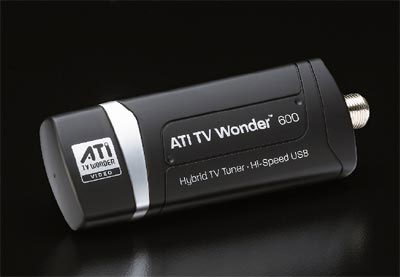
AMD and ATi teamed up some time ago and now they are starting to crank out some products not even closely related to processors. The latest is the TV Wonder 600 USB HDTV tuner. Not at all Mac friendly the ATi TV Wonder features AMD’s Catalyst Media Center software which works seamlessly (so I read) with Vista Media Center and XP Media Center from Microsoft.
In addition to the ATi TV Wonder 600 USB tuner itself, you also get a slim credit card-sized IR remote and an A/V input adapter to grab video from a camcorder or VCR. Naturally, while it is being marketed more toward the notebook side of things, the TV Wonder 600 USB is perfectly suited for operation with a desktop computer as well.
Don’t reach for your car keys just yet, the TV Wonder 600 USB TV Tuner isn’t expected to ship for another couple months. No price points as of yet.
Continue Reading
The iris USB drive requires a user to look into the on-board camera for a quick looksie. The registration or scanning process will ID the user in around 2 seconds. There are no passwords or pin numbers to unlock the drive, only the correct iris will unlock the valuable content. With 256-bit encryption I don’t think you’ll get past this, even with some James BondContinue Reading
When the Chaps from across the pond talk about tea and biscuits I don’t think this is what they had in mind. Chris Ollis introduced me to his concept USB chassis design, the USB-iscuit Biscuit.
~~~
For those not familiar with European biscuits, we’re talking about cookies. Chris developed several flash drives from ripping apart standard flash drives and applying some creativity to a handful of joke biscuits cookies.
He’s looking to take the next step and move into manufacturering, so if SolidAlliance is listening here is some contact information to get these USB-iscuits to mass market. Chris (dot) Ollis (at) InterTwined (dot) co (dot) uk
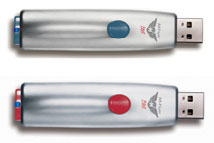
Memorex went to the streets with the M-Flyer Pilot TravelDrive UFD. Using the retractable USB connector design we’ve seen before, Memorex changed it up a spring loaded USB connector. So with the click of a button the USB connector pops-in and pops-out.
With the capless design flash drive, Memorex also bundles in some 256-bit encryption security software also called their Portable Vault Software.
Several colors are available (blue and red) which color arrangement is dependent upon storage capacity.
Blue = 4GB. Red = 2GB. $79 and $49 respectively.
Continue Reading
It’s a little slow today on the USB front so we’ll take a closer look at a new flash technology from Toshiba. Yesterday Toshiba announced a hybrid flash memory technology which should be a great boost for the mobile phone industry.
Going along the concept of Readyboost, where by you have two memory sources working together to enhance performance, the break through Toshiba made is a hybrid of two current memory technologies, SLC and MLC memory.
So here are the nuts.
Single Level Cell (SLC) memory is best suited for storing information like programs and applications. SLC memory is designed to be a fast performer for such ‘stored’ data.
Multi Level Cell (MLC) memory is best suited for data being used by programs and applications. The MLC memory has a better physical space ratio compared to SLC and is thus better for storing video, images and music.
Up until now, phone designers have had to factor the cost and the space to have two separate chips of both kinds in their designs, which has led to bigger phones.
With Toshiba’s new chip, mobile phone designers now have a choice about how much of each kind of memory they need incorporate into their phones.
Toshiba claims its latest memory-chip architecture will offer higher memory capacity, while allowing more compact mobile phone designs. Great – I don’t know about you but there definitely is a size limitation to how small a phone should be…although on the flip side the mobileLBA-NAND technology will give at least 8GB of storage. Available later this summer to mobile phone manufacturers, which means another six months it’ll hit the streets.
Continue Reading
FMWeb School released a USB security dongle which ties in with FileMaker database solutions – USB Sentry. It’s like the database is hard coded to the UFD device. The inviting point about this solution is when a database developer sells the customs solution the USB Sentry insures unauthorized copies of the database are not distributed. You need the physical security stick to launch and install the database.
Here is a typical scenario:
You sell your solution to your client. They pass it around the office and email it to their friends. Suddenly you hard work is being passed around for free. You are losing money since they are only buying single copies of your software.
USB Sentry is a USB security technology that allows you to distribute your database on UFD and ties your custom application to that UFD device. Your software is bound to that specific drive. Now they can no longer use multiple copies of your software since it will not open without the correct USB stick.
Continue Reading
USB sticks have long lost the luster of the early days when it was cool to have no matter what they looked like. Today, most of the ubiquitous sticks look like the computers they are meant for – pretty darn boring. Why not change that a little and add some soul to a otherwise lifeless object.
Here is a new release, the porcelain memory stick, a 1GB UFD in a handmade porcelain case featuring USB 2.0. The Porcelain Memory turns the traditional notion of a memory stick on its head and offers a hand crafted, beautifully glazed piece of technology in a non-tech body, and the presentation really shines when the operating LED starts glowing through the china.
To make each porcelain UFD unique each carries it’s own hand knit pouch. Not a USB deal at $125, but you would be the only one the block with one.
Continue Reading
There are far-n-few between geeky gals out there to make the USB Handbag something of value other than an exercise in creative design. Here the designer, Dima Komissarov includes the USB purse to inflate [like USB Spongebob] as capacity increases.
Don’t know about you, but it all looks Photochop’d to me.
Continue Reading
Wireless keyboards are a dime-a-dozen and sometimes the low-end just wont do. Wireless Computing turned their back on standard wireless keyboards and produced a high-end, commercial grade wireless keyboard that also carries 2-way data encryption technology for secure communication.
Albeit not a common need of the average computer user, USB input devices like this make it possible for retail and commercial organizations to do business without sacrificing security.
The RF-250 encrypted wireless keyboard can distance itself about 100 feet from the USB dongle and include a detachable wrist rest and [touch] mouse pad.
Continue Reading
IO Data is looking to broaden your viewing horizon with their USB to RGB dongle. Ideal for laptops without video or D-Sub output this “could” help improve your viewing experience by replacing the laptop screen with a bigger monitor. Then again, if you are missing video out, you’re probably missing USB too.
Before you consider building a panel of monitors from your laptop be sure to check your video card capabilities as most laptops can’t support more then original screen plus one monitor anyway. Another option is trying a new USB monitor which does the video processing for you.
Continue Reading




 It’s a little slow today on the USB front so we’ll take a closer look at a new flash technology from Toshiba. Yesterday Toshiba announced a hybrid flash memory technology which should be a great boost for the mobile phone industry.
Going along the concept of Readyboost, where by you have two memory sources working together to enhance performance, the break through Toshiba made is a hybrid of two current memory technologies, SLC and MLC memory.
So here are the nuts.
Single Level Cell (SLC) memory is best suited for storing information like programs and applications. SLC memory is designed to be a fast performer for such ‘stored’ data.
Multi Level Cell (MLC) memory is best suited for data being used by programs and applications. The MLC memory has a better physical space ratio compared to SLC and is thus better for storing video, images and music.
Up until now, phone designers have had to factor the cost and the space to have two separate chips of both kinds in their designs, which has led to bigger phones.
With Toshiba’s new chip, mobile phone designers now have a choice about how much of each kind of memory they need incorporate into their phones.
Toshiba claims its latest memory-chip architecture will offer higher memory capacity, while allowing more compact mobile phone designs. Great – I don’t know about you but there definitely is a size limitation to how small a phone should be…although on the flip side the mobileLBA-NAND technology will give at least 8GB of storage. Available later this summer to mobile phone manufacturers, which means another six months it’ll hit the streets.
Continue Reading
It’s a little slow today on the USB front so we’ll take a closer look at a new flash technology from Toshiba. Yesterday Toshiba announced a hybrid flash memory technology which should be a great boost for the mobile phone industry.
Going along the concept of Readyboost, where by you have two memory sources working together to enhance performance, the break through Toshiba made is a hybrid of two current memory technologies, SLC and MLC memory.
So here are the nuts.
Single Level Cell (SLC) memory is best suited for storing information like programs and applications. SLC memory is designed to be a fast performer for such ‘stored’ data.
Multi Level Cell (MLC) memory is best suited for data being used by programs and applications. The MLC memory has a better physical space ratio compared to SLC and is thus better for storing video, images and music.
Up until now, phone designers have had to factor the cost and the space to have two separate chips of both kinds in their designs, which has led to bigger phones.
With Toshiba’s new chip, mobile phone designers now have a choice about how much of each kind of memory they need incorporate into their phones.
Toshiba claims its latest memory-chip architecture will offer higher memory capacity, while allowing more compact mobile phone designs. Great – I don’t know about you but there definitely is a size limitation to how small a phone should be…although on the flip side the mobileLBA-NAND technology will give at least 8GB of storage. Available later this summer to mobile phone manufacturers, which means another six months it’ll hit the streets.
Continue Reading


