GetUSB.info Logo

Nexcopy’s Standalone USB Duplicator at 30MB Per Second

Introducing the Nexcopy Standalone USB Duplicator

We’ve reported about Nexcopy several times before, ranging from their USB duplicators to SD and Compact Flash duplicators. Today, we’re here to highlight the Nexcopy standalone USB duplicator.

Nexcopy, Standalone USB duplicator
Nexcopy, Standalone USB Duplicator

With flash drives growing in both capacity and affordability, it’s no surprise that data loads are also increasing. A few years ago, it was common to load a PDF or PowerPoint presentation onto a promotional USB stick for trade shows. Today, with the ease of creating videos and the popularity of platforms like YouTube, promotional content has become much larger.

Between 2010 and the mid?2010s, average MP4 video file sizes grew by roughly 30%, as creators embraced higher resolutions. In the past three years alone, they’ve expanded another 20%, driven by increased use of 4K and 8K content—a cumulative >50% increase over 15 years. Source: MASV – How Big Will Video Files Get?

The Nexcopy standalone USB duplicator supports copy speeds up to 30MB per second—that’s about 1,800MB per minute. While most standard USB drives won’t hit those speeds, higher-end flash memory can certainly take advantage of it. Taking this a step further, if you have 16 USB sticks on the system and each port is receiving 1,800MB per minute, this means the entire unit is actually copying 28.8GBs per minute as an overall throughput.

Real-World Impact on Productivity

A large software company is preparing a nationwide training program for 1,000 new employees across 50 regional offices. Each employee must receive a USB flash drive preloaded with 4GB of onboarding videos, security protocols, and software installation packages.

Without a High-Speed Duplicator:
Using a standard PC and manual copy process, it takes 10 minutes to copy 4GB to one USB drive. Copying 1,000 drives would require 10,000 minutes (over 166 hours) of labor. This could take an entire week even with multiple staff involved.

With the Nexcopy Standalone USB Duplicator:
Each port delivers up to 30MB/sec, or 1.8GB per minute. With 16 drives copying in parallel, 28.8GB is transferred every minute. Copying 4GB per drive means each batch of 16 takes just about 2.5 minutes. To duplicate 1,000 drives:
1,000 ÷ 16 = 62.5 batches
62.5 batches × 2.5 minutes = 156.25 minutes (~2.6 hours total)

Productivity Gain:
From 166 hours down to just 2.6 hours. This results in reduced labor costs, faster turnaround, and the ability to reallocate staff to other tasks. It also gives the organization immediate scaling capability for future projects.

Summary:
The Nexcopy standalone duplicator’s 30MB/sec per port speed translates to 28.8GB/min total throughput, which enables massive productivity boosts for businesses distributing digital content at scale—especially for training kits, product launches, software deployments, and marketing promotions. This technology doesn’t just save time—it transforms how companies manage USB-based data distribution.

The Nexcopy standalone duplicator line includes two models: a 16-port system and a 32-port system. Each system dedicates one port for the master device. That’s likely why the models are named USB115SA and USB131SA—one master and 15 or 31 targets, respectively.

We couldn’t find specific pricing on the Nexcopy website since the products are only available through authorized dealers. The release date for these standalone duplicator models was the first week of September 2010.

To learn more about Nexcopy’s standalone USB duplicators, visit the official Nexcopy site.

Source: EverythingUSB.com

Continue Reading

Wireless USB Dock Station For Laptops

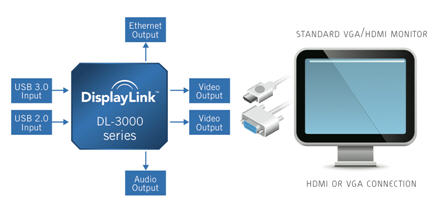
Warpia is a wireless docking station for your laptop to easily connect your keyboard, mouse, monitor and just about anything else without using cables.  Using just a wireless USB dongle to your laptop it will then connect with the base dock station where you’ve connected the keyboard & mouse dongle, the monitor, hard drive and other peripherals.

wireless USB dock station

The wireless connection of the Warpia supports resolution up to 1400 x 1050, 32-bit True Color Depth.  The dock station includes the following ports to support your peripherals – DVI connection, two USB ports and a 3.5mm audio jack.

Warpia wireless usb

The wireless USB dock station does support Mac and Windows operating systems and after a quick scan of some blogs/forums we cannot conclude if the Warpia supports Linux. We found the Warpia as low as $140 here. Continue Reading

New: USB Powered Blu-ray Plextor Drive

Earlier in the week I pointed out a great mini USB monitor for your Netbook which was under $100, and today I bring you a Blu-ray DVD player to imporve your netbook’s multimedia capabilities…and again for under $100.

USB Blu-ray Plextor

Plextor announced it’s all new PX-B120U Blu-ray DVD player yesterday which is expected to hit retail stores any day for just $99.  Powered by USB 2.0 the player is just that, a player for Blu-ray…although you do have the ability to burn DVD-R and CD-R through the device. Plextor did a nice job with design because this player will also dock with Plextor’s up-and-coming PlexMedia dock station which allows you to connect right to your HDTV in your family room. To learn more about the USB Blu-ray drive visit Plextor here. Continue Reading

Mini USB Monitor – Expand Your Netbook

Netbooks are great portable PCs and I would switch from my full sized Fujitsu laptop to my Acer Netbook if it wasn’t for the limited monitor space.

mini USB monitor

I understand there are trade-offs for ultra portable Netbooks verse size, speed and performance.  But with this new Lilliput USB monitor for only $99 it’s really got me thinking.  A switch might be eminent. So for just $99 you get a 7 inch display with resolution of 800 x 480 dpi.  The contrast ratio is nice at 400:1 and connects only through a USB port.

mini USB monitor

I understand there are trade-offs for ultra portable Netbooks verse size, speed and performance.  But with this new Lilliput USB monitor for only $99 it’s really got me thinking.  A switch might be eminent. So for just $99 you get a 7 inch display with resolution of 800 x 480 dpi.  The contrast ratio is nice at 400:1 and connects only through a USB port.

USB monitor

So with the combination of my Netbook [we have 7 at work] along with the USB mini monitor, I’m still packing less weight and space then my full blown laptop. Since there are no drivers needed for the Mac or PC it’s truly plug-n-play and ready to work with any PC, work or home. So for $99 it’s worth a shot.  What do you think? Continue Reading

How To: Use Physical Lock To Enable / Disable USB Ports

I came across this very interesting USB hack from TechOat the other day.  The concept of this modification is taking the key of a power box in your computer and turning that into the physical on/off switch for USB communication. The premise is disassembling the wires of the USB cable and port and weaving that into the circuit of a locking switch on your PC.  I think this illustration shows it best:

USB lock on off

What I particularly like about this USB hack, is the physical requirement to have the key in order to work the USB port.  This type of security [more fun then practical] for USB devices in general is much better than a Truecrypt type solution as that only protects the device, not the system. So what you need includes: Small USB thumb drive USB extension cable or USB socket and plug with cable Locking switch DPST Plastic box The rest is just elbow grease to get it working, for the specific details and tutorial, jump here.

USB lock enable disable

Continue Reading

How To: USB Steampunk a Flash Drive

Here at GetUSB.info we love the USB steampunk drive.  We’ve reported on at least a dozen of them over the past couple years and I’m sure we’ve missed three times that many.  Today we are tipping you off to a great tutorial on how to USB steampunk your own flash drive. Instructables has a very detailed, 9 page tutorial on how to steampunk your own gear.  It gives you a list of material, a detailed process, good and creative guidelines along with plenty of pictures and resources.

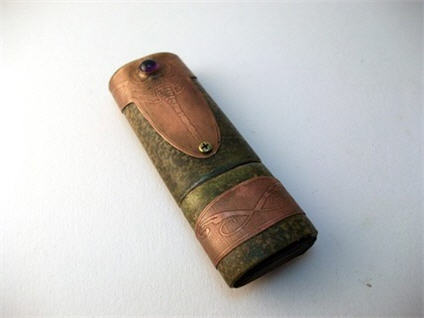
USB steampunk flash drive

It’s my goal to actually do this over the July 4th weekend [2010] and post my result.  Lets hope for the best! To give you an idea of the scope of project considering the following list of materials and tools.  If it fits into your abilities, then give it a shot! Continue Reading

Wireless USB Media Stick

wireless usb media

It’s very common these days to see a media player with a USB port.  Whether it be a Blu-ray player or a set-top box, chances are, a USB port is somewhere in the front or back. At first glance you say to yourself, “sweet, a USB port so I can play content off my flash drive” but then you think a bit more and wonder if you can hang a wireless dongle off the media player and stream content to your media box from a source computer? stream via USBWell, Home Server Technologies Inc is one step ahead of you.  Their new Wireless Media Stick will do exactly that; stream digital content to your media player. Whether it’s a laptop, TV, DVD player, Stereo or game console the Wireless Media Stick can stream the content and your media player will play it.  There is no limit to the type of format, music, audio or video. Currently the USB Wireless Media Stick will only stream saved content from the source computer, but future updates will include the ability to stream internet content to your wireless setup, so now you’ll have the best of both worlds. The Wireless USB Media Stick is $99 USD. Continue Reading

USB Hack: Nexus One Turns Into Full Blown Portable Workstation

The love for Linux is that with a bit of tweaking you can do just about anything. Case in point: Sven Killig took the Nexus One, loaded up some code to control the USB host controller and is now running a full work station. Now this sounds awesome. Sven can run a digital camera off his phone, stream video from a USB stick to his screen or even run a printer off the USB port. Check out the screen-shot of his work station…

USB Hack Nexus One

So if you’re like me, this project would be in the advanced level of Instructables for DIY mods, but thanks to Sven’s recording skills, we have a video to tell us how. The best part of all this? He’s got the whole thing demonstrated for you on video, but not only that, you can hit up the down-loadable binaries from his website. And while he tried all of this on Android 2.2, which means its the only version of Android it’s been successfully tested on (at the moment), Sven believes that it will work on Android 2.1, too. Source: SlashGear.com. Continue Reading

USB Powered Monitor By Samsung

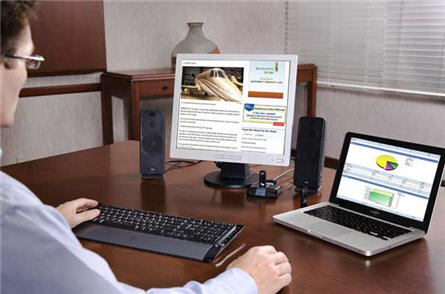
GetUSB has reported on monitors which connect via USB, but now Samsung has fine tuned this product to include connection AND power to be exclusively through USB.  The Korean electronics giant made this possible by including two USB connections to the host so that one transmits data and some power and the 2nd USB connection is designated to power only.  We’ve seen this before in USB hard drives, so it’s nothing new.

USB powered monitor

In addition, Samsung says that this was made possible by improving the transmittance of the panel and the luminance efficiency of the back-light used in the monitor, which ultimately reduced the power consumption to as low as 6.3-watts. The new USB monitor by Samsung has a shorter life span than a traditional monitor [30,000 verse 50,000] but hey, it’s just growing pains and, as with everything, expect it to get better. Source:  TechnaBob. Continue Reading

Underwater Video Recorder With Spot Light

Now this is a great USB gadget which you could have a ton of fun with, especially with summer coming up.  USBFever released a new underwater video camera which is compact in size and good with resolution.

usb underwater

The underwater video recorder is small enough it can strap to your wrist or versatile enough to mount on your bike helmet, skateboard bottom, mountain bike, you name it! The video recorder includes a powerful LED spot light to increase visibility under water or ideal for low light situations [cruising through the brush or forest on your mountain bike].

USB video recorder

If you can blow the $190 then it would be a great gift for the kids to use while at the pool all summer. Here are the bullet points worth considering: Continue Reading

Nexcopy SuperSpeed 3.0 USB Duplicator – Shipping Soon

2025 Update: Nexcopy Enhances USB 3.0 Duplicator with Higher Capacity Drives and Advanced Drive Manager Software

Nexcopy, a leader in USB duplication technology, has been shipping its USB 3.0 SuperSpeed Duplicator for over 15 years. The 16-port USB 3.0 Duplicator remains one of the most reliable solutions for high-speed USB flash drive and hard drive duplication. With peak transfer speeds of 65MB/s per device and up to 72MB/s with multiple drives connected, the duplicator can efficiently handle demanding data loads. For USB 3.0 hard drives, transfer rates reach a consistent 95MB/s, regardless of whether a single device or eight devices are connected.

USB 3.0 SuperSpeed Duplicator

Since its initial release, Nexcopy has expanded its USB 3.0 flash drive lineup, now offering capacities up to 256GB with optional custom branding. These high-capacity drives are ideal for industries requiring large data sets, secure distribution, and reliable performance.

The USB 3.0 Duplicator is powered by Nexcopy’s proprietary Drive Manager software, which receives regular updates to enhance speed, improve user experience, and add new functionality. Drive Manager updates are always free and require no license fees. For professional applications, the PRO version of Drive Manager enables advanced features such as:

  • USB write protection (hardware-based read-only mode)
  • Configuring USB drives as USB CD-ROM devices
  • Partitioning flash drives at the controller level
  • Editing USB device serial numbers

USB 3.0 flash drive

Nexcopy continues to focus on providing enterprise-grade duplication solutions with ongoing software innovation and long-term product support.

Source: EverythingUSB.

Continue Reading

Do You Really Need 64GB USB Drives?

I can honestly say, today, no I don’t.  But that doesn’t mean you don’t.  Today we found the Kingston 64GB drive on sale for $147.  That’s about $72 off the regular price.

64GB drive

The company line: Kingston’s new DataTraveler® 200 USB Flash drive is ideal for storing and transferring digital images and presentations and transporting all kinds of data. With capacities up to 128GB, the DataTraveler 200 features password protection via Password Traveler software, which allows you to create and access a password-protected, secure area of the drive called a “Privacy Zone.” DataTraveler 200 is ideal for those who need significant storage capacity and data protection in a sleek, durable design. With a capless design and enhanced with Windows ReadyBoostâ„¢,** the DataTraveler 200 is perfect for home or business. DataTraveler 200 is backed by legendary Kingston® reliability plus a five-year warranty and 24/7 tech support. Grab the GetUSB Dealz now. Continue Reading

Copyright

Copyright © 2006 +

USB Powered Gadgets and more...

All Rights Reserved

Advertise with us

GetUSB Advertising

This is a high value website providing great exposure to your product and brand. Visit our advertising page to learn specifics.

For more information
Visit our advertising page.

Nexcopy Ad

Nexcopy Provides

USB copy protection with digital rights management for data loaded on USB flash drives.

Contact us learn more

Resources and References Page

Resources and References Page