GetUSB.info Logo

Author Archive

Matt LeBoff

Kicking around in technology since 2002. I like to write about technology products and ideas, but at the consumer level understanding. Some tech, but not too techie.

Features to Consider When Buying a USB Duplicator

Came across an article today that I thought was a very good read. It’s a niche topic, but for anyone who deals with flash drives or media distribution, it’s worth checking out.

From the article:

The optical drive is nearly dead — no longer found in laptops and only rarely included in desktop PCs. As a result, the trend for distributing data has shifted toward USB flash drives instead of CDs or DVDs. Because of this shift, many companies are taking a closer look at purchasing a USB duplicator.

There are several factors to consider before spending thousands of dollars on duplication equipment. The article breaks the most important considerations into four categories. After reviewing these areas, you should have a much clearer understanding of which type of duplicator best fits your organization.

USB Duplication Speed

Speed is the first area to evaluate. This isn’t just about raw copy speed. It also includes the number of USB sockets, the user interface, and how much operational feedback is available during a copy session. Questions worth asking include:

# How many USB drives will you need to copy in a day or week?

# How large is the data load in MB or GB?

# What turnaround time is required between request and completion?

# Is printing or branding required on the USB devices?

# Do you need proof of performance via log files or reports?

Answering these questions helps define the type of USB duplicator you should be looking at: how many ports, what performance level, and what software features are necessary for your workflow.

Buy USB Duplicator

Your Production Crew

The next step is understanding who will actually be running the equipment. Will the system be operated by non-technical staff, or by IT professionals? Does the organization need to restrict access to the system or protect the data content during the duplication process?

This often depends on how the content is delivered. A duplication company might receive physical master drives from clients, while a fulfillment operation might receive files automatically from an online ordering system or internal server.

Another consideration is scale. Will the organization deploy multiple duplicators across different geographic locations? Many global companies standardize on a single manufacturer so the workflow, training, and support experience remain consistent worldwide.

Understanding the people, environment, and operational requirements goes a long way toward narrowing the field.

Read-Only vs. Read-Write

The third category is the final state of the USB media being shipped. Should the drives be read-only, or remain read-write? By default, all standard flash drives are read-write. That introduces risk: files can be deleted, modified, or infected after distribution.

Because of this, many organizations look for USB duplicators that support creating read-only (write-protected) media. With this approach, files cannot be deleted, formatted, or altered, and malware cannot write itself onto the drive. It’s a practical safeguard for training material, software distribution, compliance data, and controlled documentation.

Nexcopy is cited in the article as a world leader in read-only flash drive duplication systems and is used as an example of the type of platform organizations evaluate for secure media production.

Read the full article here

Continue Reading

Only One USB Drive Can Be Used In Windows – Others Are Ignored

The most common reason why only one USB drive can be used in Windows is due to multiple USBs connected with the same USB device signature, or disk signature collision.

If you are dealing with bootable devices and seeing this problem, we are confident a collision is the issue. If you are not dealing with a bootable device, then our information below will probably not help.

Only 1 USB Drive Can Be Use  In Windows, hard drive sketch image

What is a USB signature collision?

A signature collision can happen on any bootable device, such as Compact Flash cards, SD cards, microSD cards, and USB flash drives. A disk signature is a unique identifier number (UID). It is a unique identifier stored as part of the MBR (Master Boot Record) for an operating system loaded on the device. The operating system uses the UID to identify and distinguish between storage devices. It is commonly made up of eight alphanumeric characters. A disk collision occurs when your operating system (Windows) detects that there are two disks with identical signatures.

For Windows 7, 8, 8.1, and 10, these versions of Windows will disable the second drive and will not allow that second volume to mount until the disk collision has been rectified. If you are reading this article, chances are, this is exactly what is happening to you.

The first thing to do is navigate to the Disk Management tool within Windows. To do this, use the search tool and type in Disk Management. This will take you to the utility that Windows offers. Here you can see your multiple devices connected. If you click or hover over the device not working you will see one of two messages:

“The boot selection failed because a required device is inaccessible” or “This disk is offline because it has a signature collision.”

What created the USB disk signature collision?

Making a bit-by-bit copy of one device to another, like using a USB duplicator, would create a disk signature collision. Because these binary duplicators copy the MBR information, that UID is also copied to the target device. Stepping forward, once those two devices are connected to the same computer, “boom” you get the collision.

Chances are, the situation you are in right now is due to a cloning process you have just completed. But don’t worry, we have the fix!

Fixing a USB disk signature collision

There are two methods for fixing the collision issue. The first solution is using DiskPart, which is a free command line tool provided by Microsoft and is found on all Windows 10 computers. This is a one-by-one process. If you have multiple devices with this problem and need to fix all of them, best to use option number two.

DiskPart Method

To launch DiskPart, simply go to the search function and type DiskPart

You now see the command prompt for DiskPart and type list disk

DiskPart will list all the storage devices connected to your computer. From this list, identify which USB is your problem device. The easiest way to determine this is to check the capacity for the drive listed by DiskPart.

Select the disk you want to change the signature ID for, for example Disk 1, which is the second disk listed (typically disk 0 is your C drive). Type select disk 1

Now that disk one is selected, type uniqueid disk and the utility will spit out the disk signature for disk 1.

Our final step is to change this value. Knowing a hexadecimal value we can use, such as A53AEBE9, type the following in DiskPart: unique disk ID=A53AEBE9 and click Enter.

With this change, you can now go into Disk Management and put the device Online. When the device is online, Windows Explorer will see the device and you can use it. There is no longer a USB disk signature collision.

If your hexadecimal value will not take, it means your MBR file doesn’t have a signature you can change. You will need to flash the device with your bootstrap code. More details on that from a previous article found here.

Another reason why option number two, below, is better is that the hexadecimal number assigned to the partition is automatic and works. There is no guessing on what hexadecimal to assign to the partition, a step you must do in DiskPart.

Partition Wizard utility example

The second solution is downloading the free Partition Wizard and opening the software. The Partition Wizard software will automatically identify the USB disk signature collision and update the necessary MBR. Super simple!

There is more technical information about disk collision issues from Wikipedia. You can brush up on the details there if so inclined.

Continue Reading

Commercial Grade USB Solar Charging Station

Legrand now offers the XSOLARCS USB charging station for public works, schools, parks and transportation centers.

With the Legrand solution, there is no construction required in order to install the charging station. The unit is a self contained solar panel tower, with six USB charging ports pulling from the solar panel. There are three shelves which can mount in adjustable locations to the panel tower poll. Each shelf containes two USB ports with up to 3.1A of shared power between them. There is no trenching required or other expensive construction projects in order to get the EXSOLARCS going.

USB sockets are protected from the eliments with a sliding door in front of the two port socket assembly. Not only is there protection, but LED illumination at each port for after-dark identification and ease-of-use. If the light is illuminating, the station can provide a charge. This implies there is some type of battery inside the station, which we’ve emailed Legrand to find out exactly what.

The XSOLARCS was designed with the elimints in mind. The USB charging station is designed to withstand hurricane-force winds and has the full RoHS certificate compliance.

Source: Legrand .

Continue Reading

Flash Drive Prices Are Going Up – Cause: Japan & S. Korea Trade War

Japan has long been a major supplier of three key elements used in the manufacturing of NAND memory and semiconductors. Due to recent trade tensions between Japan and South Korea, these materials are becoming increasingly difficult to obtain.

Japan produces roughly 90% of the world’s supply of fluorinated polyimide and photoresists, along with about 70% of the global supply of hydrogen fluoride. This concentration places the global supply chain at risk if Japan restricts exports of these materials.

These chemicals are used by Korean manufacturers to produce semiconductors and are critical for making components such as memory chips, microprocessors, and integrated circuits.

The impact is already visible. For the first time in more than eight months, NAND memory pricing for flash drives has increased. While the percentage increase varies by capacity, the most notable jumps are in 32GB and 64GB wafers, which rose nearly 25% week over week at the time this article was published on July 25.

Global semiconductor supply chain affected by Japan and South Korea trade dispute

Japan has cited inadequate management of these chemicals by purchasing countries. Put another way, the materials can also be used in the manufacture of military weapons, and Japan claims some supplies have been diverted for that purpose. Japan’s response has been to impose restrictions on exports.

Who ultimately loses in this trade dispute? Anyone who relies on modern technology. Smartphones, processors, flash memory, circuit boards, and countless other products depend on a stable semiconductor supply chain.

For a more detailed and source-based report, visit this CNBC article.

To learn more about polyimide chemicals, a quick overview is available on this Wikipedia page.

Continue Reading

Off Topic: Interview with Nexcopy CEO, Greg Morris

Nexcopy is a classic entrepreneurial story—starting out in a home garage with a sale on the very first day of business. What began as a small, focused operation has steadily grown into a globally recognized manufacturer in the flash memory duplication and USB technology space. It’s the kind of company story built on persistence, product knowledge, and an unwavering focus on solving real-world production problems for customers.

Tech Company News spent time with the owner of Nexcopy, Greg Morris, to learn more about the company’s origins, its technology, and how the business evolved from a single product idea into a specialized hardware manufacturer serving enterprise, government, and industrial clients worldwide.

Here is a short snippet from that interview.

Question: What kind of technology does Nexcopy offer?

Greg Morris of Nexcopy Answer: Nexcopy has a specific focus on flash memory duplication, printing, and production needs. The business started out with one product geared toward USB duplication. From that single product, Nexcopy’s business expanded into other duplication equipment such as SD card duplicators, microSD card duplicators, CompactFlash duplicators, and more recently, USB Type-C duplicator systems.

During this expansion of hardware platforms, Nexcopy also developed advanced solutions for copy protection of digital files on USB drives and mobile storage devices. These technologies were designed to help organizations protect intellectual property, control distribution, and meet compliance requirements. Several years ago, Nexcopy introduced a USB flash drive printer, which further rounded out the company’s product offering by enabling in-house branding and device customization.

Today, Nexcopy is recognized not just for duplicators, but for a complete ecosystem: devices, duplication systems, controller-level configuration, secure media, and branding equipment. That evolution—from a single garage-built concept to a specialized manufacturer with global reach—reflects a company built on deep technical knowledge and a long-term commitment to its niche.

The full Nexcopy interview is available on the Tech Company News website.

Continue Reading

Hedgehog USB Holder

What can you get with a 3D printer and plenty of flash drives? A hedgehog USB holder. With more than 200 downloads, head over to Thingiverse to grab the 3D printable template. The hedgehog design appears to hold roughly 15 USB devices.

Continue Reading

Not So Funny USB Jokes [11]

What do you call a bee born in the United States? A USB.

When the person who invented the USB drive dies: They will lower the coffin into the grave and realize it’s the wrong direction. Flip it, and try again.

Why do people complain about plugging in USB cables? I always connect them on my second try.

Humorous USB illustration

Amazon offers a USB-powered taillight: It’s used to back up your computer.

Arguing with your wife is like a USB port: You will only be right 50% of the time.

I ate my USB flash drive: It only took 1 byte.

If you are carrying around a USB stick: Do you have mobile data?

What do you call a USB stick in Russia? A “Put-in.”

The USB Type-C design is brilliant: I can’t see a downside to it.

How do you stop an elephant from charging? Take away its USB cable.

Thanks to these guys for inspiration.

Continue Reading

QuadCore Raspberry Pi 4

Update:

From this article, the Raspberry Pi 4 USB-C power port was designed outside of official USB-IF specifications, making it incompatible with many USB-C chargers and power supplies. You can read more from the link above. The analysis leading to this conclusion was conducted by well-known Google engineer Benson Leung.

The Raspberry Pi is a collection of small computer boards assembled in a simplified way to form the foundation of a computer system. The Raspberry Pi (also known as RPi) was released in February 2012 in the United Kingdom. Its original intent was to provide a low-cost, simple computer platform for students to learn and develop on.

The original model became far more popular than anticipated and quickly expanded beyond its intended educational market into areas such as robotics. The platform does not include peripherals such as keyboards or mice, nor does it ship in a case. It is, quite literally, a bare-bones product.

To give you an idea of its popularity, Raspberry Pi products sold more than 19 million units from their 2012 launch through the end of fiscal year 2018. This places the Raspberry Pi among the best-selling computers in the world, albeit with limited resources. Until now.

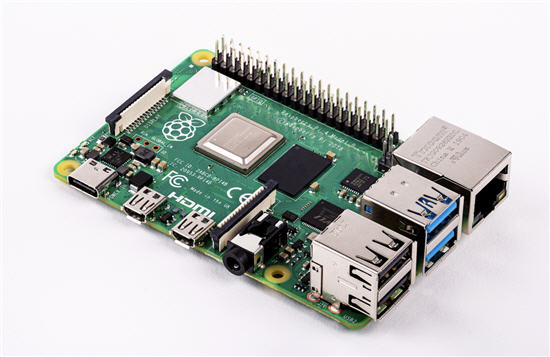
This week, the Raspberry Pi Foundation released the Pi 4. It is an impressive upgrade. Here are the key specifications:

Raspberry Pi 4 board showing ports and components

  • A 1.5GHz quad-core 64-bit ARM Cortex-A72 CPU (~3× performance)
  • 1GB, 2GB, or 4GB of LPDDR4 SDRAM
  • Full-throughput Gigabit Ethernet
  • Dual-band 802.11ac wireless networking
  • Bluetooth 5.0
  • Two USB 3.0 and two USB 2.0 ports
  • Dual-monitor support at resolutions up to 4K
  • VideoCore VI graphics supporting OpenGL ES 3.x
  • 4Kp60 hardware HEVC video decoding
  • Compatibility with earlier Raspberry Pi products

In addition to the hardware improvements, the Raspberry Pi Foundation says the new system includes an extensively modernized user interface, an updated Chromium 74 web browser, and a transition from USB micro-B to USB-C for power. The new connector supports an additional 500mA of current, ensuring a full 1.2A is available for downstream USB devices even under heavy CPU load.

The new boards are available to order now.

In the past, users have attempted running Windows on the Raspberry Pi platform, but performance was predictably slow. With this new configuration, we are curious to hear who has tried it and how it performs. Feel free to share your experience by emailing gmo @ getusb dot info.

Continue Reading

Solved Windows Will Not Assign Drive Letter To USB Flash Drive

Problem: Windows Will Not Assign a Drive Letter to a USB Flash Drive

This issue can occur on Windows 8 and Windows 10. You unplug a USB flash drive, plug it back in, and Windows fails to assign a drive letter. That’s a real problem, especially when every other computer handles the same device without issue.

There are three solutions. All of them can work:

  1. You can open Disk Management and manually assign a drive letter to the device. This works, but it’s a repetitive and inconvenient fix if the problem happens often.
  2. There’s a good chance the driver or registry entry for that device is corrupt. Use the USBScrub tool to remove old USB registry entries. In many cases, this resolves the issue immediately. Download USBScrub
  3. Use DiskPart and enable the automount feature.

Windows will not assign drive letter to USB flash drive

  • Open Command Prompt as Administrator (search for Command Prompt in the Start menu, right-click, and select “Run as administrator”).
  • Type diskpart and press Enter.
  • At the DiskPart prompt, type automount enable and press Enter.
  • Type exit and press Enter.

For solution number one above, Disk Management is essentially the graphical (GUI) version of DiskPart, but with a reduced feature set compared to what DiskPart can actually do.

DiskPart includes dozens of useful commands for managing storage devices. One of the most important is automount, which controls whether Windows automatically assigns drive letters to newly connected volumes.

Continue Reading

Updated iPad OS Will Accept USB Thumb Drives

Today Apple announced the new iPadOS will support USB thumb drives. The iPad has long been toughted a workers tablet from Apple, but the relaity is their iPad didn’t provide much functionality. In addition, the devices have limited storage.

With today’s announcement the above argument could get a little muted.

Update: We learned the iPad will allow other storage devices such as external hard drives and SD or microSD cards (with USB adapters). The USB port will also allow for HID devices, such as a USB mouse and keyboard. We are not sure if the iPad will support Bluetooth mouse and keyboard, but we’ve got to assume, right!

There is no word about the connection. The connection could be one of three; an adapter, USB-C socket size or the classic USB type A socket size.

iPad accepts usb drive

Source: The Next Web.

Continue Reading

News: USB-C Duplicator Shows USB-C Product Trending Up

In a recent news press release from Nexcopy Inc., it appears USB Type C is trending up for consumer demand.

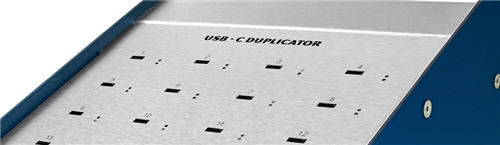
Via the EIN News Wire Service, Nexcopy announced a twenty target USB-C Duplicator. Some of the information posted in the release talks about the upward trend manufacturers are seeing with USB type C product. In addition, the production of a mass aggregator, or duplicator, is another indication users are data loading, in bulk, to USB-C product.

usb-c duplicator, nexcopy duplicator

“Apple computers and Iot, or Internet Of Things, are driving the force behind the increased demand for USB-C flash drive consumption. Although the internet is great for many data sharing applications, there is still a great need for data dissemination off line. USB is still the definitive choice among users to share data via flash memory,” states Greg Morris, President of Nexcopy.

Morris continues, “We see the demand of USB-C duplication to only rise in the coming years. In technology, smaller is always better, and as devices get slimmer in size the USB type A socket will eventually phase out and USB type C taking over. The transition is slow, but it is inevitable; and with that said, we are ready – today.”

nexcopy, usb-c duplicator, usb-c200pc

Nexcopy is also well known for the PRO series duplicators that perform advanced functions to flash drives, such as USB write protection (USB read-only), partitions at the controller level, and serial number control for UFD identification. From the press release, these advanced functions will also be available on the USB-C200PC duplicator.

The USB-C duplicator has a list price of $1,299 from what we understand and available now through a list of on-line retails like Amazon and NewEgg. The product is also available through a worldwide network of authorized resellers.

Nexcopy did allude to

Continue Reading

Will Trump Tariffs Affect USB Flash Drives?

Posted May 16, 2019.

The United States and China walked away from trade talks earlier this week. Following that departure, President Trump and China’s President Xi Jinping increased the number of products subject to tariffs.

With that said, will Trump-era tariffs affect USB flash drives?

A quick Google search may surface a BuzzFeed article claiming that flash drives are affected. That article is incorrect. USB flash drives are not affected by tariffs at this time.

U.S. and China trade tariffs illustration related to technology imports

Don’t take our word for it—verify the information directly using official sources.

Here is the Harmonized Tariff Schedule website: https://hts.usitc.gov/

The Harmonized Tariff Code for a USB flash drive is 8523.51.0000. Search the HS code on the site above. The tariff status is shown in the right-hand column, indicating whether the product is duty-free or subject to a percentage-based tax.

Continue Reading

Copyright

Copyright © 2006 +

USB Powered Gadgets and more...

All Rights Reserved

Advertise with us

GetUSB Advertising

This is a high value website providing great exposure to your product and brand. Visit our advertising page to learn specifics.

For more information
Visit our advertising page.

Nexcopy Ad

Nexcopy Provides

USB copy protection with digital rights management for data loaded on USB flash drives.

Contact us learn more

Resources and References Page

Resources and References Page