Administator for GetUSB.info
GetUSB.info started in 2004 with the concept of providing USB information for everything USB related. At the time, USB was gaining momentum and every day new products, articles and news became published. Today, the site is focused on bringing technical information, tricks and hacks to USB related products. The site does publish off topic information as well, to keep the variety up. Please visit the footer area of any page if you or your company is interested in article or product placement via purchased advertising.
I doubt you’ll see these on The Red Carpet anytime soon, none the less, a true tech lover would appreciate these USB cuff links.
It’s unclear what material these are made from, but IS clear it’s not real USB. Sure it had something to-do with size, but if you’re going to put in the effort…
These ubergeek USB cuff links will set you back $25 which is a tall order for some cash-depleted geeks.
Source:Â GeekAlerts.
Continue Reading
I enjoy the Instructables weekly email about DIY projects. Occasionally you see one worth trying or sparks your interest enough to consider trying. This week we found an instructable for a DIY iPod Video Porjector.
To turn your dream into a reality, you’ll need an iPod, mirror, lens and flat wall for projected image.
Here’s the DIY video for the iPod video projector…and sure you could get a dock station and connect your iPod to your TV, keep the lights on and enjoy the latest Jon Stewart download…but where’s the sizzle in that?
Source and full tutorial: Instructables video iPod.
Continue Reading
Seems everyone is going green these days. I don’t mind – let the grandkids live longer, better design on products and less impact on the environment. Veiro applied this philosophy to their new hand crank MP3 player.
I’ve seen hand crank music players before, they where specifically design for [lack of better terms] 3rd world countries where batteries are hard to find or too expense. I would think the Veiro is going after the same consumer base…but with solid state memory. Why?
The products I’ve seen before where
Continue Reading
The catch phrase from Firebox for the USB Desktop Dunk is “Shoot hoops without breaking a sweat.“Â Not bad – and looks like a great little gadget gift for the young ones.
Complete with 4 mini basketballs the goal is to bounce them into the hoop. You can put the USB Desktop Dunk to good office use in “competition mode” which is 2 minutes of pure stress trying to get the high score. Or, if you need to sharpen those virtual hoop skills, chill in “continuous play” mode.
For added stimulation, the USB Desktop Hoops game throws out some audio fanfare with every 10 points scored (it scores 2 points per shot).
Continue Reading
GetUSB reported a while back about the partnership between Microsoft and U3 and it turns out they’ve created the StartKey, a similar approach as the U3 drives.
The biggest difference is Microsoft using StartKey as the key component to logging in and booting up. In addition, you can store personal computer settings and privileges, applications and data files on the StartKey itself.
Microsoft is looking past the ultra popular USB stick, and will incorporate the StartKey technology to nearly all types of flash media.
Continue Reading
So many have asked the question: How do you make DVD rentals easier than running down to the video store. Well, we’ve seen NetFlix with their rapid shipping and quick turn times and Blockbuster on their heels. These big-boys are now turning to on-line download and “content on demand.” It all sounds nice, but even with great bandwidth and streaming video you still have a fundamental problem. You must watch those vidoe’s on your TV.
PortoMedia of Ireland has a different take on DVD rentals. How about rent movies on flash memory?
May seem a little crazy, but think about it. Once you have that content on flash, the ability to watch video on any portable device, be it a laptop, PDA or other device makes enjoyement of that DVD when and where you want it …well…ideal.
So what is the process?
“PortoMedia is setting up kiosks that will let consumers download movies to a flash memory key or portable hard drive. The kiosks will be packed with hard drives that can hold 350 to 5,000 titles. Users then plug in a memory device from the company, enter a PIN code, and buy or rent a movie. When consumers get home, they simply slide the memory device into a dock their viewing device and enjoy.”
If you are not on board with the idea of PortoMedia, don’t worry – you are not alone. Others, like Ziff-Davis, have doubts, but consider this:
Continue Reading
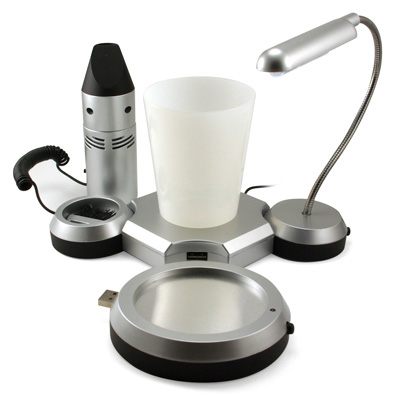
Here is an eclectic set of USB gadgets which I think would be ideal for Frank’s Cubicle. I found the USB desktop multi-tasking organizational gadget over at ThinkGeek [via OhGizmo] and what kind of organization are we talking about? Based off the lightening fast USB speed of 1.1 you get:
1 – USB cup warmer
1 – USB mini desk lamp
1 – USB mini vacuum
1 – Open USB port (still 1.1)
1 – Pen cup holder as center base with no USB connectivity.
The USB multi-tasking device does make a good gadget gift and with the recent price drop from $30 to
Continue Reading
Imagine stepping away from your computer was all that’s needed to lock your computer? It’s a great idea, too bad ProxMat thought of it first. Their USB Mat is a pressure sensitive floor mat which locks your computer when you step off/away.
The ProxMat activates the Windows Key + L shortcut to lock down your computer.
“The ProxMat sensor now locks the unattended computer automatically! The ProxMat incorporates sophisticated pressure sensing technology to detect the presence of the user. When the user leaves the mat, the ProxMat sends the keystrokes to lock the system.”
The USB mat connects via USB and requires no drivers upon installation. ComputerProx, the company which makes the ProxMat has a list of available sizes:
Continue Reading
It’s obvious there is one primary use for this USB mouse:Â adult content and hiding your “habits.”
The Politically Correct term would be the USB Privacy Mouse, here is why. Along with the traditional mouse configuration of left, right buttons and center scroll tool, there is a side button used for specific hot-swap configuration. What do we mean by hot-swap configuration? Well, since a picture can tell a thousand words, consider this:
Continue Reading
Okay, so that’s a cheezy headline, but here’s the deal – Vers Audio has this all natural cherry-veneered wooden speaker cabinet to add that classic look/feel to your office. Personally, I think there’s nothing better than the sound coming from a wooden speaker box. I still have some solid cherry-wood Bang&Olfsen speakers from 20 years ago – that sound absolutely awesome.
Although the Vers 2X isn’t Bang&Olfsen, the 3 inch full-range speakers backed with 20-watts per channel should livin up your space. At just 11.5″ x 5.6″ x 5.6″ the Vers 2X wont take up much room either.
The Vers 2X supports the entire Apple i-stuff line (including iPhone) and comes with a brushed aluminum remote for the armchair music enthusiast.
Continue Reading
So now ION has some competition and from who else, the monster retailer, Sony. The PS-LX300USB is a vinyl playback turntable with USB output to easily convert those cherished records into MP3.
With a belt drive motor for reduced motor noise and rotational stability – the PS-LX300 USB turntable includes a static balance tone arm with a bonded diamond stylus for precise tracking and low record wear (ok that was straight of the Sony site).
Continue Reading
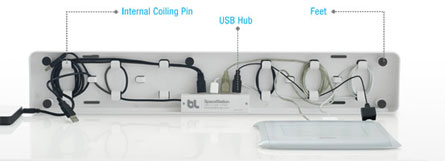
BlueLounge introduced their SpaceStation docking station and USB hub. It’s the clever idea you’ve always had but never done anything about. BlueLounge put all your storage ideas to a true, marketable package, the SpaceSation.
Really a fancy design of a cover with a USB hub tucked inside, the SpaceStation does clean up your desktop quit nicely.
“Hovering just 5mm above the desk, cords are free to enter or exit the hub at any point – on the side to connect a scanner, the front for an iPod, the back for a laptop or camera. An internal 4-port USB hub will keep all peripherals connected. One USB plug exits the station right where needed to connect a laptop. Just tip the front of the SpaceStation up to access the hub and cords.”
The SpaceStation surface is a rubber pad so your iPhone and other gadgets have a soft, non-skid surface to rest. The SpaceStation also provides air circulation to
Continue Reading