Storage capacity sounds simple until you start looking below the number printed on the side of a flash drive. A USB drive might be sold as 32GB, Windows reports something slightly different, a manufacturing tool asks for capacity in MB, and somewhere else the device reports an LBA count that looks like a completely unrelated number.
They are all related.
The connection between capacity, sector size and LBA is actually straightforward once you understand what each number represents. It is also useful information when working with USB flash drives at the manufacturing or duplication level, where specifying “32GB” sometimes isn’t precise enough.
What Is an LBA?
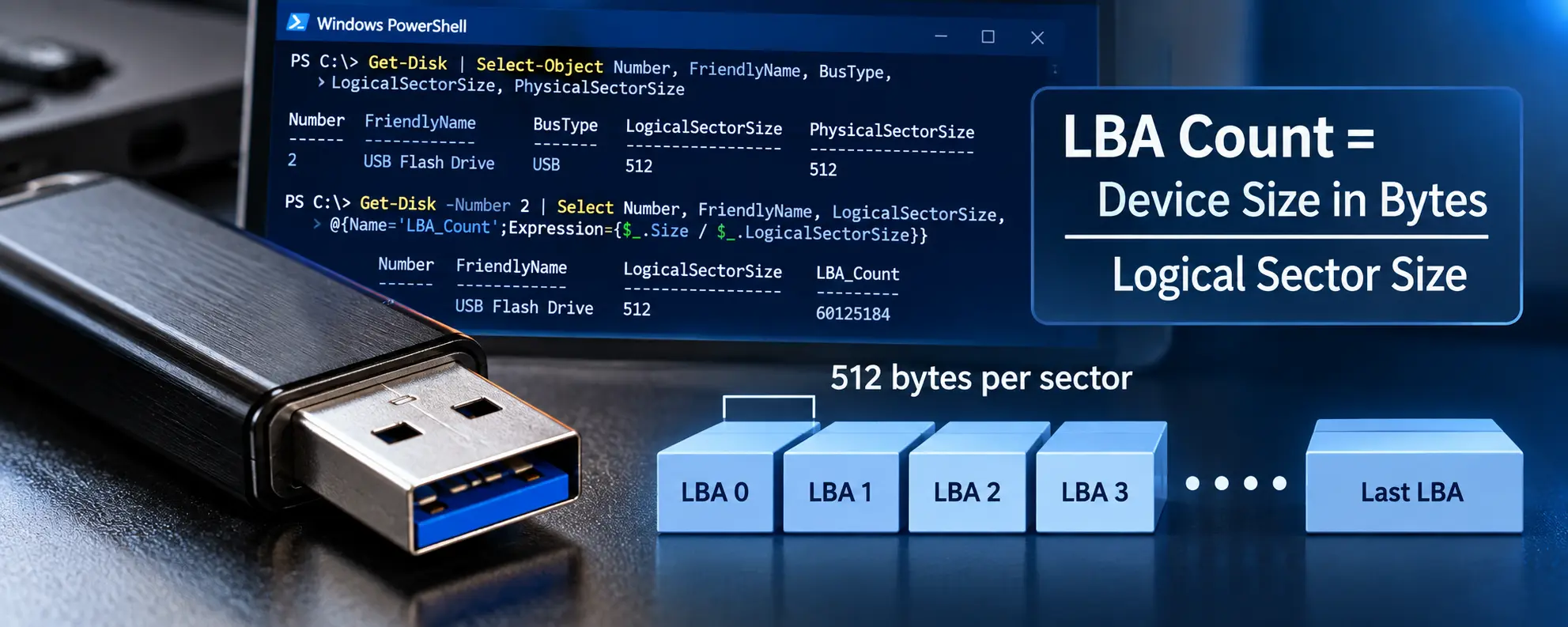
LBA stands for Logical Block Addressing. Rather than thinking about the physical location of data inside NAND flash memory, the computer sees the storage device as a long sequence of numbered logical blocks.
LBA 0 is the first logical block, LBA 1 is the next, then LBA 2, and so on until the device reaches its final available LBA.
The important part is that an LBA by itself does not tell us how much storage exists. We also need to know the size of each logical sector.
The basic relationship is:
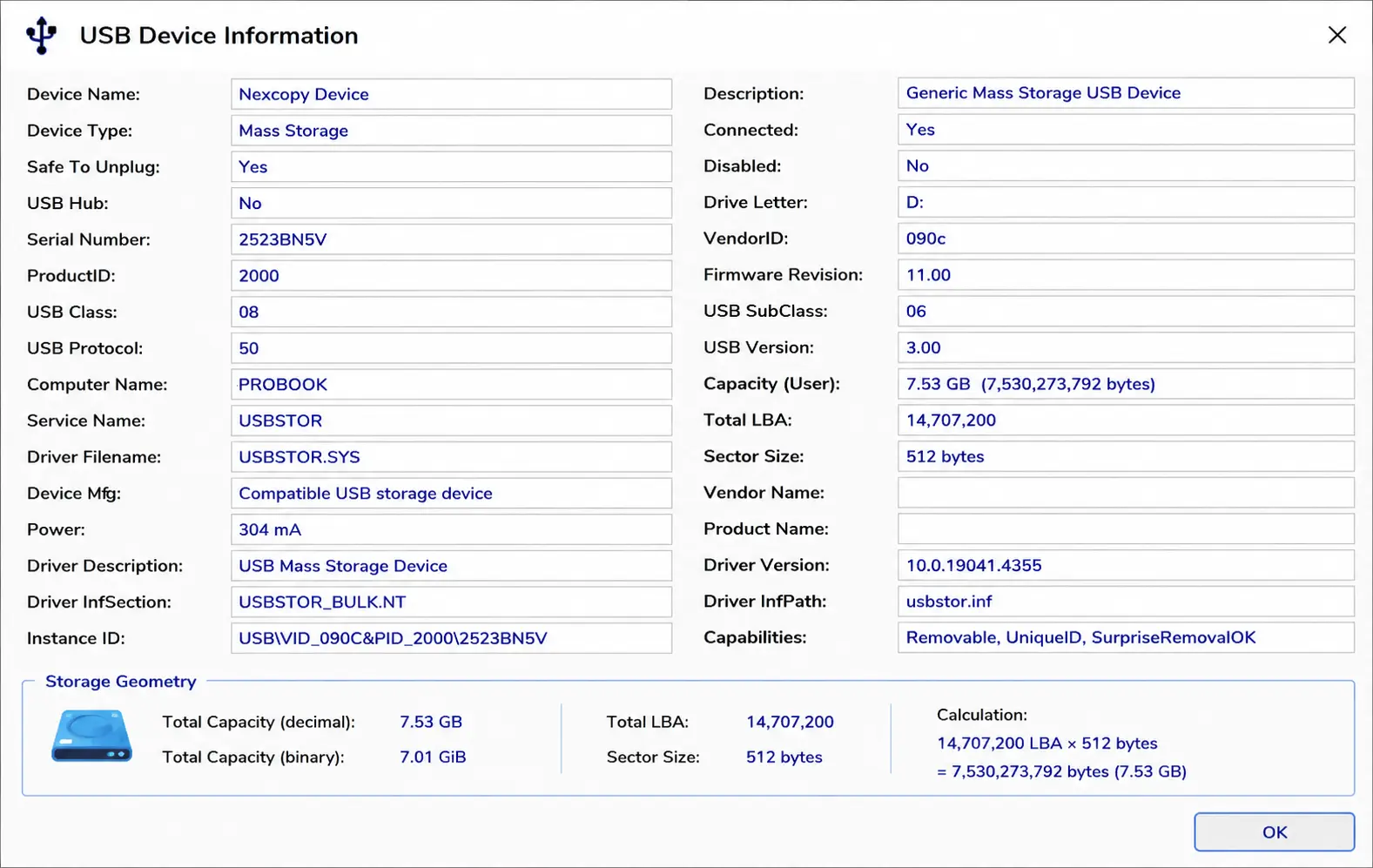
Capacity in bytes = LBA count × logical sector size
For most USB flash drives, the logical sector size is 512 bytes.
That gives us a very useful shortcut.
There are 1,048,576 bytes in one MiB. If each logical sector contains 512 bytes:
1,048,576 ÷ 512 = 2,048
Therefore, with 512-byte logical sectors:
2,048 LBAs = 1 MiB
And that means:
LBA count ÷ 2,048 = capacity in MiB
Technically, MiB is the correct term here because we are using 1,048,576 bytes rather than the decimal 1,000,000 bytes used for MB. Some manufacturing utilities and MPTools still label this value as “MB,” so it is important to understand what the particular tool means by MB.
A Real LBA Example
Suppose a USB flash drive reports an LBA count of:
60,125,184
Assuming the device uses 512-byte logical sectors, we can calculate its addressable capacity:
60,125,184 × 512 = 30,784,094,208 bytes
Or we can use the shortcut:
60,125,184 ÷ 2,048 = 29,358 MiB
So the device has exactly 29,358 MiB of addressable storage, which is about 28.67 GiB, or 30.78 GB when expressed using decimal gigabytes.
This is also why simply calling something a “32GB flash drive” doesn’t tell you its exact geometry.
Two USB drives sold as 32GB products do not necessarily have exactly the same number of available LBAs. NAND configuration, controller settings, reserved capacity, bad-block management, over-provisioning and the way the device was configured during manufacturing can all affect the final addressable capacity presented to the host computer.
For most users, a small difference doesn’t matter.
For disk duplication, it can matter quite a bit.
Going the Other Direction
The calculation can also be reversed.
If we know the exact LBA count we want and the logical sector size is 512 bytes, we can convert that LBA count into a capacity and configure the flash drive accordingly using an MPTool, assuming the controller and MPTool provide that capability.
The formula is:
LBA count ÷ 2,048 = MiB
We can therefore calculate the required capacity from a customer’s desired LBA count and set the corresponding capacity in the MPTool.
If the MPTool uses 512-byte logical sectors and its capacity field represents binary MiB, setting that capacity should result in the desired LBA count.
This can be particularly useful when producing flash drives that need to match a known master device. It is also one of the reasons USB duplication hardware behaves differently than a simple file copy. A duplicator may be dealing with the actual structure of the storage device rather than simply copying visible files from one filesystem to another.
For example, imagine a customer creates a bootable master image on one batch of USB flash drives. Six months later another batch of nominally identical 32GB drives arrives, but the NAND has changed and the newly manufactured drives expose slightly fewer LBAs.
The label still says 32GB.
The operating system still recognizes them as approximately 32GB devices.
But from the perspective of a sector-by-sector disk image, they are not identical.
If the master image expects more LBAs than the destination device provides, the image may not fit. GPT-based media adds another complication because GPT maintains a backup header at the end of the disk. The location of that structure is tied to the end of the addressable device.
This is one reason bootable media and disk images deserve a little more attention than a normal collection of files. We have also covered why some ISO files work for USB duplication while others do not, and the common thread is that disk structure can matter just as much as the files sitting on the drive.
Controlling the manufactured capacity can therefore be much more useful than simply specifying a marketing capacity such as 32GB, 64GB or 128GB.
Sector Size Changes the Calculation
There is one major qualification to the shortcut above:
LBA count ÷ 2,048 = MiB only works for 512-byte logical sectors.
LBA is an address. It does not inherently mean 512 bytes.
If a storage device instead presents 4,096-byte logical sectors, every LBA represents eight times as much data.
For example, take our same LBA count:
60,125,184
With 512-byte logical sectors:
60,125,184 × 512 = 30,784,094,208 bytes
That is approximately 30.78 GB, or about 28.67 GiB.
But if those exact same 60,125,184 LBAs represented 4,096-byte logical sectors:
60,125,184 × 4,096 = 246,272,753,664 bytes
Now the device represents approximately 246.27 GB, or about 229.36 GiB.
Same LBA count. Completely different capacity.
This is why sector size has to be known before converting an LBA count into a capacity.
Why Would Anyone Use Something Other Than 512 Bytes?
At this point the obvious question is why storage devices don’t simply use 512-byte sectors all the time.
Historically, 512-byte sectors became the standard for hard drives and eventually became deeply embedded in operating systems, BIOS implementations, boot loaders, disk utilities and other software. Compatibility is one of the biggest reasons 512-byte logical sectors remain so common, including on USB flash drives.
But modern storage devices are considerably more complicated internally.
NAND flash memory does not physically operate in neat little 512-byte chunks. NAND uses much larger pages and erase blocks, while modern hard drives have also moved toward larger physical sectors. A controller has to translate what the computer thinks the storage device looks like into the much larger structures actually used by the underlying media.
This is where sector geometries such as 512e and 4Kn come into the picture.
A 512e device uses larger physical sectors, commonly 4,096 bytes, while continuing to present 512-byte logical sectors to the host. The computer gets the compatibility of traditional 512-byte sectors while the storage device can internally operate using a more efficient physical geometry.
A 4Kn device goes one step further and exposes 4,096-byte logical sectors directly to the host.
Larger sectors can reduce addressing overhead, improve the efficiency of error-correction information and better match the physical characteristics of modern storage media. On very large storage devices, larger logical sectors also mean fewer individual logical blocks are required to describe the same capacity.
There are tradeoffs, however.
Older operating systems, boot environments, embedded devices and specialized hardware may expect 512-byte logical sectors. Software that makes assumptions about sector size can also behave differently when presented with 4Kn media. That is one reason storage manufacturers and controller vendors sometimes offer sector geometry as a configurable option rather than forcing one configuration onto every application.
For a normal USB flash drive being used to move Word documents and photos between computers, none of this is particularly exciting. The user plugs in the drive, sees roughly the expected capacity and gets on with the day.
For duplicators, bootable USB media, embedded systems, industrial equipment and controlled manufacturing environments, however, the exact geometry can become part of the product specification.
“32GB” describes the neighborhood.
Sector size and LBA count tell you the actual address.
Editorial note: GetUSB.info has covered USB flash memory, duplication systems and removable-storage behavior since 2006. This article is based on practical experience working with USB flash drive geometry, controller configuration and sector-level duplication.
Let GetUSB.info keep you updated.
Receive article notifications about USB storage, flash memory, and duplication updates in your preferred language. We average a couple of articles per week.