The Hawking parabolic WiFi dish is a fancy version of our home-brew version to boost your wireless signal. The one thing Hawking has which you will never achieve, this the cool dish look. The Hi-Gain Wireless 300N is a dish adapter to your WiFi network which connects via USB and could boost your signal as much as 600%.
The 300N supports b, g and n networks so regardless of your setup, you can put the Wireless-300N to use. As with any wireless solution security is a big concern and the Hawking unit supports WEP, WPA and WPA2 enccryption – so again, whever your setup the 300N will work.
“Since the dual-antenna is highly directional, they’re also trying to sell it on the idea that you can avoid signal interference by pointing it away from other electronics. I’m not sure that’s something I’ve ever experienced using WiFi, but I could imagine it might be useful to specifically target a base station in an area with lots of wireless congestion.  — SlashGear“
WiHood is a relatively new service which is the world’s first “virtual laptop” that protects children online [ anywhere & at all times] with the WiHood’s USB bracelet.
The concept is ideal and it appears the user interface, setup and configuration is just as simple. This is what WiHood is: A USB bracelet which auto-launches a virtual desktop when connected to any computer. The virtual desktop runs off the WiHood servers which monitor and update website, programs, virus etc 24/7 for a completely kid friendly computer system.
From personal experience, my kids have trashed my computer – by mistake of course – but it still took time and skill to restore my PC. The WiHood USB bracelet eliminates this risk because a virtual desktop is all your child can use. The other issue I have with my kids using “the parent’s PC” is constant maintenance to monitor website, filters and content. With WiHood, that daunting task is automatically taken care of.
“WiHood protects children, saves parents from purchasing a new PC, and kids love that they have their own “virtual laptop” which stores their pictures, music, homework, etc. and can be worn on their wrist!”
The USB bracelet uses the internal storage to save files, folders, pictures, music etc…but those files are only accessed through the virtual desktop which runs off the WiHood servers. This means your kids will enjoy all the performance of a PC with the security of a remote server running the underlining PC desktop.
The WiHood is free to try and costs $49 for 6 months service or $100 per year. Stack that cost up against purchase of a dedicated PC for the kids and the WiHood is the clear choice.
Still interested. Maybe some more information? Check out the WiHood FAQ page. Or their WiHood Virtual Laptop home page.
WiHood was founded in August 2007 and has been honored to be awarded funding from Innovation Norway, a division of the Norwegian government providing capital to the most innovative companies in Norway.
Continue Reading
Getting odd results off your Wi-Fi network? Maybe getting no results at all? The boss is pissed, co-workers can’t work, what do you do?
Get the Wi-Spy spectrum analyzer, that’s what you do. The Wi-Spy is the world’s smallest 2.4GHz spectrum analyzer and is specifically designed for troubleshooting Wi-Fi networks. The Wi-Spy records data traces over the wireless network and also plays them back for analysis.
This isn’t the first version of the Wi-Spy, BUT the hardware has been redesigned to increase the frequency and amplitude resolution with an added reverse-polarity SMA adapter. Wi-Spy 2.4x is packaged with a powerful little antenna, so it’s good from the start but it’s also
Continue Reading
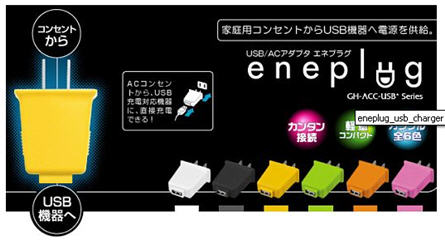
Power plug that charges USB style – I thought of this idea probably two years ago, no joke, but forgot about it just as quickly. Well, yesterday I saw Technabob do a post about this exact concept – the power plug which charges via USB [from Eneplug].
As you may [or may not] know, USB will become the standard for cell phone charging. I foresee USB branching out into other electronic gadgets as the main connectivity for juicing up. So, this obviously means the power plug which charges via USB will only become more popular.
I think it’s a great idea, because as time progresses we can all use only a single power cord to charge any device. [For now, lets forget about the fact manufacturers need to jump on board with my line of thought].
In addition, I would think any serious traveler would jump at a device like this. Look at how small it is. This is all you’d need to charge your cell phone, iPod, PDA and even your laptop.
Eneplug is the company which makes this device and it’s currently available in Japan, but I see it coming over to the states in no time. Shoot me an email if you see anything here – or I’ll update this when I find a US source.
Speaking of Source:Â Technabob.
Continue Reading
Having poor cell phone reception is a frustrating thing and it seems there’s always a zone you can’t get a call, regardless of courier. I’m lucky enough to get 4 bars of reception at my location, but my neighbor who works less than 1 mile away, gets only one lousy bar.
Southern California has rolling hills which plays havoc for cell phone providers. Until now that is. If your home or office is in a dead zone, or an area with low quality reception consider this cell phone signal booster, or signal extender.
This bad boy will boost your weak signal into full bar reception. All you need is at least one bar to let the cell phone extender do it’s boosting.
The mobile phone signal booster will add 2,500 square feet of pristine clear reception to where ever the installation is…that’s about 3 additional rooms or offices.
So what does something like this cost you? Just slightly more than cancelling your cell phone contract, about $250 bucks.
Jump over to ThinkGeek to get the details and different models available. You need to select the correct model for your courier service. It’s one of ThinkGeek’s hottest sellers, so it’s obviously worth the investment.
Continue Reading
Irvine CA based Toshiba American (Digital Products Division) announced a newly designed Satellite laptop line with sleep and charge USB power concept…and we think it’s a winner.
The sleep-and-charge USB concepts makes it possible to charge and power electronic devices connected to the laptop without the laptop being powered-on or in sleep mode.
This is a simple yet revolutionary way USB power bus technology will begin working it’s way into our life. With USB connectivity as the #1 method for peripheral connection to laptops and computers, the sleep-and-charge USB concept is brilliant.
 “Toshiba has long been a leader of innovation, and prides itself on creating solutions that make the digital lifestyle even better,†said Jeff Barney, vice president of marketing, Digital Products Division, Toshiba America Information Systems, Inc. “With the development of the Sleep-and-Charge USB ports, Toshiba has developed an innovative technology that helps ensure that our digital products are ready for use at the moment we need them.â€
As you know, the major shortcoming with today’s USB ports from either computers or laptops is the lack of power support while the host device is turned off.
I have reported on USB surge protectors which do basically the same thing, but that requires more gear for a traveling business person, the sleep-and-charge is built into the host system.
Continue Reading
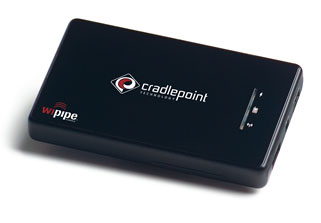
The world is quickly moving to a wireless environment. Earlier in the year I talked about how to boost your Wifi signal, and today we talk about making your own, portable, personal Wifi for wherever you go. Granted this isn’t a hack or tutorial, but with the use of the PHS300 Personal Hotspot, creating an island of connectivity has never been easier.
CradlePoint manufactures the PHS300 and with their technology and any broadband-enabled mobile phone or modem, simply plug in the phone or USB modem to the CradlePoint router then connect your computer, get access and share. I guess you could add in a few extra steps if WEP/WPA security options are required.
“The personal hotspot includes a built-in lithium-ion battery that will keep it running for several hours and can be recharged via USB when connected to your computer. It can even be used to recharge a phone that’s connected to the USB port, though that will no doubt reduce its own battery life.”
The United States is no longer the nation with the largest number of internet users. China overtook the US last month in users for the first time, according to the state-run China Internet Network Information Center.
Researcher BDA China Ltd. estimates there are now over 220 million internet users in China, compared with 217.1 million in the U.S. Online ad revenue continues to lag in China, however, totaling $1.3 billion in 2007 compared to e-Marketer estimates of $21.4 billion in America.
Maybe it’s time for me to start promoting the Chinesse translation of my blog.
methodshopContinue Reading
It’s a well known fact if you belly-up to a Starbucks or any other major coffee chain you’ll have wi-fi access. However, many other hot spots are available which you just don’t know about. This is where a wi-fi detector comes in handy.
I know a wi-fi detector would have been handy during the hField wi-fi extender review. As I was driving through my business complex looking for signal, I found it oddly ridiculous to have my laptop booted up on the front seat of my car.
The USB Fever wi-fi detector is a simple, cheep gadget where a click of a button can detect wireless hot spots. With 4 LED lights to communicate signal strength, you can spot the best signal
Continue Reading
Silex Technology rolled out their isochronous data transfer support for the SX-2000WG+ product today, making it possible to steam any type of data (or video and audio) from a USB device over a wireless network. Here is a nice diagram to help get the point across.
This might be the perfect tool for any parent to monitor their kids webcam activity as the SX-2000WG+ can stream audio and video from any USB webcam over a standard 802.11b/g network.
What Silex has been able to do with the wireless USB server is breakdown the barrier of accessing USB devices from remote computers.
“With the addition of isochronous support, users can now share virtually any kind of USB device over a wireless or wired network. No other company can match our capabilities and compatibility in this market.” says Keith Sugarwara, GM.
CES 2008 is a couple weeks old and after poring over the gadget blogs, press releases and manufacturer websites it’s clear Wireless USB or WUSB will be hot in 2008. For that reason, I thought it would be the right time to revisit: What is Wireless USB?
WUSB is a high-bandwidth wireless extension for short range communication between computers, devices and gadgets. The WUSB specification claims a transfer speed equal to USB 2.0 of 480Mbit per second. Although that has yet to be seen (even with USB 2.0 wired products).
The USB Implementors Forum based this wireless technology off the WiMedia Alliance’s Ultra-Wideband or UWB platform. WUSB will work up to 9 feet away and then slow down to 110Mbit/s with a max range of 30 feet. WUSB works on the 3.1 to 10.6 GHz frequency range and spreads communication over an ultra-wideband of frequencies. For this reason you will not see wireless interference between WUSB and Wi-Fi or Bluetooth wireless networks.
If I have peaked your interest for Wireless USB, check out some other WUSB articles.
Continue Reading
ATP is a northern California memory manufacturer who’s just launched the most “green” USB drive you’ve ever seen. The EarthDrive is designed and built using the maximum amount of bio-recycled materials resulting in a fully recyclable product.
I’ve been meaning to do something about recycling USB drives as I purchased recycleusb.com domain a while back and intended to do something about recycling. I still plan on doing it, but ATP has sure come up with a great environmental plan for USB memory recycling.
ATP doesn’t stop with just a bio-recycled drive either, part of the purchase price of the EarthDrive includes a contribution to American Forests, a world leader in planting trees for environment restoration. ATP doesn’t disclose
Continue Reading


 WiHood is a relatively new service which is the world’s first “virtual laptop” that protects children online [ anywhere & at all times] with the WiHood’s USB bracelet.
The concept is ideal and it appears the user interface, setup and configuration is just as simple. This is what WiHood is: A USB bracelet which auto-launches a virtual desktop when connected to any computer. The virtual desktop runs off the WiHood servers which monitor and update website, programs, virus etc 24/7 for a completely kid friendly computer system.
WiHood is a relatively new service which is the world’s first “virtual laptop” that protects children online [ anywhere & at all times] with the WiHood’s USB bracelet.
The concept is ideal and it appears the user interface, setup and configuration is just as simple. This is what WiHood is: A USB bracelet which auto-launches a virtual desktop when connected to any computer. The virtual desktop runs off the WiHood servers which monitor and update website, programs, virus etc 24/7 for a completely kid friendly computer system.

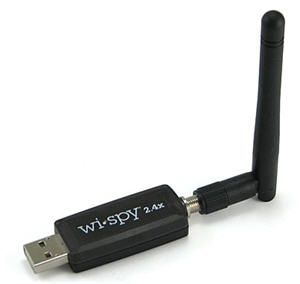 Getting odd results off your Wi-Fi network? Maybe getting no results at all? The boss is pissed, co-workers can’t work, what do you do?
Get the Wi-Spy spectrum analyzer, that’s what you do. The Wi-Spy is the world’s smallest 2.4GHz spectrum analyzer and is specifically designed for troubleshooting Wi-Fi networks. The Wi-Spy records data traces over the wireless network and also plays them back for analysis.
This isn’t the first version of the Wi-Spy, BUT the hardware has been redesigned to increase the frequency and amplitude resolution with an added reverse-polarity SMA adapter. Wi-Spy 2.4x is packaged with a powerful little antenna, so it’s good from the start but it’s also
Getting odd results off your Wi-Fi network? Maybe getting no results at all? The boss is pissed, co-workers can’t work, what do you do?
Get the Wi-Spy spectrum analyzer, that’s what you do. The Wi-Spy is the world’s smallest 2.4GHz spectrum analyzer and is specifically designed for troubleshooting Wi-Fi networks. The Wi-Spy records data traces over the wireless network and also plays them back for analysis.
This isn’t the first version of the Wi-Spy, BUT the hardware has been redesigned to increase the frequency and amplitude resolution with an added reverse-polarity SMA adapter. Wi-Spy 2.4x is packaged with a powerful little antenna, so it’s good from the start but it’s also


 Researcher BDA China Ltd. estimates there are now over 220 million internet users in China, compared with 217.1 million in the U.S. Online ad revenue continues to lag in China, however, totaling $1.3 billion in 2007 compared to e-Marketer estimates of $21.4 billion in America.
Maybe it’s time for me to start promoting
Researcher BDA China Ltd. estimates there are now over 220 million internet users in China, compared with 217.1 million in the U.S. Online ad revenue continues to lag in China, however, totaling $1.3 billion in 2007 compared to e-Marketer estimates of $21.4 billion in America.
Maybe it’s time for me to start promoting 


