GetUSB.info Logo

Verbatim Tuff-N-Tiny USB Drive

Verbatim has been busy these days.  On Monday we reported about the Verbatim USB Tuff Clip flash drive, and today Verbatim is announcing their new Tuff-N-Tiny USB flash drive.
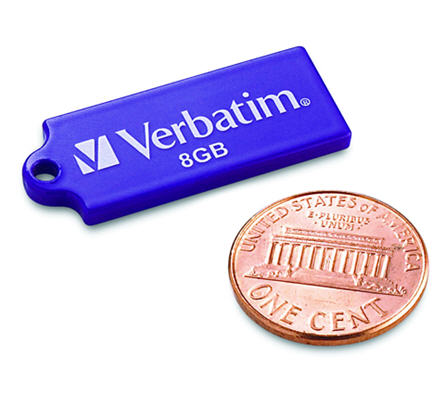
tuff n tiny

At the thickness of a penny and about twice as long, the Tuff-n-Tiny USB drive is available in 4 & 8GB sizes.  It’s almost the side of microSD card. The stick gets so incredibly small, because of it’s SIP technology which encapsulates all of the electronic components into a single miniaturized and sealed unit. As a result, the tiny drives are resistant to dust, water and static discharges. Our comment about this drive, and any other drive which uses the same USB contacts [image below] Continue Reading No Comments

Verbatim: USB Tuff Clip Flash Drive

Verbatim turned 40 this year and one of the products they have released to celebrate is the USB TUFF CLIP flash drive.  Designed for the everyday use by a teen or college student the USB TUFF CLIP is made of ABS plastic and includes a retractable USB connector.  In addition the TUFF CLIP comes with the obvious carabineer clip.

USB TUFF CLIP

The clip is the compelling part about this project, as you can pick up a 4 or 8GB flash drive just about anywhere.  The clip is well designed to fasten the flash drive to backpacks, key chains, belt loops and notebooks.  With a capless design the caps wont fall off or get lost while dangling from your person. The 4 [light blue] & 8GB [black] drives are priced at $29 and $39 respectively. Continue Reading No Comments

Split Stick USB Drive Keeps Your Personal Data Personal

What are the two things people always tell you; “don’t hire your friends and family” and “keep your work life separate from your personal life.“  Well, the USB split stick was designed for just that.  The USB drive is split into two drives.  The top lever allows you to pop out the USB connector for either work files or personal files.

USB split stick

I think this is brilliant.

You get 2GBs for each side, so whether it’s work and home, his and hers, or legal, illegal, it’s easy to separate the two without having a stoner moment and mixing your lifestyles.

The 4GB split stick sells for $20 and is available now.

Here is a bit from their press release:

Continue Reading No Comments

USB Duplicator By Nexcopy Expands to 60 Ports

Nexcopy first made waves back in 2009 with their USB400PC and USB600PC systems—PC-based USB duplicators offering 40 and 60 target ports. At the time, these systems broke ground by overcoming Windows’ drive letter limitations and offering a modular expansion path for high-volume USB duplication.

USB Duplicator, Large 60 Ports, Nexcopy

Fast-forward to 2025, Nexcopy continues to lead the field with a wide range of duplicators, now including USB 3.0 support, write protection, and advanced data handling features. Their modular system design allows users to scale from 20 ports to 60 ports by adding more hardware units to the same PC-based platform—ideal for Fortune 500 companies, schools, universities, and service bureaus.

The company also overcame technical challenges like Windows’ drive letter limit by bypassing the OS’s native mounting system. Instead, Nexcopy communicates directly with each USB controller, allowing the system to support dozens of devices simultaneously without exhausting the alphabet.

Current models include:

  • USB160PC – A 16-port USB 3.0 duplicator offering File, Device, Image, Copy?Add, and Unique Data Streaming modes. Includes checksum verification, data collection, and bootable image support.
  • USB160PRO – Adds advanced features such as hardware write protection, CD-ROM emulation, dual partitions, Copy Secure encryption, and descriptor-level customization.
  • USB400PC / USB600PC – Still the largest standard PC-based duplicators on the market with 40 and 60 USB ports, updated with Nexcopy’s latest Drive Manager PRO software.

Nexcopy’s Data Collection feature remains a unique and valuable tool. It reverses the usual duplicator workflow by extracting data from each USB drive and saving it into uniquely labeled folders on the host PC. This is especially useful for teachers collecting student homework or companies retrieving field-collected data.

Continue Reading No Comments

GetUSB Dealz: 1TB USB Hard Drive – $99

I remember buying the first CD-R blanks for $35.  I remember buying 128MB USB sticks for $45.  I will now bookmark [in my memory] when I bought a 1TB USB hard drive for $99.  Crazy how times have changed.  Not only are we talking 128MB or 650MB CD-R to a 1 Terabyte hard drive, but we are also talking about paying an exorbitant amount of money for a small bit of memory, verse paying hardly anything for 1TB of data storage. The Western Digital USB external hard drive is on sale for $99 for 1TB.  This includes free shipping. Limit 10 per customer – so act quickly.  While supplies last.

1TB USB hard drive

Grab the GetUSB Dealz now! Here is the company line: Preformatted and ready to go, WD Elements USB 2.0 external hard drives make it possible to add reliable, high capacity storage instantly to your PC or Macintosh computer. Plain, simple, reliable add-on storage. This external USB 2.0 drive is preformatted for immediate use. Simply plug it in to a USB port and you’ve got instant storage your PC or Macintosh. Features
  • High-speed USB 2.0 – For maximum performance; backward compatible with USB 1.1 ports
  • Plug and Play Storage – Just plug it in, connect the cable to add high-speed storage for both desktop and notebook computers
  • Rugged Metal Case – Compact, durable metal case for extra data protection
I bought one, how about you?  Grab the GetUSB Dealz nowContinue Reading No Comments

Free 2GB Flash Drive With dot ASIA Domain Reg

free 2GB flash riveDomainMonster.com is giving away a 2GB flash drive with new registrations for .asia web extensions.  The offer is good only while supplies last. Even if you don’t have business in Asia today, it’s still smart to get the domain name because I’ve seen plenty of domains get snatched up with me-to or look-a-like sites for the real American or UK company. Now is a good time with a 2GB UFD bonus. Here are some details for the required two year agreement from Domainmonster which is one of the top 50 fastest growing ICANN accredited registars:
Once you’ve purchased your qualifing .asia domains at Domainmonster.com you’ll receive an email directly from info@freeb.asia (the .asia registry) 5 days after your registration¹. Once you receive the email containing your redemption code and qualifing domain, you can go to freeb.asia to confirm your shipping details. Your USB Drive will be shipped to you within 28 days of successfully redeeming your code at freeb.asia. No other purchased is req.
Enjoy. Continue Reading No Comments

GetUSB Dealz: Dane Memory 16GB Cheap Cheap

Dane Memory is running a special this week through Buy.com for a 16GB USB flash drive for $27 and change.  This is a great price considering almost all the other 16GB drives are between $38-40.  In addition, you are getting some great produce.  Dane Memory uses only the best controllers and flash memory [Toshiba flash] so the performance is Category 6.  Considering most netbooks these days have 64GB hard drives, this nice little pocket addition of 16GB could make all the difference when a bit more storage is needed.

16GB Dane Memory USB

Another feature worth noting is the capless design.  Much better than the swing arms we’ve seen out there. Here is the company line for the GetUSB Deals 16GB Dane Memory drive: [only while supplies last] Continue Reading No Comments

Corrupt a USB Drive Without Properly Ejecting – Not Likely, Here’s Why

If you yank out a USB drive from your computer, do you think it hurts the stick or could damage the drive?  No it doesn’t.  Well, it’s possible, but not probable.  The reason why is that Windows updated their removal policy for mass storage devices a long time ago.

eject USB drive

To mitigate the likelihood of data loss in surprise removal scenarios, Windows XP refined the caching policy for removable storage. As of Windows XP Beta 2, for consumer-oriented removable storage (USB, Flash, Zip, and so on), write caching is disabled by default. This means the write process happens immediately and when the Windows dialogue box shows complete…it’s really complete. In the past, Windows would buffer the data first, then write.  So if you pulled out the storage device there was a good chance Windows was still writing to the drive.  That’s when you get a corrupted drive.  So Window’s changed Continue Reading No Comments

Remove Read Only USB – Remove CDROM USB Partitions

Remove CDROM USB Partitions

Remove Read Only USB – Remove CD-ROM USB Partitions

If you are like me, you’ve done a great bit of searching on the internet to remove Read Only USB partition or to remove CDROM USB partition, and unfortunately the information is very scarce and the information which is out there, isn’t very clear and direct.  The only utility we’ve found, is the one used to remove the U3 platform off a retail USB stick made by SanDisk, but chances are you are dealing with a different vendor or stick. In addition, the U3 platform was killed a long time ago by SanDisk because hackers kept using the auto-run function associated with CD-ROM discs to auto-run USB malware.
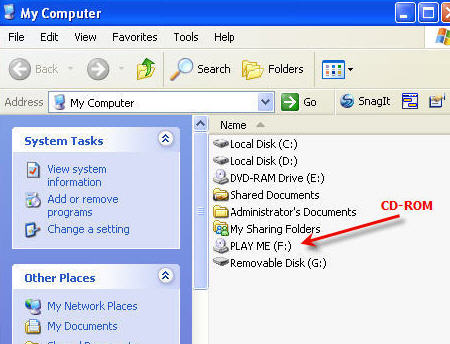
remove CDROM USB partition

We found a company that can do this, and they do it in bulk, USBCopier.com is a USB duplication service company that specializes in fixing your problem, like removing a Read Only USB partition.  I’m not sure how they do it, but their services worked for us.

As you know, a simple format or delete attempt to the USB device simply doesn’t work…you get the “This disk is write protected” message. The flash drive is configured this way at the chip level, so it’s not a formatting problem. The chip inside the USB flash drive, called the controller, has a configuration setting so the device will appear as a CD-ROM device. Since the vendor commands are not available to access the USB controller chip, you cannot re-configure the device to work like a normal flash drive.

I spoke with USBCopier.com about the issue, and they can remove a USB partition off all types of drives, like USB sticks with Chipsbank controllers, Alcor, SMI, USBest, Innostor and many others.  They also said the partition type doesn’t matter, it can be either the Read Only or CDROM and they can remove it.  USBCopier also mentioned if they can remove the USB partition, then chances are, they can also recreate it.

The company was a life saver to us and I wanted to pass along the information.  It was much cheaper to pay the service fee to remove the USB partition than it was to re-buy all the USB sticks and start from scratch.

Here is the link to their USB duplication service page.  Here is the link to their contact page.

If you are in a bit of trouble – I wish you luck – these guys could possibly help.

Continue Reading No Comments

USB Wrist Watch Almost Sounds Like Good Idea

Some things sound better on paper than real life.  Take, for example, this stylish wrist watch that doubles as a USB storage device.  First, it is so clever, you always need a watch, you always need your USB drive, put the two together and it’s a perfect match.

usb wrist watch

Aaaah, but wait, there is a flaw.  The USB flash drive is on the wrist band.  This means you [most likely] need to remove the watch from your person to use the USB stick for any length of time.  What a waste.

usb drive watch

Couldn’t they put the USB flash drive on the other side of the of the wrist band? Continue Reading No Comments

Self Powered Blu-ray USB Writer

Today Sunland International introduced their self powered Blu-ray DVD writer.  The unit doesn’t need an AC connection to burn a disc, but it does need a PC connection for the software to control it.  You can think of this as a USB connected Blu-ray burner, but it’s ultra portable because it doesn’t require AC power or laptop power to burn a disc.  Rather, the self-powered DIG-78102 [nice name guys] uses an Li-Poly battery to get it’s daily dose.

self powered usb blu-ray burner

The self-powered Blu-ray burner uses a “smart charge” approach via USB to power the device.  With an intelligent power manager to auto trickle charge the internal Li-Poly battery you can get up to 3 hours of use without a charge.

blu-ray power

All this for an on-line price of just $599 [ouch]. Self powered USB Blu-ray burner product page. Continue Reading No Comments

USB Snake Video Borescope – View What You’ve Never Wanted to View

The new USB video borescope from USBFever gives you the chance to check things out that you’ve never wanted to see.  Ok maybe that’s a bit odious [and suggestive], but the option is available considering the water resistant camera head and tube.

usb borescope

The USB borescope has a 300k digital camera on the front end, plus a nice accessory magnetic kit for the tip.  Now it’s easier than ever to find your keys lost behind the couch. Two white LED lights are positioned at the apex to illuminate those dark holes or areas.

usb video snake

What is especially cool about the USB borescope is the ability for taking pictures or live video.  With the video option you can take those YouTube clips to the next level. The USB snake scope retails for $64 + a couple bucks shipping. Product Page here. Continue Reading No Comments

Copyright

Copyright © 2006 +

USB Powered Gadgets and more...

All Rights Reserved

Advertise with us

GetUSB Advertising

This is a high value website providing great exposure to your product and brand. Visit our advertising page to learn specifics.

For more information
Visit our advertising page.

Nexcopy Ad

Nexcopy Provides

USB copy protection with digital rights management for data loaded on USB flash drives.

Contact us learn more

Resources and References Page

Resources and References Page