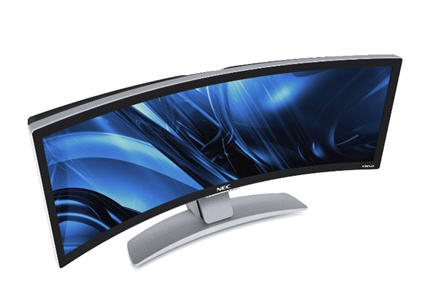
NEC uses the term of “unmatched viewing experience” for their new 43 inch curved wide screen monitor. Lets forget about the $7,000 price tage for a moment.
It’s a seamless curved design which is the most impressive feature, and includes connectivity as a single DVI-D input, HDMI 1.3, or USB 2.0. NEC doesn’t clearly spec if the USB connection is for the monitor or an internal hub that just gives you access points for promotional flash drives, cameras and camcorders.
Some notable features which I didn’t think about, but NEC did the convenience of reminding me are the lack of bezels of multiple monitors side-by-side, and auto extended taskbar that spreads natively across the screen.
Do you wonder if a USB stick will drop below $2? I don’t think it ever will, and for several reasons. First, the bare cost of the Flash, Controller and case will keep the price much higher than it’s predecessor [CD/DVD] but also consider the millions of dollars needed in equipment just to make these things in bulk.
So let’s find out how a USB stick is made…here is a behind-the-scenes video of the Kingston USB flash memory plant. With step-by-step video it’s an amazing process.
Note: The narration is nothing close to an award winning voice over.
Source: Engadget.
Continue Reading
Flash drives are getting so small, they are the size of the USB connector itself. How cool is that? Well, in size it’s cool, but in functionality…it won’t become your favorite flash drive. Take this new 4GB EagleTec USB nano drive…
This friggin tiny drive is too small. Too small to easily connected and, more importantly, disconnect from your computer. As I’ve said before, once you starting saving SOME files on that stick..you’ll soon be saving ALL your files on that stick. So why deal with something so small it’s a pain in the a$$ to get out.
So here is a sweet little deal I stumbled upon at USBFever. For $27 you can get a USB hard drive case with biometric fingerprint encryption scanner.
Given how cheap USB hard drives are these days, it’s easy to have them become your backup device of choice. Well, if you’re like me, chances are you are backing up the QuickBooks or MAS90 accounting programs which need a bit more security. It would be bad enough to lose your portable hard drive, so at least protect it with your fingerprint.
The USB hard drive case with biometric encryption supports the IDE / USB 2.5″ hard drive sizes along with plug & play insertion and removal.
The fingerprint biometrics supports all Windows platforms, but not Mac. So if you’re about to drop $15-$20 for an external case, pay just a couple bucks more and get the USB encrypted version.
Continue Reading
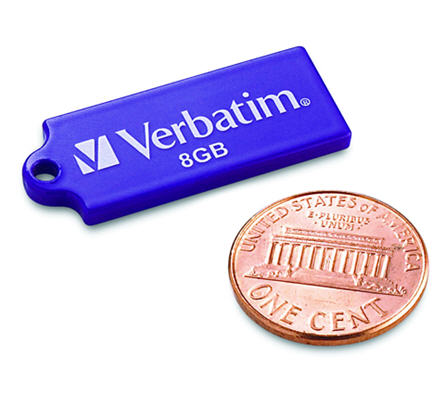
Verbatim has been busy these days. On Monday we reported about the Verbatim USB Tuff Clip flash drive, and today Verbatim is announcing their new Tuff-N-Tiny USB flash drive.
At the thickness of a penny and about twice as long, the Tuff-n-Tiny USB drive is available in 4 & 8GB sizes. It’s almost the side of microSD card.
The stick gets so incredibly small, because of it’s SIP technology which encapsulates all of the electronic components into a single miniaturized and sealed unit. As a result, the tiny drives are resistant to dust, water and static discharges.
Our comment about this drive, and any other drive which uses the same USB contacts [image below]
Continue Reading
Verbatim turned 40 this year and one of the products they have released to celebrate is the USB TUFF CLIP flash drive. Designed for the everyday use by a teen or college student the USB TUFF CLIP is made of ABS plastic and includes a retractable USB connector. In addition the TUFF CLIP comes with the obvious carabineer clip.
The clip is the compelling part about this project, as you can pick up a 4 or 8GB flash drive just about anywhere. The clip is well designed to fasten the flash drive to backpacks, key chains, belt loops and notebooks. With a capless design the caps wont fall off or get lost while dangling from your person.
The 4 [light blue] & 8GB [black] drives are priced at $29 and $39 respectively.
Continue Reading
Back in June of 2009 I made a joke that GetUSB.info had a USB Steampunk award, now I’m seriously considering it. Especially after seeing this new rendition.
This USB steampunk drive was made by a Russian modder. He traveled to a local rag fair [I’m assuming street fair] to pick up old clock parts and gears. The guy also picked up some stock brass tubing and screw rods to build a sturdy housing. Then off the the metal shop.
The source website, EnglishRussia, has the entire tutorial on how to do this crafty artwork. It’s far more interesting than educational, so if you are curious about the
Continue Reading
Mimo has made a fairly good name for itself with the 710 series USB monitor…a compact 7″ add-on monitor. Well, these guys have one-upped themselves with the new 710-S. This is a USB monitor which is now slider slim sweetness.
Just check out this picture and you’ll understand why.
Mimo better dump all their old 710 inventory because everyone will want this new version.
The 7″ display has a display resolution of 800 x 400, contrast ratio of 400:1, and brightness around 350 cd/m2. Of course, the only connection needed, including power, is a USB connection.
The 710-S pivots 90 degrees and
“The integrated stand protects the screen from scratches when closed.”
Mimo doesn’t have stock, but willing to take your money. For those who pre-book, you’ll get product by late August. Price is $149.
Mimo 710-S product page.
Continue Reading
In the beginning of July Engadget posted an article about a new release of Star Wars USB drives, not that we need more, but it was a fun little gallery – yet, not impressive enough to make you buy. Today that changed with this artist’s rendition of what he thinks a Star Wars USB drive should look like.
It should look like Luke Skywalker’s hand just got cut off.
That’s right, to gain access to your portable storage you need to sever Luke’s hand.
What’s more impressive is the detail of this home-brewed USB stick and the agony you can see in Luke’s eyes while you detach his hand just to store the latest collection of Tera Patrick photos.
No price as I don’t think these are for sale, but definitely a sweet little project for some bored teen.
Continue Reading
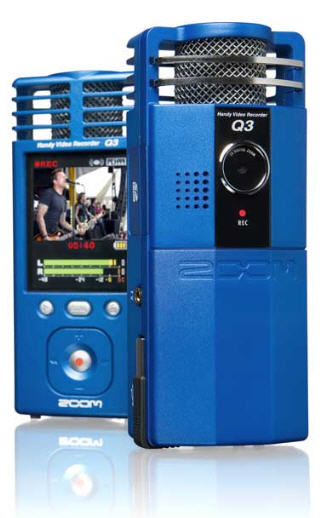
We all know the MinoHD Flip is a great hand held video recorder and is probably the most popular one, but there is a new star on the horizon, the Samson Q3.
Where the Samson Q3 differs from the Mino Flip is the great ability to capture audio. Just look at the thing…there is a towering microphone perched. Ready to capture the best of moments.
I would like to see what Jake & Amir can do with this thing?
In addition to the well positioned microphone, the Samson Q3 also has an expansion slot via SD card for additional memory capacity. Up to 32GBs to be exact.
The Samson Q3 also has VGA output so you can easily connect the device to your TV for instant viewing.Â
Continue Reading
What are the two things people always tell you; “don’t hire your friends and family” and “keep your work life separate from your personal life.“ Well, the USB split stick was designed for just that. The USB drive is split into two drives. The top lever allows you to pop out the USB connector for either work files or personal files.
I think this is brilliant.
You get 2GBs for each side, so whether it’s work and home, his and hers, or legal, illegal, it’s easy to separate the two without having a stoner moment and mixing your lifestyles.
The 4GB split stick sells for $20 and is available now.
You personal security for on-line shopping has finally arrived. No more malware keylogging your credit cards, pins and CID number. With this personal credit card swipe machine you are very secure to buy all that gadget crap off eBay.
SmartSwipe is the first to introduce this brilliant product. What the USB swipe credit card machine does, is read the mag strip, encrypts the data and sends it
Continue Reading







 You personal security for on-line shopping has finally arrived. No more malware keylogging your credit cards, pins and CID number. With this personal credit card swipe machine you are very secure to buy all that gadget crap off eBay.
SmartSwipe is the first to introduce this brilliant product. What the USB swipe credit card machine does, is read the mag strip, encrypts the data and sends it
Continue Reading
You personal security for on-line shopping has finally arrived. No more malware keylogging your credit cards, pins and CID number. With this personal credit card swipe machine you are very secure to buy all that gadget crap off eBay.
SmartSwipe is the first to introduce this brilliant product. What the USB swipe credit card machine does, is read the mag strip, encrypts the data and sends it
Continue Reading