How To Read and Write CID on SD Cards
If you are looking to read the CID number of an SD card, or extract the CID off an SD card, then you will find this article very helpful. Some also call this “reading the PSN off the SD card” or reading the product serial number off the SD card.
UPDATE (Feb 16, 2023):
We learned the company which manufactures this product now offers the ability to write the CID value as well as write protect the Secure Digital media.
Most phones and much of the software on phones will lock into the CID number of an SD card. The CID number is a unique card identifier number that is unique to the card itself. The CID number is valuable because software developers and hardware developers can lock software to the unique number of the device, thus eliminating the ability to pass along licensed software.
Reading the CID number from an SD card is not an easy task. It requires specific access codes to the index table of the memory card, and unless you know how to use the SD chipset of your card reader, chances are you won’t get the number—or at least not the correct and accurate number.
What is the CID number of an SD card?
The CID register is 16 bytes long and contains a unique card identification number. It is programmed during card manufacturing and cannot be changed by SD Card hosts. The CID number is a compilation of information about the card, such as manufacturer, date manufactured, checksum total, GB size, and more. Below is a table outlining all the items which make up the SD CID number.

So with all this said, how do you read the CID number from an SD card? As we’ve mentioned, it isn’t easy and it’s hardware based. If you do enough searching on the internet, you’ll find some home-brew code to read the CID numbers, but that’s only if you have the SD card or microSD card connected via an IDE bus to your host computer. This isn’t easy for everyone. There is clear evidence that using a USB to SD card reader will not get you the information you require—or at least accurate and correct information. Meaning most times the CID number generated is actually the serial number of the card reader itself, not the CID number of a specific SD card.
In addition, what if you are required to read the CID number off SD media in bulk? A single, one-at-a-time solution is not practical.
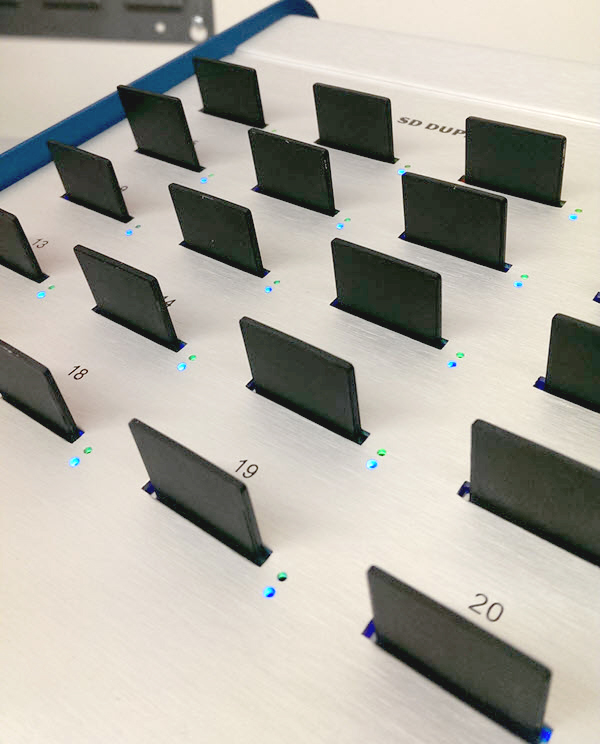
In my search to read the CID number from SD media, I came across Nexcopy – a manufacturer of USB duplicator equipment and other flash memory equipment. Several models they carry are SD duplicators and microSD duplicators. With the secure digital duplicators, part of their feature set includes reading CID numbers from SD media. The equipment can read 20 cards at a time, 40 cards at a time, or 60 cards at a time, depending on the model. The duplicators will read the CID number and export it to a .csv file for import into other business functions. This configuration makes it quick and easy to obtain the CID number. Granted, the equipment is not designed for single-use operation, but rather reading the CID of SD media in bulk quantity. Here is a screenshot of Nexcopy’s software reading 20 CID numbers:

I didn’t contact Nexcopy Incorporated for pricing of the equipment, but doing a quick search for the equipment shows me a price of about $1k for the smallest 20 target system and $3k for the largest 60 target system.
With all this said, there is still no clear-cut method to read CID numbers off SD cards for the home-user, but maybe this article will at least explain why you haven’t found a good solution as of yet.
The CID (Card Identification) number is a unique identifier that is assigned to each Secure Digital (SD) card. The CID number is a 16-byte value that is used by the SD card host device to identify the SD card and to determine its capabilities.


 DELL, so it is said, started a new code project call Ophelia. The project is turning a USB key into a portable desktop. The USB would have the ability to access online software tools and operating systems. The USB solution from Ophelia will still require a hardware setup (someone’s PC) so think of it as a USB stick high-jacking the processor, RAM, motherboard, video controller etc to run it’s own OS.
We’ve seen things like this from smaller, start-up companies, but DELL has the ability to really make this main stream. The rumor on target price is $50 US Dollars.
I for one believe the ability to high-jack another PCs hardware doesn’t warrant it enough to be more then a complimentary tool to one’s main PC. Now if DELL can high-jack the
Continue Reading
DELL, so it is said, started a new code project call Ophelia. The project is turning a USB key into a portable desktop. The USB would have the ability to access online software tools and operating systems. The USB solution from Ophelia will still require a hardware setup (someone’s PC) so think of it as a USB stick high-jacking the processor, RAM, motherboard, video controller etc to run it’s own OS.
We’ve seen things like this from smaller, start-up companies, but DELL has the ability to really make this main stream. The rumor on target price is $50 US Dollars.
I for one believe the ability to high-jack another PCs hardware doesn’t warrant it enough to be more then a complimentary tool to one’s main PC. Now if DELL can high-jack the
Continue Reading
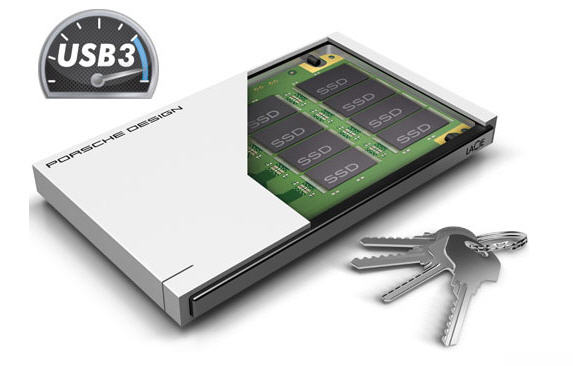 The $149.99 Slim Drive P9223 by LaCie, powered by none other than USB 3.0, follows the same minimalist design set by Porsche Design. It has a thickness of a mere 11mm; this makes it a great compliment to a 17mm slim MacBook. It’s chassis is made of solid aluminum which doubles as a heat sink for fast dissipation of any heat build up from the NAND chips.
The LaCie Porsche SSD can top a transfer speed of 400/MBs. But it’s not a walk in the park to get that data transfer rate. You need to have a computer which supports the USB Attached SCSI [UAS] protocol. This is a protocol which overcomes the aging bulk-only transport method which has been around since USB 1.0.
The $149.99 Slim Drive P9223 by LaCie, powered by none other than USB 3.0, follows the same minimalist design set by Porsche Design. It has a thickness of a mere 11mm; this makes it a great compliment to a 17mm slim MacBook. It’s chassis is made of solid aluminum which doubles as a heat sink for fast dissipation of any heat build up from the NAND chips.
The LaCie Porsche SSD can top a transfer speed of 400/MBs. But it’s not a walk in the park to get that data transfer rate. You need to have a computer which supports the USB Attached SCSI [UAS] protocol. This is a protocol which overcomes the aging bulk-only transport method which has been around since USB 1.0.
 Source:Â
  Of course, just being made with a meteorite seems like enough, but no, it also comes with a high-purity diamond embedded in it. The drive also incorporates African Black Wood, which is considered a rather high quality material.
As far as the actual thumb drive is concerned, it’s USB 3.0-compatible, and comes with 64GB of internal memory. It also has a lifetime warranty, so at least you know if anything goes wrong with your ultra-expensive drive, you will be able to get it replaced.
The device comes in two different flavors. Both have the diamond and meteorite, but the cheaper version also features silver and will set you back $1,130. The more expensive 18C gold model will set you back $1,990.
My buddy made the comment:Â
Of course, just being made with a meteorite seems like enough, but no, it also comes with a high-purity diamond embedded in it. The drive also incorporates African Black Wood, which is considered a rather high quality material.
As far as the actual thumb drive is concerned, it’s USB 3.0-compatible, and comes with 64GB of internal memory. It also has a lifetime warranty, so at least you know if anything goes wrong with your ultra-expensive drive, you will be able to get it replaced.
The device comes in two different flavors. Both have the diamond and meteorite, but the cheaper version also features silver and will set you back $1,130. The more expensive 18C gold model will set you back $1,990.
My buddy made the comment:Â

 If you stop and think about this, if a typical laptop has three USB sockets, what kind of power brick would you need to power the laptop plus 300watts of power, assuming all sockets are requesting a full load. Maybe the power brick will end up being bigger and heavier then the laptop {grin}.
For a very interesting read on the entire PD report,
If you stop and think about this, if a typical laptop has three USB sockets, what kind of power brick would you need to power the laptop plus 300watts of power, assuming all sockets are requesting a full load. Maybe the power brick will end up being bigger and heavier then the laptop {grin}.
For a very interesting read on the entire PD report,
 The easiest and most convenient decision would be saving your files to the flash drive. Most everyone has a 16GB USB flashdrive these days, it fits in your hand and you can carry it around with out trouble. But will it last? Is a USB flashdrive where I should put my photos if my computer crashes and I need to restore my photos? Lets forget about the possibility you simply misplace the USB flashdrive. Is the device archive worthy?
The other option is the USB hard drive. Most people don’t have one so you’ll need to buy one. Although they are cheap, a USB hard drive is not as cheap as a 16GB or 32GB flash drive…and to be honest the 16-32GB sticks probably have enough space that it could hold your photos. So is it worth the extra time and money to archive to a USB hard drive? I guess this is the question more and more people are asking themselves. Well I have the definitive answer:
USB hard drive.
Flashdrives are great products for quickly moving files from one computer to another. However, they are not the best choice for archive purposes, and here are some reasons why:
The devices are small and will most likely get damaged. Unless of course you put the USB stick into the back of your desk drawer, a USB
The easiest and most convenient decision would be saving your files to the flash drive. Most everyone has a 16GB USB flashdrive these days, it fits in your hand and you can carry it around with out trouble. But will it last? Is a USB flashdrive where I should put my photos if my computer crashes and I need to restore my photos? Lets forget about the possibility you simply misplace the USB flashdrive. Is the device archive worthy?
The other option is the USB hard drive. Most people don’t have one so you’ll need to buy one. Although they are cheap, a USB hard drive is not as cheap as a 16GB or 32GB flash drive…and to be honest the 16-32GB sticks probably have enough space that it could hold your photos. So is it worth the extra time and money to archive to a USB hard drive? I guess this is the question more and more people are asking themselves. Well I have the definitive answer:
USB hard drive.
Flashdrives are great products for quickly moving files from one computer to another. However, they are not the best choice for archive purposes, and here are some reasons why:
The devices are small and will most likely get damaged. Unless of course you put the USB stick into the back of your desk drawer, a USB  If you have concerns about
  Today you can apply the same tradition to technology. The Top Secret USB drive with wax seal is that device. The
 Enter the USB 3.0 Sony Micro Vault
  Microsoft has made available a new version of “Defender” to ride infected computers of malware, including rootkits which highjack your boot process and corrupt your computer.
The “Defender Offline Beta” is available from Microsoft for free
Microsoft has made available a new version of “Defender” to ride infected computers of malware, including rootkits which highjack your boot process and corrupt your computer.
The “Defender Offline Beta” is available from Microsoft for free