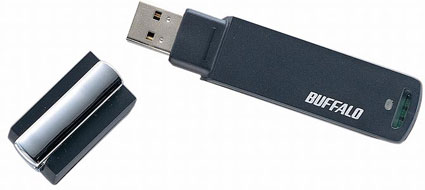
Doing music releases on a flash drive are slowly becoming more popular. Now available are The Fratellis on flash.
The 256MB flash drive includes the single Baby Fratelli (listen now), the video which goes along with it, a web link and “competition,” whatever that is. I would say The Fratellis have a touch of Penny Wise, Wild Flower and my buddies band Imperial X.
Continue Reading
I got an email from Apple this morning at 4 A.M.. Guess my Apple TV is on its way. And it looks like they gave me a discount. I only got charged $281. It’s listed for $299 on Apple.com. I pre-ordered my Apple TV the day it was announced. Maybe I got the discount because it got delayed a month?
UPDATE: The MagicJack phone jack received Product of the Year in 2007. After the purchase of the MagicJack USB dongle (about $40) you pay a one time fee of $19.95 per year for unlimited calling. Not $19.95 per month BUT $19.95 per year. This will reduce your phone bill to just $20 a year! The MagicJack phone is available at Amazon.
Review: GetUSB.info reviews MagicJack, the Magic Phone Jack.
MagicJack is a convenient USB dongle with phone jack attached to it. By connecting your regular phone to the MagicJack phone port, you can now make free calls anywhere within the US for free. If traveling in Canada, Mexico, UK, China, Italy and Israel then you can call home (USA) for free.
MagicJack is a VoIP service which doesn’t have phone charges but rather an upfront cost for the USB dongle. No pricing yet, but it does provide not only free calling using your regular phone, but includes
Continue Reading
One year ago, almost to the day, IOCell introduced the self proclaimed “World’s largest capacity flash drive” at the CeBIT 2006 show. Today, you can find 16GB flash drives from Transcend, US Modular and Pretec, so why is the Buffalo 16GB announcement of interest? Well, it uses Silicon HDD Technology.
Silicon hard drives are different then normal hard drives in that no magnetic discs are present, rather the data is stored in silicon memory. How the silicon (HDD) hard drive works is by
Continue Reading
Often those USB novelty gadgets are quite lame, but put a little music to it and become very funny. Take, for example, the USB poll dancer.
Continue Reading
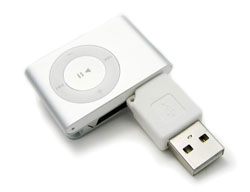
The iPod Shuffle comes with the 2G Dock station which is a little large, relatively speaking, so replace it with this inexpensive iUSB dock connector. The Essential Tech iUSB connects directly to the iPod and directly to your USB port.
The iUSB dock station supports full USB 2.0 transfer speeds, is ridiculously small and eliminates any cables. At just 5.6 grams it’s truly the best mini iPod dock station available.
Mac and PC compatible for only $10.
Continue Reading
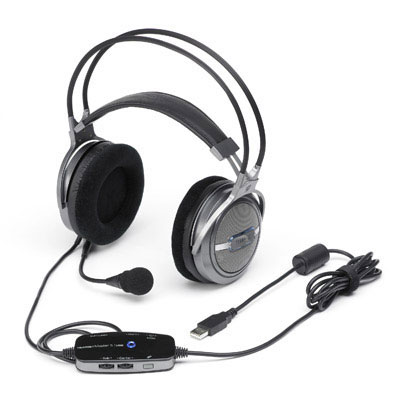
Gadget Centre has once again pulled through with an excellent review. The Terratec USB Surround Sound Headmaster is one high-tech, well built, hard core headphone system.
…held together by a unsightly looping support which wouldn’t look out of place in a medieval dungeon, it’s a good job the Headset Master is for your PC: if you took it outside people would go out of their way to point and laugh at you.
Chris Russell points out that although they are a little heavy, they are well built and designed for the hard core gamer who’d appreciate every tweak of sound during an all intense Counter-Strike tourney.
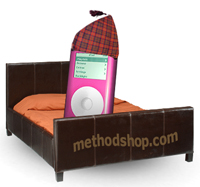
The iPod’s Alarm Clock is nestled among other features like Calendar and Notes under the iPod’s Extras menu. While you may already be familiar with many of the iPod Extras (especially Games), the Alarm Clock is largely an under appreciated feature.
Whether you prefer to be woken by the scream of a rock star or the French horn in a classical symphony, the iPod’s Alarm Clock can help you open your eyes every morning with style!
Tutorial:Waking Up to the iPod Alarm ClockContinue Reading
It’s always healthy to check in over-seas and see what trinkets are in the works. Well, the latest is a Disney MP3 player with a feeble attempt for looking like an iPod. The MixStick is a 512MB MP3 player where the navigation area is circular like the iPod but classy touch of a shuffle and repeat button atop for that Mickey tech look.
And the stainless steel Mickey MP3 player isn’t alone, one can also select from all white, pink with Minnie MP3 player or the blue Stitch MP3 player.
Continue Reading
I’m a little skeptical about the USB optical finger mouse. The potential is there, but I see some issues with the strap working loose and thus becoming more of a nuisances then asset. None the less, the optical finger mouse is worth a closer look.
So the USB finger mouse straps to your index finger via Velcro, then use your thumb to push two levers up or down for scrolling. There is a rotary navigation dial as well, and I’m guess you depress the dial for
The Electronic USB Wind Instrument from Ion Audio is something I bet any mother would pay top dollar for. With this USB instrument any middle-schooler can plug in and play a range of woodwind, brass, string synthesizer and percussion straight from the computer. Add in headphones and no more annoying notes while your little one learns the pipes. Or in my case, no more howling dog while playing the sax.
If you think about it, the USB wind instrument is probably the best tool for any newbie looking at learning an instrument. The EWI USB also comes with sampler software, pitch bend plates and octave rollers for an unprecedented playing experience. The touch-sensitive buttons make it ideal to learn clarinet, sax and flute. Add this to your USB roll-up piano and you’re set.
Continue Reading
Trust raises the bar for the pedal-to-the metal type. They’ve just released two new USB gamer steering wheels, the GM-3200 and GM-3400, and Trust didn’t lack in upgrades.
The GM-3200 is for the tiny-tikes looking to break-it-loose with a smaller wheel diameter for smaller hands and rubber coating for optimal grip and sensitivity of wheel. The 3200 also comes with sturdy clamp and suction cup so nothing shakes loose.
The GM-3400 is the vibration feedback steering wheel version of the earlier GM-3100 series wheel. The vibration feedback technology should provide one of the most realistic experiences available. This too, comes with
Continue Reading