All of Apple products are designed as a “less is more” philosophy where a user just “knows” how to use the product when they hold it or see it. The Apple Trackpad is no exception. Great looking product that works exceptionally well and is bare bone minimum on design features.
One of the beautiful elements of the Trackpad is the wireless freedom you get from using the product. For the wireless product you need juice. The Trackpad does this via batteries. However, some get tired of replacing the batteries [like it’s that hard] and did a simple USB hack to power the Trackpad. This hack is not used for communication, that is still done through Blue-tooth, but this is only for eliminating the need to swap batteries or constantly recharge them.
To accomplish the hack, remove the pad’s batteries, strip a USB cable down to the red and black power wires and attach them to a battery-sized wooden dowel. Finally, push the dowel inside the pad’s battery compartment and presto! It works.
Granted this is a USB hack even my 7 year old could do [less the wire stripping] and I’d recommend making something a bit more elegant.
Continue Reading
Just last week GetUSB.info reported on a solar charging USB hub and a USB power strip and for noting more than to recharge your gadgets. It’s clear that USB is the common thread in recharging – and moving forward I only expect this trend to continue.
Speaking of continue, now we have a 13 port USB hub which fits right into your 5.25″ computer bay. I do say, the picture is inviting enough to get this add-on component and integrate it into your tower, but then we’ve got two questions for you. 1) Don’t most people use laptops these days and 2) Imagine all the cables coming out of this thing. I say this because you’ll quickly realize the ports are much too close for anything but cables. Even the most slim USB stick would have a hard time fitting into each port.
What I do like about the design is the power connection you can make to the internal power supply of your PC. This means the 13 port USB hub will support larger devices with more power thurst…say hard drives and large 64GB flash drives.
The 13 port hub isn’t on sale yet, but will be in late August 2010. Pricing was not given. Here is a link you can bookmark to check availability.
Yesterday we spoke about Elcom introducing a USB power strip and today we have USB Fever with a solar powered USB hub. We where very excited to hear about this product - as it seems to be a step up from the introduction from yesterday, and it’s got some great features, but unfortunately, the solar power charging system isn’t for the USB devices which are connected, but rather the built-in LED torch light [insert sad face here].
I understand it would take a fairly big solar panel to correctly power 4-5 devices connected to a USB hub, but it would be nice to see a trickle charge feature for anything connected. Like I said yesterday, in our house we have 3 iPhones, a Flip Video camera, two blue-tooth headsets and some other stuff, so a solar powered trickle charging USB hub would be nice.
Continue Reading
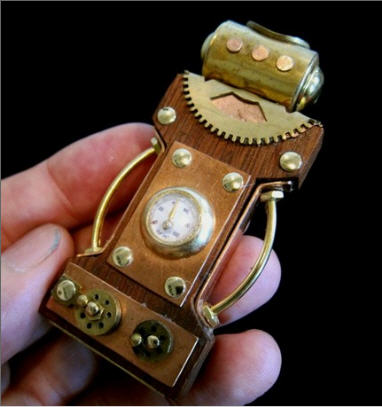
I am a bit of USB steampunk enthusiast and today Etsy shopping put out a notice on a fine looking piece with a wood body and includes rotating dials. Unfortunately I’m just an armchair enthusiast and have yet to build my very own, but one day – it will come.
Some say this USB steampunk drive looks like Rosie, the house robot, from the Jetsons. I guess the gear piece around the neck reminds you of the tradition maid outfit for a house cleaner back in the 60s.
The designer mentions something about an old narrow bridge as his inspiration for the USB steampunk, but I think he’s referencing the piece of wood he probably lifted off the bridge which he used as the body.
The design incorporates a gauge of some sort [no it doesn’t work] along with turn dials along the
Continue Reading
So here is my tutorial on making a great looking iPhone wallpaper design.
The concept is fairly easy, here is the high level over view: We will set the proper size, create the pattern image, upload the image to a web space, download the image and set it as the wallpaper. Sounds easy, right? Well it is.
First, the correct size for the iPhone screen is 320×480 pixels. So get into your favorite photo editing program and get a blank file with the size of 320×480 pixels for you iPhone wallpaper.
Second, you’ll need to create an image. Of course you can take a picture and set it that way, but I’m thinking more like a subtle pattern that isn’t obtrusive and is more complimentary to yourself while using the iPhone rather then having an ego trip by setting my kids best picture as my wallpaper.
For me, Photochop is my weapon of choice and I created this nice little pattern image which we’ll use for the wallpaper.
Note: With the new iPhone 4.0+ firmware you have the ability to set the lock/unlock wallpaper and set a different picture as your background image for Home when using your iPhone. I think the above pattern image is a very nice background image for the Home position.
Third, after you’ve created your pattern image, you will save it as a
Continue Reading
Marantz, a premium set-top audio manufacturer, introduces a new Network solution for home audio. The M-CR603 is a combination of all good things. Featuring a built-in amplifier, a receiver, a CD player, an AM/FM radio and the ability to stream music from Rhapsody, Pandora or Napster.
In addition, the Marantz unit includes a USB port for iPod / MP3 docking, but what we really like about the unit is the ability to stuff a 64GB flash drive in there loading with MP3 files and you’ve now got one hot audio box!
No pricing yet, so I’m assuming the executives and sales guys are hammering out those details. Check Marantz for more info on pricing / availability.
Continue Reading
No one likes the dentist and it’s tough getter there twice a year like everyone should. So to help fight the war against plaque you can invest a bit of money into this USB toothbrush cleaning kit. Powered by UV light, the USB toothbrush cleaning kit will sanitize your brush while you’re out getting your teeth covered in sugar-bugs.
The UVmini [as they call it] comes in two models. A USB version and a USB + battery version. Obviously the second version is geared toward the germ-a-fobes who travel and uses a lithium battery which can cycle 10 cleanings. I would opt for the battery pack as keeping your toothbrush cleaning kit tethered to your computer’s USB port is a bit ridiculous [yet again, another reason to get a USB outlet kit].
We don’t have any price information as of yet but they should start hitting Pan-Asian vendors shortly. The rest of the world will have to wait a bit longer.
Continue Reading
I’m sure most have seen this video which is the intro to Steve Job’s press conference today about the iPhone4 antenna problem. Great video, and I love the part about Gizmodo – what a bunch of drama queens.
Continue Reading
There is a new kid on the block when it comes to USB connectors, it is “The Flipper.” The concept is so incredibly simply you will laugh when you see it. The Flipper is a USB connector that will make correct contact with the host USB port regardless of how you insert it.
Granted it is not that hard to figure out which side is up and down…and I will admit [openly] that if you have trouble with that – then you are an idiot.
So if you are having trouble here is a tip:Â Seam is the down side, seamless is the up side.
So The Flipper will help the idiots who can’t figure heads from tails.
I do say, there was a design flaw in the first place with having an up and down position, it should have been universal and hopefully The Flipper will catch on and thus change USB forever…or at least until USB 3.0 takes over.
Continue Reading
We have heard of crazy USB happenings before and they always seem a bit suspicious, case in point is the latest bit of news about an iPhone 4 bursting into flames.
I doubt it really burst into flames but the temptation to make a social media claim of an iPhone 4 blowing up is all too tempting. The truth is more likely a slow melt from poor circuitry with an “after the fact” photo to create the drama.
Given the aforementioned iPhone 4’s bezel allegedly got extremely hot to the touch during the recharging process, you can stand to wonder if this might be an excellent warning sign for a phone about to blow.
What do you think? Post your comments on our Facebook page.
Continue Reading
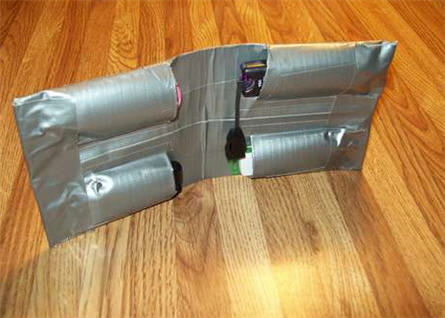
I’ve seen some USB holders at Staples and Office Max for over $20 dollars and that’s just for a fancy pouch to place your USB sticks while on-the-go. What about a DIY duct tape USB holder? You get the satisfaction of making it yourself, save yourself some cash and a hint of coolness to your storage devices.
Granted the duct tape approach is more in tune with kids, but lets give this a quick review.
In four simple steps you can do this exact project.
Step 1 – Grab some materials, that being a ruler, knife, duct tape, thumb drives and creativity.
Step 2 – Make the back plane duct tape which is very similar to making a duct tape wallet.
Step 3 – Add the pockets. In the picture you can see the USBs are parallel with each other, I would recommend staggering them so the thickness is reduced when folding.
Step 4 – Put the finishing touches on there with some clean lines of duct tape, patterns and custom designs.
For the full tutorial and loads more pictures visit Instructables.
Continue Reading
Here at GetUSB.info we love the USB steampunk drive. We’ve reported on at least a dozen of them over the past couple years and I’m sure we’ve missed three times that many. Today we are tipping you off to a great tutorial on how to USB steampunk your own flash drive.
Instructables has a very detailed, 9 page tutorial on how to steampunk your own gear. It gives you a list of material, a detailed process, good and creative guidelines along with plenty of pictures and resources.
It’s my goal to actually do this over the July 4th weekend [2010] and post my result. Lets hope for the best!
To give you an idea of the scope of project considering the following list of materials and tools. If it fits into your abilities, then give it a shot!
Continue Reading