Administator for GetUSB.info
GetUSB.info started in 2004 with the concept of providing USB information for everything USB related. At the time, USB was gaining momentum and every day new products, articles and news became published. Today, the site is focused on bringing technical information, tricks and hacks to USB related products. The site does publish off topic information as well, to keep the variety up. Please visit the footer area of any page if you or your company is interested in article or product placement via purchased advertising.
Here at GetUSB.info we love the USB steampunk drive. We’ve reported on at least a dozen of them over the past couple years and I’m sure we’ve missed three times that many. Today we are tipping you off to a great tutorial on how to USB steampunk your own flash drive.
Instructables has a very detailed, 9 page tutorial on how to steampunk your own gear. It gives you a list of material, a detailed process, good and creative guidelines along with plenty of pictures and resources.
It’s my goal to actually do this over the July 4th weekend [2010] and post my result. Lets hope for the best!
To give you an idea of the scope of project considering the following list of materials and tools. If it fits into your abilities, then give it a shot!
Continue ReadingNo Comments
Adobe Photoshop is a great product, expensive, but great. You can do amazing things and take any picture and make it look like a million bucks. The trick, layers.
The deal about Photoshop is the average user only takes advantage of 10% of the features. Meaning you are paying gobs of money for features you probably don’t use.
If this is the case, another great product to try is the Corel Paint Pro photo editing software. Here you’ve got many of the elements an average use will try. Such as red-eye, color balance, filter effects and helpful makeover tools to remove blemishes on skin or whiten teeth, etc.
To get you past the tipping point, Corel is offering a free 2GB USB flash drive with your order. So this gives you a total price of $20 for Corel Paint Pro and 2GB flash drive.
Head over to Buy.com to grab this USB Dealz!
Continue ReadingNo Comments
These days there isn’t much to flash drives, other than look and some advanced functions, so for this post I thought the video Mimobot put together for introducing their next 4 models would be the best way to entertain the readers…so enjoy:
The easiest way to remove any virus from a USB stick is this: format it! Be sure to use the Full Format function, not the quick format function.In the very unlikely event you get an error messages saying you cannot format the drive because it’s being used by another program, or for some reason you have data on there you don’t want to format off, then you can try the following.
Before I start however, let me explain the fundamental concept of what we are trying to do.
With most virus’ they make it very hard to delete the files so they can spread their infection. To do this, they use several files and ping each other so they appear to be in constant use. This is why you see the error “being used by another program cannot delete or format.” So what we need to do, is stop that process. In addition, programmers put in attributes to make it hard to delete as well. For example they set the file attribute to Archive, or System File so we’ll need to remove those attributes too.
So lets start: In Windows go to START > RUN. In the field type cmd
This will open the DOS command prompt. Here you should be at the C drive root. If not type cd\ and click return. You will then be at the C:\ root.
Next type the drive letter of your flash drive. In my example that is drive letter F. You can find the drive letter of your flash drive by going to START > MY COMPUTER > and look for the “Removable Disk“Next, type the drive letter, so for me, type f: and hit enter.
After you are in the drive letter of the flash drive, type dir/w/a
This will list all the files in your flash drive, regardless of it’s attributes of being hidden, System file or archive.
Now we should look for suspicious files such as anything listed as a .exe file or a .inf file. Specifically anything with a autorun.inf should be deleted. Some other popular ones are Ravmon.exe, svchost.exe, Heap41a and pagefile.pif.
If you see any of these, then lets remove all the file attributes and try and delet them.
To remove all attributes do the following:
In the DOS command prompt type attrib -r -a -s -h *.*Â This command will remove all attributes for all files.
Now we can delete the files. You do this by typing del filename [be sure to include the exentions too, for example type del autorun.inf and hit enter.
This should do the trick if you’d like to remove problem files without running the Full Format function.
Continue ReadingNo Comments
SuperSpeed USB 3.0 is just hitting the market and while we spend our time trying to obtain the 3.0 hard drives and 3.0 flash drives, we might get stuck with trying to make the connection.
USBFever just launched a full line if USB 3.0 adapters to help you with the connection problems you might have. Most notably would be you trying to extend the cable longer, or flipping from a Type A to a Type B connector.
During the month of July Instructables is running a USB contest for who can make the best mod while incorporating USB technology. For this reason, we’ve been keeping a close eye on what you creative folks are up to.
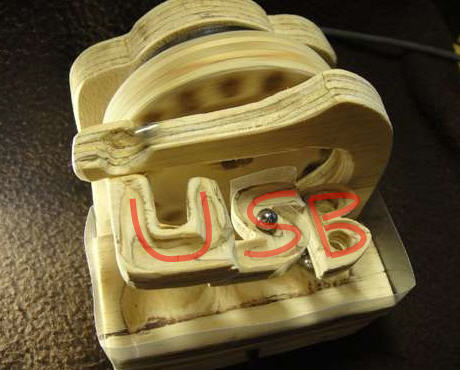
Today we bring you the 100% natural, all wood, USB marble machine.
I will admit the name is more impressive then the look, but the cool factor outweighs the look.
The wood USB marble machine is an excellent DIY project and will open up your eyes to all sorts of different ways you can make an automated, electric motor powered marble machine.
Check out the video, it’s well worth it!
Learn how at Instructables.
Continue ReadingNo Comments
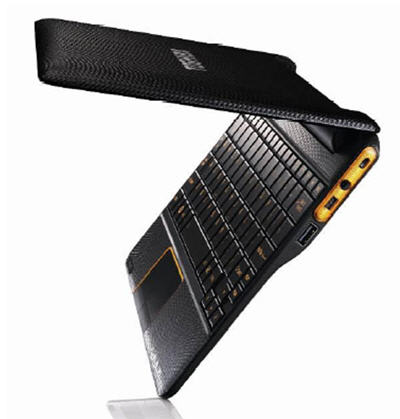
Toshiba announces a slick new Netbook running Android OS and NVIDIA processor. It boots in about 1 second, yes, that’s right, 1 second…and is it just me, or does that case look like leather?
The AC100 has a full sized keyboard, 10.1 LED backlite screen and 512RAM [upgradeable to 1GB] with 8GB of storage. With the USB port and mini USB port storage should not be a problem as it’s virtually unlimited with USB hard drives and USB flash drives.
Toshiba claims that the machine is good for up to seven days on standby with mixed use and the machine weighs in at 870g and is 14mm thick at the thinnest point.
The AC100 will be released in the UK first with an undiscolsed price point, but can’t be more than $350. To find a bit more here is the Toshiba PDF.
Continue ReadingNo Comments
Several years ago, I reported on a USB wifi extender in parabolic form. Now, we’ve got a slimmed down version using an empty food can and your USB wifi dongle.
It’s not the prettiest thing, but it works and will boost your signal strength enough to grab the channel from your neighbor who’s barely showing up in your wireless network.
Plus this hack gives you adjustable control both up and down, and left and right.
The concept here is getting the can to increase your signal. In addition, mounting the can and USB wifi dongle to a portable camera stand. This will give you the stability you need to keep the signal strength strong while in use. It will also allow you to keep the position for use from day to day.
Continue ReadingNo Comments
CD ripping is certainly nothing new, but if you’ve ever done it, the process is slow, boring and a massive suckage of time. For that reason, I wanted to post about it a new service I found. Rip2iPod is a CD ripping service which converts your CDs into MP3 files.
The CD Ripping service is very straight forward. Ship the discs. They rip them. They send them back on a DVD archive.
At that point it’s your job to finish the task and drop those MP3s into your iTunes or media management software.
After reading their FAQ about the CD ripper process I learned a couple things I didn’t know, for example; an average CD collection is 250 discs. The CD ripping for that quantity would take about 20-25 hours of solid work.
The CD ripping process includes meta data [tagging of songs] which include genre, album artwork when available, date, etc etc. You also have the choice on bit rate compression…or simply put, the quality of CD ripping you’d like.
The minimum order is quantity of 100. To get more details on price, shipping instructions and options, visit their site.
Continue ReadingNo Comments
There is nothing more satisfying for a finger work-out then using a laboriously slow old school typewriter. Or on those cloudy days where you feel a bit melancholy and in the mood to write the start of a novel you’ll never finish, you may need to punch down on those exhausting keys of a manual typewriter to get the creative juices flowing.
Today I present you that possibility and better yet, with a touch of technology to make your craving a bit more current.
A well known steampunk modder [Jack Zylkin] has taken the traditional typewriter and transformed it’s key punching into a digital conversion of letters and numbers. Using some customized PCBA, a USB connection and a bit of code it’s now possible to sync your great grandmother’s typewriter with your computer, or in this video, your iPad.
Your craving wont go without some minor cash flow issues, as you can purchase a pre-made [or pre-mod I should say] USB typewriter or you can buy a kit and down grade your very own typewriter and keep the family air loom alive and kicking.
To get more details visit the Etsy Shop to make your purchase or gather more information.
Continue ReadingNo Comments
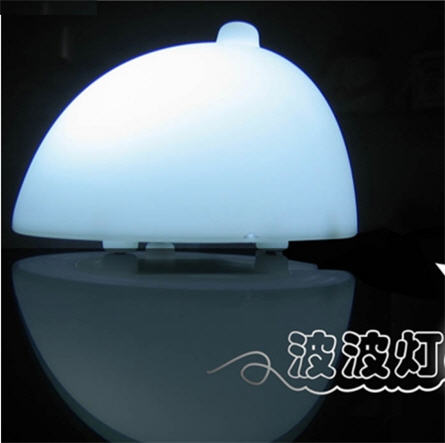
So what could you get a guy who has everything? How about a USB boob lamp. That’s right, a LED light in the shape of a single boob, nipple and all. The USB boob lamp will activate upon touch [of course] and illuminate a soft glow to brighten your surroundings.
This is the first I’ve heard of this product, and interestingly enough, I found it just near Father’s Day. Granted, it’s not something you’d like to receive from your kid, but maybe a great joke to plan on “conservative” Dad.
At just $11 USD how can you resist?
So here is the kicker, to make the LED turn on, you simply brush the nipple. To turn it off, brush the nipple again. Hmm, sounds about right.
In today’s digital age, it’s very common, in fact – expected – that everyone own a USB flash drive. Flash drives are the easiest and most convenient way to store data, transfer files and keep that ever changing data near you. If you are like me, you have a favorite flash drive. It’s not necessarily because of the way it looks, but rather – over time – all of your important information has accumulated to one stick. You get to a point where saving data can only be done on that one, favorite USB drive.
This is where RecycleUSB.com comes in, if you have extra sticks lying around, which aren’t gett’in the love – donate them. Recycle USB is a USB recycler service that partnered with Sugar Labs to turn unwanted flash drives into portable learning computers for kids.
What do I mean by portable learning computers?
Well Sugar Labs created a Linux distro [based off Fedora] which boots directly from a flash drive. The distro is a customized learning platform for kids to learn, interactively, on a computer. The great part about Sugar Lab’s approach is that it doesn’t leave a footprint on the host PC.
The USB Recycler service will take your drive, load it with the latest version of Sugar on a Stick and send it to Sugar Labs for global deployment.
Sure you can do this yourself or just drop the USB stick in the mail and not worry about it. If you’re looking for the weekend project here is the link to Sugar Labs.
Recycle USB mentions that if you are really in the mood for donating, you can get a tax credit for larger donations [say your company had a couple hundred extra flash drives from a trade show which are no longer being used].
Continue ReadingNo Comments