Understanding why copying thousands of tiny files can feel slower than moving one giant movie file
Most people assume copying data is a straightforward process. You drag files from one window to another, watch the progress bar slowly move across the screen, and eventually the files appear on the destination device. From the outside, duplication hardware seems to be doing the exact same thing — just faster and with more USB ports.
But internally, the two methods behave very differently.
That difference becomes especially noticeable when dealing with complicated folder structures, software distributions, engineering archives, photography catalogs, website backups, or anything containing thousands upon thousands of tiny files.
This is also the reason people become confused about storage performance. A USB flash drive might advertise speeds of 200MB per second. You copy a giant 20GB video file and the transfer feels incredibly fast. Then later you move a 2GB software project containing 80,000 tiny files and suddenly the computer feels painfully slow.
Same USB drive. Same USB port. Less total data.
So what changed?
The answer is overhead.
A File Copy Is Really a Long Conversation
When most people think about copying files, they imagine the computer simply moving data from one place to another. In reality, a drag-and-drop copy process involves a huge amount of communication between the operating system and the storage device.
The operating system must examine every file individually. It checks filenames, builds folders, writes timestamps, updates allocation tables, processes metadata, verifies available space, opens write sessions, closes write sessions, and confirms that every transaction completed correctly.
For one large file, this overhead is relatively small.
For 100,000 tiny files, the overhead becomes enormous.
At some point, the system spends more time managing the copy process than actually moving useful payload data.
That is the part most consumers never see.
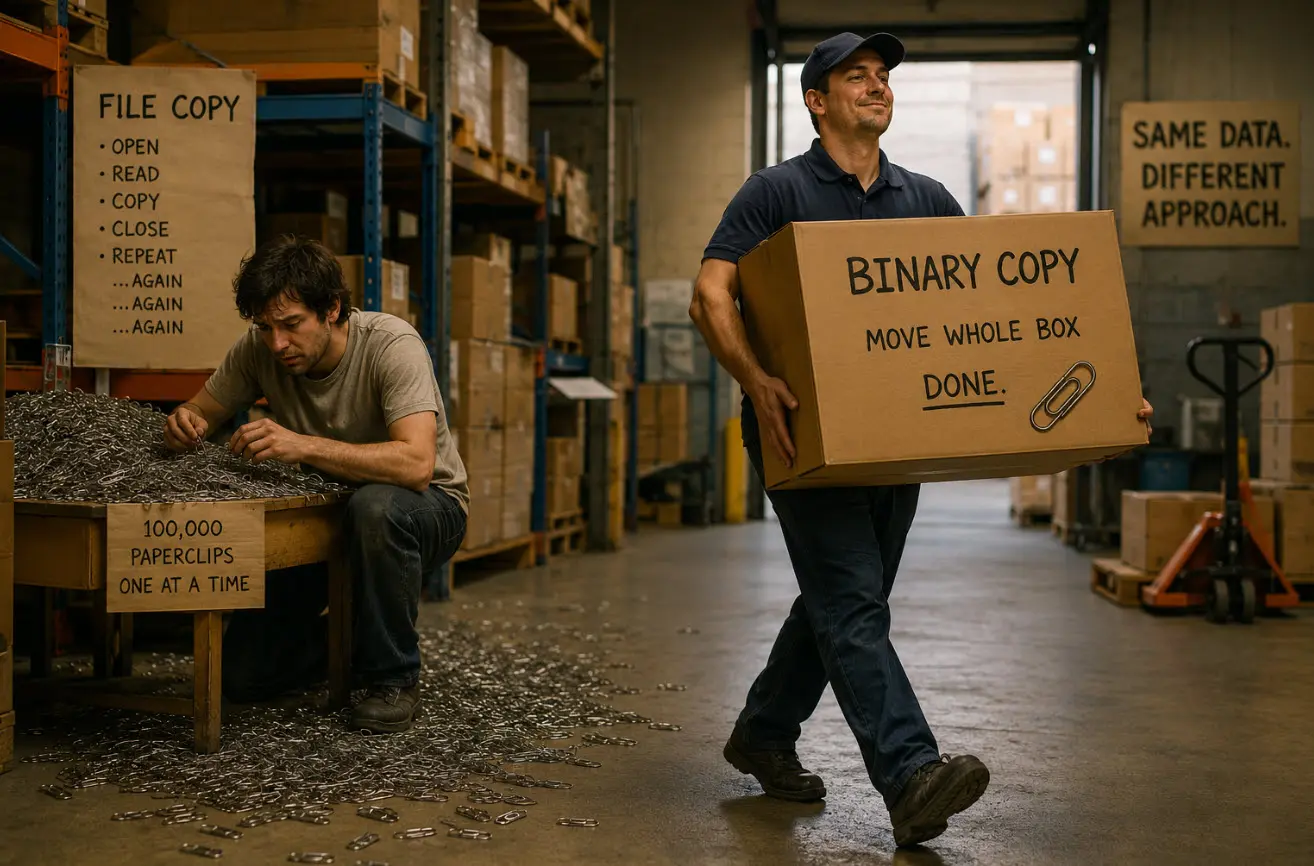
The Paperclip Problem
The easiest way to visualize this is with paperclips.
Imagine you need to move 50 pounds of material from one room to another.
One option is carrying a sealed box filled with paperclips.
The other option is moving every individual paperclip one at a time by hand.
Technically, the total weight is identical.
But one method is absurdly inefficient because the handling overhead dominates the workload.
Small files create that same problem inside a storage system. Every tiny file becomes its own little transaction. The operating system repeatedly stops to organize, catalog, validate, and manage each individual piece instead of maintaining one long uninterrupted data stream.
This is why a single 20GB video file can sometimes transfer faster than a 2GB folder containing thousands of tiny images, scripts, icons, cache files, installers, HTML assets, and configuration documents.
The issue is not always the amount of data.
The issue is the amount of handling.
Why Binary Duplication Behaves Differently
Binary duplication works from a completely different perspective.
Instead of focusing on files and folders, a binary duplication process often focuses on the raw structure of the storage device itself. Rather than asking, “What files exist inside this folder?” the system asks, “What data exists in these sectors?”
That sounds like a subtle distinction, but it fundamentally changes the workflow.
A traditional file copy only transfers visible files and folders through the operating system. It does not normally copy low-level storage information such as boot sectors, partition tables, hidden filesystem structures, or device layout information.
This is why simply dragging files onto a USB flash drive usually does not create a truly bootable clone of another device. The files may exist, but the boot code and underlying storage structure are often missing.
A binary copy or IMG deployment behaves differently because it reproduces the storage structure itself. Depending on the duplication method, the process may copy partition tables, boot sectors, filesystem structures, hidden areas, and the exact layout of the original media.
Instead of rebuilding the environment file by file, the duplication process reproduces the device much more directly.
That dramatically reduces the amount of operating system bookkeeping involved during transfer.
Why IMG Files and Device Copies Often Feel Faster
This is one reason IMG deployments and device-level duplication often feel surprisingly fast and consistent.
The system is not constantly pausing to negotiate thousands of tiny filesystem operations. Instead, it is moving large organized blocks of binary data in a more sequential process.
Sequential operations are usually far more efficient for storage devices than highly fragmented random write activity.
This becomes especially noticeable with software distributions, bootable environments, Linux deployments, embedded systems, kiosk platforms, and manufacturing workflows where enormous numbers of tiny supporting files exist underneath the surface.
A normal drag-and-drop copy forces the operating system to process every one of those pieces individually. A binary duplication process bypasses much of that overhead.
The result feels smoother, more predictable, and often dramatically faster.
We covered some of the same low-level USB behavior in our article about USB copy protection versus USB encryption, where controller-level operations behave very differently than normal file-based workflows.
Why USB Speed Ratings Feel Misleading
Consumers are usually taught to think about storage speed as one simple number.
But real-world performance depends heavily on workload type.
Large sequential files are easy for storage systems to handle because the device can maintain one long uninterrupted write process. Tiny fragmented files create constant stop-and-go activity.
The drive is no longer sprinting down an empty freeway.
It is navigating city traffic with a stop sign every twenty feet.
That difference is enormous.
It also explains why duplication hardware and imaging systems often behave differently than a normal desktop copy operation. The underlying method of moving data is not the same thing.
This becomes even more important in production workflows involving bootable USB media and boot-sector creation, where low-level storage structures matter just as much as the visible files themselves.
The Bigger Picture
Neither method is automatically “better” because the two approaches solve different problems.
A traditional file copy is flexible. You can update individual files, replace folders selectively, and work naturally within the operating system.
Binary duplication is more focused on exact reproduction and workflow efficiency. It excels when consistency matters and when large amounts of structured data need to be replicated reliably across many devices.
Most people never think about this distinction because modern operating systems hide the complexity behind a simple progress bar.
But underneath that little green bar is an enormous difference in how the storage system is actually behaving.
And once you understand the overhead involved, it suddenly makes perfect sense why moving one giant movie file can feel effortless while copying a tiny software directory full of thousands of files can bring an expensive computer to its knees.
Editorial & EEAT Note:
This article was written and reviewed by professionals who work with USB duplication systems, flash memory workflows, and controller-level storage technologies. The discussion is based on real-world observations from production duplication environments where file structure, transfer methodology, and storage behavior directly affect deployment speed and consistency.
Portions of this article were assisted by AI for organization and readability, then reviewed, expanded, and fact-checked by a human editor to ensure technical accuracy and clarity.
The warehouse and paperclip analogies were intentionally used to help explain low-level storage behavior in a way non-technical readers can visualize without oversimplifying the underlying concepts.
Let GetUSB.info keep you updated.
Receive article notifications about USB storage, flash memory, and duplication updates in your preferred language. We average a couple of articles per week.