GetUSB.info Logo

Posts Tagged ‘video’

How To: Watch Video, Play Music on PS5 from USB Flash Drive

Like the PS4 before it, the Sony PS5 allows you to play music and video directly from a USB flash drive through the console. The process is straightforward, but a few practical reminders can help everything run more smoothly the first time you set it up.

The PS5 supports MP3 audio and MP4 video playback from a USB flash drive. While the console is capable, it does not support every audio or video format available. To avoid compatibility issues, stick with widely supported formats—MP3 for audio and MP4 for video—and you should have no trouble.

It’s also worth noting that the PS5 supports the same media formats as the PS4 family and plays video at resolutions up to 3840 × 2160 (4K). Attempting to play 8K video files will not work, as the PS5 does not currently support 8K output.

Pro tip: organize your MP3 audio and MP4 video into folders before copying them to the USB flash drive. The PS5 uses folder structure to create playback order, effectively treating each folder like a simple playlist. While this requires a bit of manual organization, it makes browsing and playback far more manageable. For example, separate folders by artist, album, or video type.

When playing media from a USB flash drive, video and audio are accessed from different areas of the system interface.

Do not use the Media section. That area is reserved for streaming content and media purchased through the PlayStation Store.

To watch video, long-press the PS Button and select Media Gallery from the main menu. Then navigate to USB on the far right. Video files can only be accessed through this path.

PS5 Media Gallery USB selection screen

Navigation follows this basic path:

PS5 Home ? Media Gallery ? USB

Files within each folder are indexed in order, similar to a playlist. You can use R1 and L1 to skip between files, while the left and right directions on the D-Pad allow for smaller, chapter-style skips within a video.

To play audio, press the PS Button once to open the Control Center quick bar, then select the Music icon. The interface is fairly minimal, but it gets the job done.

Music playback can continue in the background while you navigate menus or play games. Once music is playing, you can pause tracks, skip songs, or adjust playback directly from the Control Center without interrupting gameplay.
Continue Reading

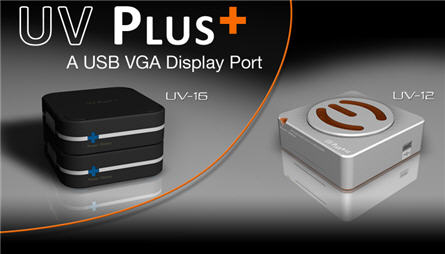
Multiple Widescreen Bliss With EVGA UV Plus Display Ports

EVGA is lowering the bar for USB to VGA adapters and that’s a good thing.  Traditionally you would pay upwards of $200 dollars for a USB to VGA adapter but now the UV12 and UV16 adapter from EVGA are under $80!

usb vga adapter

The UV Plus family take an existing USB port and convert that bus into a VGA/DVI adapter for additional monitors.  This is ideal for those will lower video processing power (laptops) who want two or three widescreen monitors. I spoke with Jeff, a pre-sales rep at EVGA and he did caution me against using the UV Plus family for hard core video applications such as Continue Reading

Capture Video Directly to iPod, YouTube via Blackmagic USB Recorder

Capture video direct to H.264 video files for your iPod, iPhone, Apple TV, YouTube and even full resolution video backups from Blackmagic.  So why is Blackmagic so great?  Because it captures video into the native file format of your mobile device like iPod or iPhone.

blackmagic usb recorder

The Blackmagic USB video recorder plugs directly into your PC via USB and using the included, easy to use software from Blackmagic you can recorder VHS, Video-8 or content directly from your video camera recorder. The software has a graphical interface to quickly and easily identify your destination device during job setup to begin the ripping process.  The software includes a cropping tool because sometimes your VHS tape has black borders or time display stamps.  Well not anymore. Check out this image of the software interface.  It’s clean, simple and logical. So getting excited and ready to pull the trigger on a purchase or maybe work it into your next months gadget budget.  Well be sure to set aside $119 + shipping. Continue Reading

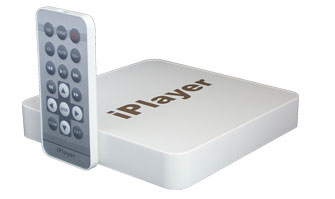
iPlayer

No, I’m not a “player” but the iPlayer is a nice piece of technology for cocktail conversations. The iPlayer is a standalone video player which can run content from a number of different flash media cards or USB drives. In addition, the iPlayer may be connected to either your TV or monitor. The iPlayer has the ability to quickly and easily share photos, music and movies on your TV or monitor.

iplayer

Sure, for the home user this might not be the ideal USB gadget for viewing your favorite content, BUT if you are running a business and doing trade shows the iPlayer is clearly worth a second look. The iPlayer makes it easy to set up a video displays without needing a PC or TV. With the combination of the iPlayer and monitor (flat screen I’d assume) you could have a slick looking trade show presentation in little time. Continue Reading

Copyright

Copyright © 2006 +

USB Powered Gadgets and more...

All Rights Reserved

Advertise with us

GetUSB Advertising

This is a high value website providing great exposure to your product and brand. Visit our advertising page to learn specifics.

For more information
Visit our advertising page.

Nexcopy Ad

Nexcopy Provides

USB copy protection with digital rights management for data loaded on USB flash drives.

Contact us learn more

Resources and References Page

Resources and References Page