The VirtuSphere could be the ultimate gaming peripheral. The oversized ball allows a person to immerse themselves into a 3D world without obstacles or obstructions.
A person would use a motion-tracking headset to project the visuals while the ball serves as your virtual terrain. The ball allows the user to jump, roll, run, crawl for an unlimited distance without encountering real world obstacles.
At over $23,000 for the VirtuSphere I doubt you’ll see this in your local Dave & Busters or arcade, but I could see a less expensive version coming out to satisfy the masses.
I could also see the VirtuSphere being used in other applications besides games, such as unique exercise or simulation experience for the military, government or law enforcement.
Although this news might be new to you,
Continue Reading
Every year on March 17, we honor Saint Patrick (circa 385–461), one of the patron saints of Ireland. Whether or not you choose to celebrate the holiday by wearing green, eating Irish foods, imbibing Irish drink (usually Guinness), or attending parades, we wish you a safe a happy holiday.
Everyone wants to be Irish on St. Patrick’s Day… even computer operating systems. So as you raise your glass to St. Patrick this year, try to pretend your beer was a computer operating system. It might go a little like this…
Macintosh Beer
Considered by many to be a “light” beer. All the cans look identical. When you take one from the fridge, it opens itself. The ingredients list is not on the can. If you call to ask about the ingredients, you are told that “you don’t need to know.” A notice on the side reminds you to drag your empties to the trashcan.
DOS Beer
Requires you to use your own can opener, and that you read the directions carefully before opening the can. The can is divided into eight compartments of 2oz each, which have to be accessed separately. A lot of people keep drinking it after it was discontinued.
Windows 3.1 Beer
Was the world’s most popular beer in the mid-1990s. Looked a lot like Mac Beer’s. Requires that you already own a DOS Beer. Claims that it allows you to drink several DOS Beers simultaneously, but in reality you can only drink a few of them, very slowly, especially slowly if you are drinking the Windows Beer at the same time. Sometimes, for no apparent reason, a can of Windows Beer will explode when you open it.
Continue Reading
I’m not talking about a room full of gadgetry, but how about a couple USB stools with devilish horns and a color matching book shelf to hold all your USB Gear?
I found the contempo-slash-corny furniture while digging up some info about a USB bomb. Apparently the designer, Joel Escalona, who made the USB bomb also did a design prototype for a USB drive. He thought to top it all off with a room full of USB furniture.
It’s fair to say this wouldn’t make it into anyone’s living room, except maybe mine, or as the lobby furniture for the USB Implementors Forum.
So what does “guarda todos tus demonios” mean? How about
Continue Reading
Scratching your head for a unique, personalized gift? How about writing down some lofty jargon and laser etching it to USB? ZaNa Design now offers laser engraving to fully customize your USB.
What ZaNa Design has done, is place a metal plate on the outer wooden chassis of their USB drives whereby you can laser etch any message you see fit.
These folks also encourage a simple design, logo or piece of artwork if you find yourself tongue-tied.
ZaNa Design has customized drives available from 1GB through 8GB and with many of them Vista Readyboost certified. Did you hear how to get Readyboost with your XP machine?
Continue Reading
I doubt you’ll see these on The Red Carpet anytime soon, none the less, a true tech lover would appreciate these USB cuff links.
It’s unclear what material these are made from, but IS clear it’s not real USB. Sure it had something to-do with size, but if you’re going to put in the effort…
These ubergeek USB cuff links will set you back $25 which is a tall order for some cash-depleted geeks.
Source:Â GeekAlerts.
Continue Reading
Seems everyone is going green these days. I don’t mind – let the grandkids live longer, better design on products and less impact on the environment. Veiro applied this philosophy to their new hand crank MP3 player.
I’ve seen hand crank music players before, they where specifically design for [lack of better terms] 3rd world countries where batteries are hard to find or too expense. I would think the Veiro is going after the same consumer base…but with solid state memory. Why?
The products I’ve seen before where
Continue Reading
Ion Audio has continued development of their ever popular USB Turntable to now include a direct-to-CD model version. Forget about connecting the USB turntable to your PC and forget about burning CDs through your computer too.
The LP 2 CD is your one-stop shop. This is the fastest and easiest way to convert your vinyl records to CD. Simply place your record on the turntable, insert a blank CD and record your album.
ION Audio includes EZ Vinyl Convert 2 for the PC user and EZ Audio Converter for the Mac in case you are still interested in compressing the audio to MP3 so you can dump it into iTunes.
I would think ION Audio created the LP 2 CD unit for
Continue Reading
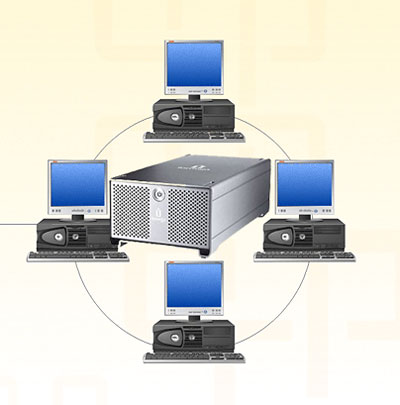
Someone once asked the question if they could network their external USB hard drive so other computers could share and store information on it.
Surprisingly it isn’t that hard. There is no need to build a NAS (Network Attached Storage) server or configure NAS software on a host computer. All you need is changing some privileges to the USB external hard drive.
Granted, this solution isn’t for the hard-core network user(s) environment, nor is it ideal for business applications where large or frequent data storage transfers are required or networks where users are accessing storage via a remote server. Rather, this is a simple solution for a home network or small business office.
Simply use the file and printer sharing setting in Windows to network a USB external hard drive. Or you can use the Windows mapping tool to map and share a drive to other computers on the network.
Continue Reading
Are you ready to get blown away, USB style? Well Joel Escalona is…and this prototype design yields some interesting insight and reflection. The USB bomb is designed to store your digital content with a visual of deterring anyone from attempting to steel your digital gold. Looks like Joel has some serious content worth protecting.
Although the USB gadget isn’t in production, there are plenty who want to see it made and with such a unique shape and design, an interesting add-on to your work space.
If Joel could team up with some security software or maybe use some open source code and incorporate a total self-destruction mechanism for unauthorized users – well, that would just top it off and blow us all away. Wouldn’t it?
Continue Reading
Vital Key is offering a new service whereby medical records are distributed via USB for personal archive.
The trend is beginning where medical records are put to USB for immediate and on-site data sharing for life threatening situations. In a critical moment, time-is-life, and having data is a powerful tool for keeping someone out of harms way.
“It really gives you peace of mind to know that you have all your medical records with you,” said Jackie Dudding, a patient. “God forbid something happens, everything a caretaker needs to know is on this thing.”
Vital Key offers an on-line service to download all your medical records in the event the key is lost or misplaced.
One of the most powerful sentences on the Vital Key website is: “More Americans die each year from medical errors than from breast cancer, colon cancer, and car accidents – COMBINED.” That’s amazing and for anyone with a medical history or condition which requires special needs, I think the Vital Key is a vital device for your longevity and health.
Source: 9 News Denver.
Vital Key website and service information.
Continue Reading
I enjoy the Instructables weekly email about DIY projects. Occasionally you see one worth trying or sparks your interest enough to consider trying. This week we found an instructable for a DIY iPod Video Porjector.
To turn your dream into a reality, you’ll need an iPod, mirror, lens and flat wall for projected image.
Here’s the DIY video for the iPod video projector…and sure you could get a dock station and connect your iPod to your TV, keep the lights on and enjoy the latest Jon Stewart download…but where’s the sizzle in that?
Source and full tutorial: Instructables video iPod.
Continue Reading
The catch phrase from Firebox for the USB Desktop Dunk is “Shoot hoops without breaking a sweat.“Â Not bad – and looks like a great little gadget gift for the young ones.
Complete with 4 mini basketballs the goal is to bounce them into the hoop. You can put the USB Desktop Dunk to good office use in “competition mode” which is 2 minutes of pure stress trying to get the high score. Or, if you need to sharpen those virtual hoop skills, chill in “continuous play” mode.
For added stimulation, the USB Desktop Hoops game throws out some audio fanfare with every 10 points scored (it scores 2 points per shot).
Continue Reading


 Every year on March 17, we honor Saint Patrick (circa 385–461), one of the patron saints of Ireland. Whether or not you choose to celebrate the holiday by wearing green, eating Irish foods, imbibing Irish drink (
 Macintosh Beer
Considered by many to be a “light” beer. All the cans look identical. When you take one from the fridge, it opens itself. The ingredients list is not on the can. If you call to ask about the ingredients, you are told that “you don’t need to know.” A notice on the side reminds you to drag your empties to the trashcan.
DOS Beer
Requires you to use your own can opener, and that you read the directions carefully before opening the can. The can is divided into eight compartments of 2oz each, which have to be accessed separately. A lot of people keep drinking it after it was discontinued.
Windows 3.1 Beer
Was the world’s most popular beer in the mid-1990s. Looked a lot like Mac Beer’s. Requires that you already own a DOS Beer. Claims that it allows you to drink several DOS Beers simultaneously, but in reality you can only drink a few of them, very slowly, especially slowly if you are drinking the Windows Beer at the same time. Sometimes, for no apparent reason, a can of Windows Beer will explode when you open it.
Macintosh Beer
Considered by many to be a “light” beer. All the cans look identical. When you take one from the fridge, it opens itself. The ingredients list is not on the can. If you call to ask about the ingredients, you are told that “you don’t need to know.” A notice on the side reminds you to drag your empties to the trashcan.
DOS Beer
Requires you to use your own can opener, and that you read the directions carefully before opening the can. The can is divided into eight compartments of 2oz each, which have to be accessed separately. A lot of people keep drinking it after it was discontinued.
Windows 3.1 Beer
Was the world’s most popular beer in the mid-1990s. Looked a lot like Mac Beer’s. Requires that you already own a DOS Beer. Claims that it allows you to drink several DOS Beers simultaneously, but in reality you can only drink a few of them, very slowly, especially slowly if you are drinking the Windows Beer at the same time. Sometimes, for no apparent reason, a can of Windows Beer will explode when you open it.