Cisco is basing their new Wireless Valet product off a study that finds only about one third of US households are set up for wireless Internet—and that low rate of adoption is due in part to the complexities of setting up wireless networks.
Cicsco is the leader in backbone routers, switches and networking gear, but have always been business enterprise focused. Today that all changes with the Valet.
The Valet is Cisco’s answer to getting a simple wireless network connected for the non-tech people…and honestly, I think they are on to something. Here is how it works.
Simply power up the Valet and connect it to your cable connection in your house. Then take the Cisco Valet USB key and plug that into each computer you want on the network. Answer three simple questions, Cisco does the rest.
That’s it.
Cisco says the Valets are so easy to set up that all users have to do is pop the included USB Setup Key in their PC or Mac, and the Valet software does the rest. Cisco says its Valet system takes the 20 or 30 steps normally involved in setting up a wireless network down to just three steps, and users can then move the USB Setup Key to additional home computers to painlessly get them up and running on wireless. Included Cisco Connect software then makes it straightforward to add more devices to the network (think iPhones, game consoles, etc.), set up a separate network for guests, establish parental controls, and customize security settings.
Cisco is offering two models of Valet routers. The Valet and Valet Plus. The Valet offers 802.11n Wi-Fi networking and four 100 Mbps Ethernet ports for connecting to a wired network. The Valet Plus steps up to four gigabit Ethernet ports. The Valet is priced at
Continue Reading
Gizmodo posted about a new product which is a docking station for your iPhone which turns it into a corded land line phone. WOW…how times have changed.
Clearly two steps back, a dock station for an iPhone and it’s not even cordless. But looking on the positive side, maybe the old timer middle management crowd can finally embrace technology of the iPhone without giving up their corded desk phone.
It’s seems to be more of a concept phone. Lets only hope. What do you think?
Source:Â Gizmodo.
Continue Reading
Victorinox has done some outlandish things in the past with respect to flash drives, including their $6,000 flash drive, and today they raise the bar once again.
Victorniox is offering £100,000 to any hacker who can crack their new biometric drive. Now there is a company with confidence.
But it’ll take one talented hacker to get the cash. Victorinox is running the hack challenge at their flagship store in London and hackers are given 2 hours to crack it and access the content stored on the disk.
The bio-drive uses a core technology called Secure Pro, which employs fingerprint reader with additional thermal and oxygen sensors to confirm that the pattern actually comes from a real, live finger. The USB stick also employs a single-chip architecture with 256-bit AES hardware encryption engine to minimize the chance of being intercepted on the circuit. As if this isn’t enough, any brute-force attempts will be dealt with by Secure Pro’s self-destruct mechanism, which literally fuses memory chip silicon beyond recovery all through the power of the USB bus.
Source:Â EverythingUSB.com.
Continue Reading
We have talked about USB turntables for years now. One’s which rip directly to your iPod, one’s which rip vinyl and CDs, hoods, no hoods…it goes on and on. Today I was tipped off about a $49 system made by Innovative Technology, the ITUT-201.
Encode your Vinyl Albums to MP3’s. The USB Turntable takes your favorite vinyl records and seamlessly converts them to MP3 digital format. Enjoy your music on your laptop or iPod, wherever you go! Easy to record with and use on any computer.
Records Vinyl to PC via USB connection
3-Speed Turntable (33, 45, 78 rpm)
One-Touch Play / Stop Control
Features
Records Turntable to PC via USB cable
3-Speed Turntable (33 1/3, 45, 78 rpm)
Ceramic Pick-up
One-Touch Play / Stop Control
Built-in Equilizer
RCA Line-out for Audio Amplifier
USB connection to enable Recording with PC
Transparent Dust Cover
Audacity Audio Editor and Recording Software
Turntable supports all version of Win 95, 98, 2000, XP and Vista as wells as MAC
Get the USBDealz now. Get the USB turntable for only $49 bucks!
Continue Reading
Today I stumbled upon a nice little website which talks about hacking up your MagicJack voice over IP phone.
The site has tips which include how to stop the software from popping up on your screen [so you can see their ads], spoofing the caller ID, changing the proxy server and using the MagicJack hardware with Skype software [nice!].
Anyone with a MagicJack phone should visit the MagicJack hack site. You can also find a review of the MagicJack here.
Continue Reading
GetUSB.info reports on all many different USB hacks which take ordinary items around your house or office and turn them into something different. Today we bring you the USB printer cartridge.
This is a low tech project easy for just about anyone to do. I wasn’t going to report on this because of it’s simplicity, but then I got to thinking. This is a great way to have a USB drive with content you don’t want anyone else to find, hidden nicely in your inkjet printer. At least for me, the color inkjet printer we use only prints black because we really didn’t need color and the cartridges are too expensive.The full USB hack is laid out really well at Instructables website, but it boils down to 5 basic steps:
Step 1 = Gather up your toolsStep 2 = Break into the USB stick and disassemble the inkjet cartridge [messy]Step 3 = Clean everything outStep 4 = Position the USB stick inside the case [ink cart full of silicon]Step 5 = Button it up and use.
Considering the simplicity of this project, you also have a low budget, about zero cents.Continue Reading
We have all see the rediculous “premium” USB flash drives. Drives with gold, dimonds, platinum case all at rediculous prices and all something the average Joe doesn’t care about. Today, Mimobot did a nice job on playing into that category with their all new “Shimmer” USB drive.
The Shimmer MIMOBOT was beamed down from the crystal caves on Planet Blooh. 64GB of MIMO-Bling! This limited edition, solid platinum MIMOBOT, encrusted with 82 precious crystals, is limited to a 100 units. The price tage for this exclusive product: $898.48.
So there you have it, April Fools.
Shimmer Mimobot page.
Continue Reading
GetUSB Dealz just spotted a D-Link RangeBooster for your laptop or PC for only $9. Sure you can take a piece of tinfoil and make a paraball and reflect your signal off the router, but where is the fun in that? Besides, it looks cheap.
So here is the dealz…the D-Link RangeBooster has a list price of $48. There is a $41 discount and Buy.com is throwing in free ground shipping. Net cost, only $9 USD.
Here is the company line:
ENHANCED WIRELESS PERFORMANCE
Connect to a fast and secure wireless network by adding the D-Link RangeBooster G™ USB Adapter (WUA-2340) to your desktop or notebook PC. Access your network’s high-speed Internet connection while also getting secure access to shared files, music, and photos from other computers in your network.
RANGEBOOSTER Gâ„¢ TECHNOLOGY
Built with RangeBooster G Technology, this Wireless USB Adapter delivers faster wireless signal rates and better reception than most other 802.11g devices. Having a faster connection gives you more time to enjoy listening to music and watching videos rather than spending time waiting for files to finish transferring. With better wireless reception, you can connect to the network from farther distances.
TOTAL NETWORK SECURITY
This USB Adapter offers total network protection by supporting WEP and WPA encryption. These features safeguard your data and privacy by giving you access to a secure wireless network.
EASY TO INSTALL AND USE
Set up the Wireless USB Adapter in minutes with D-Link’s Quick Setup Wizard. In addition, D-Link’s new utility detects available wireless networks so you can quickly connect to the network. It also keeps track of the networks used most often so that you can easily rejoin them. This Wireless USB Adapter is backward compatible with 802.11b standard, ensuring compatibility with a wide range of wireless routers and networks.
Continue Reading
Here is another USB prototype design and it’s called the Infinite USB Plug. The pictures look great and the concept is clever, however it just doesn’t work. Never will.
Designed by Gonglue Jiang, the Infinite USB Plug allows you to keep adding your peripherals without the need USB hubs or hot swapping your devices on USB ports when needed. The color coding on plugs will make it easy to identify which plug belongs to which device.
The problem is the way USB typology works. When connecting multiple devices via USB you cannot daisy-chain them. You cannot piggy back them, it must be in a logical pyramid typology. Which means, this concept requires a hub.
Designed by Gonglue Jiang, the Infinite USB Plug allows you to keep adding your peripherals without the need USB hubs or hot swapping your devices on USB ports when needed. The color coding on plugs will make it easy to identify which plug belongs to which device.
The problem is the way USB typology works. When connecting multiple devices via USB you cannot daisy-chain them. You cannot piggy back them, it must be in a logical
Continue Reading
According to some accounts, blue was the first color associated with St. Patrick’s Day, but that started to change in the 17th century. Green is one of the colors in Ireland’s tri-color flag, and it has been used in the flags of several Irish revolutionary groups throughout history. Ireland is the “Emerald Isle,†so named for its lush green landscape. Green is also the color of spring, the shamrock, and the Chicago River, which the Midwestern city has dyed green on St. Patrick’s Day for the past 40-odd years.
Continue Reading
It seems that kids these days are simply born with the jeans to run computers. I know of 7 year old kids doing Power Point presentations already! They have incorporated YouTube videos, slides with more animation then what I’ve ever done and all before the 4th grade. Impressive.
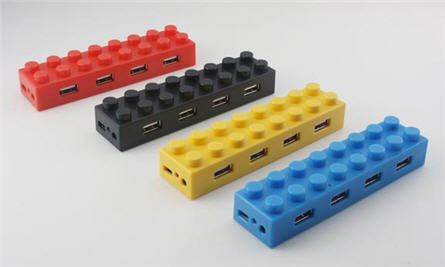
On that note, it’s worth making their computer environment a bit fun. With USB keyboards, USB mouse, flash drives, digital cameras, iPhones etc, it’s required to have a USB hub, even at the kids computer. So why not get them a fun looking Lego USB hub?
USB Fever now carries these 4 port USB hubs for just $12 USDs. It’s a USB gadget they need, in a fun familiar form factor they recognize.
It would be very cool if the USB Lego hub would stack, but with a flat bottom, it doesn’t. Shame.
In case you are color blind and can’t see the different colors available in the picture, you can purchase red, black, yellow or blue 4 port Lego hubs.
Continue Reading
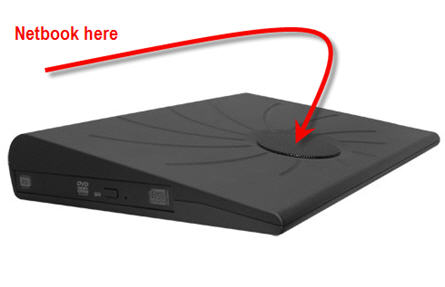
The Netbook Mate by Fantom solves many problems with the popular netbooks, it gives you expansion! Simply use a USB cable and connect from the Netbook to a Fantom USB port and you’ve suddenly got: A DVD burner, USB ports, 160GB hard drive and ergonomic dock station!
Now on sale from Buy.com
Expand the storage capacity of your Netbook with Netbook Mate. Its combination of easy slide in/out 2.5″ removable drive, DVDRW,two built in USB port hub and cooling fan enhances your Netbook in every way and gives you the ultimate portability.
Easily carry your photos, music, video and files where ever you go. Because your Netbook lacks an optical drive, doesn’t mean you have to live without one. The Netbook Mate will let you burn discs or watch movies at any time. Simply connect your Netbook Mate to a USB port on your Netbook and you are done; Installation is that easy! The Netbook Mate fits most brand Netbooks from 8 to 11 inches, it is extremely compact and light weight.
Continue Reading