
USB Pistol Gun Flash Drive
USB pistol gun flash drive could become a great fundraiser for the NRA. USB capacity range from 4GB to 16GB and just a couple bucks shipping. If interested here is the USB pistol gun link.
 Continue Reading
Continue Reading
Continue Reading
 Source:Â Satechi online store.
Continue Reading
Source:Â Satechi online store.
Continue Reading
 Touch-n-go™ is a revolutionary combination of a magnetized base unit paired with magnetized 3-inch mini-cables knows as “zip tails.†The zip tails pop immediately into place on the charging station via the built-in magnets, and safely snap off when you move your device.
 The only problem I have with this solution is finding additional 30 pin connectors since I have four iPhones to charge. In addition, TheJoyFactory doesn’t give specifics about charging times with multiple devices, so a good chance you’ll get a trickle charge to the iPad while have several other devices connected at the same time.
Purchase price for the ZipMini
Continue Reading
The only problem I have with this solution is finding additional 30 pin connectors since I have four iPhones to charge. In addition, TheJoyFactory doesn’t give specifics about charging times with multiple devices, so a good chance you’ll get a trickle charge to the iPad while have several other devices connected at the same time.
Purchase price for the ZipMini
Continue Reading
 Items you will need:
 Using tape to secure the lead start of the yarn, start wrapping
Continue Reading
Using tape to secure the lead start of the yarn, start wrapping
Continue Reading
 This post is just an appetizer for all the dirty little secrets related to USB charging devices, to get a little deeper into the details click over to
Continue Reading
This post is just an appetizer for all the dirty little secrets related to USB charging devices, to get a little deeper into the details click over to
Continue Reading
 Scientists are trying to break the boundaries of Moore’s law by taking a phosphorus atom and create a working transistor as the gate to control electrical flow.
Moore’s law describes a long-term trend in the history of computer manufacturing whereby the number of transistors that can be placed in the same amount of space doubles approximately every two years.
Michelle Simmons, director of ARC Center for Quantum Computation and Communication Technology at the University of New South Wales, Australia, took an atom and etched it into a silicon bed with “gates” to control electrical flow and metallic contacts to apply voltage to start/stop current. It’s the first such device to be precisely positioned using
Continue Reading
Scientists are trying to break the boundaries of Moore’s law by taking a phosphorus atom and create a working transistor as the gate to control electrical flow.
Moore’s law describes a long-term trend in the history of computer manufacturing whereby the number of transistors that can be placed in the same amount of space doubles approximately every two years.
Michelle Simmons, director of ARC Center for Quantum Computation and Communication Technology at the University of New South Wales, Australia, took an atom and etched it into a silicon bed with “gates” to control electrical flow and metallic contacts to apply voltage to start/stop current. It’s the first such device to be precisely positioned using
Continue Reading
 If you have concerns about USB 3.0 being a new technology without much compatibility, you are totally wrong. The great thing about USB is their backward compatible specification. What this means, is the USB-IF [the forum which governs the technology] requires that any new USB specification work will all legacy USB protocols.
So even using that ultra slow USB drive from 2004 will work in the new MacBook Air products. Not like you would, but it’s just an example. Another example is using slower USB products like USB keyboards or USB calculators or USB breast warmers will work from the Apple USB 3.0 socket.
The USB 3.0 specification has a maximum transfer speed of gigabits per second. That’s about 500MBs per second. You must keep in mind this is the theoretical maximum and you can never expect this type of performance from a USB device, but it’s nice to know the efficiency ratios are dramatically improved with the new USB 3.0 specification.
Continue Reading
If you have concerns about USB 3.0 being a new technology without much compatibility, you are totally wrong. The great thing about USB is their backward compatible specification. What this means, is the USB-IF [the forum which governs the technology] requires that any new USB specification work will all legacy USB protocols.
So even using that ultra slow USB drive from 2004 will work in the new MacBook Air products. Not like you would, but it’s just an example. Another example is using slower USB products like USB keyboards or USB calculators or USB breast warmers will work from the Apple USB 3.0 socket.
The USB 3.0 specification has a maximum transfer speed of gigabits per second. That’s about 500MBs per second. You must keep in mind this is the theoretical maximum and you can never expect this type of performance from a USB device, but it’s nice to know the efficiency ratios are dramatically improved with the new USB 3.0 specification.
Continue Reading
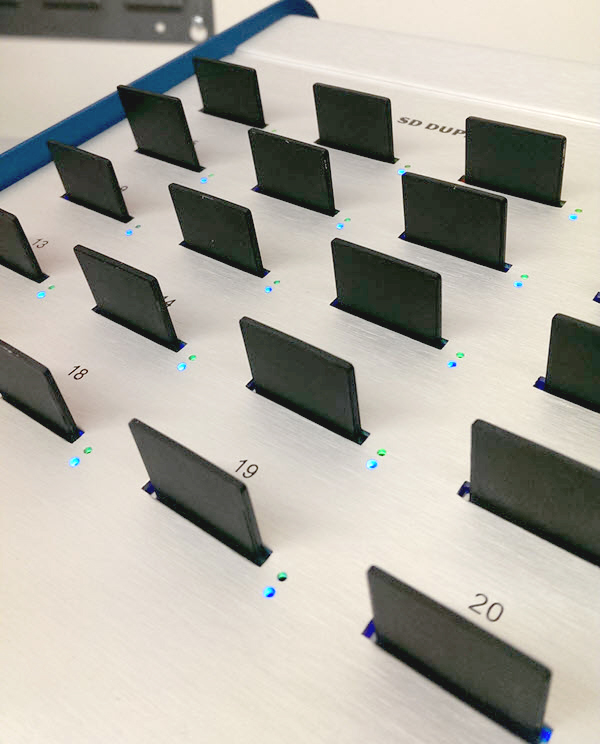
If you are looking to read the CID number of an SD card, or extract the CID off an SD card, then you will find this article very helpful. Some also call this “reading the PSN off the SD card” or reading the product serial number off the SD card.
We learned the company which manufactures this product now offers the ability to write the CID value as well as write protect the Secure Digital media.
Most phones and much of the software on phones will lock into the CID number of an SD card. The CID number is a unique card identifier number that is unique to the card itself. The CID number is valuable because software developers and hardware developers can lock software to the unique number of the device, thus eliminating the ability to pass along licensed software.
Reading the CID number from an SD card is not an easy task. It requires specific access codes to the index table of the memory card, and unless you know how to use the SD chipset of your card reader, chances are you won’t get the number—or at least not the correct and accurate number.
The CID register is 16 bytes long and contains a unique card identification number. It is programmed during card manufacturing and cannot be changed by SD Card hosts. The CID number is a compilation of information about the card, such as manufacturer, date manufactured, checksum total, GB size, and more. Below is a table outlining all the items which make up the SD CID number.

So with all this said, how do you read the CID number from an SD card? As we’ve mentioned, it isn’t easy and it’s hardware based. If you do enough searching on the internet, you’ll find some home-brew code to read the CID numbers, but that’s only if you have the SD card or microSD card connected via an IDE bus to your host computer. This isn’t easy for everyone. There is clear evidence that using a USB to SD card reader will not get you the information you require—or at least accurate and correct information. Meaning most times the CID number generated is actually the serial number of the card reader itself, not the CID number of a specific SD card.
In addition, what if you are required to read the CID number off SD media in bulk? A single, one-at-a-time solution is not practical.
In my search to read the CID number from SD media, I came across Nexcopy – a manufacturer of USB duplicator equipment and other flash memory equipment. Several models they carry are SD duplicators and microSD duplicators. With the secure digital duplicators, part of their feature set includes reading CID numbers from SD media. The equipment can read 20 cards at a time, 40 cards at a time, or 60 cards at a time, depending on the model. The duplicators will read the CID number and export it to a .csv file for import into other business functions. This configuration makes it quick and easy to obtain the CID number. Granted, the equipment is not designed for single-use operation, but rather reading the CID of SD media in bulk quantity. Here is a screenshot of Nexcopy’s software reading 20 CID numbers:

I didn’t contact Nexcopy Incorporated for pricing of the equipment, but doing a quick search for the equipment shows me a price of about $1k for the smallest 20 target system and $3k for the largest 60 target system.
With all this said, there is still no clear-cut method to read CID numbers off SD cards for the home-user, but maybe this article will at least explain why you haven’t found a good solution as of yet.
The CID (Card Identification) number is a unique identifier that is assigned to each Secure Digital (SD) card. The CID number is a 16-byte value that is used by the SD card host device to identify the SD card and to determine its capabilities.

 Recharging takes place to the single AAA battery inside the unit. If the power does drain too much, you can swap the battery for a non-chargeable one.
2.4Ghz wireless spec gets you the communication you need with out the interference you might expect. Personally, I’d rather see Bluetooth as this little guy takes up a USB port for the wireless dongle on the host side.
The Solar rechargeable wireless optical USB mouse is compatible with Windows back to XP, Linux and Mac operating systems, so ya, standard stuff.
Continue Reading
Recharging takes place to the single AAA battery inside the unit. If the power does drain too much, you can swap the battery for a non-chargeable one.
2.4Ghz wireless spec gets you the communication you need with out the interference you might expect. Personally, I’d rather see Bluetooth as this little guy takes up a USB port for the wireless dongle on the host side.
The Solar rechargeable wireless optical USB mouse is compatible with Windows back to XP, Linux and Mac operating systems, so ya, standard stuff.
Continue Reading
 Today you can apply the same tradition to technology. The Top Secret USB drive with wax seal is that device. The USB flashdrive is made of high quality porcelain, finished off with a beautifull wax stamp containing the logo.
Besides the original white porcelain version there is also a black variant. Either one is available with red, orange, pink, blue or green wax seal. We also make Top Secret USB flashdrive for special occasions, like for a wedding: white with a silver wax seal. The top secret USB flashdrive in light blue or pink are designed as a gift for a newborn. All usb sticks are sealed standard with the original Top Secret ‘TS’ logo. There is the possibility of choosing your own design, letters or images. The Top Secret USB flashdrive are available with either 2, 4 or 8 gigabytes of memory.
Continue Reading
Today you can apply the same tradition to technology. The Top Secret USB drive with wax seal is that device. The USB flashdrive is made of high quality porcelain, finished off with a beautifull wax stamp containing the logo.
Besides the original white porcelain version there is also a black variant. Either one is available with red, orange, pink, blue or green wax seal. We also make Top Secret USB flashdrive for special occasions, like for a wedding: white with a silver wax seal. The top secret USB flashdrive in light blue or pink are designed as a gift for a newborn. All usb sticks are sealed standard with the original Top Secret ‘TS’ logo. There is the possibility of choosing your own design, letters or images. The Top Secret USB flashdrive are available with either 2, 4 or 8 gigabytes of memory.
Continue Reading
 How about taking the slingshot in the game and making it real life? This is exactly what this DIY hacker did.
Over at MBed, the DIY tutorial for a USB slingshot gives step by step instructions, source code, design schematics and more for you to successfully remake a USB slingshot.
Source:Â MBed.
Continue Reading
How about taking the slingshot in the game and making it real life? This is exactly what this DIY hacker did.
Over at MBed, the DIY tutorial for a USB slingshot gives step by step instructions, source code, design schematics and more for you to successfully remake a USB slingshot.
Source:Â MBed.
Continue Reading
 This power bar will automatically shut down the devices it’s powering based on time of day or clock settings. For example, why power that laser printer when everyone is away from work? Better to power off the printer between 6pm and 7am, right? The PowerUSB Bar can do just that.
The PowerUSB Basic empowers you to put your old devices on a diet by programming when to shut off power to them. It looks like a standard 4 port power strip but 3 of the for outlets are programmable. The last outlet is always on so it’s reserved for the PC. And there’s also a 6 ft USB cord coming out of the power strip. Attach printers, chargers, speakers or external drives and let the PowerUSB Bar govern their power consumption.
Continue Reading
This power bar will automatically shut down the devices it’s powering based on time of day or clock settings. For example, why power that laser printer when everyone is away from work? Better to power off the printer between 6pm and 7am, right? The PowerUSB Bar can do just that.
The PowerUSB Basic empowers you to put your old devices on a diet by programming when to shut off power to them. It looks like a standard 4 port power strip but 3 of the for outlets are programmable. The last outlet is always on so it’s reserved for the PC. And there’s also a 6 ft USB cord coming out of the power strip. Attach printers, chargers, speakers or external drives and let the PowerUSB Bar govern their power consumption.
Continue Reading