
The Microsoft Memory Mouse 8000 is the latest peripheral release from Microsoft. Although I don’t think most seek out new technology for this peripheral, if the time is right, check this out.
The Microsoft Memory Mouse 8000 is a wireless unit with a USB dongle for communication and in the effort of saving space, Microsoft packed in 1GB of memory. You can freely take the dongle to other computers and use it as a regular USB mass storage device.
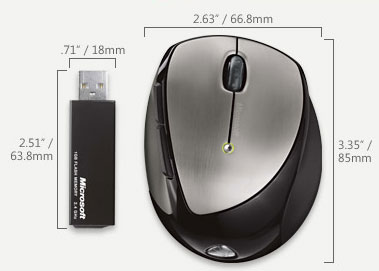
I’ve read a couple reviews and consensus is a solid unit, good design and works great with both Mac OS X, Vista and XP. So feel comfortable dropping the $99 for a 1GB USB mouse.Some other notable features include:
- 2.4 GHz Wireless Technology – The 2.4 GHz wireless USB mini-transceiver connects wirelessly right out of the box with virtually no interference, and up to 30 feet of wireless range.
- USB Rechargeable with Magnetic Connectors – Simply snap in the magnetic connectors to charge while working, using the included USB transceiver.
- High Definition Laser Technology – Microsoft High Definition Laser Mouse products are more precise, more responsive, and deliver smoother tracking.
- Battery Life Indicator – You won’t get caught with a dead battery—the Battery Status LED Indicator glows red when the battery is running low.
- Magnifier – Point and click to enlarge and edit detail using the Magnifier*.
- 4-Way Scrolling – Scroll four ways for greater efficiency and comfort with Tilt Wheel Technology.
- 5-Button Mouse – Get quick access to the media, programs, and files you use most often with customizable buttons.
- Flip 3D – Easily flip through all open windows with Flip 3D.
- Instant Viewer – Too many open items on your desktop? Click the scroll wheel button to instantly display your open windows, then point and click to select.
- Right Handed Design – Mouse design is optmized for right handed users.
- Scroll Wheel – Save time and effort with the scroll wheel—navigate documents and Web pages without using the on-screen scroll bar.
- On/Off Button – Turn your 3-in-1 device off to extend battery life even longer.
- Bluetooth Mode Switch – A switch on the bottom of the mouse enables Bluetooth notebook users to connect directly to their PC without using the included transceiver.
- Carrying Case – Protect your mouse while you’re on the go.
- Designed for Notebook PCs – Compact and comfortable, our handy notebook and laptop products are designed for convenience and mobility.


