I don’t own an iPhone, but my neighbor & buddy & fellow entrepreneur does. Recently he showed me some cool things he’s done with the phone. So here are 6 iPhone hacks any iPhone owner would probably want [to check out]. Note: You take responsibility for your actions.
iPhone Interface Tool – This toolkit lets you move files around on the iPhone, run any desired applications on the iPhone or activate the phone without iTunes.
When my buddy isn’t chatting it up on his iPhone or texting with the footer “Sent from my iPhone” he runs a nice little Photo Birth Announcements business.
Continue Reading
So it turns out a white onion is not only good for salsa, but good for charging iPods too. Here is a video showing you how to charge an iPod with an onion, Gatorade and USB cable.
I knew those electro-lights are good for something. For those not interested in watching a 3 minute video here is the down-n-dirty:
put two holes on either side of your onion with screwdriver
soak the thing in Gatorade until most is gone (about 1 cup worth)
use the iPod USB cable and push in the USB connector into the onion.
Your iPod will then turn on and charge shortly there after. So for about 1 cup of gatoraid soaked into the onion will get you about 30 minutes of charge time.
Source: TreeHugger, YouTube link
If you like this we have other USB hacks and USB Tutorials.
Continue Reading
Windows Vista has not been an easy transition for many people. One of the problems with Vista is USB support, or lack of. If you are having USB problems with Vista then please read on.
Several months ago Microsoft released hotfixes for Vista for some badly-needed improvements for USB operation. Most notably is the problems, conflicts and issues related to USB and audio components.
Microsoft plans to officially address the USB issues with their SP1 due out in early 2008, but in the mean time lets check out the Microsoft roll out update page.
If you are using Vista and having problems be sure to double check the device manufacturer update before using the Microsoft updates, your solution might already be out there.
Peter Kirn provided a couple valuable tips while diving into your problems, please read
Continue Reading
Albeit U3 claims no trace of U3 software remains on the host PC it doesn’t hurt to run a registry analyzer package just to make sure. While in the midst of doing this USB gadget research, I found the following free utility.
Ntechnologies has a U3 specific reg analyzer to aid in the registry clean-up process.
Whenever hardware or software is added to a PC there are registry changes. The registry also provides a window into the operation of the OS kernel, exposing runtime information such as performance counters, currently active hardware, software and utilities.
Even using the U3 uninstall software might not leave your PC 100% clean. You can download the Registry Analyzer for U3here.
Continue Reading
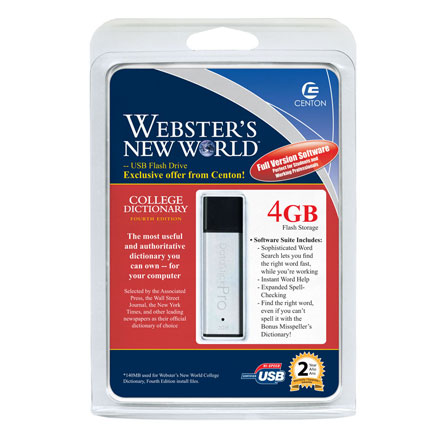
If I’m sending my kids off to college and they don’t know how to use the internet for spelling…well that’s money poorly spent.
On the other-hand, it’s always nice to load up a flash drive with 140MBs of data so you can spell check on the fly. Wait…doesn’t every program, including Photoshop, include spell check these days? Ya I thought so. I’ve never understood the USB dictionary.
Open Cellar is a wine software management program which is now available from BeWine Connected on a USB drive shaped like a wine bottle.
The USB drive includes the Open Cellar software along with mobile phone ring tones, screensavers, wallpaper and a guide to the Grand Cru wine from Bordeaux.
The advantage with the novel Open Cellar software is understanding what a wine tastes like before making the purchase. In addition the Open Cellar software allows you to track, comment and classify the wine you like.
Emmanuel Etcheparre told me via email:
Reading an article from Crave, I realized the very obvious… I should have written about this topic months ago…maybe years ago. Turning a typical USB hub into a power center for all those electronic gadgets.
The key is getting a USB hub that has a dedicated AC Power adapter which plugs directly into the wall. This way a stable supply of 5v will be streaming to all ports. You can grab a 4 port, 6 port or 7 port hub for only a few dollars.
The power hub via USB is a perfect illustration of the potential of such a setup: pretty much anything that accepts USB charging (iPods, Blackberries, cellphones, headsets, Xbox 360 controllers, and the like) should be compatible.
You should be able to power up non USB charging devices as long as they are
Continue Reading
The Mac can easily and quickly become a DVR with the right software and hardware. This Mac only tip comes just in time for this season’s prime time TV.
Using a Mac, other than the one pictured, with a USB TV Tuner (like EyeTV Tuner) along with some DVD Burning software (Toast) you can watch, record and burn every season premier your wife demands while you’re watching real TV (Football and Baseball).
For all the details jump to Macworld. Thanks LifeHacker.
Continue Reading
The UPEKEikon Digital Privacy Manager now supports Mac. But those PC guys didn’t make it that easy – you still need to download the Windows version than download the Mac version for a working “preview” version.
The Eikon USB finger scanners allows log-in during power-up, after awaking from sleep and can be further configured at the admin level settings. The UPEK offers all this from the swipe of a finger.
The PC version of the Eikon Digital Privacy Manager started shipping earlier this year for $39.99 with the current Mac version available as beta with full suite to follow.
Is that a PC in the background… Interested?
Continue Reading
Do you have a UPS that went south on you? Don’t throw it away, turn it into the ultimate hard drive storage spot.
Our good friend Alan from Hacked Gadgets found this 77 second video on hacking your broken UPS to include a USB drive. Who would ever think to look in a UPS for your porn library secret files.
[Thanks Alan] link to video here.
Continue Reading
As if you need one more device for storing files you eventually can never find, the iPod Touch can now be used as a USB mass storage device.
At this time, the following hack only applies to MacFanBoys – I’ll post a PC solution when found.
Per TUAW:
You know that “Enable disk use” checkbox? The one that appears in iTunes for most modern iPods? That checkbox isn’t there for the iPod touch. The touch provides no built-in disk access utilities but if you have an Intel Mac, and aren’t afraid of the command line, you can use these Media Folder utilities to copy files to and from your touch.
I’m not a Mac guy, but I can spot a [good] nugget of info when I see it. The Keychain utility on a Mac is designed to safeguard your important passwords, credentials, log-in info, and all those financial records.
So how can you maximize your Keychain security – well at Nevali.net they marry up the Mac Keychain and USB drive for some good-ol-fashion USB security where even the most paranoid can sleep well at night.
If interested, make the jump.
Photo courtesy of Jaron Brass.
Continue Reading


 Windows Vista has not been an easy transition for many people. One of the problems with Vista is USB support, or lack of. If you are having USB problems with Vista then please read on.
Several months ago Microsoft released hotfixes for Vista for some badly-needed improvements for USB operation. Most notably is the problems, conflicts and issues related to USB and audio components.
Microsoft plans to officially address the USB issues with their SP1 due out in early 2008, but in the mean time lets check out the Microsoft roll out update page.
Windows Vista has not been an easy transition for many people. One of the problems with Vista is USB support, or lack of. If you are having USB problems with Vista then please read on.
Several months ago Microsoft released hotfixes for Vista for some badly-needed improvements for USB operation. Most notably is the problems, conflicts and issues related to USB and audio components.
Microsoft plans to officially address the USB issues with their SP1 due out in early 2008, but in the mean time lets check out the Microsoft roll out update page.