Tokyoflash put together this odd USB watch which looks and acts very much like it’s from the future. In addition, it will challenge your cognitive abilities when someone asks you what time it is [see image 3]. The Konect is not only a watch using an unorthodox approach, it also doubles as a flash drive.
The USB flash drive, slips out from the right and the blue radial area is the watch itself.
From the description of what is what, the Konect also has voice record ability and a lavish setting of alarms. Ability to stream audio live or communicate via Skype when loaded to the USB flash.
From the source post at
Continue Reading
If you have a geeky love one, the following NES USB storage cartridges might stike that cord to make a perfect Valentine gift. Etsy dealer 8BitMemory is doing a fantastic job of mod jobs for NES hard drives like the Zelda cartridge below:
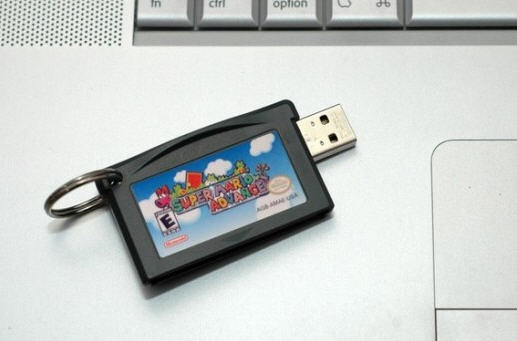
Some live, eat and sleep SuperMario, or at least did when they where younger will enjoy this small USB flash drive cartridge:
Or for the hard cord geek who needs a boat load of extra storage you can pull out all the stops for this 1TB hard drive,
Continue Reading
Nest is a contemporary looking storage slash stand for Apple products. The Nest is a device-stand small enough to prop up your iPhone and sturdy enough to hold up your iPad [via the back door sliding tray].
Very clever indeed. It would be great to see their creative genius make up a solution for multi Apple products as well. As I’ve mentioned before, my house alone has 3 iPhones and one iPad. We are constantly searching for a bulk charge center that will keep the USB power cords organized and the devices available.
Back to the Nest – different color insert lining for padded storage. The rubber insert folds over the top so that when an iPad is set flat on the top, it will not slip. Making it easy for the user to read, type and browse the device while in use.
Everyone loves a good USB missile launcher and Thanko has released yet another version. The first thing you will notice is the cosmetic change to look more like an Army missile launcher, but Brando reports hardware changes as well. The new missile launcher was retooled to have more power for longer distance and the software was updated to be less buggy.
As with all previous models, you get four foam missiles, software which controls the cannons up, down, left and right. You have the option to go into stealth mode and turn off the sound effects and of course, all this powered via USB.
Software includes support for Windows 7, although not sure about 32bit verse 64bit. Priced right at $36 + shipping.
Continue Reading
Doing a bit of research for iPhone chargers I came across the Dynamic8 iPhone and iPad charger. The look is fantastic and is very contemporary. No protrusive charger sticking out half way into the drivers console, but rather flush, stylish looking accessory.
Enjoy full use of your iPhone or iPod during car trips, and arrive with your battery fully charged
Amber/green charging status light
Detachable dock connector to USB Type A cable that you can also use to connect your iPhone or iPad to your computer
Easily replaceable 2 Amp automotive blade-type fuse to protect against spikes and surges
Works with iPhone, iPad models that feature full-size dock connector, and iPad shuffle (1st generation)
Parrot is launching their new car stereo receive which has strayed away from the trend of all touch screen interface. The Asteroid is a Google Android based receiver with loads of features and functionality.
The receiver still has a graphical interface to display the content being played, but the navigation is all “old school” buttons and radial dial.
What is most interesting about the new Parrot receive is the many number of USB ports located on the back side. With the four USB ports the Asteroid gives the user plenty of options.
Of course you’ll get the expected RCA jacks for hooking up your car’s stereo system and a 3.5 mm jack for connecting your MP3 player. The Asteroid has three high speed USB ports and one 1.1
Continue Reading
The AirStash, in one word, Amazing. This device solves all the problems of lack of storage with Apple products. With the AirStash you can now budget down to purchase the cheapest iPad or iPhone because the AirStash gives you the extra storage you need.
The AirStash, in simple terms, is a wireless storage dongle you carry around which provides unlimited storage.
The AirStash uses self powered WiFi to sync with your iPod, iPad or iPhone. The AirStash uses an SD slot for unlimited storage. The controller on the AirStash will recognize up to 32GB SD cards…from there you just swap out memory and keep saving.
Since the AirStash is wireless you can stream audio or video from the device to your Apple product. This means you can run GBs of music or videos without bogging down all the memory on your iPhone or iPad.
The only drawback I see is that you cannot dump photo’s from your Apple product to the AirStash [I’ve emailed the company to make sure my info is correct]. But you can easily take pictures using a digital camera [that uses SD cards] and simply pull the SD card from the digital camera and upload those photo’s to your iPhone / iPad.
The AirStash [kudos on the creative name] is available for $99 and is well worth the money rather than paying $100s more for a bigger Apple product.
If you’re not convinced yet, watch this 3 min YouTube video and get hooked.
Continue Reading
The iTunes backups for your mobile iPhone device or iPad device will eventually suck up much of your hard drive space. From the source article, this can be as much as 20% or more, depending on the amount of content iTunes is backing up.
To alleviate this problem, you can redirect your iTunes backup location to be an external storage drive, or a 2nd hard drive on your system. By using a Windows symbolic link routine, you can take control of where the backup location will reside.
For this tutorial you’ll need to download NTFS Junction utility [free] and do some CMD prompt edits to bring it all together. If you are not comfortable with the above, yet quest the solution, then I recommend getting someone a bit more knowledgeable with Windows to perform the task.
So to begin, you need to download this free tool to create NTFS Junctions. (This is a tool provided by a Microsoft engineer on Microsoft’s website ironically enough)
When you unzip that file, extract the junction.exe into the C:\Windows folder so that you can run in from anywhere.
Next up, you need to move all of your existing backup files to their new location. This could be secondary hard drive, or another partition, or even an external hard drive. Before we move the files, make sure iTunes is closed.
To move the files, open up a “My Computer†Window and type this into the address bar: “C:\Users\%username%\AppData\Roaming\Apple Computer\MobileSync†(without the quote of course) and press enter. This should take you into your iTunes MobileSync Folder where the Backup folder is located.
You need to right click on the Backup folder and select “Cutâ€.
Now navigate to where you’d like your backups to be located. For me, I wanted them on the D: drive in a folder I created called “iTunes Backupâ€. Paste the Backup folder to this location.
Next you need to open a command prompt. To do this, click on the Start button and type in “cmd†(again, no quotes) and then press enter. A black window should open up that looks like this.
Now for the easy part, creating the junction. All you need to do to create the junction is type in the word “junction†then the path to where Windows stores the files, then the path to where you decided to place your backup. So for me, I typed in: Junction “C:\Users\onelson\AppData\Roaming\Apple Computer\MobileSync\Backup†“D:\iTunes Backup\Backup†(Note that there are quotes around both paths since both paths contain spaces, these quotes are required).
If everything worked correctly, the junction command should indicate that it created the junction
If you decide to use an external storage device be sure the device is powered on before you start the backup process. Ya, some people are knuckleheads and will forget!
GetUSB.info did not write this tutorial, but we’d love to hear your feedback in our community.
If you are one of the few who rushed out to purchase the MacBook Air, you might have found yourself in a bit of a pinch. How to get the USB Ethernet Adapter working? If this is you, or a friend you know, here is a quick fix until a new Apple update is published.
First, it appears that some have luck plugging the adapter into different ports on the MacBook Air, but it’s not a universal solution.
After a bit of investigative work sifting through the Apple forums, you can do the following for a sure thing fix:
Continue Reading
If the benchmark claim rings true, LaCie has a new USB 3.0 flash drive which is living up to the USB 3.0 SuperSpeed promise. Things might be coming to fruition with the most recent product from LaCie, the FastKey.
The FastKey has print on the box claiming a whopping 260MB/s transfer speed. If it true, this puts a single flash drive at a faster transfer rate than your best hard drive. As EveryThingUSB points out:
“To put that in its proper perspective a typical 3.5″ hard drive has a peak read speed of about HALF of that and has an average speed about one THIRD of this little bad boy’s performance numbers”
So dumping your buddies MP3 collection of a 1,000s songs will be much easier with this USB 3.0 flash drive, then your portable USB hard drive. But don’t think this convenience, and some would say luxury, come without a price. The LaCie FastKey comes in a variety of sizes, starting at
Continue Reading
The iPhone has become an invaluable gadget for everyone I’ve meet with an iPhone. It gives the user instance access to email, the internet and a variety of applications and games. Clearly the heavy users who depend on the iPhone will run into issues with battery life. Since the product is portable, not everyone sits with the iPhone at their desk tethered to their USB port for charging and synchronization, must just leave it out for the quick grab-n-go while on the move.
Proporta has a product which will help those gassed phones, the iPhone TurboCharger Back Pack. The back pack is a iPhone case with a built in battery charger.
The TruboCharger has 1700mAh of power which will quickly and easily charge your iPhone and double it’s battery life. The TurboCharger can piggy back the iPhone during charging and use. The TurboCharger can be connected to the iPhone while connected to the PC…or you can connect the back pack seperatly for charging.
When together, the back pack will not effect performance or sync ability of the iPhone with iTunes. In addition, the TruboCharger will charge itself and the iPhone when connected to the computer.
To connect the TurboCharger, simply
Continue Reading

 The USB flash drive, slips out from the right and the blue radial area is the watch itself.
From the description of what is what, the Konect also has voice record ability and a lavish setting of alarms. Ability to stream audio live or communicate via Skype when loaded to the USB flash.
The USB flash drive, slips out from the right and the blue radial area is the watch itself.
From the description of what is what, the Konect also has voice record ability and a lavish setting of alarms. Ability to stream audio live or communicate via Skype when loaded to the USB flash.
 From the source post at
Continue Reading
From the source post at
Continue Reading
 Some live, eat and sleep SuperMario, or at least did when they where younger will enjoy this small USB flash drive cartridge:
 Or for the hard cord geek who needs a boat load of extra storage you can pull out all the stops for this 1TB hard drive,
 The Nest is bargain at just $15.

 Doing a bit of research for iPhone chargers I came across the Dynamic8 iPhone and iPad charger. The look is fantastic and is very contemporary. No protrusive charger sticking out half way into the drivers console, but rather flush, stylish looking accessory.
 What is most interesting about the new Parrot receive is the many number of USB ports located on the back side. With the four USB ports the Asteroid gives the user plenty of options.
Of course you’ll get the expected RCA jacks for hooking up your car’s stereo system and a 3.5 mm jack for connecting your MP3 player. The Asteroid has three high speed USB ports and one 1.1
What is most interesting about the new Parrot receive is the many number of USB ports located on the back side. With the four USB ports the Asteroid gives the user plenty of options.
Of course you’ll get the expected RCA jacks for hooking up your car’s stereo system and a 3.5 mm jack for connecting your MP3 player. The Asteroid has three high speed USB ports and one 1.1
 The AirStash, in one word, Amazing. This device solves all the problems of lack of storage with Apple products. With the AirStash you can now budget down to purchase the cheapest iPad or iPhone because the AirStash gives you the extra storage you need.
The AirStash, in simple terms, is a wireless storage dongle you carry around which provides unlimited storage.
The AirStash uses self powered WiFi to sync with your iPod, iPad or iPhone. The AirStash uses an SD slot for unlimited storage. The controller on the AirStash will recognize up to 32GB SD cards…from there you just swap out memory and keep saving.
The AirStash, in one word, Amazing. This device solves all the problems of lack of storage with Apple products. With the AirStash you can now budget down to purchase the cheapest iPad or iPhone because the AirStash gives you the extra storage you need.
The AirStash, in simple terms, is a wireless storage dongle you carry around which provides unlimited storage.
The AirStash uses self powered WiFi to sync with your iPod, iPad or iPhone. The AirStash uses an SD slot for unlimited storage. The controller on the AirStash will recognize up to 32GB SD cards…from there you just swap out memory and keep saving.
 Since the AirStash is wireless you can stream audio or video from the device to your Apple product. This means you can run GBs of music or videos without bogging down all the memory on your iPhone or iPad.
The only drawback I see is that you cannot dump photo’s from your Apple product to the AirStash [I’ve emailed the company to make sure my info is correct]. But you can easily take pictures using a digital camera [that uses SD cards] and simply pull the SD card from the digital camera and upload those photo’s to your iPhone / iPad.
The AirStash [kudos on the creative name] is available for $99 and is well worth the money rather than paying $100s more for a bigger Apple product.
If you’re not convinced yet, watch this 3 min YouTube video and get hooked.
Since the AirStash is wireless you can stream audio or video from the device to your Apple product. This means you can run GBs of music or videos without bogging down all the memory on your iPhone or iPad.
The only drawback I see is that you cannot dump photo’s from your Apple product to the AirStash [I’ve emailed the company to make sure my info is correct]. But you can easily take pictures using a digital camera [that uses SD cards] and simply pull the SD card from the digital camera and upload those photo’s to your iPhone / iPad.
The AirStash [kudos on the creative name] is available for $99 and is well worth the money rather than paying $100s more for a bigger Apple product.
If you’re not convinced yet, watch this 3 min YouTube video and get hooked.


