GetUSB.info Logo

Caravan That Rotates Like a USB Swivel Drive

caravan swivel design reminds us of a USB swivel flash drive

The Romotow T8 is an great conceptual caravan that has taken the world of mobile homes by storm for it’s sleek design and create form. One of the most intriguing features of the Romotow is its swiveling design which reminds us much of USB swivel drives you’ve seen so on this website.

It was created by the renowned New Zealand architecture firm W2, and it is unlike any other RVs you you’ve ever seen. With its unique design, advanced technology, and luxurious features, the Romotow T8 offers a unique camping experience for those looking to flex their muscles by owning the latest and greatest RV designs.

The caravan is built on a fixed chassis with a curved side, and the inner section can rotate up to 90-degrees. This totally new design allows the caravan to expand and contract, offering indoor and outdoor living spaces as required. When the caravan is in its open position, it offers a spacious decking area, where you can sit back and enjoy nature. The large doors open up to a sheltered living space, providing you with a comfortable and luxurious living experience.

Apart from its eye-catching design, the Romotow T8 boasts a range of features that will impress anyone. You can order the caravan with wall-mounted TVs, an outdoor projector, a pumping audio system, and a bedroom with either a single bed or a double bed. The caravan also runs off a 200-Ah lithium battery that’s charged by solar panels on the roof, making it eco-friendly and perfect for those who want to reduce their carbon footprint.

Despite its advanced features and unique design, the Romotow T8 may pose some challenges in certain camping sites. Some campers have noted that the caravan’s size and shape may not fit well in certain campgrounds. Specifically, many camping spaces are long and narrow, which could make it impossible to open up the Romotow T8 without damaging the RV of your neighbor. In fact most camping sites use slim parking stalls for the RVs, camper vans and caravans. The Romotow is probably best suited for wide-open camping spaces, rather than RV park.

While the Romotow T8 is a luxurious and innovative caravan, it does come with a hefty price tag. At $266,000 USD, it is undoubtedly one of the most expensive caravans on the market. Additionally, if you live in the United States or any other country, you may have to pay extra fees to import the caravan, which can add to the overall cost.

romotow t8

Continue Reading

TeamViewer Alternative – And it’s Free – Quick Assist from Microsoft

TeamViewer is one of the most popular applications to share computer screens with other people. However TeamViewer is very expensive. Is there a TeamViewer alternative? Yes there is… and it’s 100% free.

We found a TeamViewer alternative one day because, as a business, we had to provide technical support to a remote Windows computer. TeamViewer is very clear about their software being used in a business should have a business license.

From the screen shot below, you can see a single license is $34.90 per month. What TeamViewer doesn’t tell you… until half way through the purchase process… is a yearly subscription is your only option. Ugh. This now puts your TeamViewer cost at $418.80 for a single year. More licenses require a bigger financial commitment.

teamviewer is expensive, free alternative

We immediately went into TeamViewer alternative mode.

As an alternative, we found Quick Assist from Microsoft.

Quick Assist is 100% free and offered by Microsoft which allows users to share their computer screen and give free and total control to the other. There is no time limit for a sharing session and there is no limit to the number of times you can use the tool, or no limit for whom you use the tool with.

You need to download the free utility from the Microsoft App store, and that process is extremely easy. Type “quick assist” into the search bar and Windows will provide a link to download.

Quick Assist is TeamViewer alternative, download screenshot

After download the Quick Assist app is ready for use.

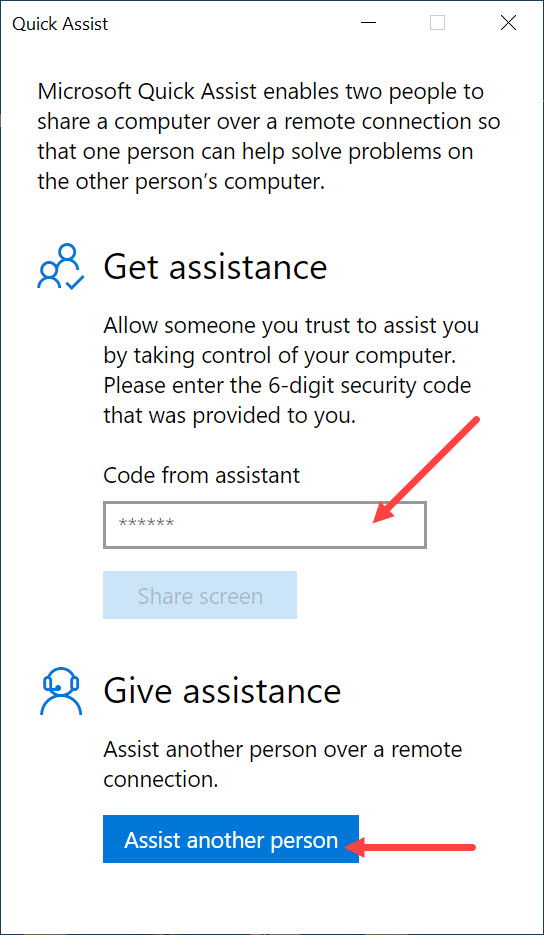
By launching the app you can either input a code from an Assistant who is helping you remotely, or you can select the option to assist someone else. See the image below.

To assist another person you will need a Microsoft account and if you don’t have one, Quick Assist will put you through the process in a couple steps.

If you are receiving help from someone, a Microsoft account is not required.

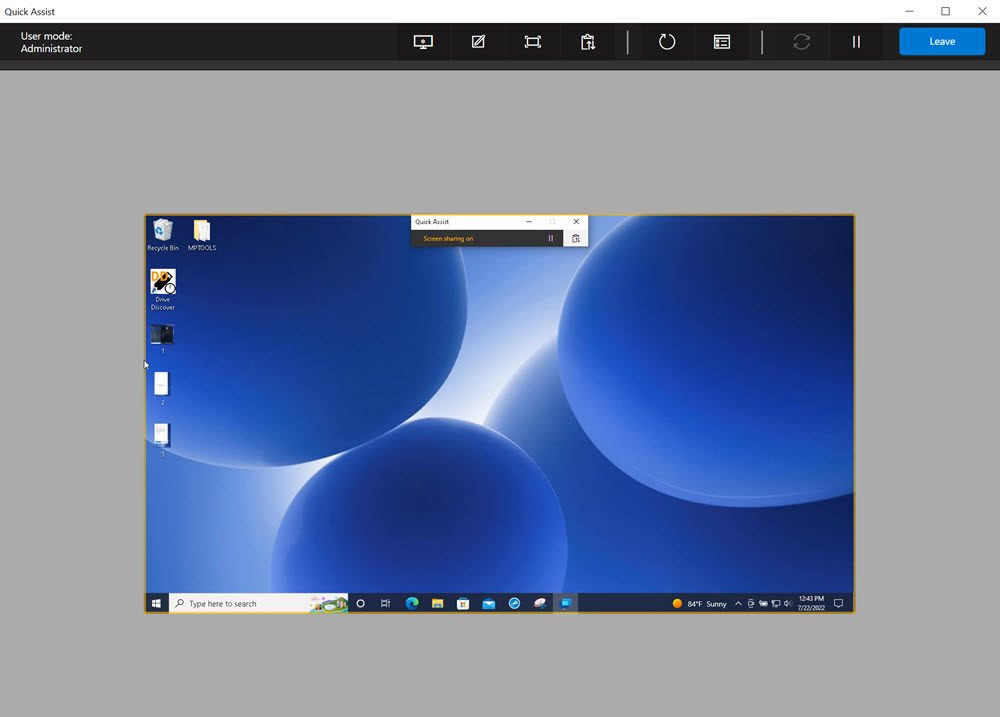
Below are a couple screen shots for getting connected between an “assistant” and the one receiving the help.

Continue Reading

Hold USB Flash Drive In DVD Case – Brilliant Solution – Inexpensive

Hold USB Flash Drive In DVD Case

This is a brilliant solution which after viewing the video you will say: “this should have come out years ago!”

This is the least expensive, yet most secure way to hold a USB flash drive in a DVD case.

The era of CD and DVD is coming to a close with USB flash drives taking its place. Yet many CD and DVD duplication facilities have shelves and shelves of DVD jewel cases which they need to put to good use. This DVD-to-USB-Insert card is the quick, easy and cheap solution. The insert allows users to keep their DVD case and related jewel case artwork to remain the same, but now secure a USB flash drive inside the DVD case, rather than an optical disc.

So many businesses enjoy the DVD case because the DVD case is a great storage box. The case is a good size with a thick spin to print what the contents in the DVD case are.

Continue this same “library” methodology with the DVD-to-USB-Insert card.

In case you can’t see, or didn’t see, the video posted above the solution will hold two USB flash drives in a DVD case. The DVD-to-USB-Insert is a thick 0.65mm clear plastic which is the same diameter as a DVD. However, the clear plastic has two rectangles which are inverted to hold just about any sized USB flash drive. This solution will fit two USB flash drives into a single DVD case. The two rectangles are the same size and as said, will fit darn nearly all USB sticks with a size that is 3″ long by 3/4″ wide and a depth of 3/8″ ( for you metric folks, that is 76mm long, 21mm wide and 9.5mm deep).

The clear plastic has a hole in the center the same size as a DVD disc and will snap into the “holder” of the DVD case. Using any DVD case on the market you can easily hold a USB flash drive inside a DVD case. The video shows how secure the USB flash drive is when inside the DVD case. The flash drive will not fall out during shipping or transit.

To be clear, the DVD-to-USB-Insert is only the clear plastic that holds the USB flash drive using the nipple snap that holds the DVD. The DVD case itself is not sold with this solution because the assumption is you (the user) already have stock or inventory of the DVD case itself.

This solution to hold a USB flash drive in a DVD case does not infringe on any patents from other manufacturers who use alternate solutions to secure a flash drive inside a DVD type case.

Please contact USB Copier for more details. This is a USB duplication service company.

Continue Reading

Off Topic: Making Home Brew Starbucks Vanilla Latte – Life Changer

DIY recipes are beloved for many reasons; saving money, saving time and the rewarding task of simply doing it yourself. Today is a post that is clearly off topic from the normal USB hacks and news we typically post about. Today we are talking about making a Starbucks coffee at home. Not the standard black coffee from Starbucks, but the more delicious variety like the vanilla latte.

At the time of this post the Coronavirus is in full swing and many Starbucks shops are closed, or limited hours, or the drive-thru line is too long for the wait. Here is your in-home solution:

The first thing to understand is how sweet Starbucks really makes their drinks. It is well known the calorie intake and carbohydrate count for a vanilla latte is fairly high. This DIY recipe will help you control those intake amounts to help better control the sugar intake your body gets from these sweet-delicious-energy-giving drinks.

We should really give Starbucks serious credit on figuring out the right bit of sugar and caffeine to jump start the heart rate in a legally addictive way.

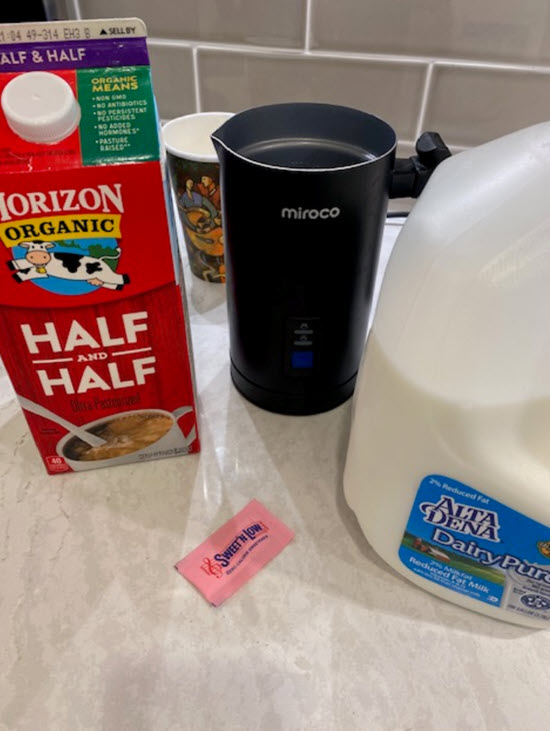
Starting with a vanilla latte, the true magic of this drink is the full, frothy milk. No requirement for a fancy frother which you see on the Starbucks counter top, but rather a simple $40 (about) milk frother from Amazon will do the trick (Miroco). The Miroco is a fantastic product and truly a life changer for making coffee flavored drinks. Probably the best “appliance” purchase we’ve made since the introduction of the DVR in 1999 (feel free to challenge us on this claim {wink}).

starbucks frother

First step is brew your coffee. Use any brand. If you really want the exact taste of a Starbucks version, use their coffee, but honestly they put enough sugar and syrup into these drinks, the coffee brand doesn’t matter all that much.

Once the coffee is brewed, fire up the milk frother.

Continue Reading

Why Does the Partition Size Matter Inside an Image File?

This topic is brought up today because we hear some Users have issues understanding this point. The partition size inside an image file does matter. The question we will answer today is why it matters.

Let us start off with two simplified overviews. First, all storage devices use a partition to define it’s characteristics. A storage device has a file system, like FAT32 or exFAT or NTFS and that file system has a defined size or digital capacity. These characteristics, and some others, are laid out in the partition.

Second, an image file is the above partition with all its detail, the file system, defined capacity along with all the actual files and folders on that partition and put into a single file or .img file.

For a non-technical person, let me use a puzzle as an example.

partition table, puzzle, image file

  • The puzzle box is equivalent to the physical device.
  • The plastic bag inside the puzzle box, holding all the pieces, is the image file.
  • Print on the puzzle box indicating the number of pieces, is the partition.
  • The puzzle pieces inside the box are equivalent to the data.

Okay, so at this point we know the image file (.img) is the bag which holds all the puzzle pieces and the data are all the bits inside the bag. So let’s address the question of this post, “Why does the partition size matter inside an image file?”

Back to the puzzle box. As with any puzzle, the outside of the box lists the number of pieces. In this example, we can use the number of pieces printed on the outside of the box as the partition table size. If the physical box size is, let us say, 8″ x 11″ then it’s totally logical that a 1,000 piece puzzle would fit inside. In fact, it is logical to say even a 20 piece puzzle will fit inside the box. But, could a 5,000 piece puzzle fit inside this box?

From the three scenarios above, one doesn’t work, right? The scenario where the box says there are 5,000 puzzle pieces in a box that is physically to small.

Partitions are the same.

The situation which doesn’t work, is when the print on the outside of the puzzle is telling you the number of pieces inside the box are clearly more than what the physical box can handle.

Said another way, you cannot use a partition table size of 4GBs and try to have the image file fit on a USB stick that has only 1GB of storage space. Even if the image file itself is only 1GB large of actual data. Just like the puzzle, no matter what is printed on the outside of the box, if the number of pieces are larger than what can fit inside the box… it just doesn’t work.

Here is a real-world example: You can download this IMG file which is only 40MB large. The IMG itself has a 4GB partition inside it. As long as you write out the IMG file to a flash drive that is 4GBs or larger, everything will work. If you try and write out the IMG file to something smaller, like a 2GB stick, it won’t work.

What happens?

Windows is very smart. All versions of Windows (from 7 and higher) will take a look at the total available memory and compare that to the partition table size. If Windows sees the partition table is larger than the available memory of the device, she won’t let you do anything with the device… other than format it. Once the drive is formatted, Windows will automatically rewrite the partition table to fit the amount of available memory. In this example, Windows would format the drive to become a 2GB stick… not a 4GB stick.

Why does Windows do this?

They want to eliminate fraud. Windows 7 was introduced in 2009 and before that, the only OS was WindowsXP. Well, Windows XP didn’t have the capability to compare partition tables to available memory. The result was fraud. Many would sell some larger GB capacity drive… like at the time 32GB, but only 4GB of real, usable, memory was there. The user would run out of memory space long before the “printed capacity” of the drive was reached.

If you found this article; maybe there is a situation where an image file is not working when written out to a USB flash drive? If this is the case, be sure to check your partition table compared to the amount of physical memory available. The easiest way to check, would be mounting the IMG file on your computer and check Properties for the partition size. Keep in mind, the default “Mount” command in Windows doesn’t work. You need something like this.

Continue Reading

USB Juice Jacking – A Total Long Shot?

Will “USB juice jacking” trend on Twitter anytime soon? Probably not. Should you be paranoid about USB juice jacking? Probably not.

What is USB juice jacking anyway?

The idea is someone, a hacker, trying to steal your data while you are charging up, or “getting juice” from a public USB port.

Yes, it can technically happen, so don’t be fooled. But could it actually happen? Probably not, so don’t sound like a fool.

Getting down to brass tacks of how this could happen, what would a hacker need to pull it off?

First, they’d need to make a connection, either WiFi or Bluetooth. This connection would transmit your valuable data to the hacker. To do that, the hacker needs some sort of device that holds that communication chip. That chip would need to sit behind the USB port in the string of communication. This “device” would also need power.

Given the above, a quick observation of the USB port you are planning to use, will tell you everything you need to know. So basically if you see a big block with a USB port, don’t plug in your device. If it’s a wall mounted USB port, chances are ultra-slim there is a technology behind the placard stealing your data.

So take airport chairs and charging stations for example; as this is the most comment place a website gives for the “scare.” You are not going to get hacked using those ports. First off, airports are high security areas and those charging stations are monitored. Second, the security cameras will pick up on someone trying to tamper with a charging station or USB port on the chair. Third, the people in the terminal need a boarding pass to get to those spots, so their identity is already known if anything suspicious does turn up.

Now, if we are talking a coffee shop just be sure

Continue Reading

Not So Funny USB Jokes [11]

What do you call a bee born in the United States?
A USB.

When the person who invented the USB drive dies:
They will lower the coffin into the grave and realize it’s the wrong direction. Flip it, and try again.

Why do people complain about plugging in USB cables?
I always connect them on my second try.

Amazon offers a USB-powered taillight:
It’s used to backup your computer.

Arguing with your wife is like a USB port:
You will only be right 50% of the time.

I ate my USB flash drive:
It only took 1 byte.

If you are carrying around a USB stick:
Do you have mobile data?

What do you call a USB stick in Russia?
A “Put-in”

The USB Type C design is brilliant:
I can’t see a downside to it.

How do you stop an elephant from charging?
Take away its USB cable.

Thanks to these guys for inspiration.

Continue Reading

Microsoft Finally Capitulated the USB Safe Removal

In a battle that is so ancient most no longer consider it an issue, Microsoft has gone away with the safe removal for USB flash drives. The original suggestion by Microsoft was to eliminate data lose if a user removed the drive before properly ejecting it.

Nine out of ten times you wouldn’t lose data, unless a large file was being transferred, but it’s nice to see Microsoft adjust to user habits.

The update which includes this change is Windows 10 v v1809. If you are not sure the Windows version you have, simply right click the Windows icon in the bottom left of your screen and select “System

From the resultant page, you can view the version of your OS.

Continue Reading

Snap Power USB Charger

You know a product is a great idea when a couple of pictures describe the entire product. With that in mind, we’ve all seen wall outlet USB charges, but the Snap Power, in my opinion, will rule them all. The design is clever. Installation is ultra-easy. Accessibility supersedes all others. Take a second and just look at it: In my mind there are three things which make this a brilliant wall charger. If you don’t mind me walking you through the obvious, here we go. Or skip the highlights and jump right over to their website: The design is brilliant. The User keeps both outlets available for normal use while a sleek looking USB port is added underneath. At the time of this article there is one USB socket, but visiting their website you can see two sockets, one on either side. They are constantly improving. Installation is very easy. Simply unscrew your current face-plate and replace it with Continue Reading

History of Portable Storage Devices – Infograph

History of portable storage devices – An interesting topic and starts earlier then you probably think.  Starting in 1928 the punch card is what started it all.  Like the punch music you probably remember on your grandmothers piano where the piano played automatically from the punch roll.

(Infograph) History of Portable Storage Devices

  • 1928 – Punch Card Storage: One of the earliest forms of portable data storage, punch cards used holes in paper to represent data and instructions for computers.
  • 1956 – Magnetic Disk Storage (IBM 305 RAMAC): Introduced the first hard disk drive, capable of storing 5 MB of data using rotating magnetic platters.
  • 1963 – Magnetic Tape Cartridges: Offered portable data storage for mainframes, allowing larger amounts of information to be transported between systems.
  • 1971 – Floppy Disk: A flexible magnetic disk developed by IBM, making it easier to store and transfer data on personal computers.
  • 1984 – CD-ROM (Compact Disc Read-Only Memory): Allowed digital data to be stored on optical discs, improving durability and storage capacity over floppies.
  • 1990 – PCMCIA Flash Memory Cards: Early flash memory cards, primarily used in laptops and industrial equipment, paved the way for solid-state storage devices.
  • 1994 – CompactFlash (CF) Cards: Used in digital cameras and handheld devices, offering small, removable flash-based storage.
  • 2000 – USB Flash Drive: A major breakthrough in portable storage, offering rewritable, durable, and high-capacity data storage via USB interface.
  • 2005 – SD and microSD Cards: Became the standard flash storage format for cameras, smartphones, and embedded systems due to their small size and reliability.
  • Today – High-Capacity Flash Storage: Modern USB drives and SSDs now offer terabytes of solid-state storage, with fast read/write speeds and advanced encryption capabilities, replacing most earlier portable storage technologies.

History of Portable Storage (Infograph) An infographic by the team at History of Portable Storage (Infograph)

Continue Reading

Eliminating Moore’s Law With Phosphorus Atom Transistor

Scientists are trying to break the boundaries of Moore’s law by taking a phosphorus atom and create a working transistor as the gate to control electrical flow. Moore’s law describes a long-term trend in the history of computer manufacturing whereby the number of transistors that can be placed in the same amount of space doubles approximately every two years. Michelle Simmons, director of ARC Center for Quantum Computation and Communication Technology at the University of New South Wales, Australia, took an atom and etched it into a silicon bed with “gates” to control electrical flow and metallic contacts to apply voltage to start/stop current.  It’s the first such device to be precisely positioned using Continue Reading

Web Receipt Is Snap Shot of Web

Little Printer is a thermal printer which browses the web and prints up interesting snippets of information. I love my iPhone and use it for many things, keeping a calendar, phone book, email, text etc, but I still prefer a piece of paper to make my daily list of to-do’s.  Likewise, it’s best to read a story from a book or magazine.  Well, along those same lines of “analog” textual feeling is the Little Printer.  A printer designed to print up a receipt of information for a grab-n-go read. For all the douche-bags who are going to write about going green, or go paperless, or get with the times and read your phone – you know I’m right when I say – screw you!   Sometimes paper is better. Continue Reading

Copyright

Copyright © 2006 +

USB Powered Gadgets and more...

All Rights Reserved

Advertise with us

GetUSB Advertising

This is a high value website providing great exposure to your product and brand. Visit our advertising page to learn specifics.

For more information
Visit our advertising page.

Nexcopy Ad

Nexcopy Provides

USB copy protection with digital rights management for data loaded on USB flash drives.

Contact us learn more

Resources and References Page

Resources and References Page