Administator for GetUSB.info
GetUSB.info started in 2004 with the concept of providing USB information for everything USB related. At the time, USB was gaining momentum and every day new products, articles and news became published. Today, the site is focused on bringing technical information, tricks and hacks to USB related products. The site does publish off topic information as well, to keep the variety up. Please visit the footer area of any page if you or your company is interested in article or product placement via purchased advertising.
Dane-Electronic dropped their drawers on pricing for the 8GB zMate flash drives. Currently you can get the 8GB for $8.74.
Here is the company line:Universal Serial Bus (USB) drives bring the durability and compact form factor of flash memory to all your portable data storage and transfer needs. The USB flash drive enables anyone who works on multiple computers to readily carry their most important and useful files anywhere. Ideal for students of all ages, travelling professionals and everyone who has a need to share a file or a photo with a friend. Youll find hundreds of applications for yours. Compliant with both 1.1 and 2.0-standard USB ports and virtually all Operating Systems since 2000. Dane Elec Flash Drives come with a 5-year warranty.
Get the USB Dealz now! Click for more USB Dealz…
Continue Reading
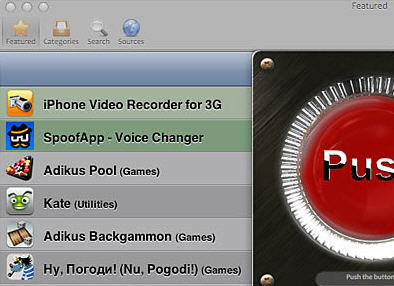
Could this be a threat to the Apples iTunes store? The idea is loading up your applications via USB cable, rather than via iTunes store. This type of app installer would eliminate the need for an iTunes app store.
It seems there are several non-Apple sponsored app stores popping up which is the first step to threaten iTunes…but a direct load via USB cable would even threaten the unofficial app stores.
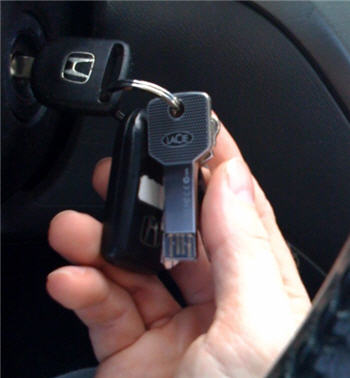
The blogosphere has been talking quite a bit about the new LaCie USB key chains, in fact, I did a post just the other day about them. Well, yesterday LaCie sent GetUSB.info the iamaKey model. Here she is in the wild.
The iamaKey is a beautiful drive. Extremely solid, heavy and doesn’t scratch easily. LaCie put a lot of effort into the design and material selection to make one outstanding drive. I’ve used dozens of flash keys and most end up failing and in the trash. With the durability I see here, the iamaKey will last.
So here’s the deal…I’m going to keep the iamaKey on my keychain until it breaks. I use USB sticks daily so there will be frequent tests. I’ve also been known to forget my keys in my pants, which ultimately ends up in the wash…so there are many stress test opportunities.
I’ll report back when the device fails, but don’t expect an update anytime soon.
Continue Reading
LaCie launched a new line of USB keys that look like, well…keys. I’ve mentioned a key looking USB key before, but it was just a prototype. Here LaCie made USB keys a real-deal and they look pretty sweet.
There are three models LaCie has introduced. The PassKey, IamaKey and Itsakey.
Engadget reports these guys also have microSD card readers, but I honestly don’t see where that is, but clearly a nice addition.
Continue Reading
The desk drawer to my left is full of card readers, USB sticks, cables etc. It’s just too much. Last week Brando sent me an email with their latest idea to reduce the clutter and global waste of all these connection devices. It was a USB cable with an SD card reader built; in-line.
Take away the fact that it’s ANOTHER cable I will have, the idea of putting connectors in-line a USB cable is brilliant.
There are two versions to you can buy, but really only one is needed. Brando offers the full size SD card reader and the microSD card reader version. Simply buy the full SD card version and get a microSD adapter and you are set.
Continue Reading
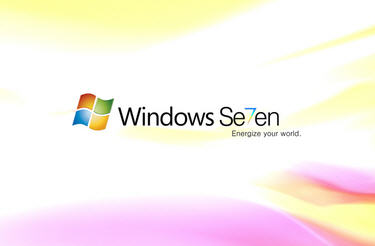
With the backlash and failure of Vista, Windows is quickly moving to Windows 7. This OS is focused on correcting all the Vista short comings, while providing a faster operating system and speedy USB enumeration.
However, upgrading or installing Windows 7 from a DVD takes a long time. You can speed up the process by putting the Windows 7 ISO file on a USB stick and install from there.
The guys at Think Computers, put together a nice tutorial. The USB tutorial covers the placement of Win7 on a custom USB flash drive, then doing a complete install from the UFD.
Windows 7 is about 2.5GBs so make sure you have a 4GB flash drive before you think about starting this process.
Continue Reading
One of the great things about an Apple iPhone are the abundant number of free or cheap applications you can download. These applications make your life much easier. From Shazam to ID that song playing on the radio, to AroundMe which helps you find things around you like gas stations, coffee houses and hospitals, yet sometimes you need a physical upgrade to make your iPhone a bit better.
Today, USBFever introduces the mini microphone for the iPhone. This small attachment makes it possible to record conversations, depositions, meetings or interview conversations for you live bloggers.
The iPhone is truly becoming your single device for mobile travel, work and communication. I’m mean really, what else do you need? Maybe video capability…
Continue Reading
America takes comfort in the fact we lead technology, but with mobile devices we are the exception. Europe is way ahead of us and so is China. In fact, back in Dec 2006, China made the decision to standardize cell phone charges to have a micro USB port. The reason, to reduce waste. Back then, you purchased a phone and you’d get a new wall charger. The charger was loaded with lead, plastic etc. Today, you simply get a USB cable.
Last week 17 mobile phone companies officially made the plung to accept micro USB as the connection for recharging cell phones. This decision was based on the same reasons as mentioned above.
Continue Reading
What is more economical: Buying a 2GB flash drive or downloading a $0.99 cent application to get 2GBs of free storage on your iPhone? Don’t answer. We know.
MiDisk is one of those great iPhone applications. The app gives you the ability to create Directories on your iPhone for storing files, documents etc. It’s great because you don’t need the iPhone sync app – you can use the iPhone as a mass storage device.
So how do you make the iPhone a mass storage device of 2GBs?
Turn on the application (while in Wi-Fi), point a web browser to the link that it gives you, and there you go. You have full access to all information stored within this application. The information held inside the application is protected by a PIN number. To turn on access to the files within the application, your PIN number must be entered.
You can also view your documents with the built in documents viewer. You can view image, text, PDF, and many more types of files.
Wi-Fi is required to use this application. In situations where a Wi-Fi network is not available, if the computer supports Ad-Hoc, you are set.
Store your information in multiple directories to keep organized. Easily remove and add new files as you need.
Here is the step-by-step:
Continue Reading
USBFever has a 5 port USB wall charger for those a bit light on USB ports, yet need something to charge those iPhones, iPods and PDAs.
The USB SuperTravel has 4 standard USB ports and one miniUSB port. It’s no longer required to haul around your laptop just to power up your gadgets while on the go.
The kit includes world voltage acceptance with plugs that cover you in US, UK, AU and EU. The charger will auto detect the voltage and adjust accordingly so no mess with figuring out which fuse or setting is needed in different countries.
USBFever is offering the USB wall charger for $26.
Continue Reading
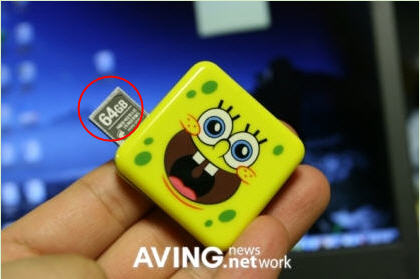
Yes we do…or at least the 64GBs of memory…and yes, I said gigabits, not megabits. No word or price for the Spongebob drive, but it’s expected to display at CeBiT 2009, so we’ll find out soon enough.
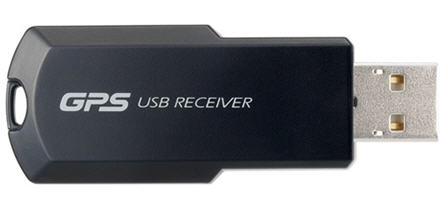
The individual user wouldn’t need this, but a GPS dongle for the corporate world would have it’s benefits. For this reason, I-O Data released their first USB GPS key.
Now team this device up with Google Maps and any control freaked boss could track your where-a-bouts 24/7 [or is the new term 31]. Anyway, the USB GPS unit will cost you about $175 USD. That seems a bit steep as you could furnish your employee with a Blackberry or iPhone for $199, and have the same benefits with loads more features.
But, for those on-site job descriptions this would also fit the bill.
Continue Reading