Administator for GetUSB.info
GetUSB.info started in 2004 with the concept of providing USB information for everything USB related. At the time, USB was gaining momentum and every day new products, articles and news became published. Today, the site is focused on bringing technical information, tricks and hacks to USB related products. The site does publish off topic information as well, to keep the variety up. Please visit the footer area of any page if you or your company is interested in article or product placement via purchased advertising.
So here is a sweet little deal I stumbled upon at USBFever. For $27 you can get a USB hard drive case with biometric fingerprint encryption scanner.
Given how cheap USB hard drives are these days, it’s easy to have them become your backup device of choice. Well, if you’re like me, chances are you are backing up the QuickBooks or MAS90 accounting programs which need a bit more security. It would be bad enough to lose your portable hard drive, so at least protect it with your fingerprint.
The USB hard drive case with biometric encryption supports the IDE / USB 2.5″ hard drive sizes along with plug & play insertion and removal.
The fingerprint biometrics supports all Windows platforms, but not Mac. So if you’re about to drop $15-$20 for an external case, pay just a couple bucks more and get the USB encrypted version.
Continue ReadingNo Comments
iLuv is showing their love to USB with this three port charger. Not only does it support multiple devices, it looks cool too.
iLuv put in a flip-out AC adapter so if the USB charger needs to be stored or thrown in a desk drawer it’s a bit more compact. Not much else to report about it other than a $20 price tag and available in Sep 09.
Continue ReadingNo Comments
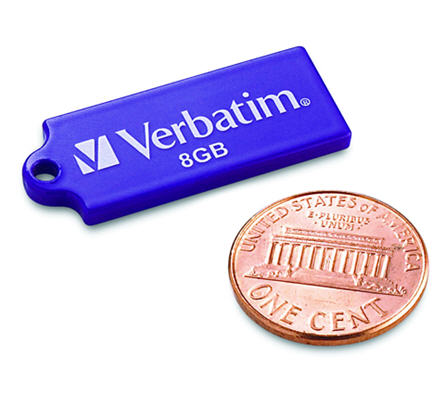
Verbatim has been busy these days. On Monday we reported about the Verbatim USB Tuff Clip flash drive, and today Verbatim is announcing their new Tuff-N-Tiny USB flash drive.
At the thickness of a penny and about twice as long, the Tuff-n-Tiny USB drive is available in 4 & 8GB sizes. It’s almost the side of microSD card.
The stick gets so incredibly small, because of it’s SIP technology which encapsulates all of the electronic components into a single miniaturized and sealed unit. As a result, the tiny drives are resistant to dust, water and static discharges.
Our comment about this drive, and any other drive which uses the same USB contacts [image below]
Continue ReadingNo Comments
Verbatim turned 40 this year and one of the products they have released to celebrate is the USB TUFF CLIP flash drive. Designed for the everyday use by a teen or college student the USB TUFF CLIP is made of ABS plastic and includes a retractable USB connector. In addition the TUFF CLIP comes with the obvious carabineer clip.
The clip is the compelling part about this project, as you can pick up a 4 or 8GB flash drive just about anywhere. The clip is well designed to fasten the flash drive to backpacks, key chains, belt loops and notebooks. With a capless design the caps wont fall off or get lost while dangling from your person.
The 4 [light blue] & 8GB [black] drives are priced at $29 and $39 respectively.
Continue ReadingNo Comments
Back in June of 2009 I made a joke that GetUSB.info had a USB Steampunk award, now I’m seriously considering it. Especially after seeing this new rendition.
This USB steampunk drive was made by a Russian modder. He traveled to a local rag fair [I’m assuming street fair] to pick up old clock parts and gears. The guy also picked up some stock brass tubing and screw rods to build a sturdy housing. Then off the the metal shop.
The source website, EnglishRussia, has the entire tutorial on how to do this crafty artwork. It’s far more interesting than educational, so if you are curious about the
Continue ReadingNo Comments
It’s not often you can merge the terms USB and Rock Star together. I can’t picture one scenario…but Intel can – and did. Here is their 20 second promo on USB technology. Funny, classic funny.
Source: DailyCupOfTech.
Continue ReadingNo Comments
Mimo has made a fairly good name for itself with the 710 series USB monitor…a compact 7″ add-on monitor. Well, these guys have one-upped themselves with the new 710-S. This is a USB monitor which is now slider slim sweetness.
Just check out this picture and you’ll understand why.
Mimo better dump all their old 710 inventory because everyone will want this new version.
The 7″ display has a display resolution of 800 x 400, contrast ratio of 400:1, and brightness around 350 cd/m2. Of course, the only connection needed, including power, is a USB connection.
The 710-S pivots 90 degrees and
“The integrated stand protects the screen from scratches when closed.”
As Windows 7 is set to release sometime in October, today we heard there is an update to USB support. Honestly, I don’t know exactly what it means, but the quote is, “adding new USB and drive sharing support options…”
Does this mean you can set a USB stick as a shared device, maybe there is a default USB wireless support built in, I’m not sure, but maybe the following information will help.
The information I have is simply a download link to try out the “release candidate” for Windows 7. Here it is. If you have time, give it a download and try…see what the USB sharing is all about. I’d do it myself, but honestly…I’m too knee deep in other projects at the moment.
As a quick highlight, the Windows 7 requires an additional 1GB of RAM and 15GBs of disk space. We’ve also learned that XP virutal desktop will be preloaded on most new PCs and clearly an option for those who upgrade. Meaning, any software package built around .NET and XP will have full support under Windows 7. Microsoft did this so that large corporations don’t have to worry about software updates with an OS update. Just focus on the OS update and the software will still work. BUT – Windows 7 is built on Vista code [scary] so only time will tell.
Source:Â ARN.
Continue ReadingNo Comments
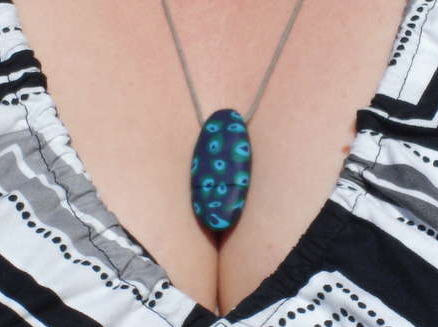
Here is a great gift idea that includes a splash of tech…give the gift of millefiori glass with a USB stick tucked inside. Granted, the picture is what caught my eye for this article, but the bottom line is that: it IS a good gift idea.
Personally an image like this might work even better…but who am I to judge.
To create the millefiori USB drive can be done in several simple steps. If you haven’t heard of millefiori then let me tell you: Millefiori is a glass work technique which produces distinctive decorative patterns on glassware. The term “millefiori” is a combination of the Italian words “mille” (thousand) and “fiori” (flowers).
The millefiori technique has been applied to polymer clays and other materials. Because polymer clay is quite pliable and does not need to be heated and reheated in order to fuse it, it is much easier to produce millefiori patterns than with glass. And this is what we are going to do today.
In seven steps you can produce a nice looking USB necklece. The detailed how-to is over at Instructables but here is the general idea.
Get a small USB flash drive and take it apart. Get some polymer clay, such as Fimo Soft or Fimo Effect. Prep the millefiori material into a cane like shape. Include a core in the cane shape as this is where the USB stick will go. Cut the cane so you have
Continue ReadingNo Comments
This isn’t the first time we’ve seen a USB tattoo and it isn’t the first time we’ve asked ourselves “why?” But here we are…asking that question again:
Is it me, or does this arm look like it belongs to a woman? Interesting.
Sometimes you need a USB stick to always use the same drive letter. Whether it’s backup software needing to point to a specific storage device, or you use a Windows Office application which requires a specific drive letter – sometimes it is just needed.
Given that Windows will assign a drive letter as a first-come, first serve basis to removable media it can get frustrating to always try for the same drive letter. Here is one way to assign a specific drive letter to a USB drive.
Before you can assign a drive letter to a USB device, take a look at what drive letters you have available. This will vary depending on what’s connected, networked drives and mapped drives in your system. Simply go to START > MY COMPUTER and take a look.
Next, plug in your USB drive to your computer and let Windows enumerate it [see it].
Navigate to:Â START > CONTROL PANEL > ADMINISTRATIVE TOOLS > COMPUTER MANAGEMENT >
An alternate way to get to the same spot is START > RUN > “diskmgmt.msc”
In the left panel expand the Disk Management icon. On the right side you’ll see all the drives available. Right click on the Removable drive and select “Change Drive Letter and Paths”
Click the Add button and choose a drive letter not already in use from the drop-down list. Click OK.
Now exit or close all the dialogue windows and you’re set. Now, each time this specific USB stick is plugged in, Windows will assign it the same drive letter.
Note:Â Windows is associating the serial number of the device to the request you’ve entered above, SO, you’ll need to perform this same process for different flash drives.
Spread the word and enjoy.
Continue ReadingNo Comments
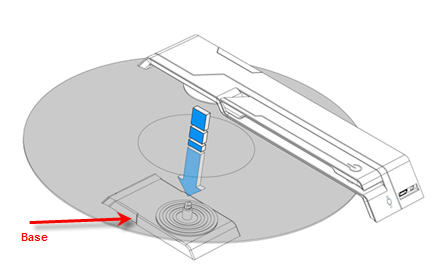
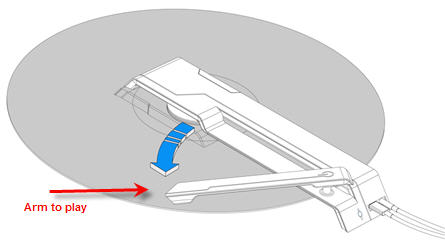
Albiet a concept design, this is one portable looking USB vinyl record player. Comprised of just two parts, a base and top, the USB vinyl record player is meant for table top play back. Granted, you’ve got to ask yourself who’s in such need of a portable solution, but for the die hard vinyl fan who just can’t stand MP3 this is a sure bet.
Published on Pyott Design they give you 3 easy steps:
1) Carry around & store as needed. To play separate base and player via side button.2) Place record on base spindle and reattached top player
3) Plug in power jack to USB port and additional audio jacks if needed. Will play 35/45 RPM
4)Â Place needle head on desired track and play.




 To create the millefiori USB drive can be done in several simple steps. If you haven’t heard of millefiori then let me tell you: Millefiori is a glass work technique which produces distinctive decorative patterns on glassware. The term “millefiori” is a combination of the Italian words “mille” (thousand) and “fiori” (flowers).
The millefiori technique has been applied to polymer clays and other materials. Because polymer clay is quite pliable and does not need to be heated and reheated in order to fuse it, it is much easier to produce millefiori patterns than with glass. And this is what we are going to do today.
In seven steps you can produce a nice looking USB necklece. The detailed how-to is over at Instructables but here is the general idea.
Get a small USB flash drive and take it apart. Get some polymer clay, such as Fimo Soft or Fimo Effect. Prep the millefiori material into a cane like shape. Include a core in the cane shape as this is where the USB stick will go. Cut the cane so you have
Continue Reading
No Comments
To create the millefiori USB drive can be done in several simple steps. If you haven’t heard of millefiori then let me tell you: Millefiori is a glass work technique which produces distinctive decorative patterns on glassware. The term “millefiori” is a combination of the Italian words “mille” (thousand) and “fiori” (flowers).
The millefiori technique has been applied to polymer clays and other materials. Because polymer clay is quite pliable and does not need to be heated and reheated in order to fuse it, it is much easier to produce millefiori patterns than with glass. And this is what we are going to do today.
In seven steps you can produce a nice looking USB necklece. The detailed how-to is over at Instructables but here is the general idea.
Get a small USB flash drive and take it apart. Get some polymer clay, such as Fimo Soft or Fimo Effect. Prep the millefiori material into a cane like shape. Include a core in the cane shape as this is where the USB stick will go. Cut the cane so you have
Continue Reading
No Comments