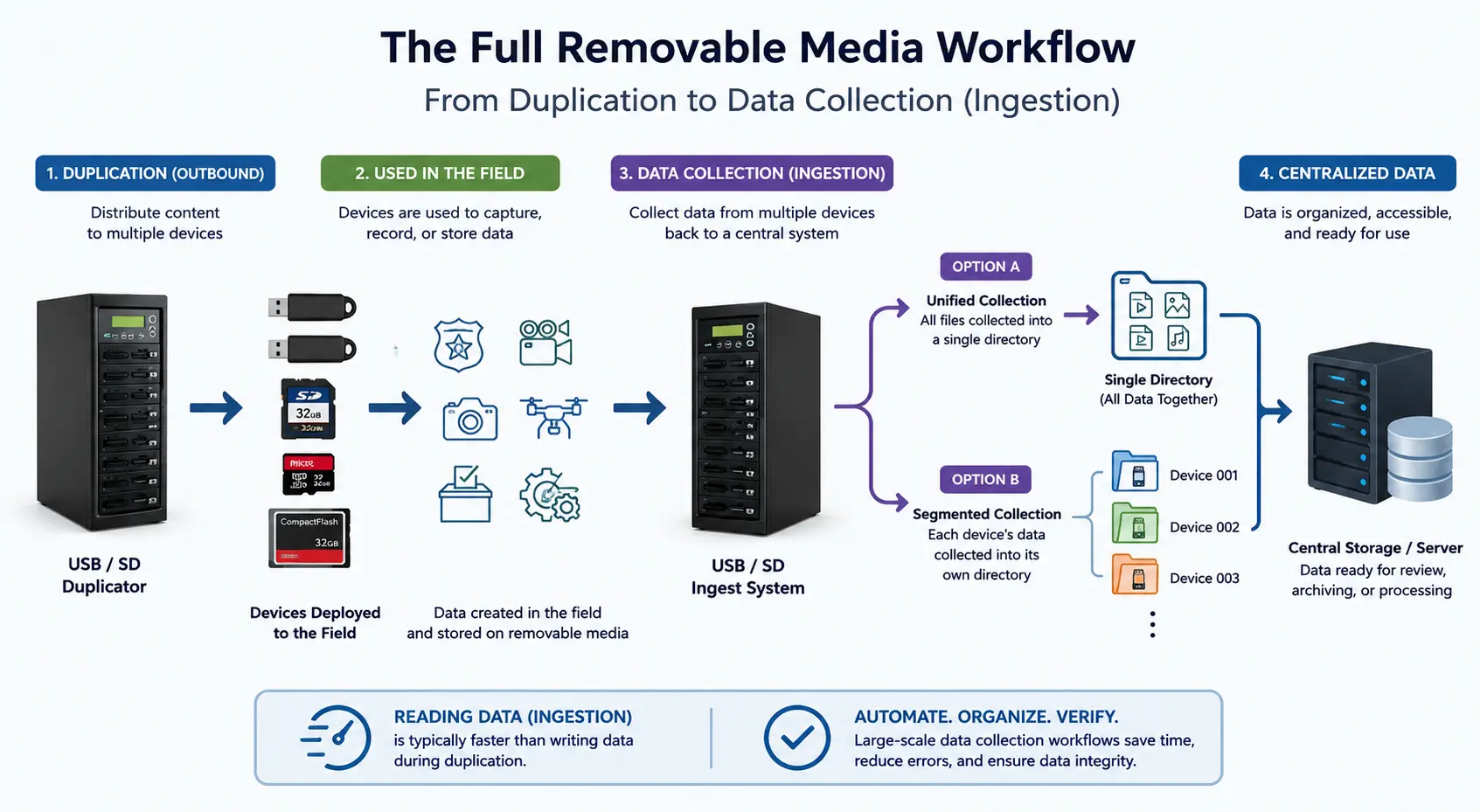
When most people think about USB duplication systems, they picture content going outward. A company loads software onto a thousand flash drives. A school distributes coursework to students. A marketing team hands out promotional USB sticks at a trade show.
The workflow is easy to understand because it follows a familiar direction: copy data onto media and distribute it.
What often gets overlooked is the opposite side of the workflow — getting that data back.
For organizations operating in the real world, collecting data from large numbers of USB drives, SD cards, microSD cards, and other removable media has quietly become its own operational challenge. In many cases, the collection process is now more complicated than the original duplication process itself.
The reason is simple. Modern organizations are generating enormous amounts of field data.
Law enforcement agencies collect body camera footage and patrol recordings. News organizations gather photographs and video clips from reporters in the field. Election systems archive data from voting infrastructure. Industrial teams retrieve logs from embedded systems. Drone operators return with memory cards full of aerial footage. Medical and scientific organizations collect portable data from distributed devices operating far away from centralized servers.
At small scale, this kind of work is manageable with a stack of USB hubs and a few employees manually dragging files into folders.
At large scale, the workflow breaks down quickly.
The problem is not simply copying files. The real challenge becomes organization, verification, consistency, and speed.
That is where large-scale removable media data collectionA workflow system for automatically retrieving and centralizing data from multiple removable storage devices. systems enter the picture.
What Is a Removable Media Data Collection Workflow?
A removable media data collection workflow is a system designed to automatically retrieve files from multiple storage devices and centralize the content onto a single destination system.
The storage media may include:
- USB flash drives
- SD memory cards
- microSD cards
- CompactFlash cards
- CFast media
- External SSD devices
The goal is not duplication outward to users. The goal is aggregation inward from distributed devices, cameras, systems, or operators.
This distinction matters because the operational requirements are completely different. In many industries, the process is commonly referred to as media ingestion or removable media ingest workflows. While newcomers may think of the task as simply “copying files,” organizations handling large numbers of storage devices typically view the process as part of a broader ingestion pipeline involving automation, organization, verification, and centralized asset management.
Traditional duplication systems focus on:
- deployment
- replication
- imaging
- write protection
- media preparation
Data collection systems focus on:
- centralized ingest
- file harvesting
- workflow automation
- organization
- verification
- source tracking
The two categories may appear similar from the outside, but in practice they solve very different problems.
The Hidden Bottleneck Most Organizations Eventually Encounter
Most organizations do not initially plan for large-scale media collection workflows.
The process often begins informally.
Someone plugs memory cards into a laptop. Another employee copies files from USB drives into a shared folder. A producer gathers media from photographers after an event. A technician downloads log files from field equipment at the end of a shift.
For a while, manual collection works well enough.
Then scale changes everything.
Ten devices becomes fifty. Fifty becomes several hundred. Suddenly, hours are spent sorting files, renaming folders, checking for duplicates, and trying to determine which files came from which device.
At that point, the bottleneck is no longer storage capacity.
The bottleneck becomes workflow management.
This is where many organizations realize that removable media collection is not simply a copy-and-paste task. It is an operational process that requires structure and automation.
Unified Collection Versus Segmented Collection
One of the more interesting aspects of large-scale data collection is that organizations often need completely different types of workflows depending on the nature of the data being collected.
In general, most collection systems fall into two categories.
Unified Collection
In a unified collection workflow, files from all connected media devices are gathered into a single destination directory.
This method is often used when the origin of the files is less important than the content itself.
Examples include:
- photography teams
- media production crews
- event coverage
- marketing departments
- creative agencies
A newsroom collecting photographs from multiple photographers after a sporting event may simply want all media centralized into one production folder where editors can immediately begin sorting content.
The emphasis is speed and convenience.
Segmented Collection
In a segmented workflow, every memory device receives its own dedicated destination folder during the collection process.
This preserves the relationship between the files and the original storage device.
For many organizations, this distinction is critically important.
Examples include:
- law enforcement evidence collection
- election data archiving
- compliance workflows
- industrial logging systems
- medical data retention
In these environments, preserving chain-of-origin informationData that tracks the source and history of files collected from removable media devices. matters just as much as collecting the files themselves.
A body camera recording may need to remain associated with the original officer device. Election records may need to remain separated according to voting system source. Industrial inspection logs may require device-specific tracking for compliance purposes.
The collection system is no longer acting as a simple file copier. It becomes part of the operational recordkeeping process.
Discussions surrounding removable media evidence handling and forensic recovery continue to evolve across both enterprise and investigative environments. One interesting public discussion about recovering information from damaged USB devices can be found on Reddit’s computer forensics community, where professionals discuss the realities and limitations of data extraction workflowsAutomated processes for collecting, organizing, and verifying data from multiple removable media devices into a centralized system..
Data Collection Is No Longer Just About USB Drives
Although USB flash drives remain one of the most common forms of removable media, many modern workflows now involve multiple storage formats operating side by side.
This is especially true in media production and field operations.
A photography team using SD duplicator systems may return from an assignment carrying:
- SD cards from DSLR cameras
- microSD cards from drones
- USB flash drives containing transfers between teams
- portable SSD devices used for backup recording
Similarly, industrial and embedded systems often generate data across several different removable media standards depending on the age and purpose of the equipment.
As a result, organizations increasingly look for collection systems capable of handling multiple media formats within the same workflow rather than maintaining separate ingestion systems for each media type.
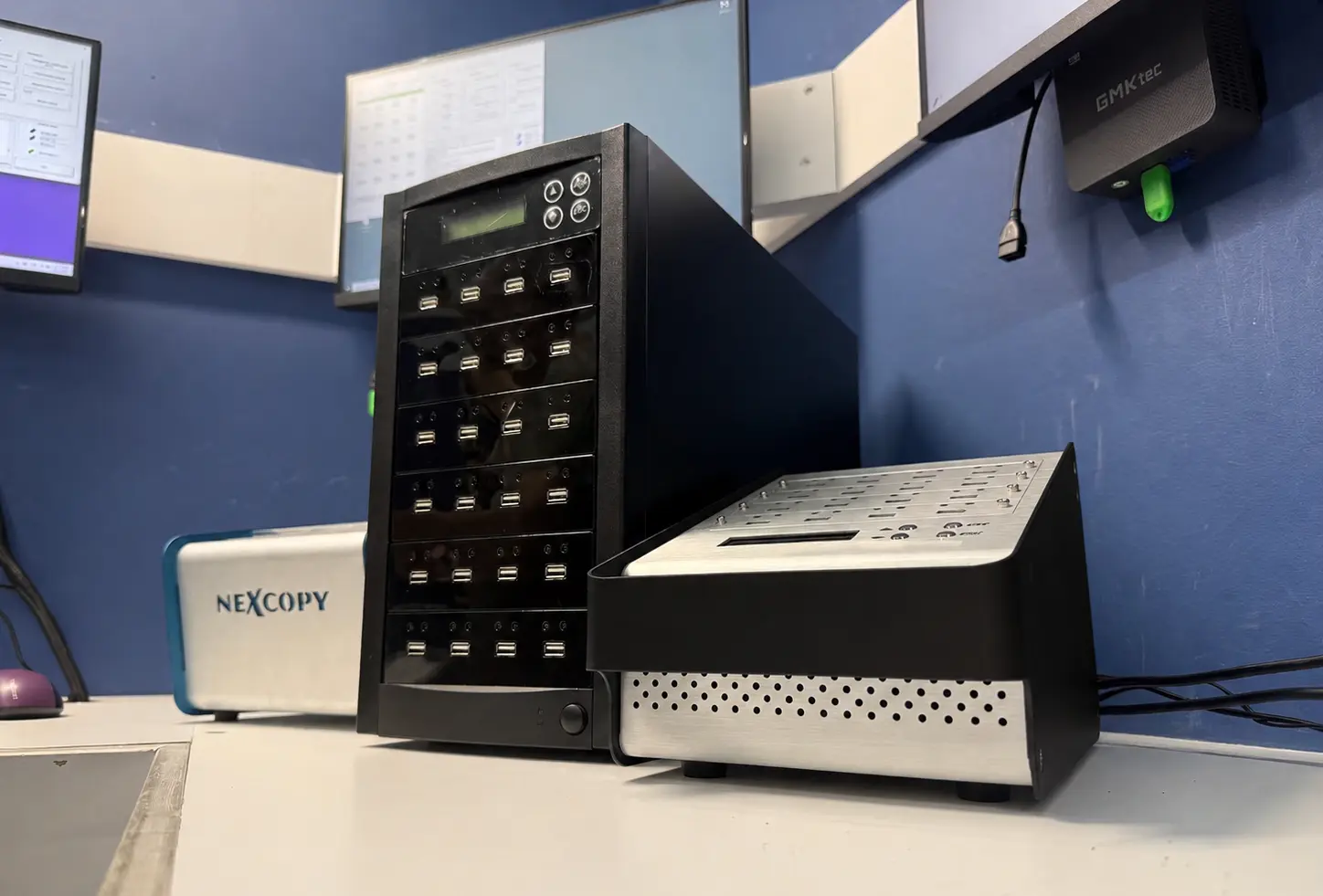
This is one of the reasons removable media collection has evolved into a specialized category rather than simply remaining an accessory feature of duplication equipment.
Real-World Examples of Large-Scale Data Collection
The most interesting thing about removable media collection workflows is how often they operate quietly in the background of industries most people never associate with USB technology.
Election System Data Collection
One example involves election infrastructure.
Various voting systems generate removable media data that must later be collected and archived as part of broader election recordkeeping procedures.
In these environments, the challenge is not merely transferring files. The challenge is collecting data from large numbers of devices while preserving organization and maintaining efficient workflows under strict timelines.
Because the data may originate from numerous locations and systems, automation becomes extremely valuable.
The process is less about convenience and more about consistency and repeatability.
Law Enforcement Video Archiving
Another example involves law enforcement agencies collecting digital video evidence from patrol operations and body-worn camera systems.
Modern policing generates enormous amounts of digital footage.
At the end of a shift or operational cycle, organizations may need to retrieve and archive content from large numbers of storage devices quickly and consistently.
In many cases, maintaining device separation and preserving folder structures becomes part of the workflow requirement itself.
Again, this moves the process far beyond basic file copying.
News and Photography Workflows
Photography and news organizations provide another excellent example.
Field photographers often return from assignments carrying multiple memory cards filled with RAW images and video footage.
Producers and editors typically need fast centralized access to those assets so content can move into editing pipelines immediately.
The challenge is not whether files can be copied. Any laptop can technically copy files. Even basic USB benchmark testing can demonstrate how modern storage devices are capable of very high read speeds during ingestion workflowsAutomated processes for collecting, organizing, and verifying data from multiple removable media devices into a centralized system..
The challenge is collecting large volumes of media quickly while minimizing confusion, delays, and organizational mistakes.
This is especially true during live event coverage where turnaround times are measured in minutes rather than hours.
Comparison of Removable Media Collection Workflow Capabilities
View Removable Media Collection Workflow Comparison Table
| Company | Media Ingest Capability | Unified Collection | Segmented Device Collection | USB Media | SD / microSD Media | Workflow Automation |
|---|---|---|---|---|---|---|
| Disc Makers | No | No | No | USB | No | No |
| EZ Dupe | No | No | No | USB | Partial | No |
| StarTech | No | No | No | USB | Partial | No |
| Nexcopy | Yes | Yes | Yes | USB | Yes | Yes |
| U-Reach | No | No | No | USB | Partial | No |
| Kanguru | No | No | No | USB | Partial | No |
Feature support based on publicly available product specifications and removable media workflow capabilities at the time of publication.
How this article was created: This editorial was researched and written using a combination of industry experience, technical workflow analysis, publicly available product information, and AI-assisted drafting tools. The final article was reviewed, edited, and fact-checked by the author to ensure technical accuracy and real-world relevance regarding removable media collection workflows, ingestion systems, and flash storage operations.
Let GetUSB.info keep you updated.
Receive article notifications about USB storage, flash memory, and duplication updates in your preferred language. We average a couple of articles per week.