If you came here trying to defrag a USB stick or TRIM a USB flash drive, the reason you hit a dead end is simple: those tools do not apply to USB flash drives the way they do to hard drives and SSDs.
You found this article because you are trying to defrag a USB stick or TRIM a USB flash drive, and you have probably noticed something frustrating – there is no option to do either. No setting, no tool, nothing that works the way it does for a hard drive or SSD. That is not a mistake, and it is not something hidden in a menu somewhere. You simply cannot defrag or reliably TRIM a USB flash drive, and once you understand how these devices work, the reason becomes pretty clear.
It usually starts the same way. You notice a USB flash drive slowing down, or maybe you are just trying to do the right thing from a maintenance standpoint, so you go looking for tools. In some cases, it helps to measure what is happening before trying to fix it, and we have covered that in our guide to USB benchmark software, but more often than not, the search leads people down the wrong path of defrag and TRIM.
That confusion is not your fault. The storage industry reused familiar ideas, but under the hood, USB flash drives operate differently enough that those tools do not translate the way you would expect.
The Defrag Assumption
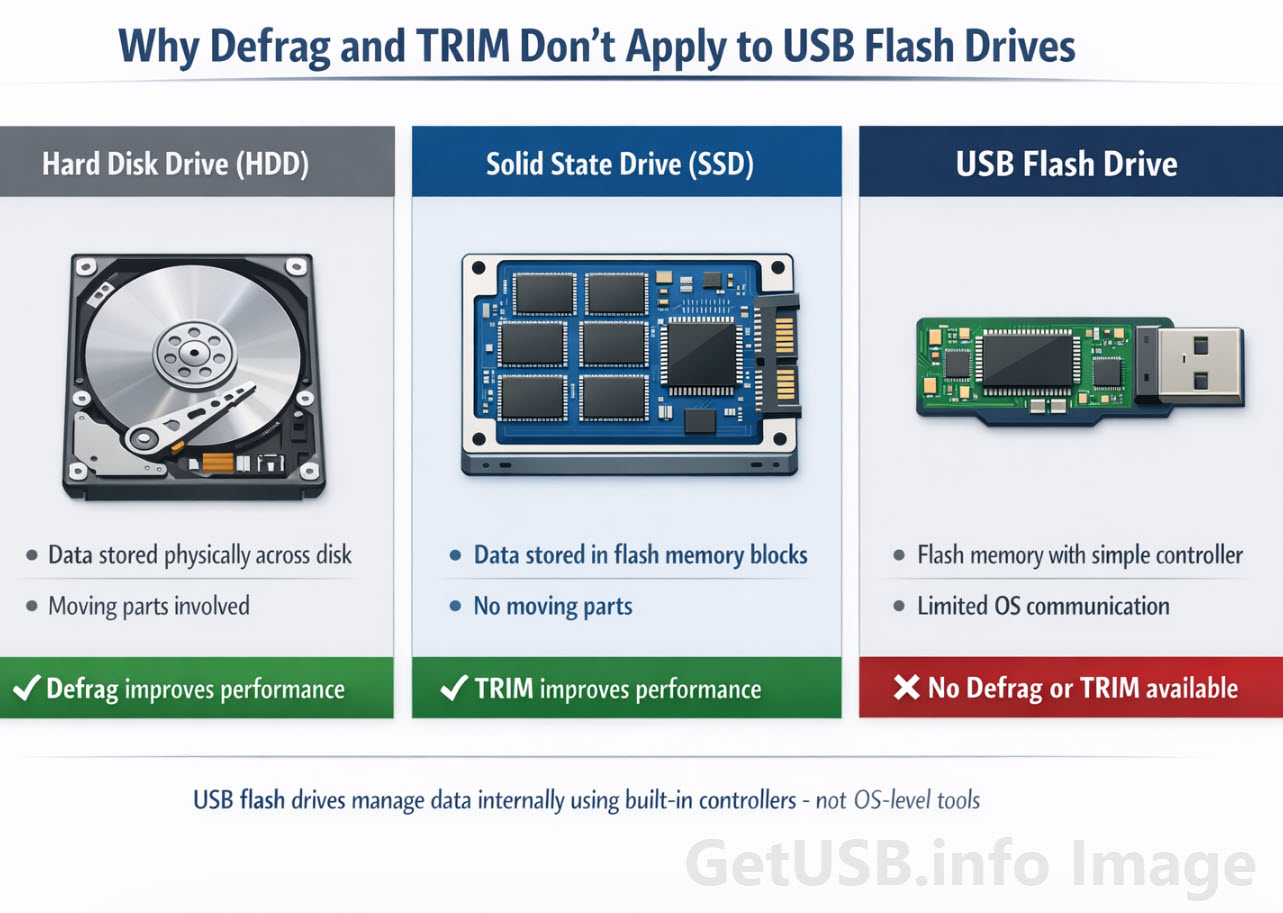
Defragmentation made perfect sense in the era of spinning hard drives. Data scattered across the disk meant the read and write head had to physically move around, which slowed everything down. Defrag tools simply reorganized the data so it was stored in one continuous block, reducing mechanical movement and improving performance.
A USB flash drive does not work like that at all. There are no moving parts, no read and write head, and no physical distance penalty when accessing data. Whether a file is stored in pieces or all together does not really change how quickly it can be read.
So when people ask if they should defrag a USB stick, the honest answer is no, and not just because it is unnecessary. Rewriting data repeatedly on flash memory adds wear, so defragging can actually shorten the life of the device rather than improve it. If you are thinking in terms of maintenance, tasks like formatting a USB drive correctly are far more relevant than trying to reorganize data that does not benefit from it.
Where TRIM Enters the Conversation
Once defrag is ruled out, many people land on TRIM because it is often described as the SSD equivalent of maintenance. That description is a bit misleading, but it is understandable why it sticks.
TRIM is a command used by an operating system to tell a storage device which blocks of data are no longer needed. When you delete a file, the system does not necessarily erase it immediately; it usually marks the space as available. TRIM is the extra step where the operating system informs the device that those blocks can be cleaned up in advance.
On an SSD, this matters a lot. Flash memory cannot simply overwrite old data. It has to erase entire blocks before writing new data, and that process becomes slower if the drive is constantly juggling old data that might still be valid. TRIM clears up that uncertainty and helps an SSD maintain more consistent performance over time.
Why You Can’t TRIM a USB Flash Drive
This is where expectations and reality start to separate.
In theory, a USB flash drive could support TRIM. In practice, most do not, at least not in a way you can use or rely on. For TRIM to work, three things need to line up: the operating system has to send the command, the connection protocol has to support it, and the flash drive controller has to recognize and act on it. With USB sticks, that chain is often broken somewhere along the way.
Many flash drives use simpler controllers that do not expose TRIM functionality to the operating system, even if the underlying memory could benefit from it. Others may technically support it but operate over a USB connection that does not pass the command through in a meaningful way. From your perspective as the user, the result is straightforward: there is no reliable way to TRIM a USB flash drive, and no tool that consistently enables it.
What the Flash Drive Is Doing Instead
Even without TRIM, the drive is not completely blind. Every USB flash drive has a controller that manages how data is written and erased behind the scenes. It keeps track of where data lives, spreads writes across memory to avoid wearing out specific areas, and performs cleanup operations when it has the opportunity.
A helpful way to think about it is a warehouse.
Without TRIM, the workers in the warehouse assume every box still matters, even if some of them are actually trash. When new shipments come in, they have to carefully move and preserve those old boxes just in case, which slows everything down.
With TRIM, someone walks through the warehouse and marks certain boxes as discardable ahead of time. Now the workers can clear space efficiently before new shipments arrive, making the whole operation smoother.
USB flash drives operate mostly in that first scenario. The controller figures things out on its own, but it does not always have clear guidance from the operating system about what data is truly no longer needed.
Why This Usually Isn’t a Problem
The reason this has not become a major issue for most users comes down to how USB drives are typically used. They are written to, used for transport or storage, and then left alone for periods of time. That is a very different workload compared to an SSD running an operating system with constant read and write activity.
Because of that, the lack of TRIM support does not usually lead to dramatic slowdowns in everyday use. Where you might notice it is with heavy reuse, frequent rewriting, or lower quality drives where the controller has fewer resources to manage data efficiently. In those cases, the better next step is not defrag or TRIM, but understanding how the device is performing in the first place, which is exactly why a practical look at USB benchmark software can be more useful than maintenance tools designed for a different class of storage.
It is also worth remembering that not every slowdown points to something you can fix with software. Sometimes the limitation is simply the flash memory itself, the quality of the controller, or the way lower-capacity and lower-cost media behave once they have been filled and reused over time. That is part of the bigger story behind flash performance, and it is something we touched on in The Dirty Little Secret of 32GB Flash Drives.
For a deeper look at how data is handled, protected, and managed at the device level, it is also worth understanding the difference between USB copy protection and USB encryption, which ties directly into how controllers manage data behind the scenes.
The Takeaway
If you came here looking for a way to defrag or TRIM a USB flash drive, the answer is simple: you cannot, and you do not need to.
Defrag does not apply because there are no moving parts to optimize, and TRIM is not something most USB flash drives support in a meaningful or user-accessible way. Instead, the device handles its own housekeeping internally, for better or worse.
Put simply, USB flash drives follow a different set of rules, even though they are built on similar flash memory technology.
Editorial & Content Transparency
This article was developed based on the author’s direct experience working with USB flash media, controllers, and storage behavior in real-world environments. The structure, technical direction, and explanations reflect that hands-on perspective.
Artificial intelligence tools were used to assist with sentence flow, rhythm, and readability, helping shape the delivery of the content without altering the technical accuracy or conclusions.
The accompanying image was created through a collaborative process between the author and AI tools, with the author guiding the concept, layout, and visual intent to ensure it aligns with the subject matter.
Let GetUSB.info keep you updated.
Receive article notifications about USB storage, flash memory, and duplication updates in your preferred language. We average a couple of articles per week.