
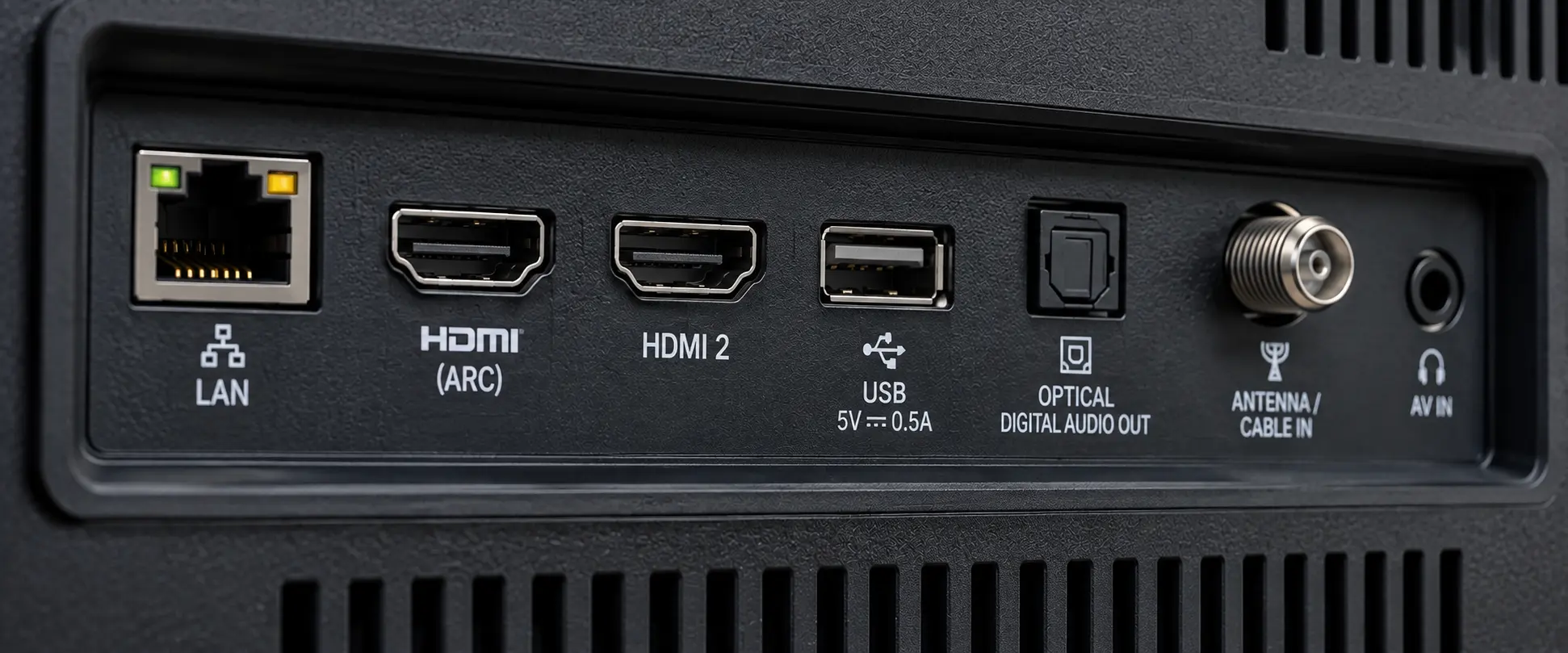
I recently read an article arguing that smart TVs are being held back because manufacturers continue to use USB 2.0 ports instead of USB 3.0. The argument sounds reasonable at first. USB 3.0 is newer, USB 3.0 is faster, therefore a modern television should have USB 3.0.
But the more I thought about it, the less the argument made sense.
There are several reasons why USB 2.0 remains perfectly reasonable for a television, and the biggest one is simple: a television isn’t a computer. The USB port on the back of a TV has a very specific job, and adding substantially more bandwidth to that port doesn’t necessarily make the television perform any better.
USB 2.0 Already Has Enough Bandwidth for 4K Video
The first issue is bandwidth.
USB 2.0 has a theoretical maximum transfer rate of 480 MbpsThe theoretical maximum data transfer rate of USB 2.0, equal to 480 megabits per second.. Nobody should expect to get the full 480 Mbps of actual file-transfer performance from a USB 2.0 flash drive. Protocol overhead, the USB controller, the flash memory and the storage device itself all reduce real-world performance.
However, even if we use a much more realistic USB 2.0 read speed of approximately 25 to 40 MB/s, we’re still talking about roughly 200 to 320 Mbps of available data throughput.
Now compare that with the amount of data a television actually needs to play compressed 4K video.
A typical compressed 4K video stream may require somewhere around 20 to 60 Mbps. Even a very high-quality HEVC video running at 100 Mbps requires only about 12.5 MB/s of sustained read performance.
USB 2.0 can handle that.
Movie File Size Isn’t the Important Number
This is also where the argument about “large 4K movie files” becomes misleading. The physical size of the movie file doesn’t determine how quickly the USB interface needs to read it. The bitrate does.
A 20GB movie encoded at 60 Mbps and a 100GB movie encoded at 60 Mbps place essentially the same bandwidth requirement on the USB connection during playback. The larger file contains more data, but the television still only needs to consume that data at approximately 60 Mbps while the video is playing.
This is very different from the way most of us think about USB performance on a computer.
If I’m copying 100GB of data from one USB device to another, I absolutely care whether I’m using USB 2.0 or USB 3.0. I don’t want to sit there waiting for 100GB to transfer at USB 2.0 speeds. In that application, USB 3.0 provides an obvious and significant benefit.
A television isn’t doing that.
For normal media playback, the television is primarily reading a continuous stream of data from the USB storage device and feeding that data into the video decoder. Once the USB interface can supply data faster than the decoder consumes it, making the USB connection ten times faster doesn’t make the movie play ten times better.
The pixels don’t get sharper because they arrived early.
A Smart TV USB Port Isn’t a PC USB Port
There is another reason television manufacturers may not be rushing to install faster USB ports, and I think this one gets overlooked even more often.
The USB port on a smart TV is deliberately limited by the television manufacturer.
Plugging a USB device into a Windows PC gives you access to an operating system designed to support thousands of USB devices, drivers and USB device classes. A smart television is completely different. As we’ve explained before about why USB works differently on smart TVs, the manufacturer controls which USB functions the television recognizes and what those devices are allowed to do.
A television might support USB mass storage for movies, photos and music. It might support a keyboard or certain approved accessories. Some televisions use USB for firmware updates or service functions. Other models and regions may support recording television programs to attached USB storage.
Those capabilities are controlled by the television’s firmware and operating system. They aren’t determined by whether the physical USB connection happens to operate at USB 2.0 or USB 3.0 speeds.
There are also good security reasons for manufacturers to keep that USB environment tightly controlled. Every additional USB device class, driver and external interface creates more software to maintain, more compatibility scenarios to test and potentially another attack surface.
Remember, a smart TV isn’t necessarily an isolated appliance anymore. It may be connected to the home’s Wi-Fi network alongside computers, phones, security cameras, network storage and other smart devices. If a malicious USB device or compromised flash drive were able to exploit a vulnerability in the television’s USB stack, media parser or firmware, the problem could potentially extend beyond simply crashing the television. A compromised network-connected device could become another foothold inside the home network.
This gives television manufacturers another reason to be conservative about what the USB port is allowed to recognize and execute. Supporting basic mass storage for movies, photos and music is one thing. Supporting a broad collection of USB peripherals, drivers and device classes is something entirely different. From the manufacturer’s perspective, there is very little reason to turn the USB port into a general-purpose computer interface when the television doesn’t need one.
Putting a 5 Gbps USB 3.0 controller into a television doesn’t magically turn the USB port into the USB port on your computer.
Would USB 3.0 Provide Any Benefit?
There are certainly situations where USB 3.0 could be useful on a television. Faster storage could improve operations involving large amounts of data. USB 3.0 can also provide additional power compared with a standard USB 2.0 port. A manufacturer could design a television to support higher-speed USB Ethernet adapters or other peripherals where the additional bandwidth would actually be useful.
Those are legitimate advantages.
But that is very different from saying USB 2.0 is preventing modern televisions from properly playing 4K videoA high-resolution video format with approximately 4,000 pixels across the horizontal axis..
For ordinary compressed video playback, USB 2.0 already provides considerably more bandwidth than the television normally requires. If a 4K movie is stuttering when played from a USB storage device, I would look at the storage device’s sustained read performance, video bitrate, codec, container format, filesystem, television decoder and firmware before automatically blaming the USB 2.0 interface.
Sometimes Faster Doesn’t Solve the Problem
Sometimes an older interface remains in a product because the manufacturer is saving a few dollars. I’m sure that happens.
Sometimes, however, an older interface remains because the faster interface doesn’t solve a meaningful problem.
For playing compressed video from USB storage on a smart TV, USB 2.0 is a good example. USB 3.0 is unquestionably faster.
The television just doesn’t need most of that speed.
EEAT Note: This article was written by Greg Morris, President of Nexcopy Incorporated. Nexcopy has developed USB duplication, USB testing and flash-memory solutions since 2004. The technical discussion is based on practical experience with USB storage devices, USB transfer performance and flash-memory hardware.
Let GetUSB.info keep you updated.
Receive article notifications about USB storage, flash memory, and duplication updates in your preferred language. We average a couple of articles per week.

