With over 5,300 Diggs, I figure this would be a good article to report about on how to make a sawed-off USB key. Nothing about this project is too technical, but the idea is clever enough it’s gained a lot of attention.
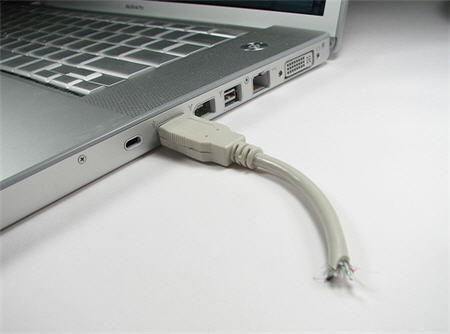
The sawed off UFD is a mod of using a slim Kingmax USB drive, USB cable and some glue + knife for a very cool looking storage device.
The intro line to this tutorial from the main page is:
“Holy crap– somebody just went and TORE MY FREAKING USB CABLE IN HALF while it was still attached to my laptop!!!
No– wait– sorry. That’s just my USB drive. My bad. Never mind.”
Which I think is pretty funny.
So besides getting a slim Kingmax USB drive (here is a 4GB for $15), you will need the following:Â USB cable, X-acto knife, glue, pliers, small screwdriver and some mad cutting skills.
First thing you will want to do is cut open the female end of the USB cable so you can insert the memory for storage. It’s fairly straight forward in the process. Some additional pictures are available at the main page, but even from the above you’ll get the drift.

After this process you will replace the copper connectors of the USB cable with the slim Kingmax drive. This will give the appearance of the storage device being a USB cable, but those connectors really go to the UFD.

After gluing everything back together, you’ll need to cut the USB cable in such a way it looks as though it’s torn off or sawed off. This will give your UFD the look of something crazy just happened.
The author has a good tutorial on the project along with additional pictures on his flickr page.
Original article:Â Here.