USB charging is something most of us don’t spend much time thinking about. A phone needs power, so we plug it into a charger. The same is true for headphones, cameras, flashlights, GPS devices, watches and dozens of other small electronic devices we use every day. What makes this arrangement work so well isn’t necessarily USB. It’s the electrical outlet sitting a few feet away.
Take away that electrical outlet for five or six days and USB charging becomes a much more interesting problem. Battery capacity matters, charging efficiency matters and even the USB cable starts to matter. More importantly, every bit of stored electricity has a physical weight because the battery cells required to store that energy have to be carried with you.
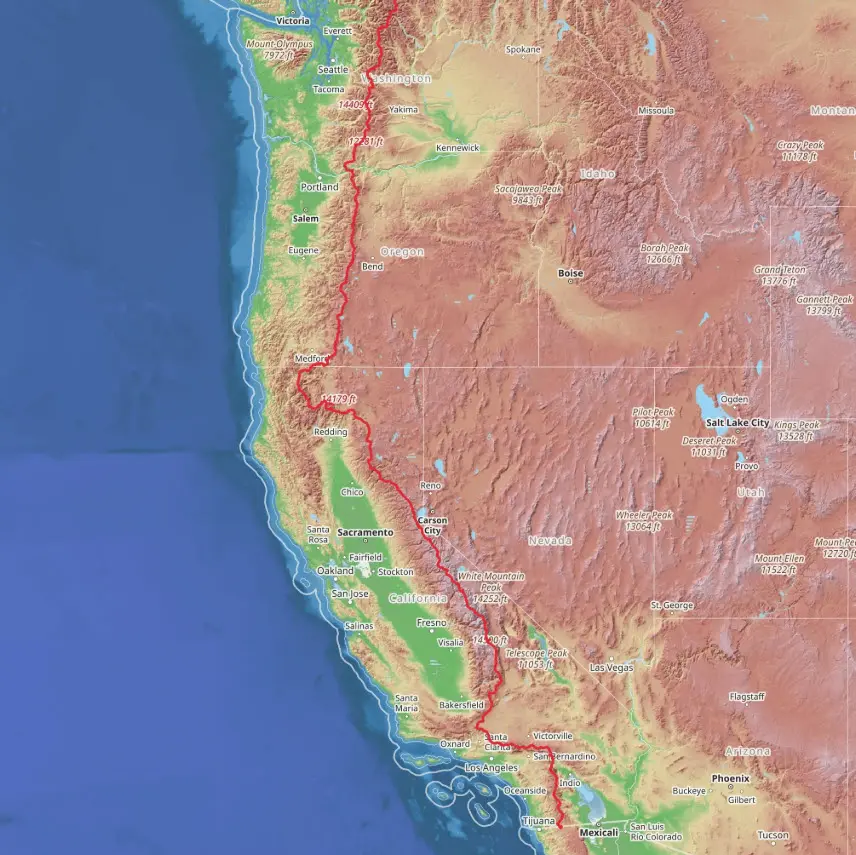
One interesting way to look at this problem is the Pacific Crest Trail. The PCT is obviously an extreme example, but that’s what makes it useful for this discussion. This isn’t intended to be an article about how to hike the Pacific Crest Trail. Instead, we’re using the trail to look at what happens to USB charging when electricity is no longer conveniently available.
A 2,650-Mile USB Charging Problem
The Pacific Crest Trail runs from the Mexican border through California, Oregon and Washington before reaching the Canadian border. The Pacific Crest Trail Association commonly describes the PCT as a 2,650-mile trail, although its January 2026 GIS data puts the latest estimate at 2,655.84 miles. The exact distance changes slightly over time as portions of the trail are rebuilt or rerouted.
A typical thru-hiker attempting the entire trail might spend approximately five months completing the trip. During that time, nearly everything needed for daily life is being carried on the person’s back. That obviously includes food, water, shelter and clothing, but today it increasingly includes something hikers from previous generations didn’t have to think about nearly as much: electricity.
A modern hiker might carry a smartphone for maps, GPS, photography, notes and communication. A satellite communicator or beacon provides another method of communication in areas without cellular service. Add a rechargeable headlamp, GPS watch, camera or earbuds and it isn’t difficult to end up with several devices that periodically need USB power.
Cellular coverage also cannot be assumed. The Pacific Crest Trail Association cautions that cell phones often don’t work on the PCT and discusses satellite communication devices as another tool used in the backcountry. The electronics are useful, but every electronic device creates an additional requirement for power.
Electricity Has Weight
At home there is essentially no physical penalty for using more electricity. Charging your phone three times instead of twice doesn’t make the wall outlet any heavier. Portable power is different because additional capacity requires additional battery cells, electronics and enclosure material.
This is where the relationship between battery capacity and weight becomes important. A hiker may have several devices with very different power requirements, and each device contributes something to the overall energy budget.
Typical Electronics and Charging Requirements
| Electronic item | Typical purpose | Charging requirement |
|---|---|---|
| Smartphone | Navigation, maps, photos, communication | Moderate to high |
| Satellite communicator | Messaging and emergency communication | Low to moderate |
| GPS/smartwatch | Location, distance and activity tracking | Low |
| Rechargeable headlamp | Lighting | Low |
| Camera | Photography/video | Moderate |
| Earbuds | Audio | Very low |
| Power bank | Stores energy for the other devices | — |
Not every hiker carries all of these devices, and some people will carry considerably more. The specific equipment isn’t really the point. The common problem is that whatever energy those devices consume eventually has to be replaced.
The Real Problem Isn’t 2,650 Miles
Fortunately, nobody needs to carry enough battery capacity to operate electronics continuously for the entire 2,650-mile trail. Long-distance hiking is organized around resupply points. According to the Pacific Crest Trail Association, hikers can generally purchase food every four to ten days, although reaching those locations may require leaving the trail and traveling into town.
Those resupply stops also provide opportunities to recharge electronics and power banks. From an energy standpoint, this changes the problem quite a bit. Instead of asking how much electricity someone needs for five months, the more useful question is how much electricity must be carried between reasonable opportunities to recharge.
For this example, we’ll use seven days. It isn’t intended to represent every section of the PCT or every hiker, but seven days gives us a reasonable period for looking at portable battery requirements.
Building a Seven-Day USB Power Budget
For our example, we’ll use four common electronic devices: a smartphone, satellite communicator, GPS watch and rechargeable headlamp. These aren’t based on specific products because we’re more interested in the electrical requirements than recommending a particular piece of equipment.
A reasonable seven-day energy estimate could look something like this:
Example Seven-Day USB Power Budget
| Device | Approx. energy consumed per day | Seven-day requirement |
|---|---|---|
| Smartphone | 6 Wh | 42 Wh |
| Satellite communicator | 1 Wh | 7 Wh |
| GPS watch | 0.5 Wh | 3.5 Wh |
| Headlamp | 0.5 Wh | 3.5 Wh |
| Total | 8 Wh/day | 56 Wh |
These numbers are deliberately estimates because actual consumption can vary considerably. A smartphone being used continuously for GPS navigation, photography and communication will consume much more energy than a phone spending most of the day in airplane mode. Likewise, a headlamp might see very little use during long summer days.
For our example, however, the four devices require approximately 56 watt-hours of usable energy over seven days. That gives us something useful to compare against the capacity of a portable power bank.
A 20,000 mAh Battery Isn’t Really the Number We Need
Portable power banks are normally marketed by milliamp-hours, so we’re accustomed to seeing capacities such as 5,000 mAh, 10,000 mAh, 20,000 mAh and 30,000 mAh. The larger number generally means more stored energy, but milliamp-hours by themselves aren’t ideal when comparing devices operating at different voltages.
For this type of calculation, watt-hours (Wh) are more useful. A power bank advertised as 20,000 mAh will typically contain lithium cells with a nominal voltage around 3.6 to 3.7 volts. Using 3.7 volts for a simplified calculation gives us:
On paper, 74 Wh appears to provide a comfortable margin over our estimated 56 Wh requirement. The problem is that the entire 74 Wh isn’t going to arrive at the batteries inside our electronic devices.
The battery’s internal voltage has to be converted to USB output voltage, and the electronics performing that conversion consume some energy. The USB cable introduces resistance, and the receiving device performs another conversion while charging its own battery. As we’ve shown in our simple test of how USB cables affect charging, the cable itself can have a measurable effect on how much power reaches the device.
Every one of these steps introduces some loss. If our hypothetical power system delivered around 80–85% of the stored energy as useful charging energy, a 74 Wh battery might provide approximately 59–63 Wh to the devices.
Now the 20,000 mAh power bank that initially appeared to provide plenty of extra capacity is much closer to the estimated seven-day requirement. This is also why comparing power banks strictly by the advertised mAh number doesn’t tell the entire story.
How Much Does Portable Electricity Weigh?
This is where the subject gets particularly interesting for something like the Pacific Crest Trail. Long-distance hikers pay close attention to equipment weight because an item isn’t lifted once and put back down. It gets carried mile after mile for days or months.
Portable battery capacity therefore has a physical cost. The following table gives some broad representative ranges for common USB charging options. These aren’t specifications for any particular product, but they provide a useful idea of how capacity and weight tend to scale.
Portable USB Charging Options and Weight
| Charging option | Typical stored capacity | Approximate weight range | General tradeoff |
|---|---|---|---|
| Small power bank | ~5,000 mAh | 3–5 oz | Light, limited reserve |
| Medium power bank | ~10,000 mAh | 6–9 oz | Good capacity/weight compromise |
| Large power bank | ~20,000 mAh | 11–16 oz | Substantial reserve |
| Very large power bank | ~25,000–30,000 mAh | 16–24 oz | More energy, significant weight |
| Folding solar panel | Energy source rather than storage | 8–20+ oz | Can generate power but adds equipment |
| Wall charger | No stored energy | 2–6 oz | Required to replenish batteries quickly in town |
| USB cable | No stored energy | ~0.5–2 oz each | Small weight, but essential |
A 10,000 mAh battery therefore isn’t just 10,000 mAh of capacity. Depending on the design, it might also represent half a pound of equipment being carried for hundreds or thousands of miles. Doubling battery capacity may solve an energy problem, but it can just as easily create a weight problem.
For this type of application, the best battery capacity isn’t necessarily the largest battery someone can afford or fit inside a backpack. The better target is enough capacity to reliably reach the next charging opportunity while maintaining whatever reserve is considered reasonable.
USB-C Has an Unexpected Advantage in the Backcountry
USB-C is normally discussed in terms of data speed, charging power and the convenience of having a reversible connector. For a situation like this, USB-C offers another advantage that isn’t discussed as often: standardization can reduce the amount of equipment someone needs to carry.
If five electronic devices require four different charging cables, all four cables may need to come along. If those same five devices can charge from USB-C, one primary cable and perhaps a lightweight backup could potentially replace several cables and adapters.
Saving a few ounces doesn’t seem particularly important when the cables are sitting in a desk drawer. When those same ounces are being carried for 2,650 miles, reducing unnecessary equipment starts to make more sense.
This is a practical benefit of USB standardization that extends beyond convenience. In applications where size and weight matter, using a common charging interface can reduce the physical infrastructure needed to support the electronics.
USB Power Delivery Matters When You Get Back to Civilization
USB Power Delivery might seem less important for wilderness travel because a USB-C PD power bank capable of accepting 30, 45 or 65 watts doesn’t provide much benefit while someone is standing on a mountain without access to electricity. The benefit appears when that person finally reaches a place where electrical power is available again.
A hiker arriving in town may need to recharge a smartphone, satellite communicator, watch and a nearly depleted power bank. At that point, charging speed becomes important because there may be a limited amount of time available before returning to the trail.
A large battery replenished through an older low-power USB connection could require many hours. A power bank capable of accepting substantially higher USB-C PD input can potentially reduce that charging window, assuming the wall charger and available power source support the required output.
So USB Power Delivery doesn’t necessarily solve the off-grid portion of the problem. Its value is that it can reduce the amount of time required to refill the energy reserve before going off-grid again.
Why Not Just Carry a Solar Panel?
Solar power seems like an obvious solution for someone who will be outside for several months. Rather than carrying all of the required electricity in batteries, a portable solar panel provides a way to generate additional energy along the way.
The problem is that the solar panel also has to be carried. Its rated output is generally based on favorable conditions, while actual output depends on sunlight intensity, panel orientation, temperature, shading and how long the panel can remain properly exposed to the sun. A panel hanging vertically from a moving backpack or sitting at an unfavorable angle isn’t necessarily producing anything close to its advertised rating.
The environment also changes dramatically along the PCT. Southern California provides very different solar conditions from the Sierra Nevada or the heavily forested areas of Oregon and Washington. A system that works very well in one section may be much less productive in another.
This turns solar into the same type of weight-versus-energy calculation as a power bank. If a solar setup weighs 12 ounces, the important question isn’t simply whether the panel can generate electricity. Of course it can. The useful question is whether it can generate enough electricity between resupply points to justify carrying those 12 ounces instead of using that same weight for additional battery capacity.
The answer will depend on the season, location, weather and how the equipment is used, which is why solar isn’t automatically better or worse. It’s simply another option with a different set of tradeoffs.
The Cheapest Component Can Become the Most Important
There is another part of an off-grid USB system that’s easy to overlook. Someone might be carrying hundreds or even thousands of dollars worth of electronic equipment, yet a relatively inexpensive USB cable can prevent some of that equipment from being charged.
Cables bend, connectors collect dirt, equipment gets wet and cables get crushed inside backpacks. USB-C connectors can collect lint, sand or other debris, and a cable can simply be lost somewhere along the way. None of these situations are particularly serious at home because another cable is probably sitting in a drawer.
Fifty miles from the nearest replacement, a failed cable becomes a much bigger problem.
This doesn’t mean carrying several backup cables for every connector because doing that defeats the purpose of reducing weight. It does show why simplifying the charging system has value. Fewer connector types means fewer different cables to carry and fewer inexpensive components capable of disabling an otherwise functional piece of equipment.
The USB System Has Its Own Weight
To put all of this into perspective, we can assemble a basic charging system and look at the total weight. Again, these numbers are examples rather than specific equipment recommendations.
Example USB Charging System Weight
| USB charging component | Example quantity | Approximate weight |
|---|---|---|
| 20,000 mAh power bank | 1 | 13 oz |
| USB-C wall charger | 1 | 3 oz |
| Primary USB-C cable | 1 | 1 oz |
| Short backup USB-C cable | 1 | 0.5 oz |
| Small device-specific adapter/cable | 1 | 1 oz |
| Total charging equipment | 18.5 oz |
That works out to a little over one pound of equipment primarily dedicated to storing and moving electricity, and it doesn’t include the smartphone, GPS watch, satellite communicator, camera or headlamp themselves.
A larger battery adds more weight. Adding solar adds weight. Carrying several incompatible charging cables adds more weight again. On the other hand, reducing battery capacity too aggressively creates the possibility of running out of power before reaching the next charging opportunity.
This is why maximum battery capacity isn’t necessarily the goal. The goal is having enough capacity for the expected energy requirement, along with a reasonable reserve, without carrying substantially more battery than necessary.
Off-Grid USB Is Really Energy Management
The Pacific Crest Trail is an extreme example, but the same basic calculations apply to many situations where electronics need to operate away from dependable electrical power. Camping, field research, photography, disaster preparedness, remote construction, boating and overlanding all involve some version of the same problem.
At home, USB charging is mostly about convenience. Away from the electrical grid, it becomes a small energy system. There is a certain amount of stored energy, a certain amount of daily consumption and unavoidable losses as power moves between batteries, voltage converters, cables and devices. Charging rates determine how quickly that stored energy can be replaced, while the connectors and cables determine which devices can actually use it.
Then there is the physical side of the equation. Every battery, charger, cable and adapter takes up space and adds weight. The challenge is balancing those items against the amount of energy that will realistically be needed before another power source becomes available.
The PCT makes this relationship unusually easy to see. A 20,000 mAh power bank sitting in a desk drawer doesn’t seem particularly heavy. Carry the same battery from Mexico to Canada and the extra weight becomes much more noticeable.
Most of us don’t need to think about USB this way because there is usually another electrical outlet nearby. Remove the outlet for a week and the relationship between battery capacity, charging efficiency, cable quality, charging speed and weight becomes much easier to understand.
Let GetUSB.info keep you updated.
Receive article notifications about USB storage, flash memory, and duplication updates in your preferred language. We average a couple of articles per week.