USB data verificationThe process of confirming that data written to a storage device matches the original source data. confirms that information written to a flash drive can be read back correctly. Whether you are using a dedicated verification utility, backup software, an imaging tool, or a simple file copy program, the purpose is straightforward: ensure the destination data perfectly matches the source. Different verification methods, including MD5 verification, all share this same objective.
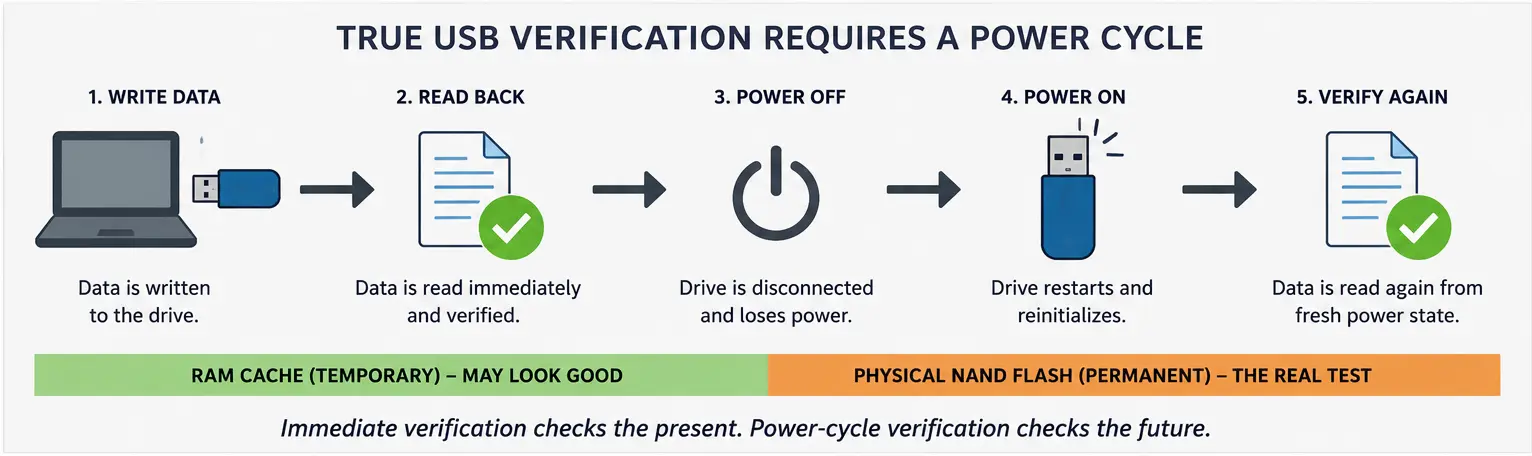
Most verification methods follow a standard loop: write the data, immediately read it back, and compare the two. If they match, the drive passes.
For the vast majority of use cases, this is an excellent test. It catches failed writes, incomplete transfers, communication errors, and blatant corruption. However, immediate verification has one critical, rarely discussed limitation.
A successful verification only proves the data was readable immediately after it was written. It does not guarantee the device will behave the same way once power is removed and restored.
The “Wet Paint” Problem

Think of painting a wall. As soon as you finish rolling on the paint, everything looks fantastic. The color is even, the finish looks smooth, and the job seems complete. But a few hours later, after the paint dries, you might notice roller marks, thin spots, or small imperfections that were completely invisible while the wall was wet. The wall did not change; the finished result simply could not be fully judged until the paint settled.
USB flash memory has a similar verification challenge.
Flash memory stores information as electrical charges. Immediately after data is programmed, the USB controller reports a successful write. A verification utility then reads the data right back. However, depending on the device, operating system, and verification method, the software may be reading data from the drive’s volatile RAM cache or the host operating system’s cache rather than forcing a completely fresh read from the physical flash memory.
Because the drive has not lost power, the data is still “wet.” In the case of marginal flash memory, weak cells, or low-quality media, the physical cells might fail to retain their charge after power is removed, even though the temporary cached data read perfectly only a moment earlier.
Two Different Verification Questions
A standard USB verification utility asks one question: Can the data be read immediately after it was written?
A power-cycleThe process of removing and restoring power to a device to reset it and clear temporary data. verification process asks a tougher question: Can the data still be read correctly after the device has restarted from a completely fresh power state?
Power cycling forces the USB drive to disconnect, discard temporary cached information, reset, reinitialize its controller, and read the physical flash memory from a cold state. This more accurately simulates what happens when a USB drive is shipped, stored, or later connected to a client’s computer.
After all, we do not verify drives for the benefit of the computer that just copied the data. We verify them for the next computer that uses them.
Does This Apply to You?
For casual file transfers, such as moving photos, documents, or temporary files, immediate verification is usually enough. It provides reasonable confidence that the copy completed without a communication error or other obvious problem.
For high-stakes deployments, however, standard verification may not provide the highest possible level of assurance. Software installers, operating system images, firmware updates, medical records, legal evidence, and industrial control files depend on the drive working later in the field, not only while it remains connected to the production computer.
This does not mean traditional USB verification is broken. Read-after-write verification catches the overwhelming majority of real-world copying problems and remains a necessary step. However, it has a clearly defined boundary. If you’re interested in how different verification techniques compare, our article on CRC versus checksum verification explains the strengths and limitations of each approach.
For maximum assurance, especially in mass data-loading environments, the ideal workflow is to copy the data, remove power from the USB device, restore power, and then perform verification. This sequence confirms that the drive can restart, initialize correctly, and retrieve the data without relying on the state that existed immediately after the original write operation.
Few commercial USB duplication systems or software utilities currently automate this additional power-cycle step. However, as flash memory becomes denser, less expensive, and more varied in quality, incorporating a hardware-level power cycle into the verification process may shift from a niche engineering standard to an industry necessity.
Editorial and Technical Experience: This article was prepared by Matt LeBoff, contirbuting publisher of GetUSB.info. Matt has worked with USB flash memory, data-loading systems, flash-drive duplication, and USB verification processes for more than two decades. The information presented here is based on practical experience with removable-media production and data-integrity testing.
Let GetUSB.info keep you updated.
Receive article notifications about USB storage, flash memory, and duplication updates in your preferred language. We average a couple of articles per week.