Most people buy a USB flash drive the same way they buy a pack of pens — grab what’s cheap, assume they all work the same, and move on.
And to be fair, for basic file transfer, that assumption isn’t completely wrong.
But if you’ve ever dealt with data integrity issues, inconsistent performance, or tried to do something more advanced like write protection or controlled distribution, you’ve probably realized something: not all USB drives behave the same.
The difference isn’t the plastic shell. It’s not even the NAND flash.
It’s the controller — and more specifically, how that controller is built into the device.
Disposable Camera vs DSLR — A Better Way to Think About USB Drives
Think of a typical low-cost USB drive like a disposable camera.
It does one job. It’s inexpensive. It’s designed to be used and replaced without much thought. You don’t expect to adjust settings, control behavior, or fine-tune anything. It just works — until it doesn’t.
Now compare that to a DSLR camera.
Same core purpose — capturing images — but everything about how it operates is different. You can control exposure, adjust focus, change lenses, and tailor the system to your exact needs.
That’s the same gap you see in USB flash architecture.
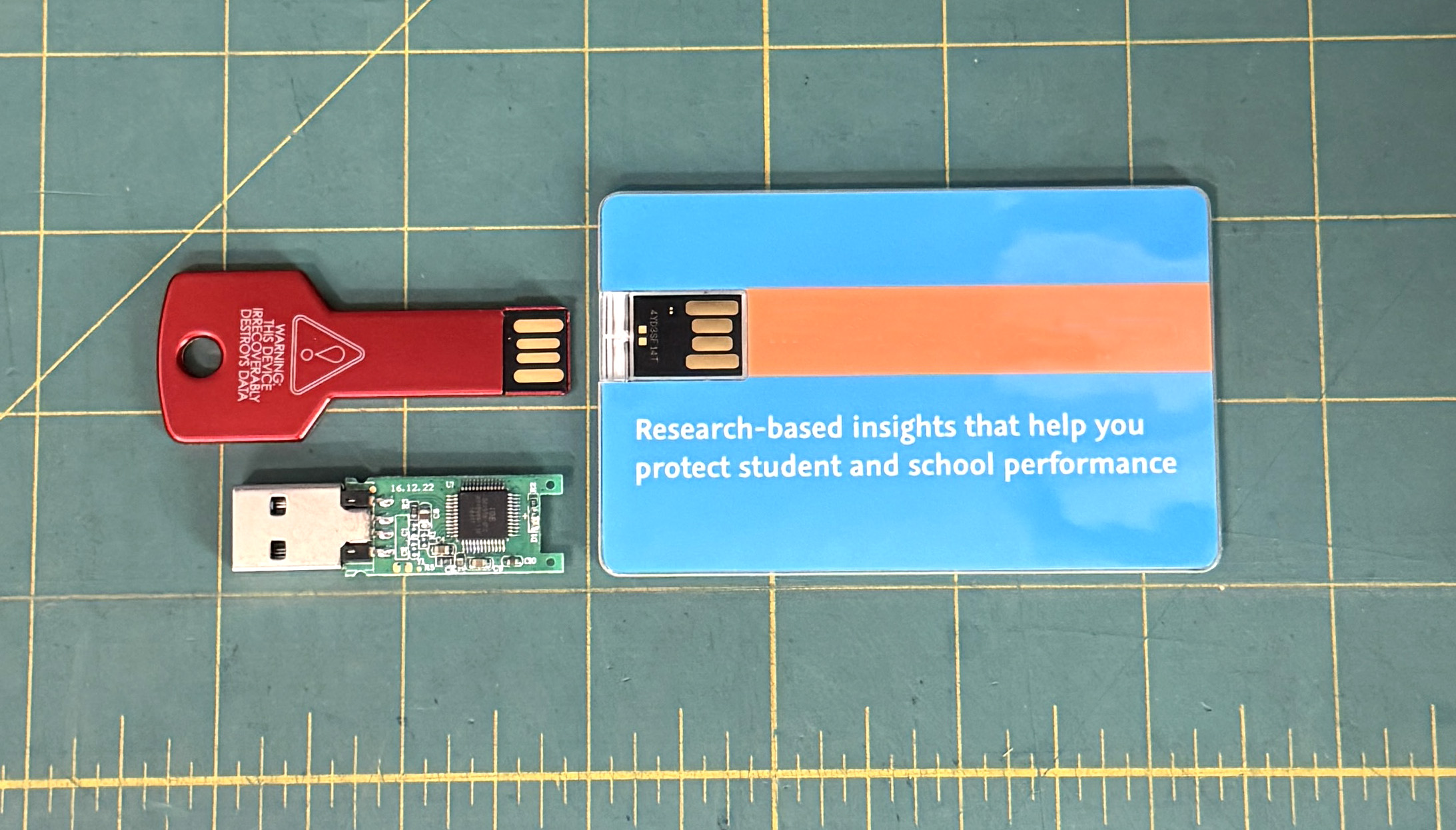
Some drives are built as simple, highly integrated devices — often using chip-on-board (COB) construction. Others are built around a dedicated controller IC, where firmware and behavior are part of the design — not an afterthought.
What COB Really Means (Without the Marketing Spin)
COB, or chip-on-board, refers to a manufacturing method where the controller die is mounted directly onto the printed circuit board rather than housed in a discrete IC package. The die is wire-bonded to the PCB traces and then encapsulated in epoxy for mechanical and environmental protection.
By eliminating the IC package, manufacturers reduce both cost and physical footprint. This makes COB an attractive option for high-volume, cost-sensitive USB products where simplicity and size are primary considerations.
However, the integration level also limits flexibility. The controller and its firmware are effectively locked into a single configuration, which can restrict feature support, customization, and long-term adaptability compared to designs using packaged controller ICs.
There’s nothing inherently wrong with that approach. In fact, it’s ideal for high-volume, low-cost applications where simplicity matters more than flexibility.
But that design choice comes with tradeoffs — and those tradeoffs tend to show up when you need the device to do anything beyond basic storage.
- Limited firmware flexibility — behavior is mostly fixed at production
- Fewer options for customization or partition control
- Minimal support for advanced features like secure zones or emulation
- Harder to qualify across different use cases or environments
In other words, COB devices are optimized to be consistent and inexpensive — not adaptable.
Dedicated Controller IC Does Change the Game
When a USB drive is built around a standalone controller chip, the architecture shifts from “fixed device” to “configurable platform.”
This is where the DSLR analogy really starts to hold up.
With the right controller, the firmware isn’t just managing NAND — it’s defining how the device behaves.
- Partition control (public, hidden, read-only areas)
- Write protection at the controller level
- CD-ROM emulation for software delivery
- Fixed disk behavior for OS or embedded systems
- Consistent performance tuning across NAND variations
These aren’t features you can “add later.” They require the right controller architecture from the start.
That’s also why certain applications — like secure content distribution or controlled USB deployment — simply aren’t possible on many low-cost designs.
The Architecture Tells You About the Product
One of the easiest ways to think about this is: the internal architecture usually reflects the intended use.
If the goal is low cost and mass production, highly integrated designs make sense.
If the goal is control, repeatability, and feature support, then the controller becomes the priority.
We’ve seen this play out across the industry for years. Drives built for promotions or giveaways tend to favor cost-optimized architectures. Drives built for software distribution, compliance, or field deployment tend to use controller platforms that support those requirements from day one.
There’s a good example of this in how write protection is handled. Some devices rely on physical switches or OS-level tricks, while others implement protection directly at the controller level. That difference isn’t cosmetic — it changes how reliable and permanent the protection actually is. You can see that contrast in this older write-protection approach compared to programmable solutions.
From Storage Device to Deployment Tool
This is where things start to separate clearly.
A basic USB drive stores data. A controller-driven USB platform manages how that data is accessed, protected, and delivered.
That distinction is exactly why products like Lock License USB solutions exist. Instead of relying on external software or temporary controls, the behavior is defined at the controller level — meaning the protection follows the device itself, not the environment it’s plugged into.
That’s not a small difference. It’s the difference between hoping something works and knowing how it will behave.
Where This Leaves Us
Most USB drives look the same from the outside, and for simple tasks, they often perform the same.
But underneath, the architecture tells a very different story.
COB designs are efficient, compact, and cost-effective. They do exactly what they’re built to do — no more, no less.
Controller-based designs, on the other hand, open the door to control, flexibility, and long-term reliability in how the device behaves.
So the next time you’re comparing USB drives, it’s worth asking a slightly different question.
Not just “how much storage do I get?” — but “what is this device actually capable of doing?”
Note: The ideas and comparisons in this article come from hands-on experience with USB flash architecture, controller behavior, and real-world deployment. AI was used to help organize and polish the content, but the technical perspective and conclusions are grounded in practical use. Image note: The image used in this article is original and created in-house to reflect real-world USB hardware and architecture.