USB tethering is a nickname for getting internet access for a computer through a cell phone. Well, it seems the iPhone 3.0 beta software will have that feature and a programmer has [currently] figured it out.
Scott Forstall, Apple’s Senior VP of iPhone Software, stated on Tuesday that the feature is now built into the OS, but carriers will have to choose whether to take on all that extra network burden and allow access. As developers continue to tinker with the iPhone OS 3.0 beta, though, one has unlocked access to iPhone tethering and taken it for a spin.
An iPhone developer, Steve Troughton, was tinkering around with a couriers itcc file [network access files] and managed to get his iPhone tethered.
The ability to tether an iPhone is not a technical challenge; it’s a network challenge. Computers can haul far more data down a connection than a cell phone, and many carriers are simply not ready to provide that large of a wireless pipe to 17 million iPhone owners.
Source:Â ARS Technica.
Continue Reading
In the old days a fast car and leather jacket would get a ladies attention. From there it’s up to you to close the deal. Well, today some might want to try ubergeek gear to get a girls attention. To that end, consider the USB butterfly flash drive.
The USB butterfly flash drive has a bronzish, gold butterfly logo on the front and Cubic Zirconium center piece to finish it off – then polished silver body to give it shine and luster.
Attach the USB butterfly to your BMW key chain and you might just get the attention you need from that girl you’ve been eying…but make sure the BMW logo is well seen.
Take it a step further and tell her the USB drive has a VVS1 diamond encrusted on the front, but don’t tell her it’s your Dad’s Beemer.
Truth be told, the 8GB drive will only set you back $32.
Source. Brando.
Continue Reading
Dane-Electronic dropped their drawers on pricing for the 8GB zMate flash drives. Currently you can get the 8GB for $8.74.
Here is the company line:Universal Serial Bus (USB) drives bring the durability and compact form factor of flash memory to all your portable data storage and transfer needs. The USB flash drive enables anyone who works on multiple computers to readily carry their most important and useful files anywhere. Ideal for students of all ages, travelling professionals and everyone who has a need to share a file or a photo with a friend. Youll find hundreds of applications for yours. Compliant with both 1.1 and 2.0-standard USB ports and virtually all Operating Systems since 2000. Dane Elec Flash Drives come with a 5-year warranty.
Get the USB Dealz now! Click for more USB Dealz…
Continue Reading
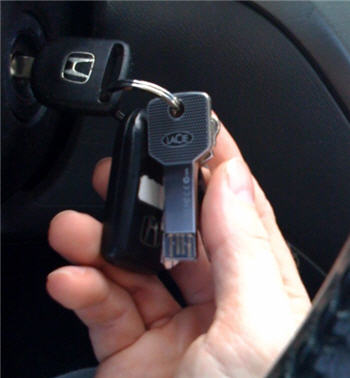
The blogosphere has been talking quite a bit about the new LaCie USB key chains, in fact, I did a post just the other day about them. Well, yesterday LaCie sent GetUSB.info the iamaKey model. Here she is in the wild.
The iamaKey is a beautiful drive. Extremely solid, heavy and doesn’t scratch easily. LaCie put a lot of effort into the design and material selection to make one outstanding drive. I’ve used dozens of flash keys and most end up failing and in the trash. With the durability I see here, the iamaKey will last.
So here’s the deal…I’m going to keep the iamaKey on my keychain until it breaks. I use USB sticks daily so there will be frequent tests. I’ve also been known to forget my keys in my pants, which ultimately ends up in the wash…so there are many stress test opportunities.
I’ll report back when the device fails, but don’t expect an update anytime soon.
Continue Reading
The desk drawer to my left is full of card readers, USB sticks, cables etc. It’s just too much. Last week Brando sent me an email with their latest idea to reduce the clutter and global waste of all these connection devices. It was a USB cable with an SD card reader built; in-line.
Take away the fact that it’s ANOTHER cable I will have, the idea of putting connectors in-line a USB cable is brilliant.
There are two versions to you can buy, but really only one is needed. Brando offers the full size SD card reader and the microSD card reader version. Simply buy the full SD card version and get a microSD adapter and you are set.
Continue Reading
One of the great things about an Apple iPhone are the abundant number of free or cheap applications you can download. These applications make your life much easier. From Shazam to ID that song playing on the radio, to AroundMe which helps you find things around you like gas stations, coffee houses and hospitals, yet sometimes you need a physical upgrade to make your iPhone a bit better.
Today, USBFever introduces the mini microphone for the iPhone. This small attachment makes it possible to record conversations, depositions, meetings or interview conversations for you live bloggers.
The iPhone is truly becoming your single device for mobile travel, work and communication. I’m mean really, what else do you need? Maybe video capability…
Continue Reading
Stanton has been around for years. A while back they introduced the T.90 USB turntable for easy conversion of LPs to digital audio.
The Stanton T.90 USB turntable is a great looking product and looks much better than our Ion Audio turntable we’ve reported about the last couple of years. There are a host of features any DJ or home audio enthusiast would appreciate include a high torque direct drive motor for longevity.
Continue Reading
Could this be a threat to the Apples iTunes store? The idea is loading up your applications via USB cable, rather than via iTunes store. This type of app installer would eliminate the need for an iTunes app store.
It seems there are several non-Apple sponsored app stores popping up which is the first step to threaten iTunes…but a direct load via USB cable would even threaten the unofficial app stores.
LaCie launched a new line of USB keys that look like, well…keys. I’ve mentioned a key looking USB key before, but it was just a prototype. Here LaCie made USB keys a real-deal and they look pretty sweet.
There are three models LaCie has introduced. The PassKey, IamaKey and Itsakey.
Engadget reports these guys also have microSD card readers, but I honestly don’t see where that is, but clearly a nice addition.
Continue Reading
With the backlash and failure of Vista, Windows is quickly moving to Windows 7. This OS is focused on correcting all the Vista short comings, while providing a faster operating system and speedy USB enumeration.
However, upgrading or installing Windows 7 from a DVD takes a long time. You can speed up the process by putting the Windows 7 ISO file on a USB stick and install from there.
The guys at Think Computers, put together a nice tutorial. The USB tutorial covers the placement of Win7 on a custom USB flash drive, then doing a complete install from the UFD.
Windows 7 is about 2.5GBs so make sure you have a 4GB flash drive before you think about starting this process.
Continue Reading
America takes comfort in the fact we lead technology, but with mobile devices we are the exception. Europe is way ahead of us and so is China. In fact, back in Dec 2006, China made the decision to standardize cell phone charges to have a micro USB port. The reason, to reduce waste. Back then, you purchased a phone and you’d get a new wall charger. The charger was loaded with lead, plastic etc. Today, you simply get a USB cable.
Last week 17 mobile phone companies officially made the plung to accept micro USB as the connection for recharging cell phones. This decision was based on the same reasons as mentioned above.
Continue Reading