GetUSB.info Logo

Snap Power USB Charger

You know a product is a great idea when a couple of pictures describe the entire product. With that in mind, we’ve all seen wall outlet USB charges, but the Snap Power, in my opinion, will rule them all. The design is clever. Installation is ultra-easy. Accessibility supersedes all others. Take a second and just look at it: In my mind there are three things which make this a brilliant wall charger. If you don’t mind me walking you through the obvious, here we go. Or skip the highlights and jump right over to their website: The design is brilliant. The User keeps both outlets available for normal use while a sleek looking USB port is added underneath. At the time of this article there is one USB socket, but visiting their website you can see two sockets, one on either side. They are constantly improving. Installation is very easy. Simply unscrew your current face-plate and replace it with Continue Reading No Comments

How To Partition a USB Flash Drive in Windows

Using Windows 10, you can partition a USB flash drive into multiple partitions. The process is not difficult; you simply follow some easy steps. This tutorial will partition the drive so that your device is assigned multiple drive letters when connected to the computer.

This partition process is not done at the USB controller level, or said another way, done at the hardware level. This USB partition process, for lack of better terms, is done at the software level. What does this mean for you? It means the partitions can be wiped off the drive and the full capacity of the USB flash drive can be restored.

When a USB stick is partitioned at the controller level, or at the hardware level, there is no way to reverse the partition. The multi-partition drive is permanent. At the end of this tutorial is the solution for a hardware-based partition solution.

So let’s get started.

How to partition a USB flash drive in Windows 10:

Connect the USB flash drive to your Windows 10 machine. Be sure there is nothing valuable on the USB as this process will remove all content from the drive.

Right Click the Windows icon and select Disk Management.

How To Partition a USB Flash Drive in Windows - Disk Management Access

The Disk Management window will appear with all the connected devices. Select your USB flash drive by clicking one time. By selecting your flash drive, it will allow Windows to apply the partition to that device.

Partition a USB Drive in Windows - Select USB Device

You will see your flash drive as Disk X. The device is represented by diagonal gray lines. Right Click your device in the diagonal gray line area on your screen and select Delete Volume.

Delete Volume to Partition USB in Windows

Windows will display an error message stating all the contents of the device will be removed. Confirm Yes.

USB Flash Drive Partition Setup - Windows Confirmation

You will now have an unallocated partition for the flash drive. This means a file system is not assigned to the drive. Having no file system on your USB means you cannot save data to the drive. We need to create a file system for this partition, i.e., FAT, FAT32, NTFS, or exFAT.

At the same time, we assign a file system to this partition, we will also slice up the USB flash drive to create multiple partitions.

Right Click the unallocated space on your screen, represented by the diagonal gray lines. Select New Simple Volume from the options presented.

Create New Simple Volume - Partition USB Drive in Windows

A Microsoft wizard utility will start. Click Next from the first introductory screen. Windows will display the total amount of memory available to the device. This is where you will enter the size of your first partition. In this example, I am using a 2GB flash drive (1,896MBs) and will make a first partition of 500MBs.

Set Partition Size for USB Flash Drive in Windows

The rest of the wizard utility is auto-populated and straightforward. For example, the wizard will ask if you want a specific drive letter assigned to the partition once the process is done.

The wizard utility will ask you what file system you want for this new partition. If you are not sure, just leave the auto-populated selection from Windows.

TIP: If you want the dual partition USB drive to also work in Mac computers, be sure to format the drive as FAT, FAT32, or exFAT. Do not use NTFS, as Mac computers will only read the content but cannot write to the device. In fact, read this article on why to never format USBs as NTFS.

Be sure to set a volume name to the device so the partition (new drive letter) will be easy to recognize.

Name Partition - USB Flash Drive Setup Windows

Click Finish for Windows to make this first partition. Looking in Disk Management once the wizard has closed, you will now see the device with one partition and a balance of the drive as unallocated.

Partition USB Flash Drive - Disk Management Final View

Rinse and Repeat. Do the same steps as above for this smaller unallocated memory space.

After the second pass using the partition wizard for Windows, you will have a dual partition USB drive with two drive letters. Each USB flash drive letter will work and appear like a normal, single flash drive. You can data load each partition as normal. You can even flash one partition to make it bootable if you are into making bootable USB sticks.

Dual Partition USB Drive Setup in Windows

Although the above tutorial makes things easy to partition a USB flash drive into multiple drive letters, this method is not permanent. Using the same steps, you may clear out all the partitions and its content. For some users or companies, having an unsecured dual partition drive is not ideal for their business practice or application. There is an alternative. There is a method to partition a USB at the hardware level.

In order to partition a USB drive at the hardware level, or controller level, you will need some specific controller chips and the vendor commands to set up the partitions. These tools are not readily available as there are hundreds of chip makers and thousands of USB suppliers. However, Nexcopy has a solution for business-to-business applications for creating dual partitions at the controller level.

In addition, Nexcopy has the ability to make these partitions write-protected, or read-only. If this hardware solution is what you need, please contact them.

Continue Reading No Comments

Extra Facebook Security With USB Keys

Account security is one of the most vital pieces of the busy and interconnected world right now and nobody wants strangers accessing their personal information online. You might use a password manager as well as two-factor authentication like we mentioned in a previous post, but now there’s another way to stay protected.

Data Cable


In response to similar approaches from Google and Dropbox, Facebook has added support for safe login security keys. When you log into your account, this device will prove your identity rather than a code which sends to your phone. In addition to the superior security, they’re also potentially faster. With just a tap on the device you can have access to your Facebook account and feel safer in knowing only you can unlock it. It’s a welcome move from the company in an age where cyberattacks and identity theft are on the rise and as a universal rule on the internet, it’s never a bad time to strengthen your defences.

Continue Reading No Comments

A Battery That Charges In Seconds

With the potential to push past the lithium ion cells in the majority of mobile tech today, scientists from the University of Central Florida have created a supercapacitor battery prototype. This model works like new even after 30,000 recharges and has an estimated lifetime 20 times longer than traditional mobile battery sources.

Battery Tech


Supercapacitors can be charged quickly because they store energy on the surface of a material rather than using internal chemical reactions. This two dimensional sheet is predominately made of graphene and prioritizes surface area to maximize its storage.

Continue Reading No Comments

The Audio Jack Could Be Gone For Good

To the confusion and frustration of many iPhone 7 users, the lack of an audio jack is being seen as a step forward rather than back. With the advent of USB Type-C, audio will no longer require a 3.5mm headphone port. Instead, that data can be transmitted, along with videos and power, through Type-C.

USB Audio


The USB Implementers Forum (USB-IF) recently announced its awaited audio specifications for USB Type-C to end the reign of our beloved headphone jack so lets take a look at the new standard. Officially called the USB Audio Device Class 3.0, manufacturers that need to feed sound through USB Type-C ports are affected the most by it. Everything from PCs to phones is included and the USB-IF expects Type-C to be the “primary solution for all digital audio aplications, including headsets, mobile devices, docking stations, gaming set-ups, and VR solutions.”

Continue Reading No Comments

A New Generation Of Desktop Storage

While all pre-built desktops and laptops come with a hard drive, it’s not uncommon for users to look for a more mobile way to store their data rather than carrying their entire machine with them to all destinations. External hard drives have been the answer to this lack of mobility ever since the ingenuity of a floppy disk met with the carrying capacity of standard disk or optical memory and while many users have their needs met by existing externals, the paradigm of “bigger, faster, and cheaper” in the tech industry rings true as Seagate unveils the Innov8.

USB_Desktop_External_Drive


The Seagate Innov8 is first in its class in a variety of ways. Its 8TB capacity is something rarely seen in externals and the reason for this is transfer speed. External hard drives usually connect to a machine through a USB cable and with the standard transfer rates of USB 2.0 and even USB 3.0, uploading and accessing such a massive quantity of data was not feasible. Seagate has solved this by being the first and only pioneer to not only use USB Type-C connections to access data, but also for power needs. The Innov8 reduces the additional power cord required for external hard drives of this size by making it energy efficient enough that just one Type-C connector can power the device. Additionally, with the recent release of USB 3.1, an 8TB drive is no longer some overwhelming beast of a data load to sift through when armed with speeds up to 10Gbps.

Continue Reading No Comments

$20 USB Printer Server Amazon

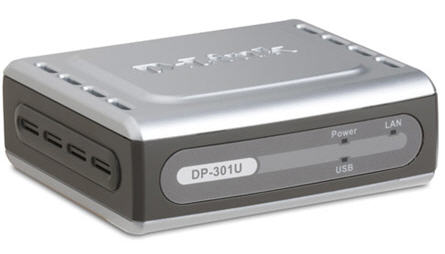
Question:  Have you ever used a WiFi printer setup?  It may sound like nothing special, but trust me, once you try it you’ll wonder why you waited so long. Some printers have WiFi built into them already [Brother for only $109 >] and some printers need a wireless print server. This is where the D-Link wireless print server comes into play.

The D-Link DP-301U allows you to connect those older laser and inkjet printers to the wireless print server. Meaning everyone in your office will have access to the printers without the cables. Consider I work off a laptop and so do most others, walking around and being to print on demand is insanely convenient. You may not think so now… but that means you don’t have a wireless printer connection [otherwise you’d agree].

You can buy it from Amazon.com and includes free shipping [limited time] if you use a free shipping Amazon coupon. The unit is not refurbished.

This is indeed a great deal for everyone and you should buy it while this price is still so low.

Continue Reading No Comments

Phone Charging On The Go

Never again will the average skateboarder miss out on recording a sweet 12-stair or kickflip due to lack of battery life on the most popular recording device on the planet. With the revolutionary method of harnessing centripetal force, FluxTech Industries is looking to change the lives of millions of skaters across the world with the PowerBoard.

PowerBoard


While many have dreamt of the hover board since Marty McFly showed us its possibilities, the PowerBoard achieves a far greater feat. To understand this, lets look at some of the board’s functionality. Underneath, there is a thin panel covered in an adamantium shell. Inside the panel a unique architecture of circuits, capacitors, and Legos enables the board’s magnificent ability to convert each wheel’s centripetal force into electromagnetic energy with 120% efficiency, a magnitude completely unheard of in the physical world.

Continue Reading No Comments

Energizing How We Charge Our Phones

At trade shows around the world, StoreDot is showing off the Samsung Galaxy S6 with a modified battery and charging port which enabled the device to charge from 10% to 100% in 5 minutes and 25 seconds. This solution isn’t simply faster, the physics within the battery is a new generation of lithium ion batteries which sets it apart from companies pursuing similar avenues to solve the battery inconvenience.

Possibly one of the most impressive features is how the charger manages heat. At Nexcopy we manage temperatures between each piece of our products to keep them safe and durable throughout their use, so we can appreciate some solid thermal decorum when we see it. These new batteries will make sure your phone is never hot to the touch during or after a charging session and it does so with modifications to the connector itself. This however, means there isn’t simply a wire between the phone and the charger but rather a solid, wall-mounted charger unit.

Wall Mounted Charging

What does this means for the industry? Well the technology is alive and well to make our charge times negligible. The delay will be in the coordination needed to make the improvement. There has to be a suitable connection port to enable the top speed charging, and a StoreDot 150W charger is required to reach these speeds. Most notably, Samsung has invested alongside other interested parties so eliminating the wait time of charging could be a thing of the past in the next generation of our smartphones.

Source: StoreDot

Continue Reading No Comments

StarTech USB 3.0 & 4K DisplayPort Dock Station

The USB 3.0 / 4K display and dock station is ideal for the Bring Your Own Device work environment (BYOD).

Assuming you have a limited port laptop computer the StarTech dock station can expand your laptop screen and extend out to a 4K video feed needed. It doesn’t stop there with USB 3.0 port connectivity, and Ethernet connection.

The front side of the dock station also includes a USB charging port. You can avoid the inconvenience of a dead battery and make sure your mobile device is always ready to go, using the dock’s USB fast-charge and sync port. Plus, the always-on port supports device charging even when your laptop isn’t connected to the dock.

The dock station can act as a charging station unplugged as well, making it a very portable solution. A good fit for this product would be home-office where the work space is not that large, or class room where the budget isn’t there for a complete work station and a BYOD situation best applies.

Continue Reading No Comments

Portable, Plugable USB Type C Dock Station

With the single USB-C port of the new MacBook laptop we knew a power station and/or dock station was right behind.  Here is a Kickstarter compaign to address the single port computer and connecting all your peripheral gadgets to your new computer.

The ultimate dock station will power and charge your system using USB’s new Power Delivery specification, while providing an additional alternate mode video output up to 4K resolution, gigabit Ethernet, audio input/output, and 4 USB ports.  The tall slender design of the dock station packs a number of sockets to support any type of peripheral you need to connect.

In addition, the USB 3.1 Type-C specification supports a feature called “VESA Alternate Mode” which works with the built-in graphics processor on supported systems to provide video output at resolutions up to 4K.  This is particularly important given the up-tick in TVs and monitors which are being released with a 4K specification.  The other two display outputs in the Ultimate Dock are enabled by the DisplayLink DL-3900 graphics processor, which can support two additional 1080P displays at 60Hz.  The DisplayLink driver is still in development, but the Kickstarter campaign claims the driver will have a final release by the time the dock station hits full production.

The Plugable Ultimate USB-C Universal Docking Station supports:

Continue Reading No Comments

Copyright

Copyright © 2006 +

USB Powered Gadgets and more...

All Rights Reserved

Advertise with us

GetUSB Advertising

This is a high value website providing great exposure to your product and brand. Visit our advertising page to learn specifics.

For more information
Visit our advertising page.

Nexcopy Ad

Nexcopy Provides

USB copy protection with digital rights management for data loaded on USB flash drives.

Contact us learn more

Resources and References Page

Resources and References Page