GetUSB.info Logo

New mini Size USB Duplicator from Nexcopy

LAKE FOREST, CA, USA, November 20, 2019 /EINPresswire.com/ — Lake Forest, CA – November 20, 2019 – Nexcopy Inc. introduces an all-new mini-size USB duplicator, the USB104SA, a 4-target standalone USB flash memory duplicator specifically designed to be lightweight and portable.

USB104SA mini USB duplicator by Nexcopy

The USB104SA USB Duplicator has a list of features which pivot from the larger, award-winning Nexcopy standalone duplicators. Features include:

  • Asynchronous copy mode, all the time
  • Binary copier will copy any format: FAT, FAT32, exFAT, NTFS, HFS, Ext2, Ext3, Ext4, Proprietary
  • Binary CRC verification algorithm
  • Quick Erase and Full Erase for disk sanitization
  • Four language modes in LCD menu
  • USB speed benchmark utility
  • Firmware upgradeable

“With the lack of optical drives in computers and laptops, the USB stick continues to grow in popularity,” reports Greg Morris, President of Nexcopy. “What we have seen is a demand for both small configuration systems for those transitioning from optical media to USB media and large production systems which we’ve serviced for years. The USB104SA is a great stepping stone for those coming from the optical duplication industry.”

Stan McCrosky, Head of Sales, comments, “What we have seen are small organizations and businesses requesting something low cost and low volume for data duplication. Our main focus is still business-to-business, but the growing demand for low-volume duplication equipment justified the development of a product like the USB104SA.”

The USB104SA is a portable solution and ideal for trade shows or speaking events. The unit weighs less than one pound and has a footprint of about six inches by one inch tall. The unit can easily fit into your computer bag, which is ideal for carry-on luggage at the airport.

The USB duplicator is powered by a microUSB cable which can be connected to your laptop’s USB port. A USB power block is also provided for powering from an outlet.

Nexcopy firmware is a code technology which has evolved since 2008. This system is backward compatible with USB 1.0, 2.0, and 3.0 flash memory. The system will accept SD card reader adapters, microSD and CF card reader adapters. The firmware may be used to speed test flash memory, which is a great tool for understanding the quality of flash memory a supplier has provided.

EIN PressWire official news release

Continue Reading

USB Flash Drive Doesn’t Get Assigned a Drive Letter: Solution

You’ve connected a USB flash drive, heard the familiar Windows sound of connection, yet no drive letter shows up. You then go into Disk Management for Windows and see the device and memory, but the USB flash drive doesn’t get assigned a drive letter.

What should you do?

USB Flash Drive Doesn't Get Assigned a Drive Letter

Most of the time, Windows will automatically assign a drive letter to any connected storage device—whether it’s a USB stick, USB hard drive, or other mass storage device.

However, if a drive letter isn’t assigned, there’s a quick fix to get your computer working properly again:

  1. Open Command Prompt as Administrator (search for CMD, then right-click and select “Run as Administrator”).
  2. Type diskpart and press Enter.
  3. Once in DISKPART, type automount enable and press Enter.
DISKPART command prompt for USB drive automount, USB Flash Drive Doesn't Get Assigned a Drive Letter

If the above steps don’t solve the problem, there could be conflicting registry entries from past USB devices that disabled or interfered with the automount function.

Nexcopy offers a registry cleaning tool specifically designed for USB devices connected to your computer. This utility is an executable file that requires no installation and contains no spyware or malware. Nexcopy is a reputable company that provides direct support via phone, email, or live chat, so you can trust their software is safe and reliable.

USBScrub is the utility name and is available for download here.

Continue Reading

Erase USB or Clean USB or Format USB?

We’ve seen these terms floating around forums and how-to articles for years when someone is explaining what to do with USB flash drives. Most people gloss over the definitions of Clean, Erase, and Format because the terms sound interchangeable or because they are not planning to perform the task being discussed.

The goal of this article is to clearly explain the differences between Clean, Erase, and Format so you can better understand what people mean when discussing USB flash drive maintenance and data removal.

All of the functions below can be performed on a Windows 10 system or newer. We’ll start with the simplest operation and work toward the more advanced ones.

Format

Formatting is what roughly 98% of Windows users rely on. This is the graphical option you see when you right-click a drive letter in Windows Explorer and select “Format.” But what does this function actually do?

Formatting is the least complicated option. It removes the file allocation table from the USB flash drive and creates a new one. Put simply, the operating system deletes the index that tells Windows where files are stored, making the drive appear empty.

The important detail is that the data itself still exists on the drive. It is no longer organized in a way that Windows can easily display, but the underlying information remains intact.

Using basic file-recovery tools, like the one we reviewed previously, it is often possible to recover most or all of the files that were on the drive.

The image below illustrates this concept. The light-gray area represents data that still exists on the flash memory but is no longer referenced by the file system. Recovery software scans this space to reconstruct files. Notice that the boot code area of the drive is untouched during a standard format.

Format USB flash drive showing remaining data blocks

If you’re wondering whether a flash drive should be formatted as FAT, FAT32, exFAT, or NTFS, we previously published a detailed comparison covering those file systems.

Clean

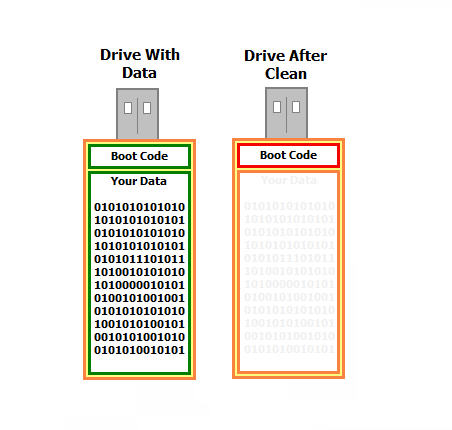
The Clean function goes a step further than formatting. It directly targets the Master Boot Record and partition information of the USB flash drive.

Running Clean removes the boot code and deletes all partitions. The partition data is what tells a computer how large the drive is and whether it can be used as a bootable device.

The Clean function is not available through the standard Windows graphical interface. It can only be accessed through the Windows command-line utility DiskPart.

The image below highlights the boot code area affected by the Clean command. While this portion of the drive is cleared, the actual data area remains intact, which is why Clean executes very quickly.

Clean USB flash drive removing boot record

The most common reason to use Clean is troubleshooting. If a flash drive contains data but no longer behaves correctly when connected to a computer, clearing corrupted boot or partition information can sometimes restore functionality while preserving recoverable data.

To run Clean on a USB flash drive:

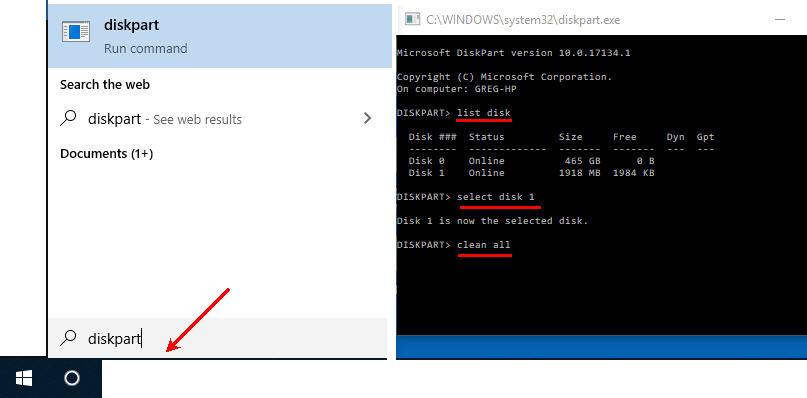
  • Type diskpart into the Windows search bar and press Enter
  • Type list disk and press Enter
  • Identify which disk number corresponds to your USB flash drive
  • Type select disk 1 (replace 1 with your USB’s disk number) and press Enter
  • Type clean and press Enter
  • DiskPart will confirm when the process is complete

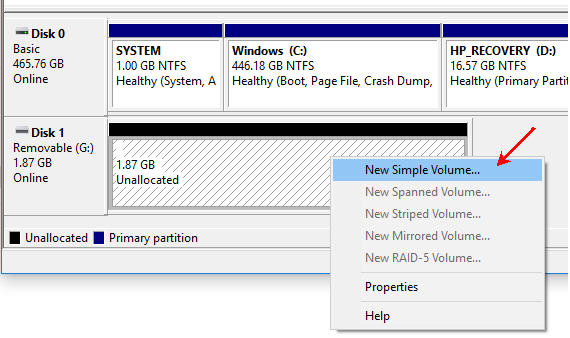
After running Clean, the drive will appear as RAW and unreadable to Windows. To make it usable again, open Disk Management, locate the unallocated space, create a new simple volume, and follow the formatting wizard.

Windows Disk Management showing unallocated USB space

Clean All

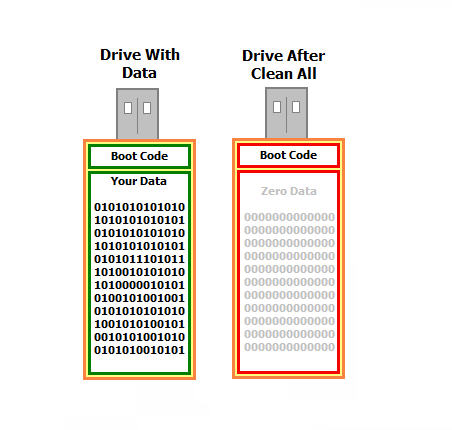
The Clean All command is the most thorough option. Like Clean, it is only available through DiskPart, but it also writes zeros across the entire memory space of the flash drive.

This means all previous data is physically overwritten. Once Clean All is complete, file recovery is no longer possible.

For readers familiar with Department of Defense data-destruction methods, Clean All is conceptually similar to a single-pass overwrite. Traditional DoD methods repeat this process multiple times using different patterns.

Clean All USB flash drive overwriting data

Common reasons to use Clean All include securely handing a drive to another person, recycling a USB flash drive, or ensuring a virus is completely removed.

To run Clean All, follow the same DiskPart steps as Clean, but replace the final command with clean all. Because the entire memory space is overwritten, this process can take significant time depending on drive capacity.

DiskPart Clean All process

This tutorial applies to Windows 7, Windows 8, and Windows 10 systems. Administrator privileges are required to use DiskPart’s Clean and Clean All commands.

This article was inspired by a forum discussion on TenForums.com.

If you found this post helpful, please share it so others can benefit as well.
Continue Reading

How To Enable Disable USB Write Protection in Windows 10

The link below is for a ZIP file that contains two batch files to either enable or how to disable USB write protection on a Windows 10 computer. These batch files also work on Windows 7 machines.

This solution is ultra-easy and very quick: one click to run the registry edit file and one click to confirm the task. That’s it.

Typically, a person will want to lock down the USB ports of a computer to ensure a virus doesn’t spread through a USB device, such as a flash drive. This batch file provides a fast and simple way to both lock down your USB ports and easily unlock them again.

Important: Do not have a USB flash drive connected to the system when you run either batch file.

For those seeking more technical details, here is the specific registry edit being applied. Changing the DWORD value to 00000001 sets the device policy for the computer to be write-protected. Changing that value back to 00000000 restores normal read/write access.

[HKEY_LOCAL_MACHINE\SYSTEM\CurrentControlSet\Control\
StorageDevicePolicies]
“WriteProtect”=dword:00000001

Note: This USB write protection method is specific to the PC on which it is applied. It is not device-specific and will not follow the USB drive to other machines.

If you require USB write protection that is permanent on the device itself and universal across all computers, contact Nexcopy.com and ask about their Lock License USB drives. This hardware-level solution is embedded in the USB controller, ensuring the drive is always write-protected, preventing any possibility of a virus being written to the USB stick. This is the best universal solution for USB write protection.

Screenshots of the Batch File Process

Batch files included in the ZIP:

USB Write Protection batch files

Windows confirmation prompt after running the batch file:

Windows confirmation prompt

Task completion screen:

USB write protection task complete

Download link for the two batch files:

USB Write Protection Registry Edit Batch Files

Continue Reading

USB4 Is Coming: Here Is The Speed

USB 3.2, the most recent widely deployed standard at the time of its introduction, supports maximum transfer speeds of up to 20Gbps under its fastest configuration. USB4 builds on that foundation and raises the ceiling to 40Gbps, with the newer USB4 Version 2 specification extending bandwidth even further to a theoretical 80Gbps. Put another way, 80Gbps is equivalent to moving roughly 10,000MB of data in a single second, or about 10GB per second.

Keep in mind this is all theoretical maximum throughput. Real-world performance will always be lower due to protocol overhead, controller limitations, cable quality, and storage speed. That gap between headline numbers and actual transfer rates has always existed and will continue to do so.

USB4 flash drive concept image

USB4 is built on Intel’s Thunderbolt technology, a high-speed interface Apple strongly promoted starting around 2012. While Thunderbolt delivered excellent performance, licensing costs and strict certification requirements kept accessory prices high and limited widespread adoption. Intel’s long-term goal was always to merge Thunderbolt into USB, bringing higher speeds to the mainstream at more affordable price points.

USB4 maintains backward compatibility with USB 3.2, USB 2.0, and Thunderbolt 3 devices. Because the standard fully embraces the USB-C connector and unifies multiple protocols, manufacturers can design fewer ports while supporting more use cases. As USB4 adoption increases, faster cables, docks, and storage devices are already becoming more common and less expensive.

USB4 devices are also required to support USB Power Delivery, which intelligently manages charging and power negotiation. This allows everything from smartphones to high-performance laptops to draw the correct wattage safely and efficiently from the same port.

Early USB4 products began appearing in the market in 2020, and today the ecosystem is steadily expanding as controllers, cables, and host systems mature. This post was originally prompted by the release of the finalized specification from the governing body, USB-IF, and the momentum behind USB4 has only increased since then.

Continue Reading

Hynix Enters US Market With Ultra-Fast SSD Drive

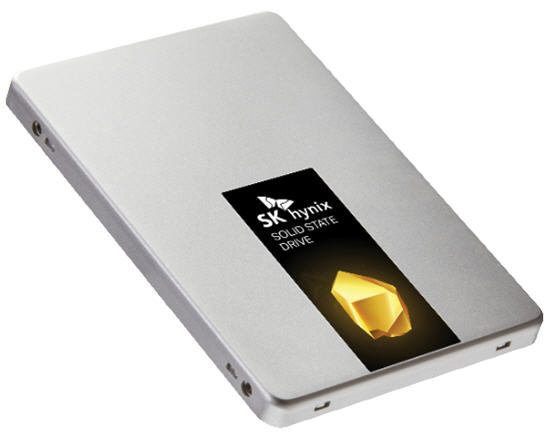
Today, Hynix put out a press release on their Gold S31 solid-state drive (SSD). The SATA III, first generation, is the first of their SuperCore series of products.

With a 560MB/s read speed, this device becomes an ideal SSD for high-demand users such as gamers. What’s also somewhat unique about the new Gold S31 drives is that they are entirely built in-house.

“All key components in Gold S31, from NAND flash and built-in controller to DRAM and firmware, were designed and produced by SK Hynix. The in-house components are built for robust performance and reliability,” SK Hynix says.

SK Hynix G31

What’s more interesting, at least for us right now, is the history of SK Hynix we uncovered while researching the company.

I always wondered what happened to Maxtor, an optical media giant in the early 2000s. It turns out SK Hynix acquired them. Today, SK Hynix is the third-largest conglomerate in South Korea.

Hynix is the world’s second-largest memory chipmaker (after Samsung) and the world’s third-largest semiconductor company. Founded as Hyundai Electronic Industrial Co., Ltd. in 1983, the company has continued to grow steadily ever since.

Hynix memory is well known for quality and is used in products made by Apple, Asus, Google, Dell, Nexcopy, and Hewlett-Packard.

The company also merged with LG Semiconductors in 1999.

These guys reported an operating income of $18 billion for 2018, so this is a company with serious capital and a willingness to spend it to stay competitive. We say good luck with your SSD product in the United States.

Press release source

Source for company history

Continue Reading

Features to Consider When Buying a USB Duplicator

Came across an article today that I thought was a very good read. It’s a niche topic, but for anyone who deals with flash drives or media distribution, it’s worth checking out.

From the article:

The optical drive is nearly dead — no longer found in laptops and only rarely included in desktop PCs. As a result, the trend for distributing data has shifted toward USB flash drives instead of CDs or DVDs. Because of this shift, many companies are taking a closer look at purchasing a USB duplicator.

There are several factors to consider before spending thousands of dollars on duplication equipment. The article breaks the most important considerations into four categories. After reviewing these areas, you should have a much clearer understanding of which type of duplicator best fits your organization.

USB Duplication Speed

Speed is the first area to evaluate. This isn’t just about raw copy speed. It also includes the number of USB sockets, the user interface, and how much operational feedback is available during a copy session. Questions worth asking include:

# How many USB drives will you need to copy in a day or week?

# How large is the data load in MB or GB?

# What turnaround time is required between request and completion?

# Is printing or branding required on the USB devices?

# Do you need proof of performance via log files or reports?

Answering these questions helps define the type of USB duplicator you should be looking at: how many ports, what performance level, and what software features are necessary for your workflow.

Buy USB Duplicator

Your Production Crew

The next step is understanding who will actually be running the equipment. Will the system be operated by non-technical staff, or by IT professionals? Does the organization need to restrict access to the system or protect the data content during the duplication process?

This often depends on how the content is delivered. A duplication company might receive physical master drives from clients, while a fulfillment operation might receive files automatically from an online ordering system or internal server.

Another consideration is scale. Will the organization deploy multiple duplicators across different geographic locations? Many global companies standardize on a single manufacturer so the workflow, training, and support experience remain consistent worldwide.

Understanding the people, environment, and operational requirements goes a long way toward narrowing the field.

Read-Only vs. Read-Write

The third category is the final state of the USB media being shipped. Should the drives be read-only, or remain read-write? By default, all standard flash drives are read-write. That introduces risk: files can be deleted, modified, or infected after distribution.

Because of this, many organizations look for USB duplicators that support creating read-only (write-protected) media. With this approach, files cannot be deleted, formatted, or altered, and malware cannot write itself onto the drive. It’s a practical safeguard for training material, software distribution, compliance data, and controlled documentation.

Nexcopy is cited in the article as a world leader in read-only flash drive duplication systems and is used as an example of the type of platform organizations evaluate for secure media production.

Read the full article here

Continue Reading

Commercial Grade USB Solar Charging Station

Legrand now offers the XSOLARCS USB charging station for public works, schools, parks and transportation centers.

With the Legrand solution, there is no construction required in order to install the charging station. The unit is a self contained solar panel tower, with six USB charging ports pulling from the solar panel. There are three shelves which can mount in adjustable locations to the panel tower poll. Each shelf containes two USB ports with up to 3.1A of shared power between them. There is no trenching required or other expensive construction projects in order to get the EXSOLARCS going.

USB sockets are protected from the eliments with a sliding door in front of the two port socket assembly. Not only is there protection, but LED illumination at each port for after-dark identification and ease-of-use. If the light is illuminating, the station can provide a charge. This implies there is some type of battery inside the station, which we’ve emailed Legrand to find out exactly what.

The XSOLARCS was designed with the elimints in mind. The USB charging station is designed to withstand hurricane-force winds and has the full RoHS certificate compliance.

Source: Legrand .

Continue Reading

Flash Drive Prices Are Going Up – Cause: Japan & S. Korea Trade War

Japan has long been a major supplier of three key elements used in the manufacturing of NAND memory and semiconductors. Due to recent trade tensions between Japan and South Korea, these materials are becoming increasingly difficult to obtain.

Japan produces roughly 90% of the world’s supply of fluorinated polyimide and photoresists, along with about 70% of the global supply of hydrogen fluoride. This concentration places the global supply chain at risk if Japan restricts exports of these materials.

These chemicals are used by Korean manufacturers to produce semiconductors and are critical for making components such as memory chips, microprocessors, and integrated circuits.

The impact is already visible. For the first time in more than eight months, NAND memory pricing for flash drives has increased. While the percentage increase varies by capacity, the most notable jumps are in 32GB and 64GB wafers, which rose nearly 25% week over week at the time this article was published on July 25.

Global semiconductor supply chain affected by Japan and South Korea trade dispute

Japan has cited inadequate management of these chemicals by purchasing countries. Put another way, the materials can also be used in the manufacture of military weapons, and Japan claims some supplies have been diverted for that purpose. Japan’s response has been to impose restrictions on exports.

Who ultimately loses in this trade dispute? Anyone who relies on modern technology. Smartphones, processors, flash memory, circuit boards, and countless other products depend on a stable semiconductor supply chain.

For a more detailed and source-based report, visit this CNBC article.

To learn more about polyimide chemicals, a quick overview is available on this Wikipedia page.

Continue Reading

Will Trump Tariffs Affect USB Flash Drives?

Posted May 16, 2019.

The United States and China walked away from trade talks earlier this week. Following that departure, President Trump and China’s President Xi Jinping increased the number of products subject to tariffs.

With that said, will Trump-era tariffs affect USB flash drives?

A quick Google search may surface a BuzzFeed article claiming that flash drives are affected. That article is incorrect. USB flash drives are not affected by tariffs at this time.

U.S. and China trade tariffs illustration related to technology imports

Don’t take our word for it—verify the information directly using official sources.

Here is the Harmonized Tariff Schedule website: https://hts.usitc.gov/

The Harmonized Tariff Code for a USB flash drive is 8523.51.0000. Search the HS code on the site above. The tariff status is shown in the right-hand column, indicating whether the product is duty-free or subject to a percentage-based tax.

Continue Reading

Where to Guy SD Card Duplicators, Some Say “SD Copiers”

SD cards are so popular today because the gigabyte capacity in relation to the form factor size is such a great trade off. The average user on the street would associate an SD card with a camera, but we know heavy users of SD cards use them for embedded operating systems, GPS systems and hand-held point of sale systems.

With that said, for those who need to mass data load content to Secure Digital cards, you might be looking for options on where to buy the gear. The following article, which has no affiliate links for commissions, lists some house-hold names who offer on-line purchasing of SD duplication gear.

SD card duplicators manufactured by Nexcopy are available from a variety of different on-line retailers. The models available from the manufacturer range in different sizes. The models also range between systems running from a host computer and systems which are stand alone. The following content will talk about both, PC based and standalone duplicators.

Wal-Mart is a growing on-line destination for purchasing technology equipment. Yes, Wal-Mart. For example, a user can buy a 20 target SD card duplicator from Wal-Mart.

20 target SD card duplicator from Wal-Mart. A PC Based system for data loading to SD cards

This system is PC based and requires a very minimal Windows computer to run the software. You might ask, why a PC based system? What advantages are there with a system like this? Here are some bullet points on why a PC based system is a benefit:

Continue Reading

Windows 10 Update, Hickup With Flash Drives

We’ve read online that Microsoft’s May 2019 update might not install on systems that have USB flash drives or SD cards connected. According to Microsoft, the update is intentionally blocked when removable storage is detected because the operating system may reassign drive letters during the upgrade process.

Windows 10 update USB drive issue

At first glance, drive letter reassignment doesn’t sound like a serious issue, especially for removable devices. However, Microsoft also noted that internal hard drives could be affected by this drive letter shuffle.

That’s the red flag.

The newly published Windows 10 support documentation explains that systems already running the April 2018 update (version 1803) or the October 2018 update (version 1809) may receive the error message: “This PC can’t be upgraded to Windows 10.” This happens specifically when USB storage devices or SD cards are detected during the upgrade process.

Microsoft’s documentation does not indicate that internal drives will be reassigned when no removable media is present. That’s why the company chose to block the update entirely if a USB device or SD card is connected. Microsoft understands how critical mounted internal drives are to system stability, so this preventative block is their way of avoiding a potentially serious issue.

Continue Reading

Copyright

Copyright © 2006 +

USB Powered Gadgets and more...

All Rights Reserved

Advertise with us

GetUSB Advertising

This is a high value website providing great exposure to your product and brand. Visit our advertising page to learn specifics.

For more information
Visit our advertising page.

Nexcopy Ad

Nexcopy Provides

USB copy protection with digital rights management for data loaded on USB flash drives.

Contact us learn more

Resources and References Page

Resources and References Page