You’ll need several utilities to build the Mac package and some time on your hands. I opt for the quick download…
So what could you do with this Mac-on-a-stick, well maybe show your kids what the original Mac OS looked like (good timing with the iPhone launch and show them where Apple began), play with some old system software to re-live the good-ol-days or possibly use a Mac on Windows or Linux machine.
You can download the zip and build everything on a flash drive as small as 32MBs (if you still have one that small) just make the jump over to Nothickmanuals.info.
Continue Reading
USBCell is best known for the AA USB rechargeable battery, but their product line doesn’t stop there (actually it does, but read more).
Continue Reading
“Would You Consider Watching TV on Your Computer?” was the question for this week and I was surprised to see such a higher percentage (23%) who already do.
However, for the majority of voters wanting a boobless TV experience it would take an act of simplicity. So, for the simplistic 45% who would consider it, here is a product that fits the bill.
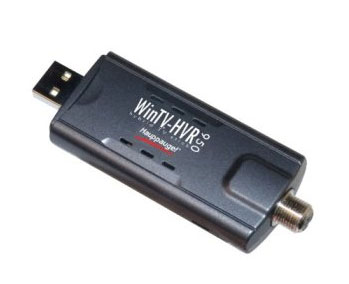
The Hauppauge WinTV HVR 950 USB TV Tuner is simple to setup and simple to use. If you can insert a USB stick and auto launch some software, than you’re set.
However, if you’re looking for some HD television then a couple items you’ll need to consider before jumping into the Hauppauge TV solution.
Since HD shows have a much higher resolution and thus need better reception/bandwidth you’ll need to make a couple of adjustments. First, update the standard antenna which comes with the Hauppauge WinTV USB TV Tuner to an amplified unit. This will boost the signal strength to insure there are no dropped frames. Second, configure your PC to have at least 2GBs of RAM for quick processing and avoid overload on the CPU.
You can also connect your coaxial cable directly to the USB TV receiver for that HD signal, but again keep the RAM up to 2GBs min.
Continue Reading
When the Chaps from across the pond talk about tea and biscuits I don’t think this is what they had in mind. Chris Ollis introduced me to his concept USB chassis design, the USB-iscuit Biscuit.
~~~
For those not familiar with European biscuits, we’re talking about cookies. Chris developed several flash drives from ripping apart standard flash drives and applying some creativity to a handful of joke biscuits cookies.
He’s looking to take the next step and move into manufacturering, so if SolidAlliance is listening here is some contact information to get these USB-iscuits to mass market. Chris (dot) Ollis (at) InterTwined (dot) co (dot) uk
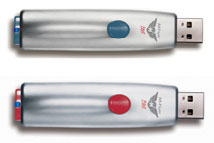
Memorex went to the streets with the M-Flyer Pilot TravelDrive UFD. Using the retractable USB connector design we’ve seen before, Memorex changed it up a spring loaded USB connector. So with the click of a button the USB connector pops-in and pops-out.
With the capless design flash drive, Memorex also bundles in some 256-bit encryption security software also called their Portable Vault Software.
Several colors are available (blue and red) which color arrangement is dependent upon storage capacity.
Blue = 4GB. Red = 2GB. $79 and $49 respectively.
Continue Reading
The iPhone is out. Letting the big-boys do the iPhone coverage I thought to chime in with something a little less mainstream. Apple released a “Works With iPhone” badge, mark, logo, whatever you want to call it.
Viewing the accessories page Apple has the following USB related accessories for the iPhone:
USB Power Adapter
Apple Dock Connector to USB Cable
iPhone Bluetooth Travel Cable
Apple USB Power Adapter
iPhone Dual Dock
Other iPhone accessories include Bluetooth connectivity, headsets, AirPort Extreme support and fancy TTY adapter. Given you just dropped at least 4 bills on the iPhone I’d sport the little extra cash for certified accessories products, but that’s just me.
Visit iPhone accessories pageContinue Reading
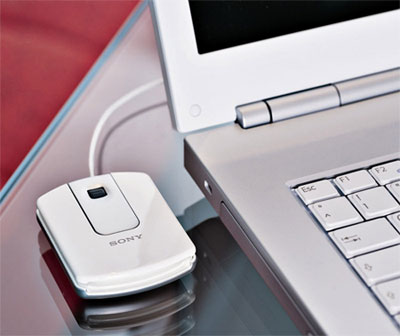
I’ll give Sony one thing, their high priced products do have style. Take the new travel USB mouse from Sony. Not your average looking optical mouse and added design with cord wrap feature underneath. I also like the fact Sony kept the wire. 1) It gives me the ability to report on it as the connection is [obviously] USB and 2) I don’t like the battery-sucking wireless models.
Now this truly is a USB powered gadget. Earlier this week SolidAlliance introduced the USB engine hub. Based off a two liter motorcycle engine the USB hub houses 3 USB ports and takes up quite-a-bit of space.
Two things are crazy about this. One, the USB engine hub makes noise, a lot of noise. The non-soothing sounds begin with; starter, gear shift and rev-engine sounds. Two, the president of SolidAlliance predicts this novelty gadget will become their best selling product. Well, that isn’t much of a stretch considering SolidAlliance is best known for Sushi flash drives.
If you need a USB hub and need to be heard, get the USB engine for only $43 USD. SolidAlliance ships globally.
Continue Reading
The USB vertical mouse might alleviate that pain you have from obsessive mouse clicking. I’m a little skeptical with products like this but after reading the description, there is definitely merit here.
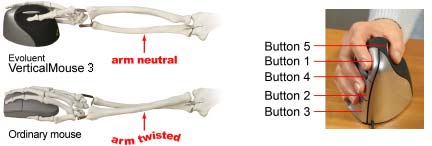
The shape supports you hand in a fully upright handshake position which reduces pain and strain from forearm twisting which comes from a normal, horizontal mouse.
Introduced earlier this year, the USB vertical mouse is used at UC Berkeley, where it was developed, by nearly all the staff. It was found to be comfortable, easily adapted to, and promote a neutral wrist and forearm posture.
When I first saw the vertical mouse I thought it useless because when you went to click, the mouse would slide sideways. After a moment of thought (and reading) you understand the thumb provides the balance as it naturally opposes the finger position.
Albeit not a traditional looking mouse it does look very useful. If anyone at UC Berkeley is reading this, shoot me an email about it’s performance. I’ll update this post.
FYI – The vertical mouse is a Windows only device, but Evoluent does provide a link to a third party Mac solution for mouse drivers to run on the OSX.
Source: Evoluent via Blog De OnasisContinue Reading
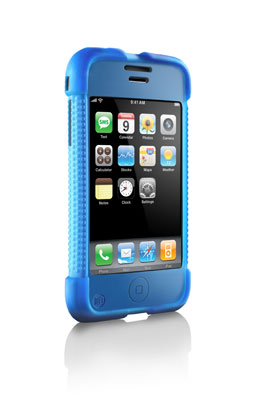
With the iPhone coming out this Friday we figured to address the “more” in USB Powered Gadgets and more… this week for GetUSB. DLO introduced this lack-luster iPhone case. Available in black, silver, pink and blue.
A start-up firm in the French Alps put together one Pretty Hot And Tempting USB stick. This one only has 256MB of memory, but IS a full working computer.
Based off an Atmel processor this SoC (System-On-Chip) design has a 190MHz processor, 64MB RAM, 256MB of memory, USB connectivity and a 10/100 Ethernet port.
The company, Calao, didn’t give a price tag but did mention some useful applications like GPS and image processing.
I for one saw that lovely USB connector and immediately thought of the new Samsung USB monitors and wondered if this is our future of computing.
Not only is the Calao Linux computer PHAT it’s also fat. Measuring at 3.3 inches long and 1.4 inches wide it is much larger then your average UFD…but also clear there is nothing average about this concept.
Continue Reading
It’s a goocher. From the latest GetUSB poll, “How Many USB Ports Do You Need?” a whopping 40% said the standard 4 USB ports is good enough.
What is more interesting is that over 50% of the voters indicated even with 8 USB ports they could still use more. This means most users have at least two USB Hubs hanging from their system. What a mess. You may ask yourself, why don’t they make bigger USB hubs? One answer might be this:
Chip manufacturers make either a 4 port or 7 port USB hub chip. You run into power problems after 7 ports. Companies who build USB Hubs are limited by this chip design. Placing two hub chips inside a hub box doesn’t make much sense because your host computer already has several USB ports – they just figure you’ll buy two units if you need more (4 or 7) USB ports.
With these poll results I think it’s safe to say USB is the majority leader in peripheral connectivity.
Continue Reading