Microsoft has made available a new version of “Defender” to ride infected computers of malware, including rootkits which highjack your boot process and corrupt your computer.
The “Defender Offline Beta” is available from Microsoft for free [here] and does require updates as virus definitions are always changing.
Definitions are files that provide an encyclopedia of potential software threats. Because new threats appear daily, it’s important to always have the most up-to-date definitions installed in Windows Defender Offline Beta. Armed with definition files, Windows Defender Offline Beta can detect malicious and potentially unwanted software, and then notify you of the risks.
The Redmond company suggests you make a USB drive with the Defender Offline Beta software from a PC which is not infected. Doing so on a corrupted computer could interfere with the USB and yield the Microsoft tool useless.
To use Windows Defender Offline Beta, you need to follow four basic steps:
Continue Reading
Looking to for a simple DIY project for a school report or class event, this USB charger is it! Or if you’re just looking to try your hand with some simple electronic wiring to see if you have what it takes.
Well, using some off-the-shelf times, a battery and the simple schematics below you can have a great USB charge for just about any USB product.
The full tutorial is at Instructables, and I’ve also seen a couple good comments in their thread, like:
Continue Reading
In a mad rush, I’ve logged off my computer, shut down the PC and ran out the door. All the while with my USB stick still connected. The USB stick with all my photo’s, portable applications and the exe file I promised to give my neighbor. Getting home, I reach for my flash drive in pocket, and oh Sh1t it isn’t there.
Or some of you may be using USB’s to boot from so there is boot strap code on the device. If the USB is connected during bootup of your PC, you can get an error message…and for a non-tech person [wife or girlfriend] they may think their computer has crashed.
The only way around all this stuff is making sure to pull the USB out of your computer.
With USB Guard this is exactly what it does, reminds you a USB flashdrive is connected before you log off, or power down the PC.
You can also flag USB hard drives so they too are never forgotten.
Continue Reading
IronKey has long been known as the ultimate in data storage and security for content loaded on a flash drive. With hardware encryption, self destruct safety protocols for incorrect passwords and AES 256 data encryption it’s no wonder those who need the ultimate in data security go to IronKey. Well no longer says Imation.
Under the agreement, Imation will receive exclusive license rights from IronKey for the secure storage management software and service along with licensing to use the IronKey brand for its secure storage products.
While Imation is bringing the IronKey brand to a global distribution channel, IronKey will accelerate their focus on cloud-based security tools and features. IronKey will support
Continue Reading
I think we can agree that “USB light back” is not a common tech term among the geeks out there. What I mean is a LED system powered by USB which provide background lighting to your TV or monitor.
USB light back takes your TV one step further by supply complimentary tones and colors to what is currently being displayed on your TV. Gives you a theater effect.
The only way to fully understand, is to watch:
A quote from the creator:
The software analyzes the image on your monitor and transfers its data by USB to the Lightpack board. This board lights the surface behind a monitor, TV or laptop by means of RGB LEDs of the corresponding colors. The effect reminds us of the illumination of Phillips Ambilight TVs most of all.
The lightpack is available for all via Google Code download link. For the more advanced, but an very effective tool to enhance your TV experience.
Continue Reading
These days it’s popular to take just about any house hold item, a USB flash drive, and mill out a space to make a USB mod case. Today’s post is no exception. Using just two dice and a mini USB, in four easy steps you can make a USB dice key-chain.
Step 1: Get your items. Dice, USB, Dremel, blue or epoxy and a file.
Step 2:Â After some measurements, mill out the hold where the USB will be inserted.
Step 3: Repeat step 2 for the second die as this will be your cap. You also need to drill a hole on a dice side for the lanyard which will attached to your key-chain
Step 4: Epoxy the USB drive into the base die, and attached the lanyard to the cap die. Now you’ve got a USB dice key-chain.
You might want to take things a step further and
Continue Reading
Found this today, little kid project for turning a USB drive into a Shuriken. Not familiar with the term, then check this out.
As for the tutorial and link, it’s after the jump.
Continue Reading
Apple has made waves in the news with their stellar 2nd Quarter results, increased stock price, new MacBook Air and Mac Mini’s computers, no wonder many are talking about them. In addition, Apple released another OS update, the OS X Lion. Lion is available immediately via download off the app store. Some may not want to download a new 4GB OS update. For that, Apple will release their Lion on USB.
First off, lets get some pricing out of the way. The download update is retail at $30. The USB stick is set to be at $70. Not bad, but seems like their math doesn’t add up. Granted you get an 8GB stick, but lets take a look…$30 for update + $15 for an 8GB stick, the retail should around $45. Oh, and the Apple logo, that’s another $25. Okay, now my math is correct. I apologize.
However, if you have an extra 4GB or 8GB stick you can create your own USB OS X Lion stick. The USB tutorial isn’t that long and only involves three steps. For the tutorial, I’m going to redirect you to
Continue Reading
Who didn’t love the movie thriller “The Da Vinci Code?” Not only that, who didn’t dream about having a cool Cryptex gadget to store all your valuable secrets? Come one, you know it would be phenomenally great to have such a device. Well, it might not be that far off.
A Russian engineer has posted his version of a USB Cryptex case which includes detailed drawings, CAD files and component assembly.
You can’t help but to want one. [more photo’s after the break]
Continue Reading
Not everyone keeps their flash drive on a key-chain or in their pocket. For many, using a ultra slim USB flashdrive and sticking it into your wallet is your form of portability. For those who do this, read on for a good DIY to insure the stick doesn’t get lost.
First off, if you are using something like the Kingmax Super Stick, the drive is so small you’re more likely to lose it pulling keys out of your pocket then forgetting in the computer USB port. For this reason, the USB wallet is a DIY project to stitch the drive into your wallet.
You’ll need:
wallet
tiny USB flash drive
piece of Velcro
thread, needle and a thimble
In addition, this method of storing your drive will provide extra protection from the slim stick getting damaged.
In short, you’re going to use the lanyard loop of the stick and some thread to stitch it a piece of Velcro which is then put into the wallet. This design allows the drive to be some-what permanent, yet you can pull it out completely when needed.
Continue Reading
Sifting through the Instructables website I came along this retro looking USB spinner wheel or Jog wheel. The USB tutorial project is a bit complicated and requires some technical know-how, so if you are looking to increase your mod skill sets, this might be the project for you.
So what is something like this good for anyway? The jog wheel functions like your wheel on that mouse you have, but larger and has good momentum which is nice when searching through large bits of code, viewing long webpages or searching through numerous documents.
A job wheel is also excellent for media editing like sound or video. You can scroll around in these large files effortlessly and without stressing out your finger from the mouse scroll wheel. With the heaviness of the VCR head you can get the motion going and it’s inertia will keep it spinning for quite some time and when you’ve found the frame you’re looking for, just hold the wheel to stop it.
Enough about the sales pitch of a DIY project, jump over to
Continue Reading
For several years we’ve seen many Linux guys post about bootable USB flash drives into portable operating systems like Ubuntu or simplified versions of the OS for children, like Strawberry from SugarLabs
via donated USB flash drives.
In the spirit of ultra portable operating systems – over the weekend – we learned of Raspberry Pi. The Raspberry is not only an operating system from a flash drive, but it includes the processor too! This means the Linux OS is not high jacking the hardware of the host computer, but rather using it’s own processing power to boot into Linux.
The developer, David Braben, are shooting for a target price of the Raspberry USB computer to be around $25. The above prototype isn’t pretty, but hey – what prototype is? David and his team started this project in the effort to bring ultra low cost computers to less fortunate kids who need and want computer access.
A long long time ago, the One Laptop per Child was a program to get $100 computers into the hands of kids who’d otherwise never get a computer.
To give you an idea of what this mini USB computer can do, here are the specifications of the prototype:
700MHz ARM11
128MB of SDRAM
OpenGL ES 2.0
1080p30 H.264 high-profile decode
Composite and HDMI video output
USB 2.0
SD/MMC/SDIO memory card slot
General-purpose I/O
Open software (Ubuntu, Iceweasel, KOffice, Python)
If you are looking for video to spoon feed you this information, check out the video after the jump:
Continue Reading

 Microsoft has made available a new version of “Defender” to ride infected computers of malware, including rootkits which highjack your boot process and corrupt your computer.
The “Defender Offline Beta” is available from Microsoft for free [here] and does require updates as virus definitions are always changing.
Definitions are files that provide an encyclopedia of potential software threats. Because new threats appear daily, it’s important to always have the most up-to-date definitions installed in Windows Defender Offline Beta. Armed with definition files, Windows Defender Offline Beta can detect malicious and potentially unwanted software, and then notify you of the risks.
The Redmond company suggests you make a USB drive with the Defender Offline Beta software from a PC which is not infected. Doing so on a corrupted computer could interfere with the USB and yield the Microsoft tool useless.
To use Windows Defender Offline Beta, you need to follow four basic steps:
Continue Reading
Microsoft has made available a new version of “Defender” to ride infected computers of malware, including rootkits which highjack your boot process and corrupt your computer.
The “Defender Offline Beta” is available from Microsoft for free [here] and does require updates as virus definitions are always changing.
Definitions are files that provide an encyclopedia of potential software threats. Because new threats appear daily, it’s important to always have the most up-to-date definitions installed in Windows Defender Offline Beta. Armed with definition files, Windows Defender Offline Beta can detect malicious and potentially unwanted software, and then notify you of the risks.
The Redmond company suggests you make a USB drive with the Defender Offline Beta software from a PC which is not infected. Doing so on a corrupted computer could interfere with the USB and yield the Microsoft tool useless.
To use Windows Defender Offline Beta, you need to follow four basic steps:
Continue Reading
 Well, using some off-the-shelf times, a battery and the simple schematics below you can have a great USB charge for just about any USB product.
 The full tutorial is at
  Or some of you may be using USB’s to boot from so there is boot strap code on the device. If the USB is connected during bootup of your PC, you can get an error message…and for a non-tech person [wife or girlfriend] they may think their computer has crashed.
The only way around all this stuff is making sure to pull the USB out of your computer.
With USB Guard this is exactly what it does, reminds you a
Or some of you may be using USB’s to boot from so there is boot strap code on the device. If the USB is connected during bootup of your PC, you can get an error message…and for a non-tech person [wife or girlfriend] they may think their computer has crashed.
The only way around all this stuff is making sure to pull the USB out of your computer.
With USB Guard this is exactly what it does, reminds you a  Under the agreement, Imation will receive exclusive license rights from IronKey for the secure storage management software and service along with licensing to use the IronKey brand for its secure storage products.
While Imation is bringing the IronKey brand to a global distribution channel, IronKey will accelerate their focus on cloud-based security tools and features. IronKey will support
Under the agreement, Imation will receive exclusive license rights from IronKey for the secure storage management software and service along with licensing to use the IronKey brand for its secure storage products.
While Imation is bringing the IronKey brand to a global distribution channel, IronKey will accelerate their focus on cloud-based security tools and features. IronKey will support
 Step 1: Get your items. Dice, USB, Dremel, blue or epoxy and a file.
Step 2:Â After some measurements, mill out the hold where the USB will be inserted.
Step 3: Repeat step 2 for the second die as this will be your cap. You also need to drill a hole on a dice side for the lanyard which will attached to your key-chain
Step 4: Epoxy the USB drive into the base die, and attached the lanyard to the cap die. Now you’ve got a USB dice key-chain.
You might want to take things a step further and
Step 1: Get your items. Dice, USB, Dremel, blue or epoxy and a file.
Step 2:Â After some measurements, mill out the hold where the USB will be inserted.
Step 3: Repeat step 2 for the second die as this will be your cap. You also need to drill a hole on a dice side for the lanyard which will attached to your key-chain
Step 4: Epoxy the USB drive into the base die, and attached the lanyard to the cap die. Now you’ve got a USB dice key-chain.
You might want to take things a step further and

 First off, lets get some pricing out of the way. The download update is retail at $30. The
  A Russian engineer has posted his version of a
  First off, if you are using something like the
  In short, you’re going to use the lanyard loop of the stick and some thread to stitch it a piece of Velcro which is then put into the wallet. This design allows the drive to be some-what permanent, yet you can pull it out completely when needed.
 So what is something like this good for anyway? The jog wheel functions like your wheel on that mouse you have, but larger and has good momentum which is nice when searching through large bits of code, viewing long webpages or searching through numerous documents.
A job wheel is also excellent for media editing like sound or video. You can scroll around in these large files effortlessly and without stressing out your finger from the mouse scroll wheel. With the heaviness of the VCR head you can get the motion going and it’s inertia will keep it spinning for quite some time and when you’ve found the frame you’re looking for, just hold the wheel to stop it.
Enough about the sales pitch of a DIY project, jump over to
So what is something like this good for anyway? The jog wheel functions like your wheel on that mouse you have, but larger and has good momentum which is nice when searching through large bits of code, viewing long webpages or searching through numerous documents.
A job wheel is also excellent for media editing like sound or video. You can scroll around in these large files effortlessly and without stressing out your finger from the mouse scroll wheel. With the heaviness of the VCR head you can get the motion going and it’s inertia will keep it spinning for quite some time and when you’ve found the frame you’re looking for, just hold the wheel to stop it.
Enough about the sales pitch of a DIY project, jump over to
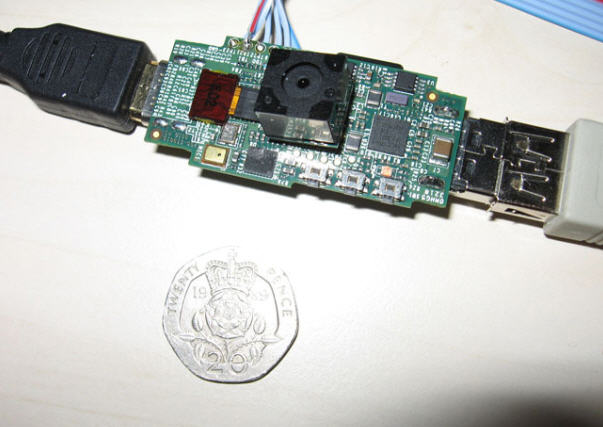 In the spirit of ultra portable operating systems – over the weekend – we learned of Raspberry Pi. The Raspberry is not only an operating system from a flash drive, but it includes the processor too! This means the Linux OS is not high jacking the hardware of the host computer, but rather using it’s own processing power to boot into Linux.
The developer, David Braben, are shooting for a target price of the Raspberry USB computer to be around $25. The above prototype isn’t pretty, but hey – what prototype is? David and his team started this project in the effort to bring ultra low cost computers to less fortunate kids who need and want computer access.
A long long time ago, the
In the spirit of ultra portable operating systems – over the weekend – we learned of Raspberry Pi. The Raspberry is not only an operating system from a flash drive, but it includes the processor too! This means the Linux OS is not high jacking the hardware of the host computer, but rather using it’s own processing power to boot into Linux.
The developer, David Braben, are shooting for a target price of the Raspberry USB computer to be around $25. The above prototype isn’t pretty, but hey – what prototype is? David and his team started this project in the effort to bring ultra low cost computers to less fortunate kids who need and want computer access.
A long long time ago, the