Do you have an iPod that is unresponsive? Occasionally an iPod may freeze or fail to respond to your commands. There are a few things you can do to troubleshoot this.
Here’s an email from a MethodShop.com reader about an unresponsive iPod:
“I’m using a 40GB click-wheel iPod in Windows 2k. It is unable to fully boot up. When I turn it on, the Apple symbol comes up and the hard drive sounds like it begins to spin, and then it stops. Occasionally it gets to the folder w/exclamation point screen and then the hard drives stops and then starts again, going back to the apple screen. The iPod update application either doesn’t detect the iPod or it freezes my whole computer. I have tried resetting, and since Windows/iPod update don’t detect it, I can’t restore either (even in disk mode). I have been unable to get the disk scan working.” ~ dan
You most likely dropped your iPod or hit it pretty hard. This happened to a friend of mine (Bill) when he threw his backpack on the floor. His iPod was inside the backpack and the jolt from hitting the floor physically damaged the iPod’s hard drive.
Unfortunately, if your hard drive is physically damaged, there’s only one way to fix it – get it replaced. If your iPod is still under warranty or you purchased extended AppleCare for your iPod, then have Apple replace or repair your iPod. If your iPod is out of warranty, there are several third-party companies that can fix your iPod like these guys.
But before going through the hassle and cost of sending your iPod off to be repaired, try these free iPod troubleshooting tips first. Good luck!
BeSocial: methodshopContinue Reading
Is your UFD stuffed with portable applications? Do you find yourself constantly exploring the USB drive to launch your program? If so, forget about it. Use PStart.
I while back I wrote an article about 55 Portable Applications to Make a Super Stick – well that list is nothing without the PStart tray tool. (PStart is apart of that list too).
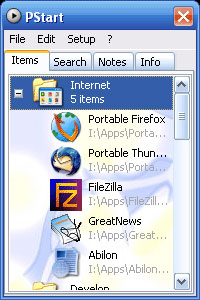
Pstart is a simple tray tool to start user defined applications from their flash drive. Designed to run portable applications you can start anything without actually opening up and exploring your flash drive – do it right from your desktop tray.
Of course Pstart is as portable as your applications and will work on any PC system.
PStart has four useful tabs to help in your daily routine. Items, Search, Notes and Info. Here’s a break down:
Continue Reading
Even with the inexpensive USB fans available sometimes it’s just more fun to build one yourself. Here is a quick video tutorial whereby you need two CDs, a motor, some cable a lighter and a little time and you’ll be cool (although not looking) at the click of a USB connection.
Source: Click here if you can’t view the video: YouTubeContinue Reading
Over the years I think we’ve all gathered some extra power supplies and wall adapters. Here is a quick guide to a home brew USB charger or USB power supply. This USB tutorial is from the Hacked Gadgets website and Alan runs a good site – check’em out.
This unit is great for charging your iPod, PSP or any USB device and only costs pennies to make.
The main unit needs to run from a regulated 5vdc wall adapter with at least 500ma or higher. These are very common and I’d think most households have at least one extra laying around.
You’ll also need:
Sure Notepad is basic and free for a text editor, but if you’re a webmaster worth your salt, Notepad wont do. UltraEdit has been around for years and is now available to launch from your U3 flash drive.
Running UltraEdit U3 Software from a UFD is ideal because this powerful program installs once, doesn’t mess with registry files and is 100% portable.
UltraEdit is a text editor and offers much more…
…configure it for your favorite preferences like syntax highlighting, code folding, basic or advanced menus/toolbars, add your macros, scripts, user-defined tools, and/or FTP/SFTP account information—all in a “digital briefcase” no larger than the size of a stick of gum.
The trial version is 45 days and full price of the software is $49. A small investment for the web guru.
Grab the free trial at U3 headquarters or click the publisher IDM Computer Solutions. Not sure what U3 is? Read this.
Continue Reading
Today I put together all the information needed to run a mobile Library from Apple iTunes on a USB stick or USB drive. This method will run the entire iTunes application from the storage device, making it easy to manage iTunes libraries from a single location. I believe this is how iTunes should have be developed – as having a library specific for each computer is a frustrating way to enjoy your music.
What pushed me over the edge is my wife wanting to purchase music from iTunes at work and sync them up with the iTunes computer at home. Typically this is done by purchasing the music and downloading directly to the iPod, but she’s a CPA and travels from location to location for audits and doesn’t even use the same computer all the time – yet she loves her music. The solution was to run iTunes from a USB flash drive to manage a single Library.
This tutorial includes installing iTunes on a flash drive, creating autorun files for auto-launching iTunes from the flash drive and how to set-up iTunes on different computers to run a music library from the single flash drive. Of course this method also works for larger storage hard drives – basically anything that appears as a Mass Storage Device on your system. If you are looking for a long term strategy for managing your iTunes music, I strongly recommend doing this process to an external hard drive that is, at least, 120GBs. So here we go:
Here is a quick summary so you know what we are getting into:
Several weeks ago I ran an article on running WordPress from a USB stick. That tutorial uses the same utilities as this USB Web Server product BUT since I received 11 emails about the WordPress post – I think a version which can be purchased is worth posting.
WebServUSB is a full featured web server programmed into flash memory a USB device. It features HTTP and FTP web services, plus a companion email server program which provides POP3 and SMTP mail services. By plugging WebServUSB into any PC with a USB port, it can enable that PC to become and Intranet (LAN) or Internet based web server.
The good folks at AppleTVHacks just released a way to use an external drive via USB for additional storage. Here comes the 1TB AppleTV! So here’s the high-level summary, the AppleTV hack allows the system to boot normally from the internal drive of the AppleTV then allows for digital content to be stored, pulled and played from an external drive. Unfortunately this AppleTV hack is only working on Max OSX at the moment, but a community call to action has been made to incorporate this hack to support other opperating systems. Ahh, how nice.
On more occasions that I’d like to admit, Windows will not eject a USB device from my operating system when using the Safely Remove Hardware in the icon tray. The annoying error message Windows displays “The device cannot be stopped right now. Try stopping the device again later” usually appears in a time sensitive situation. So what is the work around?
Try using a freeware software utility I found while reading FreewareGenius.com called Unlocker. Unlocker is a utility that frees a file or folder which is being used by another program or process. Albeit there are situations that a file should remain tied to it’s process or program but other times you need to force the release.
Continue Reading
USB on DOS, does it work? Sometimes. At least that’s the answer Ed gave me from BootDisk.com.
USB was never meant to run from DOS, yet there are situations you want a USB device to run from DOS. For those elite select few check out BootDisk to homebrew your own solution.
Unfortunately there isn’t one disc or zip file you can unpack, load and mount a USB device and for that reason BootDisk gives you several options to figure things out.
I would say BootDisk has the most complete collection of USB drivers around if you are one in need of USB on DOS.
Continue Reading
IOCELL introduced their version of the U3 launch pad – I like the name better – very direct with “USB Computer.” U3 might have gotten more traction with that name.
IOCELL created a launch pad to provide the user with an easy-to-use interface for launching portable applications. Really, the same thing as U3, the difference being IOCELL gives you the ability to make any application portable for storing and running off your UFD.
It appears IOCELL (like U3) uses a micro-controller (chip logic) to confirm the drive is a “USB Computer” version and thus launches the IOCELL interface without seeing the default Windows screen “What do you want Windows to do?” question. IOCELL is calling this COB Technology (Chip-On-Board).
To get the IOCELL with COB Technology look for the Castella brand name. Available from 1GB to 4GB sizes.
Looking to install U3 on a regular flash drive? It won’t happen and this is why…
Source: IOCELLContinue Reading
You can run WordPress, or any blog platform, from a USB stick. It’s easy and useful. If you are anything like me, you are probably laughing while asking the question “Why would anyone need to run WordPress from a USB drive?” I laughed too, until recently.
About two months ago I received a notice for jury duty. Just a couple days ago I served for jury duty. I wasn’t called into a trial, but I did make the most of my day. All thanks to my WordPress on a stick. I didn’t know if the court house had internet access and didn’t feel like reading a book all day, so I dove into a little project to run WordPress from a stick. After all I had a long list of website tweaks I wanted to perform and this could be the perfect day to do them.
After a day of working with my remote blog platform I came to realize there are many reasons why this is valuable…here is a short list I came up with:

“I’m using a 40GB click-wheel iPod in Windows 2k. It is unable to fully boot up. When I turn it on, the Apple symbol comes up and the hard drive sounds like it begins to spin, and then it stops. Occasionally it gets to the folder w/exclamation point screen and then the hard drives stops and then starts again, going back to the apple screen. The iPod update application either doesn’t detect the iPod or it freezes my whole computer. I have tried resetting, and since Windows/iPod update don’t detect it, I can’t restore either (even in disk mode). I have been unable to get the disk scan working.” ~ dan