Backing up your data is probably the #1 item most computer users neglect, ignore or simply don’t pay attention to. Most times it’s because the software is too difficult or you don’t have the right storage device to back up your data [sat DVD, DLT tape etc]. Well, this article should change your mind.
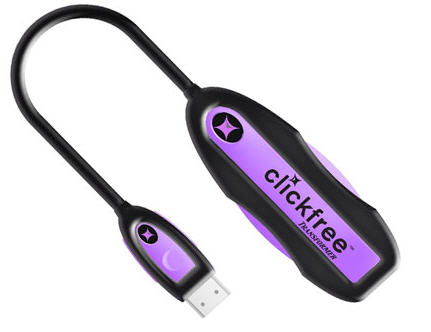
ClickFree has a very unique and convenient solution for data backup. Using their USB cable and embedded backup software [embedded on the cable] you can backup any computer to your USB hard drive, USB stick or anything else USB.
No software to install or setup. Works right out-of-the-box. Just plug the Clickfree Transformer into the computer, then plug any external USB hard drive into the other end of the Transformer and it converts the external hard drive into a Clickfree backup drive. Automatically starts, finds, organizes and backs up all of your data onto the external hard drive.
The ClickFree software is robust enough to support over 400 file types. Here is the category breakdown for you:
Continue Reading
Who’s up for a little bit of fun. Who’s up for driving your co-worker totally crazy. We are. Here is a great USB joke device that when connected to your PC will randomly lock your CAPS button, make keystrokes or jiggle your mouse around on the screen.
What is particularly nice about this useless USB gadget is the ability to select one, two or all three options and control the speed in which the phantom activities take place. It’s also a complete and finished product…much better then our USB hack we mentioned for creating a
Continue Reading
There are a large number of computer users out there which need to eliminate the function of their computer going into sleep mode. I was talking to a friend of mine last night who had this exact problem.
The problem was at the corporate level the IT guys started a function that once your computer went idle for 30 minutes the screen saver would pop up requiring a password login. The reason behind such a decision was unclear, but it’s probably related to measuring productivity.
Well, as any good employee would do, you search Google for a work around. Today we found one. The USB shake stick, which doesn’t actually shake, but is a device that keeps your mouse moving in the screen so that sleep mode never turns on.
You can avoid sleep mode through this USB stick by simply connecting it to your computer and setting up the preferences [shake speed of mouse icon].
Although the above example is a great way to circumvent a corporate policy, there are a couple legitimate reasons. For example,
Continue Reading
It’ is very possible many of you have left a USB stick in a work computer or friends computer simply because you forgot to pull it out upon leaving. To help in those moments of lapsed memory, there is a utility that take care of your temporary Alzheimers. The Flash Drive Reminder utility is a Windows based application and simply reminds you the USB stick is still plugged in when you log off or shut down.
The tiny app takes up very little space, autoruns from your USB stick and displays a pop up window upon connection. This is where the application confirms the device is connected and you have the option to turn off the reminder or hide it until logging off or shutting down. At which time, the software will throw up another pop-up windows telling you to grab your USB stick.
There is a “quiet” version which eliminates the original pop-up window [nice] but will definitely display when you go to power down.
The Flash Drive Reminder utility is free for the taking.Â
Continue Reading
Icron is the leader in professional extensions for USB technology where a company or corporation is looking to run data via USB over an extended amount of length. Generally USB is goof for about 12 feet or so, but with Icron you can run over 300 feet of USB. Yet, there is a middle ground for those who need more than 12 feet and less than 40 feet for USB data transmittal applications. A good example is a small business or home business who’s looking to run a USB webcam at the front door for security.
Albeit you can get some WiFi webcams you may want to build something yourself for only pennies. Today, we have a nice tutorial for you to build a USB dongle for a CAT5 cable to run USB data transfers. The CAT5 DIY project will double your USB cable length and get you to about 30 or 35 feet of distance.This project is best suited for video and audio transfers for extended S-Video applications or webcam applications. I found this tutorial on Instructables.
Enjoy.
Continue Reading
Infra Recorder has a open source CD and DVD burning software package which may be configured to run as a USB portable application. You can download the application for free, then make some edit changes in the properties box and run from a USB stick.
I’m sure the first question you have is, why burn a CD or DVD if you already have a USB stick. Well, maybe you are just slow to transition to 100% USB, or maybe you need to burn some video files at the parents house and don’t want to hassle with figuring out if they’ve got software to support the job.
Press Release:Â Cryptzone, the Nordics leading Data Leak Prevention provider, today announced the release of their new USB flash drive encryption software, Secured eUSB 4.0.
Secured eUSB 4.0 is the first product to be integrated in the new version of Cryptzone´s centrally managed security platform, the Simple Encryption Platform (SEP) 4.0.
Providing security to USB drives is a growing problem for many companies but with Cryptzone’s solution, companies can now take control of this problem. Secured eUSB can convert any existing USB flash drive into a secure means of transporting sensitive data.
The new version of Secured eUSB, version 4.0, will enable users to encrypt, decrypt, compress and password-protect personal files – even entire folders – stored on USB drives. Operating on the Windows platform
Continue Reading
If you take a typical USB stick and select the Windows format option, you only get the FAT and FAT32 option for anything under 4GBs. However, there are times you might want to format as NTFS. For example, you want to set specific file and folder privileges to the content and you feel NTFS is the best way.
Well, there is an easy solution and it’s just a matter of setting the options correctly in Windows for your device.
This is how you do it:
Start > My Computer > Right click on the drive letter for the USB stick and select Properties.
Next click the Hardware tab of the Properties dialogue box and select the device which you’d like to change. In this case, it’s drive letter F shown as “Simple Flash Disk 2.0 USB Device“ From here you can double-click the device or highlight in blue and click the Properties button.
Continue Reading
The floppy diskette was an icon of portable storage. For years, this was the de facto standard for moving information from one location to another. Heck, an entire industry was made for duplicating floppy diskettes. Today things are a bit different. We still have the specialized duplicator equipment, but the media has changed. Now, the de facto standard are USB flash drives.
Well, this commercialized floppy has the look and feel of the old days, but all the flare and space of modern USB sticks. Check out this USB floppy drive.
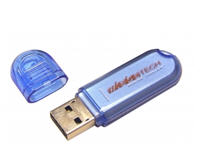
In the rare situation your USB stick finds it’s way into the wash, there are a couple of steps you can take to help get the device back on track if it isn’t working.
You’ll need a little space, time, [sunlight wouldn’t hurt] and some WD-40. Ya, WD-40.
According to Kevin at JK On The Run, it’s a critical step in the saving of your USB stick.
So in the unlucky event your drive went through the wash, don’t throw it in the trash. Try these steps first.
Open up the USB stick plastic case and set everything out for a dry.
Sunlight would speed the process, but I would recommend at least 24 hours of dry time.
Next, take the PCB board and memory and spray it down with some WD-40. The idea hear is to avoid any metal contacts to become rusted or corroded, as once you close up the plastic case, it’s a great environment for moisture to do some good damage. The WD-40 will help prevent moisture damage.
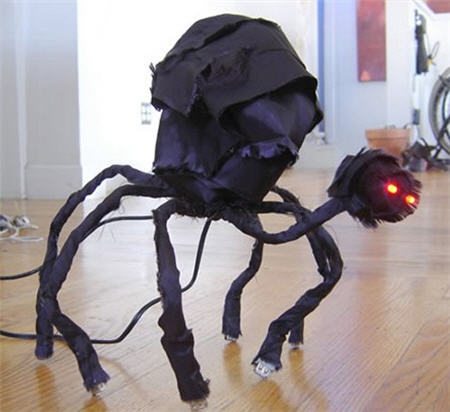
If you can’t tell from the picture, this is a DIY project on taking a regular USB hub and turning it into the ideal Halloween desk monster.
Using stiff wire, USB cables, USB hub and some LED you can build the inner structure of the USB monster. Then sharpen your sowing skills and make a fabric body. The fun part about this project is turning those clawed USB feet into working USB connectors.
Albeit not the most space conscience hub you could find, but it’s definitely a fun project for the upcoming Halloween season.
Source:Â SlipperyBrick via Instructables.
Continue Reading
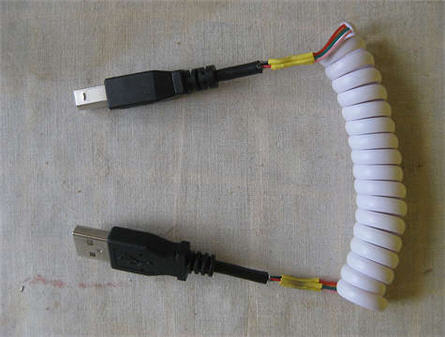
Here is a simple USB tutorial on taking a typical phone cord and splicing it so USB connectors sit on each end. The concept being a cheap and easy way to make a short cable expand out for long distance connection during use.
The only fear is that phone cords are not well shielded and that might slow down the data transfers or possible drop packets. But at the length shown here, we feel you’re alright.
If anything, making the USB coil cable would be a nice little project for a DIY starter. Great to sharp those soldering skills and steady hand. The full USB tutorial can be found at Instructables.
Continue Reading


 There are a large number of computer users out there which need to eliminate the function of their computer going into sleep mode. I was talking to a friend of mine last night who had this exact problem.
The problem was at the corporate level the IT guys started a function that once your computer went idle for 30 minutes the screen saver would pop up requiring a password login. The reason behind such a decision was unclear, but it’s probably related to measuring productivity.
Well, as any good employee would do, you search Google for a work around. Today we found one. The USB shake stick, which doesn’t actually shake, but is a device that keeps your mouse moving in the screen so that
There are a large number of computer users out there which need to eliminate the function of their computer going into sleep mode. I was talking to a friend of mine last night who had this exact problem.
The problem was at the corporate level the IT guys started a function that once your computer went idle for 30 minutes the screen saver would pop up requiring a password login. The reason behind such a decision was unclear, but it’s probably related to measuring productivity.
Well, as any good employee would do, you search Google for a work around. Today we found one. The USB shake stick, which doesn’t actually shake, but is a device that keeps your mouse moving in the screen so that 




 In the rare situation your USB stick finds it’s way into the wash, there are a couple of steps you can take to help get the device back on track if it isn’t working.
You’ll need a little space, time, [sunlight wouldn’t hurt] and some WD-40. Ya, WD-40.
According to Kevin at
In the rare situation your USB stick finds it’s way into the wash, there are a couple of steps you can take to help get the device back on track if it isn’t working.
You’ll need a little space, time, [sunlight wouldn’t hurt] and some WD-40. Ya, WD-40.
According to Kevin at