GetUSB.info Logo

How To Make a USB Spy Camera

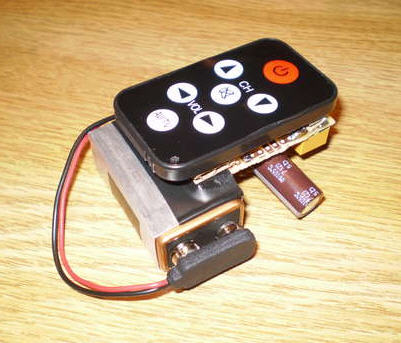
It’s not often you need a USB spy camera, but when you do, this is a quick and easy method.  The setup is putting a USB camera into your hoodie pocket then running the camera from your laptop stuffed in a computer bag.  The situation reminds me of a perfect setup for college days where you need to video a test or capture some funny footage at a party. Plenty of applications for this type of setup, check it out. Continue Reading No Comments

One Touch USB Backup By Corsair

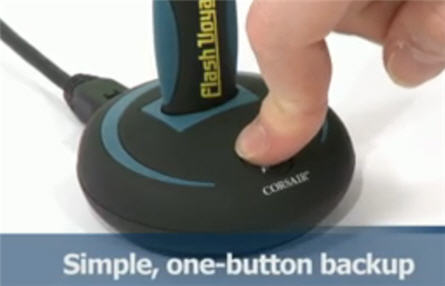
Corsair put an interesting twist on backup technology.  They have devised a one touch USB flash drive backup adapter.  The adapter has a female USB port sitting on the top of the device.  This is where you can plug in any flash drive.  The adapter then connects to your PC via miniUSB cable.

corsair usb backup

At this point, the USB backup adapter is ready to suck information off your PC and stuff it onto your flash drive, with the push of a single button. Of course you need to set some configuration options in the NovaBackUp software, but once set – you’re ready at any moment.
“Our research indicated that over 80% of users have a My Documents folder of less than 64GB, and more than 85% need to regularly transport less than 64GB of data between different PCs. This shows that USB flash drives are an efficient method of backing up your data, and with high-capacity USB flash drives, there is still plenty of room for your favorite music, photos and even movies,” said Jim Carlton, Corsair’s vice president of marketing.
This is also an excellent marketing tool to encourage users to break away from their 2 year old 1GB drives and saddle up for a larger 16GB, 32GB or 64GB flash drive. I for one, am a lazy backer-upper and a device like this might encourage me to be more vigilante about data backups. The Corsair USB backup adapter has an MSRP of $35. Corsair product page. Continue Reading No Comments

Install Windows 7 From Custom USB Flash Drive

With the backlash and failure of Vista, Windows is quickly moving to Windows 7.  This OS is focused on correcting all the Vista short comings, while providing a faster operating system and speedy USB enumeration. However, upgrading or installing Windows 7 from a DVD takes a long time.  You can speed up the process by putting the Windows 7 ISO file on a USB stick and install from there.

install windows 7 from usb

The guys at Think Computers, put together a nice tutorial.  The USB tutorial covers the placement of Win7 on a custom USB flash drive, then doing a complete install from the UFD. Windows 7 is about 2.5GBs so make sure you have a 4GB flash drive before you think about starting this process. Continue Reading No Comments

Custom Flash Drive With Post-It Note Dispenser

This should really be a post about a DIY project.  This custom flash drive stores your data and gives you a post-it note dispenser to write down what’s on the drive. You can buy the official version for about $30 overseas [here] or you could spend a few hours this weekend and create your own.  What you need:  Flash drive, wood, post-it note pad.

post it note custom flash drive

Step one.  Shape some wood to about the size you’d like to make the USB stick and post-it note paper.  About 3/4inch wide and 3 inches long. Step two:  Cut out a part of the wood block to place Continue Reading No Comments

USB Hack: Turn a USB Stick Into a Hard Drive or Local Disk

USB Hack:  Turn a USB Stick Into a Hard Drive or Local Disk

USB Tutorial: Turn a USB stick into a Hard Drive or Local Disk

NOTE: The original article can be found at the bottom of this page — jump there now.

UPDATE (2025): USB “Local Disk” without the XP-era driver hack

The old method on this page uses an XP-friendly INF/registry trick to flip the removable bit. It was clever, but on modern Windows 10/11 it’s brittle (driver signing, updates) and many tools/policies now check the device’s hardware class, not a label you force with a file edit.

What changed

  • Windows storage stack + signing tightened; spoofed drivers are fragile after updates.
  • Backup/imaging/installers increasingly verify true fixed disk at the controller level.
  • Enterprise policies often block anything enumerating as “removable,” regardless of UI text.

What works now

Use hardware that natively enumerates as a fixed disk. The device tells Windows “I’m a hard drive,” so Disk Management, BitLocker, and picky installers behave accordingly—no per-PC driver editing.

Product we tested

Nexcopy USB HDD Fixed Disk appears as a Local Disk on any host (controller/firmware set). No utilities, no INF edits, just plug in. It’s suited for tools that require “Local Disk,” imaging, BitLocker, or multi-partition workflows.

Quick self-check

  • Just need multiple partitions? Windows can create multiple partitions on many USB sticks. They won’t enumerate as “fixed,” but the partitions work—standard USB is fine.
  • Need true “Local Disk” behavior? Choose fixed-disk hardware (e.g., Nexcopy) for installers that refuse “removable,” full-disk imaging, BitLocker parity, or corporate environments that block removable-class media.

Bottom line

The legacy hack is useful history, but for real-world deployments start with hardware that already identifies as a hard drive. For a full, modern walkthrough, see our new article covering 2025-ready options and workflows.

Original Article Starts Here

This is a very valuable tutorial, especially if you are looking to partition a USB stick.  Another application for turning a removable drive into a local disk, is that now many software programs can be loaded directly to a USB drive.  The first program which comes to mind is iTunes.  I know you need My Documents and a Local Disk to install it, so after this tutorial, I’ll try installing iTunes and share the results.

The process of turning a USB stick into a hard drive is fairly easy.  However, there are limitations.  For example, this works best with Windows XP operating systems.  You also need to update the drivers for the device for any computer you are going to use.  Typically, this isn’t a big deal as you can easily do this for your work and home computers.  However, this isn’t a great solution if you are trying to create a partitions USB stick for distribution to many possible users [say trade show give-away].

Couple of items you’ll need:

  • USB_LocalDisk.zip files [download here]
  • Windows XP
  • USB stick

What we will do, is connected the USB stick, find the driver code, update the driver code and re-connect the device.  Simple.

Here are the details:

Continue Reading No Comments

USB Drive Is Double Take of DDR RAM Memory

USB sticks come in many different sizes, shapes and colors, but today is the first time we’ve seen a custom USB drive with the look and feel of RAM memory.  The Segon Turbo drive is another release from Brando on unique USB shapes. Brando claims it’s ingenious and exquisite, which I think is a bit too much on credit, but definitely a different look.  Too bad you can’t use the PCI looking slot to boost your real RAM needs.

ram usb stick

The Segon Turbo drive includes a push-pull design for the USB connector making it a good portable product with protection to the connector. Some notable software functionality comes preloaded on the IC controller chip, such as:
  1. Security Manager
  2. Boot Manager
  3. Flash Mail Manager
  4. PC Lock Manager
  5. Bookmark Manager
  6. Security Folder
Available in a 2 and 4GB sizes, starting at just $12. Continue Reading No Comments

USB Cable Runs Your Back Up Software

Backing up your data is probably the #1 item most computer users neglect, ignore or simply don’t pay attention to.  Most times it’s because the software is too difficult or you don’t have the right storage device to back up your data [sat DVD, DLT tape etc].  Well, this article should change your mind.

usb backup cable

ClickFree has a very unique and convenient solution for data backup.  Using their USB cable and embedded backup software [embedded on the cable] you can backup any computer to your USB hard drive, USB stick or anything else USB. No software to install or setup.  Works right out-of-the-box.  Just plug the Clickfree Transformer into the computer, then plug any external USB hard drive into the other end of the Transformer and it converts the external hard drive into a Clickfree backup drive.  Automatically starts, finds, organizes and backs up all of your data onto the external hard drive. The ClickFree software is robust enough to support over 400 file types.  Here is the category breakdown for you: Continue Reading No Comments

Best USB Joke – USB Keystroker Will Drive Anyone Crazy

Who’s up for a little bit of fun.  Who’s up for driving your co-worker totally crazy.  We are.  Here is a great USB joke device that when connected to your PC will randomly lock your CAPS button, make keystrokes or jiggle your mouse around on the screen.

usb keystrocker

What is particularly nice about this useless USB gadget is the ability to select one, two or all three options and control the speed in which the phantom activities take place.  It’s also a complete and finished product…much better then our USB hack we mentioned for creating a Continue Reading No Comments

Avoid Sleep Mode With USB Shake Stick

avoid sleep mode usbThere are a large number of computer users out there which need to eliminate the function of their computer going into sleep mode.  I was talking to a friend of mine last night who had this exact problem. The problem was at the corporate level the IT guys started a function that once your computer went idle for 30 minutes the screen saver would pop up requiring a password login.  The reason behind such a decision was unclear, but it’s probably related to measuring productivity. Well, as any good employee would do, you  search Google for a work around.  Today we found one.  The USB shake stick, which doesn’t actually shake, but is a device that keeps your mouse moving in the screen so that sleep mode never turns on. You can avoid sleep mode through this USB stick by simply connecting it to your computer and setting up the preferences [shake speed of mouse icon]. Although the above example is a great way to circumvent a corporate policy, there are a couple legitimate reasons.  For example, Continue Reading No Comments

Copyright

Copyright © 2006 +

USB Powered Gadgets and more...

All Rights Reserved

Advertise with us

GetUSB Advertising

This is a high value website providing great exposure to your product and brand. Visit our advertising page to learn specifics.

For more information
Visit our advertising page.

Nexcopy Ad

Nexcopy Provides

USB copy protection with digital rights management for data loaded on USB flash drives.

Contact us learn more

Resources and References Page

Resources and References Page