
USB Not Working – Try This
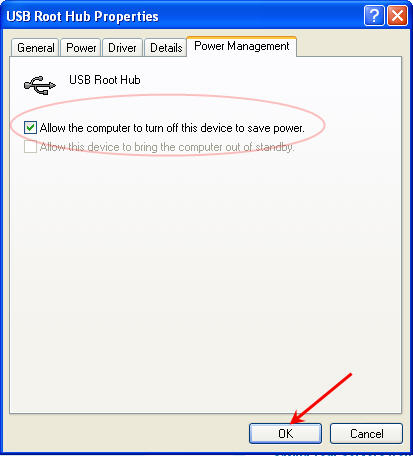
Do you have USB ports on your computer but for some reason the devices connected are not working? Or maybe your USB ports stop working after a long period of time? Don’t worry, the USB not working is [most likely] related to your computer configuration, not the ports malfunctioning. If our hunch is right, the fix is easy. This is what we recommend checking if USB devices are not working on your computer. Lets check to see if the USB hubs and ports are set to power save when idle. What this setting controls is the ability for a USB port to sleep if not used. The sleep mode of the port is an effort to help your computer save energy going to connected devices that are not in use. To check the USB power setting lets do the following: Go to > START > CONTROL PANEL > SYSTEM. From here go to the Hardware Tab and click the Device Manager. Next, scroll down to the section labeled Universal Serial Bus controllers and expand it out. Right click on the USB Hub listing and select properties.
USB Flashrods
What do you get when you cross a Hot Wheels car and USB stick? Flashrods. We’ve seen plenty of mods for USBs and hot rods, but we found one guy making a part time job of it. Sure you can do your own, but getting the masterpiece on the first try is hard, buy a Flashrod of $25 and have it done right. There are 20+ styles to select and available in different GB capacities.
How To: Format USB as NTFS File System
Format USB Stick as NTFS File System
Flash drives are getting very large in size these days, the new SuperSpeed USB 3.0 sticks are getting over 256GB capacity. With these larger sticks, the option to format the device as a NTFS file system is available, but what about the smaller USB sticks? By default, any USB stick under 4GBs in capacity will not have the Format USB as NTFS file system option, but we can fix that. Here is the How To: Format USB sticks as NTFS: Click Start > My Computer > Right click on the drive letter for the USB stick and select Properties.

Chat Stick – USB Flash Drive To Recover All Her Dirty IMs
Several weeks ago I reported on the flash drive which detects p0rn and today I’m letting you know about the Chat Stick. A flash drive which recovers all those dirty Instant Messages. The USB Chat Stick is loaded with software which scans the host computer for all instant message conversations, deleted or not, and uses recovery software to localize all those discussions into one, nice, handy place; the flash drive.
Review: USB Benchmark Software
Review: USB Benchmark software by USB Performance.
USB Performance has a nice USB benchmark testing program with lots of features besides read / write tests.
The USB performance testing software gives you the option to test at a File Copy level or a Bit for Bit copy level. The difference with the File Copy is the process includes reading from the File Allocation Table [FAT] and thus slows down the process. The bit for bit read/write tests will show the best possible performance your device will be able to obtain.

Included in the USB benchmark software are some bonus features such as file recovery.
We all know with flash memory once you click delete, it’s gone forever. Well the USB Performance software will recover those deleted files. OR maybe you’ve lost data with a system Blue Screen or hardware crash, again the USB recovery feature should be able to restore those lost files.
Another nice feature is the backup function. The backup function will create a single image file on your PC. You can restore or backup the image file at any time. This nice thing about a single image file [rather than copying all the files off your USB stick] is that you wont accidentally delete a single file or folder, you’d have to really be an idiot and delete the entire image file backup.
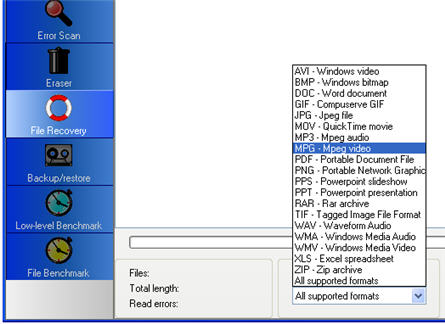
Other nice features include the USB typology layout and bad sector scan function.
The USB Performance software is free for download with no time limit or expiration date, however, it does miss a couple features of the full [paid] version.
Bottom line, if you need some quick benchmark testing, this is the way to go.
Infinite USB Plug – Good On Paper But Will Never Work
Here is another USB prototype design and it’s called the Infinite USB Plug. The pictures look great and the concept is clever, however it just doesn’t work. Never will.
Designed by Gonglue Jiang, the Infinite USB Plug allows you to keep adding your peripherals without the need USB hubs or hot swapping your devices on USB ports when needed. The color coding on plugs will make it easy to identify which plug belongs to which device.The problem is the way USB typology works. When connecting multiple devices via USB you cannot daisy-chain them. You cannot piggy back them, it must be in a logical Continue Reading
Printer Cartridge USB Storage Drive – Great Hidding Spot
GetUSB.info reports on all many different USB hacks which take ordinary items around your house or office and turn them into something different. Today we bring you the USB printer cartridge.
Step 1 = Gather up your tools Step 2 = Break into the USB stick and disassemble the inkjet cartridge [messy] Step 3 = Clean everything out Step 4 = Position the USB stick inside the case [ink cart full of silicon] Step 5 = Button it up and use.Considering the simplicity of this project, you also have a low budget, about zero cents. Continue Reading
USB Hot Plate From Old CPU
Here is a simple and incredibly fun USB hack where you turn an old CPU into a hot plate for your coffee, tea or some liquid fragrance [in a dish].
- Step 1) Tools and Materials
- Step 2) The Idea
- Step 3) The Steps
- Step 4) Preparing the hot plate
USB Hack: Motorola Android With USB Connectivity
I was given a tip today on how someone hacked the Motorola Android and now has USB connectivity. It’s a great little hack so now just about any USB device could potentially be connected to the Android. The question becomes what kind of drivers will the Android support so that printers, controllers, USB sticks etc can be used. The hack is fairly simply. With a little amount of effort, it is possible to enable the B port of the Android as a host interface, meaning the cable USB hack supplies power and acts as the bus controller for connectivity.
- A car charging cable (off-the-shelf at the Verizon store)
- A Micro-USB cable (as above)
- A USB extender cable (the teeny ones that sometimes come free with USB keys work great)
Old Tech For New Gadgets — USB Fan
MSN did a nice article today about 9 new tech gadgets you can make with the stash of old stuff you probably have laying around. One which fits into the USB category, is this USB fan. Retro and cool looking, you can put together a nice desk fan with just an old tower or power supply fan along with solder and USB connector.
USB Recycle Bin For Flash Drives
iBin is a portable application designed for USB stick so users can restore files which have been accidentally deleted. Since Windows does not redirect a deleted file off the OS into the Recycle Bin, once a user clicks delete, it’s gone forever [well unless you use restore tools to get it back], but iBin resolves that problem.
