GetUSB.info Logo

USB Key Safe – The SplashID

How many times have you registered for a service or product on the web, only to be required to enter a user name and password?  How many times has that website required some 6 or 8 character password which includes numbers, capital letter and lower case letters – basically some abstract combination of characters?  Or you enter a user name only to find it’s already been used or you’re required to enter your email address as your user name.  With most people having mulitple email address its difficult to remember which one, the password or combination there of.  You need a system. That system could very well be the SplashID from SplashData.

SplashID, USB password

Consider some of the following – would they help you?
  • Never forget a username or password again – ever
  • Secure and backup your passwords, credit card numbers, registration codes, PINs, and more
  • Generate truly random passwords hackers cannot guess
  • Protect yourself from identity theft, keyloggers, and phishing
The SplashID uses a autorun function which automatically opens up the SplashID user interface upon connection to a PC or Mac computer.  Pull the key out, and not a trace of SplashID stays on the system or any of your sensitive data you just gone done using.  So clearly a big value add for passwords, data base of private content and  password generator. Currently you get the SplashID for $30 with free shipping…although the free shipping is for a limited time.  Here is the link for more info. Continue Reading No Comments

USB Mass Storage Mode For Windows Phone 7

It’s standard for mobile phones to sync and connect with your computer with limited or no access to the memory for storage.  As with our Zune hack for making a Mass Storage Device, here is a tip for the Windows Phone 7 as well…

Windows Phon 7 USB hack

The caviet to this tutorial, is that you can only perform the tweak to your computer which you sync the Windows Phone 7 device with. To get started, do the follwoing:
  • Open the registry editor on your PC by typing regedit in your Start menu
  • Go to HKEY_LOCAL_MACHINE\SYSTEM\CurrentControlSet\Enum\USB; search for ZuneDriver
Now you will modify three entries (note, if you have multiple WP7 phones, you have to do it for each one)
  • Change ShowInShell from 0 to 1
  • Change PortableDeviceNameSpaceExcludeFromShell from 1 to 0
  • Change EnableLegacySupport from 0 to 1
Note:  Perform registry entries at your own risk.  It’s best if you back up the Reg before starting. Continue Reading No Comments

Mysterious USB Ports Show Up In NYC

A New York artist names Aram Bartholl is trying a very daring, if not crazy, art exhibit by placing USB sticks throughout New York City.  The idea is for others to share their digital life, secrets, information with others to bridge the life of digital information with that of the physical world.  So what exactly do you do?

USB in wall

Aram has placed a small collection of USB ports in public places thinking that others will connect their laptop or computer to the USB port and upload or download data to share.  I bit crazy if you ask me…you know how many viruses and key logging programs one could get?  Even with virus checking software – there are sophisticated attacks you could expose yourself too.  BUT, if you dare, connect! Currently the installation is only a five-stick preview, but Bartholl is planning to expand the operation to more sticks and more cities. Check Bartholl’s blog for coming information including “full documentation, movie, map, and ‘How to make your own dead drop’ manual coming soon!”

USB in New York

Aram – you should use USB Write Protected flash drives and share controlled data so that you’re exhibit doesn’t kill computers!  Maybe provide an upload link where you can control the data, then put the data on flash drives and write protect the stick.  Don’t know how – contact us, we’ll show you. Continue Reading No Comments

Ford Making An App Store for Cars?

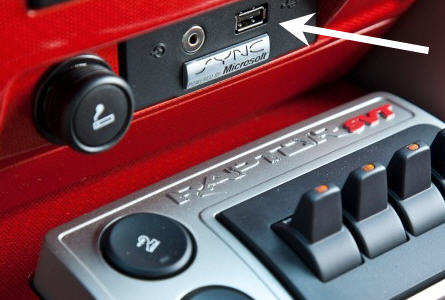
Wouldn’t that be nice – an app store for cars?  Ford isn’t there yet, but they could be.  I read earlier this week that Ford is pushing out a new SDK for software developers to create applications for For Motor cars.

USB Ford Sync

A simple example of an app would be syncing your smartphone with the car [via USB] and run Pandora music or Stitcher internet radio.The new SDK from Ford includes access to the voice recognition utilities to help developers integrate voice command applications.  An example here would be syncing the voice command functions of your phone through the speaker system of your car stereo.  Developers could also design apps where you ask the car Continue Reading No Comments

How To: Run LED Solo From PCless USB Connector

Do you see something odd about this picture?  Maybe the fact an LED is illuminating from a USB connector with no PC in site?  Ya that’s it.  Good job Sherlock.

USB LED

So what we have here is a How To or USB Hack on running an LED from a Super-capacitor.  If you are non-technical, then we basically mean a very short lived battery to run the LED.  A super-capacitor has the ability to store energy for longer periods of time over traditional capacitors – yet still not long enough as with batteries.The concept of this tutorial is to wire a super-capacitor to a USB socket whereby your computer can charge up the capacitor and when disconnected you’ll get about 10 minutes of LED illumination.

USB LED

Granted there isn’t much day-to-day use with this USB hack, but just a fun little project if you have the time. Over on the Instructables website there is an updated USB tutorial which includes Continue Reading No Comments

DIY: How To Get Power From USB For Any USB Gadget Project

Here is a 7 minute video on how to wire up any USB port and suck the power right out for that USB gadget you dreamed up at 3am.  For DIY projects, USB hacking is one of the most popular forms of taking something ordinary and making something unique.  So if you’ve never tried a hack or USB tutorial, this is a great building block for yourself.  Enjoy! Source: YouTube. Continue Reading No Comments

PS Jailbreak Sales Solution Held Up In Red Tape

PS3 jailbreakingOver the past several weeks we’ve read reports about the PS3 Jail breaking solution via USB whereby the jailbreak tricks the console into thinking it’s in debug mode and thus gives you access to the device like never before. The PS3 jailbreak would allow the use of illegal games as well as homebrew games to be played on the console.  In addition, the hack also blocked mandatory updates from Sony which could overwrite the hack and secure the device once again. Jail breaking like this is nothing new, in fact we’ve heard about it with the iPhone for [literally] years.  However, with the PS3 it was a bit different.  It was different because the PS3 has been a platform which has remained unbroken or un-hacked [if that’s a word] for nearly a decade.  That is a feat no other gaming company has Continue Reading No Comments

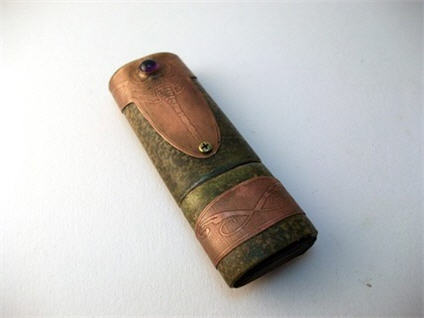
WWWorks USB Steampunk Drive – New Kid On The Block

If you’ve been to this site before, you know we are a fan of USB Steampunk.  We just received word there is a new kid on the block who’s doing some cool USB steampunk. This design is coined “Steampunk Scorpion USB.”

USB steampunk Scorpion

WWWorks is the profile name over at Etsy and he’s done some nice work on his first release.  What I like about the style of this design is the lack of gears you so commonly see with USB steampunk.  Rather, WWWorks put some detail into the design on the brass. So here is a bit of detail about WWWorks.  Based in Budapest Hungary WWWorks is a computer IT guy by day and a craftsman by night.  Trying to break away from the Continue Reading No Comments

USB Hack: miniUSB Connector Hack for Dell Streak

John from LinuxSlate.com figured out the Dell Streak connector for sync and charging is nothing more than a PDMI connector.  So John made a nice little USB hack to eliminate the need for Dell’s expensive accessory kit in exchange for a quick DIY mod with a miniUSB cable.

USB Hack Dell Streak

The USB hack allows you to connect the Dell Streak to a PC for synchronizing with your computer, or simply charging the device from any USB charger [or port]. The modification also allows the unit to appear as a normal mass storage device or removable memory. Continue Reading No Comments

USB Hack: Apple USB Trackpad

All of Apple products are designed as a “less is more” philosophy where a user just “knows” how to use the product when they hold it or see it.  The Apple Trackpad is no exception.  Great looking product that works exceptionally well and is bare bone minimum on design features.

USB Hack, Apple Trackpad

One of the beautiful elements of the Trackpad is the wireless freedom you get from using the product.  For the wireless product you need juice.  The Trackpad does this via batteries.  However, some get tired of replacing the batteries [like it’s that hard] and did a simple USB hack to power the Trackpad.  This hack is not used for communication, that is still done through Blue-tooth, but this is only for eliminating the need to swap batteries or constantly recharge them. To accomplish the hack, remove the pad’s batteries, strip a USB cable down to the red and black power wires and attach them to a battery-sized wooden dowel. Finally, push the dowel inside the pad’s battery compartment and presto! It works. Granted this is a USB hack even my 7 year old could do [less the wire stripping] and I’d recommend making something a bit more elegant. Continue Reading No Comments

USB Laser Duck Solves Lack of Laser Ducks

I think we can all agree there are not enough USB laser ducks out there.  To help solve this problem we came across a nice USB laser duck tutorial to take any rubber ducky and turn it into a zombie, creepy laser duck. I don’t think Ernie will be to pleased to hear the news.

USB duck

The USB hack is fairly simple and the ideal project for a young kid looking to do something cool for the first time.  All you need is a USB cable, rubber duck and some diodes. You’ll need to solder the diodes to the USB cable, then mount the laser eyes correctly and securely into the rubber ducky.  If the concept doesn’t make sense, you can jump over to Instructables and get the play-by-play. I think one way to increase the coolness would be stuffing the entire USB cable into the duck body.  Either that, or take another Instructable where you can increase the laser intensity to pop balloons, burn paper and more… but do it with a bit of caution and common sense. Video. Continue Reading No Comments

DIY: iPad Cork Sleeve

Don’t dismiss this post because you think a cork sleeve would be cheezy for your $700 iPad.  It’s not.  This tutorial helps you create a well designed, cool looking, durable cork case. Sure, cork isn’t very strong, but with added cloth and fleece the end result creates a strong sleeve and something which will protect your iPad and last for quit some time.

cork ipad sleeve

The materials are not difficult to find and should run you about $20 at most. Bobber does an excellent job of point out the details and making sure you don’t miss the important steps for making a quality DIY iPad sleeve.  He includes a ton of well documented pictures, after all, nothing is better than a picture for projects you’ve never tried. Full tutorial here. Continue Reading No Comments

Copyright

Copyright © 2006 +

USB Powered Gadgets and more...

All Rights Reserved

Advertise with us

GetUSB Advertising

This is a high value website providing great exposure to your product and brand. Visit our advertising page to learn specifics.

For more information
Visit our advertising page.

Nexcopy Ad

Nexcopy Provides

USB copy protection with digital rights management for data loaded on USB flash drives.

Contact us learn more

Resources and References Page

Resources and References Page