Kicking around in technology since 2002. I like to write about technology products and ideas, but at the consumer level understanding. Some tech, but not too techie.
There have been plenty of moments in my computer life I’d like to turn back time. Especially those Vista Upgrades or even the minor events like accidentally deleting files. For the last [mentioned] brain fart, there is some U3 Software which can help; NT File Recovery. The file recovery software is designed to recover any deleted file from a NTFS system.
Many USB file recovery software packages only support files and folders, but this package includes support for getting back applications and media files such as wmv and mpeg files.
Another point worth consideration, is the convenience of running the software from your U3 drive as to eliminate the risk of overwriting your data from the PC you’re try to salvage data from. This U3 application is absolutely free, and ready for the taking.
U3 Software NT File Recover download page.
Continue Reading
Have you ever wanted to hide files on your computer or flash drive? I could think of several “categories” of data in which I’d like to hide from people around me. Of course I’m talking about valuable data such as passwords, financial records and the priceless contact list for GetUSB.info network of publishers.
Today I found a small utility called HideFlash 1.0 which does just what the name says. Hides your data on a UFD.
The USB security software protects files and folders from others who are trying to view them without permission. What works for me with this package is not only do you have the 128bit encryption working for you, but the Hide Flash software also hides the files and folders it’s protecting. This means when a USB drive is plugged into any computer, the user wouldn’t even know there’s extra data.
The USB security software remains hidden on any computer and invisible to even
Continue Reading
Several weeks ago I picked up a 1 penny (yes 0.01) card reader for microSD cards from USB Fever. Today, I set aside some time to see how well the little bugger performs…and to my surprise, very well.
Introduction:
The microSD USB Card Reader is very compact and comes with mini lanyard and plastic case. The device is unique in that all components for the card reader sit inside the USB Type-A connector. It makes for an extremely small and portable reader, and can be, at times, difficult to pull out from a stubborn USB port. However, given the idea of what this product is all about – compact, portable performer – it didn’t bother me too much.
I compared the performance of a direct connect of the microSD card through the USB card reader to the microSD adapter provided to me from SanDisk when I purchased the flash memory. When using the SanDisk adapter, I did need a USB card reader which could contribute to
Continue Reading
Back in September of 07 GetUSBinfo reported on the GPS Keychain from Proporta. Today I just got news from Hannah, their marketing guru, the new GPS 2000 Keychain is smaller, lighter and stronger.
Well, the new GPS keychain model weighs 8 grams less and connectivity strength that’ll reach through your handbag, purse, glovebox or just about any other place you could stash your keys.
Compatible with all mapping software Proporta can currently find along with state-of-the-art Bluetooth Technology, Proporta now challenges you to lose your keys.
For those with separation anxiety the GPS 2000 Keychain is ideal for connecting to your notebook, PDA or mobile phone, the receiver also comes with USB charger cable and car charger cable making it very portable for home or office use.
Bonus: The GPS 2000 Receiver is capable of connecting simultaneously to up to
Continue Reading
I don’t own an iPhone, but my neighbor & buddy & fellow entrepreneur does. Recently he showed me some cool things he’s done with the phone. So here are 6 iPhone hacks any iPhone owner would probably want [to check out]. Note: You take responsibility for your actions.
iPhone Interface Tool – This toolkit lets you move files around on the iPhone, run any desired applications on the iPhone or activate the phone without iTunes.
When my buddy isn’t chatting it up on his iPhone or texting with the footer “Sent from my iPhone” he runs a nice little Photo Birth Announcements business.
Continue Reading
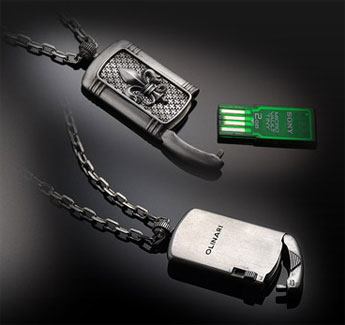
Olinari doesn’t work with silver spoons, but rather silver dog tags. These plush sterling silver dog tags hold your K9 info in a Sony Micro Vault USB drive. The hand made pieces are anything short of cheap. Now it’s just a matter of wanting to place a $350 dog tag around the puppies head to only be drug through the mud, sh!t and food bowl.
But don’t let my sarcasm stop you short of checking out these beauties…I understand the love an owner has for their dog. And albeit these USB dog tags mean you’ll probably get the dog back, but not the tag, shouldn’t stop you from putting return-to-owner on USB.
Oh – and if you wanna to forget the DOG reference altogether – just use this as a high-end lanyard for personal [human] use . There are 7 models to chose and a selection of
Continue Reading
Over the course of 2007 we have seen our share of jewelry USB drives, now we see vanity making it’s way into the market place. The new Lindy USB Mirror 57-in-1 Card reader and Mirror USB hub are now available for high tech connection and personal reflection.
Stephen Fawcett, Senior Product Manager states:
When we asked our development team to come up with a compact device we didn’t really expect them to literally deliver a ‘compact’. Fortunately, they didn’t include the powder in the spec. But it’s very handy for checking you haven’t left a bit of marmite on your chin or seeing what colleagues are up to behind your back.”
Unfortunately the Lindy website isn’t up to date with this press release, but GetUSB did find the card reader will go for 22.99 and the hub for 14.99 USD.
Source: Spanish GetUSBinfoContinue Reading
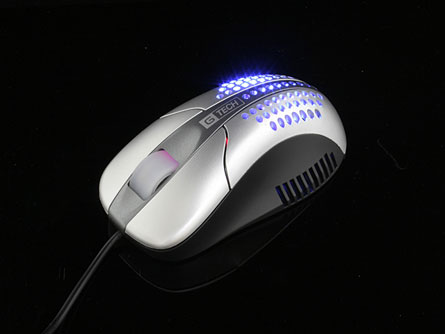
We started out with a USB a$$ blower a while back, now we have the USB optiwind mouse, the ideal Palmar Hyperhidrosis USB gadget. With over 28 CFM airflow those sweaty palms will never be wet again.
The USB optiwind mouse has a little more RPM than the USB seat blower we reported a while back (1500 rpm).
For the tech palmer hyperhidrosis type consider the 800 dpi, 25dBA noise level spec and MTFG of 20,000 POH.
Continue Reading
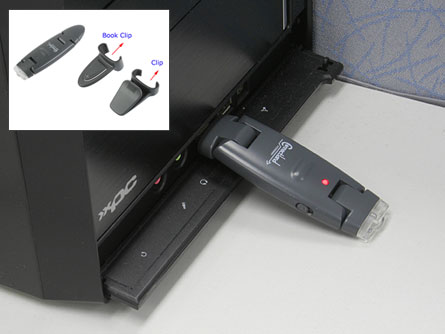
It’s called a USB rechargeable clip torch but I’m not sold on the term torch…sound like something needs to go up in flames. Rather, the rechargeable clip light uses a USB port on the back-end for juicing up during down time.
The convenient and portable LED light comes with a couple different clips so attachment can be made virtually anywhere. At just $14 the rechargeable light also affordable for just about anyone. The LED light portion and USB connect portion do rotate a full 180 so it’s fairly easy to get optimal positioning…as with this book clip light illustration.
The recharge part is done in about 3 hours however no specs where given on how long the USB clip light stays…well…lit.
Here is the USB rechargeable clip torch product page. Keep in mind
Continue Reading
I’m not a big fan of CDs (more of a USB fan) but there are definitely times a CD or DVD is exactly what I need. I’m not a big fan of markers as CD labels either, or sticker labels for that matter. That’s why I’m very interested to bring to you the Casio USB CD thermal printer.
With quick connect via USB, 200 dpi resolution and various ribbon colors to get the exact look I’m a big fan of the Casio CD printer (CW-E60). Throw in the price tag of just $60 and call it a done deal.Casio labeling software does support the true type fonts so whatever Windows fonts you have, English or otherwise, will print like a charm on this jem. And for the road worrior the CD thermal printer has a eight AA battery option.
As this post is going up just before the Christmas holiday season, I’d think some would find this a great stocking stuffer or all out holiday gift for those on a budget. Casio CD printer at Amazon link.
Continue Reading
Capture the everyday moments that happen anywhere, and share them with family and friends everywhere. That’s the idea behind the new Flip video camcorder. It’s portable, simple to use, and amazingly affordable. Shoot anything. Share everything.
Never Miss Another Moment
Flip Video’s simple, one-touch recording feature and compact size make it the ideal choice for capturing videos on the go. No bulky gear, charger, or memory card needed.
Flip camcorder functions
View, Share, and Save Videos With Built-In Software
Flip Video makes sharing videos incredibly simple. Watch your movies instantly on TV using the included cable. Or, connect Flip Video directly to your computer through the built-in USB arm. The simple on-board software makes it easy to view, edit, and share your favorite videos.
Email videos and greeting cards with ease
Publish directly to YouTube and Grouper
Organize and archive your videos
Capture Still Photos and Make Custom Movies
With Flip Video’s on-board software, you can easily edit video clips, capture still photos from your videos, or create custom movies set to music.
Product Description
Simple to use, pocket-sized camcorder with one-touch recording and digital zoom. Holds up to 60 Minutes of TV-Quality video on 1 GB of built-in memory; no tapes or additional memory cards required. Flip Video is equipped with a convenient USB arm that plugs directly into your computer for easy sharing and archiving. Flip’s built-in software lets you easily email videos, share them on YouTube and Grouper, edit your footage, and capture still photos from video. System Requirements: Windows: PC with USB port and Windows 2000 / XP/ Vista. Mac: Macintosh with USB port and Mac OS X.
Looking for other USB video camera items?
Continue Reading
So it turns out a white onion is not only good for salsa, but good for charging iPods too. Here is a video showing you how to charge an iPod with an onion, Gatorade and USB cable.
I knew those electro-lights are good for something. For those not interested in watching a 3 minute video here is the down-n-dirty:
put two holes on either side of your onion with screwdriver
soak the thing in Gatorade until most is gone (about 1 cup worth)
use the iPod USB cable and push in the USB connector into the onion.
Your iPod will then turn on and charge shortly there after. So for about 1 cup of gatoraid soaked into the onion will get you about 30 minutes of charge time.
Source: TreeHugger, YouTube link
If you like this we have other USB hacks and USB Tutorials.
Continue Reading


 There have been plenty of moments in my computer life I’d like to turn back time. Especially those Vista Upgrades or even the minor events like accidentally deleting files. For the last [mentioned] brain fart, there is some U3 Software which can help; NT File Recovery. The file recovery software is designed to recover any deleted file from a NTFS system.
Many USB file recovery software packages only support files and folders, but this package includes support for getting back applications and media files such as wmv and mpeg files.
Another point worth consideration, is the convenience of running the software from your U3 drive as to eliminate the risk of overwriting your data from the PC you’re try to salvage data from. This U3 application is absolutely free, and ready for the taking.
U3 Software NT File Recover download page.
Continue Reading
There have been plenty of moments in my computer life I’d like to turn back time. Especially those Vista Upgrades or even the minor events like accidentally deleting files. For the last [mentioned] brain fart, there is some U3 Software which can help; NT File Recovery. The file recovery software is designed to recover any deleted file from a NTFS system.
Many USB file recovery software packages only support files and folders, but this package includes support for getting back applications and media files such as wmv and mpeg files.
Another point worth consideration, is the convenience of running the software from your U3 drive as to eliminate the risk of overwriting your data from the PC you’re try to salvage data from. This U3 application is absolutely free, and ready for the taking.
U3 Software NT File Recover download page.
Continue Reading