
Author Archive

Matt LeBoff
Kicking around in technology since 2002. I like to write about technology products and ideas, but at the consumer level understanding. Some tech, but not too techie.
Switch Hitter USB Connector
There is a new kid on the block when it comes to USB connectors, it is “The Flipper.” The concept is so incredibly simply you will laugh when you see it. The Flipper is a USB connector that will make correct contact with the host USB port regardless of how you insert it. Granted it is not that hard to figure out which side is up and down…and I will admit [openly] that if you have trouble with that – then you are an idiot. So if you are having trouble here is a tip: Seam is the down side, seamless is the up side.
Paper Clip With USB Flash Memory
They say the best product to invent is taking an existing product and make it better. Today is a case in point. The paper clip has been around forever [1870] and just recently have we seen a true improvement. The USB paper clip is very creative and a fresh twist on an old product. In fact, TechCrunch quoted, “why didn’t I think of that” type design. So here it is, the USB memory clip.
DIY: iPad Cork Sleeve
Don’t dismiss this post because you think a cork sleeve would be cheezy for your $700 iPad. It’s not. This tutorial helps you create a well designed, cool looking, durable cork case. Sure, cork isn’t very strong, but with added cloth and fleece the end result creates a strong sleeve and something which will protect your iPad and last for quit some time.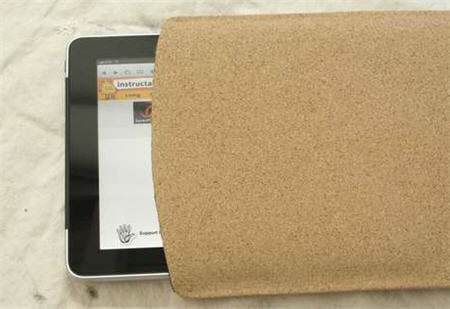
Did An iPhone Really Burn Someone?
We have heard of crazy USB happenings before and they always seem a bit suspicious, case in point is the latest bit of news about an iPhone 4 bursting into flames.
How To: Two Port USB Bike Generator
 Biking is great exercise, but don’t let a healthy body be the only reward for this activity, power up your gadgets. Here is a USB tutorial which incorporates a two port USB hub and switching regulator to generate a 5v charge to any USB device.
There are so many small electronics that can be powered or charged from a USB connection it only makes since that people might want to do this while riding a bike.
The hack isn’t too complicated, but it is a weekend project and will require some soldering skills. The two fundamental components are a Rectifier which changes AC current into DC current and a Voltage Regulator which is a switching regulator to control the amount of volts going to the charged devices.
To get all the details visit the DIY project here.
Continue Reading
Biking is great exercise, but don’t let a healthy body be the only reward for this activity, power up your gadgets. Here is a USB tutorial which incorporates a two port USB hub and switching regulator to generate a 5v charge to any USB device.
There are so many small electronics that can be powered or charged from a USB connection it only makes since that people might want to do this while riding a bike.
The hack isn’t too complicated, but it is a weekend project and will require some soldering skills. The two fundamental components are a Rectifier which changes AC current into DC current and a Voltage Regulator which is a switching regulator to control the amount of volts going to the charged devices.
To get all the details visit the DIY project here.
Continue Reading
How To: Duct Tape USB Holder / Wallet
I’ve seen some USB holders at Staples and Office Max for over $20 dollars and that’s just for a fancy pouch to place your USB sticks while on-the-go. What about a DIY duct tape USB holder? You get the satisfaction of making it yourself, save yourself some cash and a hint of coolness to your storage devices.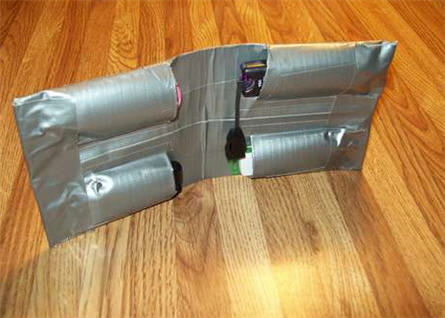
Happy 4th of July From GetUSB.info
Happy 4th of July for 2010 from GetUSB.info. Here is a great image of a USB drive branded with the US flag. Did you know why we celebrate the 4th of July? I’m sure you do, but for a friendly reminder, read this:
How To: Use Physical Lock To Enable / Disable USB Ports
I came across this very interesting USB hack from TechOat the other day. The concept of this modification is taking the key of a power box in your computer and turning that into the physical on/off switch for USB communication. The premise is disassembling the wires of the USB cable and port and weaving that into the circuit of a locking switch on your PC. I think this illustration shows it best:

How To: USB Steampunk a Flash Drive
Here at GetUSB.info we love the USB steampunk drive. We’ve reported on at least a dozen of them over the past couple years and I’m sure we’ve missed three times that many. Today we are tipping you off to a great tutorial on how to USB steampunk your own flash drive. Instructables has a very detailed, 9 page tutorial on how to steampunk your own gear. It gives you a list of material, a detailed process, good and creative guidelines along with plenty of pictures and resources.
GetUSB Dealz: Corel Paint Pro + 2GB Flash Drive
Corel Paint Pro + 2GB Flash Drive = $19
Adobe Photoshop is a great product, expensive, but great. You can do amazing things and take any picture and make it look like a million bucks. The trick, layers. The deal about Photoshop is the average user only takes advantage of 10% of the features. Meaning you are paying gobs of money for features you probably don’t use.
Mimobot Video – A Bit of Viewing Fun
These days there isn’t much to flash drives, other than look and some advanced functions, so for this post I thought the video Mimobot put together to introduce their next four models would be the best way to entertain readers. So enjoy:
Watch: Mimoco presents Core Series 2.5 on Vimeo
Mimoco presents Core Series 2.5 from MIMOBOT & mimoZine on Vimeo.