Kicking around in technology since 2002. I like to write about technology products and ideas, but at the consumer level understanding. Some tech, but not too techie.
Question:Â Would you take a slimmer seat cushion (thus less space) to gain USB power?
If your answer is yes, then Alaska Airlines has you covered.
Alaska announced last week that the new seats, manufactured by German company Recaro Aircraft Seating, will also include 110-volt socket AND USB power outlets on the seat back in front of every passenger. To date, the company has installed the slim seats with USB sockets on seven new planes and plans to have them on 75% of its fleet of 125 planes by the end of 2014.
Initial response from customers
Continue Reading
You can’t help to think Apple’s push for Thunderbolt has something to do with the latest announcement from the USB-IF…in that transfer speeds via USB will double what the USB 3.0 specification currently is. If development can stay on target, this increased speed should be seeing implementation by end of 2014.
The new specification will run with USB 3.0 sockets and connectors; however, will require new wire setup for the cables.
It is expected to see the faster USB spec in PCs, adapter cards and hard drives, but will take significantly longer to reach mobile devices and tablets. As it stands now, USB 3.0 is just gaining momentum as a standard socket in PCs and mobile devices should start seeing 3.0 connectors in late 2013. Â
Continue Reading
In recent weeks the cost of flash memory has increased substantially. The commodity product, is for the most part, a stable consumable with pricing that fluctuations in single digit percentages. However, lately the prices have increased between 10-30%. As with any product there are variables which contribute to price and the following information might help explain why flash memory is getting more expensive.
The two largest manufacturers of flash memory (NAND memory) are Samsung and Toshiba. Together they account for about 70% of the world’s flash. These companies produce a wide variety of flash memory models and the factories have various levels of quality for the output of their product.
Typically the high performance memory that gets the best test ratings is sold to large consumers like Apple, Nokia and Sony. As the ratings for the speed of the memory drop, these variants get pushed into the low-end market segments, such as USB drives and inexpensive MP3 players and other promotional gadgets.
In Q3 2012 Toshiba made an announcement they will reduce world wide production by 30%. Since this time, flash pricing has remained stable and has not decreased in cost.
With the on-going patent battles between Apple and Samsung the Cupertino based company made a decision
Continue Reading
When a USB stick is connected to a PC the Windows operating system enumerates the device. In simple terms, this means Windows will check to see what type of device was just connected, a HID device, Mass Storage Devicet etc, it will also check the speed of the device.
During the enumeration process some registry entries are made into the Windows registry…this is where a hacker could get into your system and take control. This is the update Microsoft issues earlier this week to fix the security flaw.
Since the vulnerability is triggered during USB enumeration, no user intervention is required. In fact, the vulnerability can be triggered when the workstation is locked or when no user is logged in, making this an unauthenticated elevation of privilege for an attacker with casual physical access to the machine. Other software that enables low-level pass-through of USB device enumeration may open additional avenues of exploitation that do not require direct physical access to the system.
So be sure to update your PC with the update notification comes through – it’s in your best interest.
Full Microsoft article
Continue Reading
Intel has reported a problem between the Haswell processor, the next-generation microprocessor that uses 8-series cor-logic sets.
Intel says when a PC system with Core i-series Haswell inside wakes from S3 sleep mode, it experiences issues with devices connected through USB 3.0. Intel defines the issue only as a nuisance for end users, but who will be the real judge of that?
Continue Reading
Here is a great tool for cleaning Windows Registry of USB drive entries. The program runs in the Windows console and removes all devices that are not currently connected.
To clean up the Windows registry of a USB flash drive, or other USB devices can make your system boot faster and run faster.
For example, each time you connect a USB printer to a different USB port on your PC there are registry entries made which associate the device with the drivers. Windows is trying to be smart and log this information so the next time you connect the device, Windows will know exactly what to do. Meaning when you connect the printer a second time, you don’t see the balloon from Windows saying “Installing Brother driver” or something, it’s just connected and ready to go.
But, for example, lets say you connect your Nikon camera to your PC and you use a different USB port each time, now you have a bunch of registry entries that can make your PC boot slower, run slower or possible give you trouble with that external device.
With all this said, if you are having trouble with a USB drive, or a USB camera, printer or scanner, the first thing you’ll probably want to do is run this Windows registry cleaner utility. Good chance it will solve your problems.
System Requirements:
WinXP / Vista / Win7 Writes settings to:
Does not write files to host computer Dependencies:
Administrator rights License:
Freeware How to extract:
Download the ZIP package and extract to a folder of your choice. Launch drivecleanup.exe either in the ‘Win32’ folder or ‘x64’ folder.
As with any good project, there should always be a back up plan. The Curiosity for Mars is no different. The system has a B-Side computer in the event the A-Side computer went down…well guess what, it went down.
There is a theory that cosmic rays affected some of the flash memory on Curiosity causing the A-Side computer to shut down and reboot into Safe Mode.
JPL is currently backup up the A-Side data to the B-Side computer and should reboot by weeks end. Configuration and data transfer can take a while, then of course the verification process of everything done right.
JPL states:
“The hardware that we fly is radiation tolerant, but there’s a limit to how hardened it can be, you can still get high-energy particles that can cause the memory to be corrupted. It certainly is a possibility and that’s what we’re looking into.”
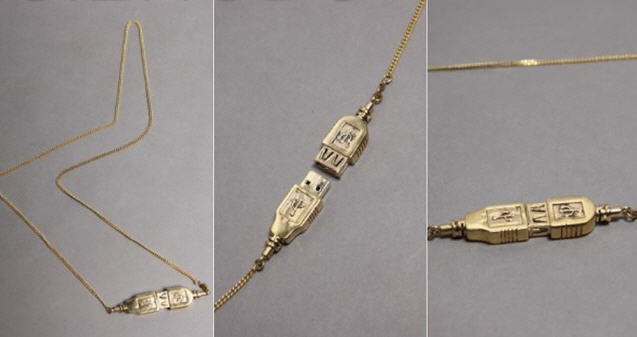
Gizmodo posted about a USB necklace in early February and all the comments ripped them a new one for the non-tech product. I kinda agree, but the funny thing, the “Upload” necklace is sold out. And sold out with a price tag of $48.
I think we should push the jeweler (if we can call her that) to make some more.
Order Page: Here!
Continue Reading
ComputerWorld did a nice write up about the IronKey Workspace product for Windows 8 operating system.
Read the full article here.
“IronKey storage devices have also been validated by the National Institute of Standards and Technology (NIST) to meet the stringent Level 3 criteria of FIPS 140-2. Combined with the cloud -based IronKey Enterprise Management Service, data security can be managed and audited from anywhere in the world. The IronKey Workspace flash drive, however, is not FIPS-certified.”
The IronKey will boot from any PC or Mac computer. Boots in about 35 seconds but has an initial configuration time of about 4 minutes.
Continue Reading
Smartronix has a USB power monitor and it’s ideal for those who want to regulate what power is coming from a USB device. Most notably would be the ability to test power from a suspect defective drive or gadget. With so many useless USB toys made in cheap factories over seas, one can get a product which plays havoc with your system. Most problems always come from power.
Granted the power meter probably takes more juice then any USB power gadget your testing, but again, this is designed for the hobbyist or guy troubleshooting some gear.
This is also a good device to test products which claim to fall into the USB-IF specification for a USB device, something like this USB power meter could help prove your case against an overseas supplier who’s not fessing up to their poor quality work. (can you tell we’ve ran into this problem on multiple occasions !)
Too bad it doesn’t measure calories, otherwise we’d find out just how hard that USB humping dog is really working.
Smartronix webstore, vai Gadgeteer.
Features:
USB 1.1 and USB 2.0 compatible
Large, easy to read LCD
Folding Stand
Auto Power-Down
Peak Hold
Measures current in either direction (Host>Device or Device>Host
Batteries and USB Cable included
Specifications:
Maximum Voltage Reading +/- 19.99 Volts
Voltage Reading Accuracy: +/- 0.1 volt from -10V to 10V; 5% from 10.01V to 19.99V; 5% from -10.01V to -19.99V
Maximum Current Reading +/- 1999 mA
Current Reading Accuracy: +/- 2mA from -500mA to 500mA; 5% from 501mA to 1999mA; 5% from -501mA to -1999mA
The DN-84254 is a microUSB cable which mirrors your smartphone screen on your PC. The sync software allows you to click around on the PC screen and control your phone.
So what’s it good for, imagine this:Â Â If an app would require you to input letters or characters, you can simply do so by using the PC’s keyboard. Several key shortcut buttons on top of the program also allow you to conveniently make the device do specific commands, or access certain areas instantly. So, aside from being able to record screen activity directly on your PC (for gaming and reviews and the likes), you can also intuitively control the smartphone within the PC’s environment as if it was just a simple Android emulating program or similar.
For me, this cable is worth
Continue Reading


 Alaska announced last week that the new seats, manufactured by German company Recaro Aircraft Seating, will also include 110-volt socket AND USB power outlets on the seat back in front of every passenger. To date, the company has installed the slim seats with USB sockets on seven new planes and plans to have them on 75% of its fleet of 125 planes by the end of 2014.
Initial response from customers
Continue Reading
Alaska announced last week that the new seats, manufactured by German company Recaro Aircraft Seating, will also include 110-volt socket AND USB power outlets on the seat back in front of every passenger. To date, the company has installed the slim seats with USB sockets on seven new planes and plans to have them on 75% of its fleet of 125 planes by the end of 2014.
Initial response from customers
Continue Reading
 The new specification will run with USB 3.0 sockets and connectors; however, will require new wire setup for the cables.
It is expected to see the faster USB spec in PCs, adapter cards and hard drives, but will take significantly longer to reach mobile devices and tablets. As it stands now, USB 3.0 is just gaining momentum as a standard socket in PCs and mobile devices should start seeing 3.0 connectors in late 2013. Â
The new specification will run with USB 3.0 sockets and connectors; however, will require new wire setup for the cables.
It is expected to see the faster USB spec in PCs, adapter cards and hard drives, but will take significantly longer to reach mobile devices and tablets. As it stands now, USB 3.0 is just gaining momentum as a standard socket in PCs and mobile devices should start seeing 3.0 connectors in late 2013. Â
 The two largest manufacturers of flash memory (NAND memory) are Samsung and Toshiba. Together they account for about 70% of the world’s flash. These companies produce a wide variety of flash memory models and the factories have various levels of quality for the output of their product.
Typically the high performance memory that gets the best test ratings is sold to large consumers like Apple, Nokia and Sony. As the ratings for the speed of the memory drop, these variants get pushed into the low-end market segments, such as
The two largest manufacturers of flash memory (NAND memory) are Samsung and Toshiba. Together they account for about 70% of the world’s flash. These companies produce a wide variety of flash memory models and the factories have various levels of quality for the output of their product.
Typically the high performance memory that gets the best test ratings is sold to large consumers like Apple, Nokia and Sony. As the ratings for the speed of the memory drop, these variants get pushed into the low-end market segments, such as  When a
 Intel has reported a problem between the Haswell processor, the next-generation microprocessor that uses 8-series cor-logic sets.
Intel says when a PC system with Core i-series Haswell inside wakes from S3 sleep mode, it experiences issues with devices connected through USB 3.0. Intel defines the issue only as a nuisance for end users, but who will be the real judge of that?
Intel has reported a problem between the Haswell processor, the next-generation microprocessor that uses 8-series cor-logic sets.
Intel says when a PC system with Core i-series Haswell inside wakes from S3 sleep mode, it experiences issues with devices connected through USB 3.0. Intel defines the issue only as a nuisance for end users, but who will be the real judge of that?

 As with any good project, there should always be a back up plan. The Curiosity for Mars is no different. The system has a B-Side computer in the event the A-Side computer went down…well guess what, it went down.
There is a theory that cosmic rays affected some of the flash memory on Curiosity causing the A-Side computer to shut down and reboot into Safe Mode.
JPL is currently backup up the A-Side data to the B-Side computer and should reboot by weeks end. Configuration and data transfer can take a while, then of course the verification process of everything done right.
JPL states:
As with any good project, there should always be a back up plan. The Curiosity for Mars is no different. The system has a B-Side computer in the event the A-Side computer went down…well guess what, it went down.
There is a theory that cosmic rays affected some of the flash memory on Curiosity causing the A-Side computer to shut down and reboot into Safe Mode.
JPL is currently backup up the A-Side data to the B-Side computer and should reboot by weeks end. Configuration and data transfer can take a while, then of course the verification process of everything done right.
JPL states:
 Read the
  Smartronix has a USB power monitor and it’s ideal for those who want to regulate what power is coming from a USB device. Most notably would be the ability to test power from a suspect defective drive or gadget. With so many useless USB toys made in cheap factories over seas, one can get a product which plays havoc with your system. Most problems always come from power.
Granted the power meter probably takes more juice then any USB power gadget your testing, but again, this is designed for the hobbyist or guy troubleshooting some gear.
This is also a good device to test products which claim to fall into the USB-IF specification for a USB device, something like this USB power meter could help prove your case against an overseas supplier who’s not fessing up to their poor quality work. (can you tell we’ve ran into this problem on multiple occasions !)
Too bad it doesn’t measure calories, otherwise we’d find out just how hard that
Smartronix has a USB power monitor and it’s ideal for those who want to regulate what power is coming from a USB device. Most notably would be the ability to test power from a suspect defective drive or gadget. With so many useless USB toys made in cheap factories over seas, one can get a product which plays havoc with your system. Most problems always come from power.
Granted the power meter probably takes more juice then any USB power gadget your testing, but again, this is designed for the hobbyist or guy troubleshooting some gear.
This is also a good device to test products which claim to fall into the USB-IF specification for a USB device, something like this USB power meter could help prove your case against an overseas supplier who’s not fessing up to their poor quality work. (can you tell we’ve ran into this problem on multiple occasions !)
Too bad it doesn’t measure calories, otherwise we’d find out just how hard that 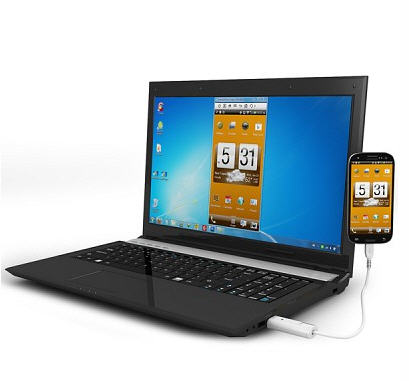 So what’s it good for, imagine this:Â Â If an app would require you to input letters or characters, you can simply do so by using the PC’s keyboard. Several key shortcut buttons on top of the program also allow you to conveniently make the device do specific commands, or access certain areas instantly. So, aside from being able to record screen activity directly on your PC (for gaming and reviews and the likes), you can also intuitively control the smartphone within the PC’s environment as if it was just a simple Android emulating program or similar.
For me, this cable is worth
So what’s it good for, imagine this:Â Â If an app would require you to input letters or characters, you can simply do so by using the PC’s keyboard. Several key shortcut buttons on top of the program also allow you to conveniently make the device do specific commands, or access certain areas instantly. So, aside from being able to record screen activity directly on your PC (for gaming and reviews and the likes), you can also intuitively control the smartphone within the PC’s environment as if it was just a simple Android emulating program or similar.
For me, this cable is worth